

Product images are for informational purposes only and may vary slightly depending on the batch and supplier. Product specifications and prices may be subject to change without notice. We do our best to provide accurate and complete product specifications, but they may not be completely accurate. If you encounter any such situation, please let us know.
The product is intended for specialists and requires qualified and authorized personnel. The product does not include assembly/use instructions . Putting the product into operation by unqualified persons leads to the loss of the warranty according to the Terms and Conditions on the site.
The specified technical parameters (current, power, etc.) represent maximum allowable values under ideal operating conditions. For safe use and optimal lifespan, it is recommended to operate the product continuously at no more than 50% of the specified maximum values.
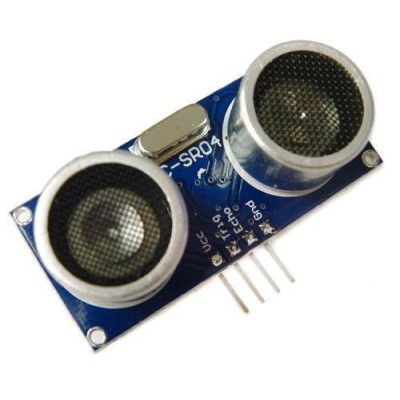
HC-SR04 ultrasonic sensor, distance 2–450 cm, 5V
Arduino compatible ultrasonic sensor, ideal for quick distance measurement and obstacle detection in robotics or automation projects. It operates at 5V, covers the range of 2 cm to 450 cm, offers accuracy up to 0.3 cm and simply connects via Trigger and Echo pins for easy integration into assemblies.
Shipping by Thursday 22 October
Buying this product earns you 0.41 RON in loyalty points.

International fast shipping within EU. Free Shipping for orders above 100 EUR in most EU countries.

We ship from our stock within 24H

You earn points with every order, worth 5%.
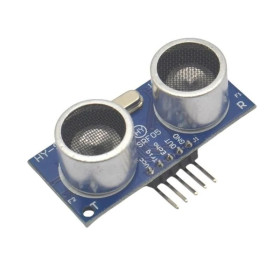
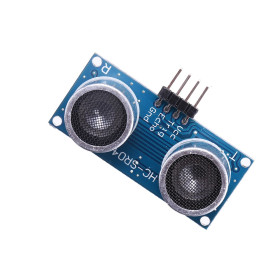
The HC-SR04 ultrasonic sensor is a contactless distance-measuring module that combines an ultrasonic transmitter and receiver on the same board, along with a dedicated control circuit. The sensor detects the presence of and distance to solid objects in front of it, and is commonly used in mobile robotics for obstacle avoidance, in parking systems, in measuring liquid levels in tanks, or in any project that needs a fast and inexpensive distance reading.
The operating principle is simple and based on the time of flight of sound. The Trig pin receives a TTL pulse of at least 10 us, after which the module automatically sends a burst of 8 cycles of ultrasound at 40 kHz and waits for the echo reflected by the object. The Echo pin stays at logic high for the entire time the sound travels back and forth, and this duration is converted into distance using the formula distance in centimeters equals time in microseconds divided by 58, or distance equals time multiplied by the speed of sound of 340 m/s and divided by 2. The effective measuring angle is approximately 15 degrees, and for correct results the target surface must have at least 0.5 square meters.
Among the main features are the two ultrasonic transducers visibly mounted on the front of the board, the oscillator crystal that clocks the control circuit, the signaling components, and the 4 interfacing pins marked Vcc, Trig, Echo and Gnd, accessible on a header with a 2.54 mm pitch. The module is powered at 5 VDC through the Vcc pin, with a typical operating current of 15 mA.
Through the two digital signals Trig and Echo, the sensor is compatible with Arduino, ESP32, STM32, Raspberry Pi and any other development board that has at least two GPIO pins, one output pin for trigger and one input pin for reading the echo.
Specifications:
Model: HC-SR04
Supply voltage: 5 VDC
Current consumption: approximately 15 mA
Ultrasonic frequency: 40 kHz, in bursts of 8 cycles per measurement
Trigger signal: TTL pulse of at least 10 us on the Trig pin
Echo signal: TTL pulse with duration proportional to distance, on the Echo pin
Detection distance: 2 cm - 450 cm
Accuracy: 0.3 cm
Measuring angle: 15 degrees
Interface: 4 pins Vcc, Trig, Echo, Gnd
Dimensions: 45 x 20 x 15 mm
Pinout:
| Connector | Pin | Function |
|---|---|---|
| 4-pin header | Vcc | 5 VDC power supply |
| 4-pin header | Trig | Trigger input, TTL pulse of at least 10 us to start the measurement |
| 4-pin header | Echo | TTL pulse output with duration proportional to the measured distance |
| 4-pin header | Gnd | Ground |
Usage:
Connect the sensor’s Vcc pin to 5 VDC and the Gnd pin to the common ground with the development board.
Connect the Trig pin to a digital output and the Echo pin to a digital input of the development board.
If you are using a board with 3.3 V logic, such as ESP32, STM32 or Raspberry Pi, install a resistive divider or a level shifter on the Echo pin, because the sensor’s output signal is 5 V.
Generate a HIGH pulse of at least 10 us on the Trig pin to start a measurement.
Measure the duration of the HIGH pulse received on the Echo pin and calculate the distance by dividing the time expressed in microseconds by 58 for centimeters, or by 148 for inches.
Leave a pause of at least 60 ms between two successive measurements so that the echo from one measurement does not interfere with the next.
Mount the sensor so that the target object’s surface has at least 0.5 square meters and is as perpendicular as possible to the two transducers.
Avoid targets made of soft or absorbent materials, such as textiles or foam, because these attenuate the echo and can cause incorrect readings or no response.
Do not exceed the 5 VDC supply voltage and check the polarity of Vcc and Gnd before connecting.
Produs destinat utilizarii in proiecte electronice, automatizari, prototipare, educatie si cercetare.
Produsul trebuie utilizat numai conform specificatiilor tehnice mentionate in descriere si/sau in documentatia produsului.
Avertismente generale de siguranta:
Nu utilizati produsul la tensiuni, curenti sau temperaturi peste valorile specificate.
Montajul si conectarea trebuie realizate de persoane cu cunostinte tehnice minime in domeniul electric/electronic.
Evitati scurtcircuitele, inversarea polaritatii si conectarea gresita a alimentarii.
Nu lasati produsul alimentat nesupravegheat in timpul testelor.
Produsul nu este jucarie si nu este destinat copiilor.
Pentru modulele electronice, se recomanda utilizarea in carcase, panouri sau montaje protejate, dupa caz.
Identificare produs:
Denumirea produsului, codul/SKU-ul si caracteristicile tehnice sunt mentionate in pagina produsului si/sau pe eticheta ambalajului.
Producator / Importator / Distribuitor:
Sigmanortec S.R.L.
Calea Bucuresti nr. 9, Targu Jiu, Gorj, Romania
E-mail: [email protected]
Website: www.sigmanortec.ro
Persoana responsabila in UE:
Sigmanortec S.R.L.
Calea Bucuresti nr. 9, Targu Jiu, Gorj, Romania
E-mail: [email protected]
Documentatie si siguranta:
Pentru informatii suplimentare, fise tehnice, declaratii de conformitate sau instructiuni, ne puteti contacta la [email protected].
Reviews (4) - Review moderation

Excelent
Functioneaza corect
Foarte bun.
Ok
// Test program for HC-SR04 Ultrasonic Distance Sensor
// Board: Arduino Uno (or any Arduino with free digital pins)
// Wiring:
//   HC-SR04 Vcc  -> Arduino 5V
//   HC-SR04 Trig -> Arduino D9
//   HC-SR04 Echo -> Arduino D10
//   HC-SR04 Gnd  -> Arduino GND
// No library required, the sensor is driven directly with digitalWrite and pulseIn

const int trigPin = 9;
const int echoPin = 10;

void setup() {
  Serial.begin(9600);
  pinMode(trigPin, OUTPUT);
  pinMode(echoPin, INPUT);
  digitalWrite(trigPin, LOW);
  Serial.println("HC-SR04 test starting...");
}

void loop() {
  // Generate the 10 microsecond trigger pulse
  digitalWrite(trigPin, LOW);
  delayMicroseconds(2);
  digitalWrite(trigPin, HIGH);
  delayMicroseconds(10);
  digitalWrite(trigPin, LOW);

  // Read the echo pulse width, with a timeout to avoid blocking forever
  long duration = pulseIn(echoPin, HIGH, 30000);

  if (duration == 0) {
    Serial.println("No echo received, check wiring or target out of range");
  } else {
    float distanceCm = duration / 58.0;
    float distanceInch = duration / 148.0;
    Serial.print("Distance: ");
    Serial.print(distanceCm);
    Serial.print(" cm (");
    Serial.print(distanceInch);
    Serial.println(" inch)");
  }

  delay(200);
}
The HC-SR04 ultrasonic sensor is the most commonly used component for measuring distance in Arduino projects, being found in mobile robots that need to avoid obstacles, in assisted parking systems, in measuring the liquid level in a tank, or in any setup that needs an approximate distance to an object in front of the sensor.
The module has two ultrasonic transducers visible on the front of the board, an oscillator crystal, and a 4-pin header Vcc, Trig, Echo, and Gnd, being ready to work immediately after connection, without additional calibration.

How it works:
The sensor uses the echolocation principle. You send a HIGH pulse of at least 10 us on the Trig pin, and the module responds by sending a packet of 8 ultrasonic cycles at 40 kHz. At the same time, the Echo pin goes HIGH and stays that way until the sound reflected by the object is received back by the sensor.
The duration in microseconds that Echo stays HIGH is read with the pulseIn function and converted into distance by dividing by 58 for centimeters, the formula coming from the speed of sound of 340 m/s divided by 2, because the sound travels the distance there and back. The farther the object is, the longer the pulse on Echo will be.
What you need:
- 1 x HC-SR04 Ultrasonic Sensor
- 1 x Uno R3 Development Board with ESP8266 Wifi, Arduino compatible
- 4 x 40 Dupont Wires 10cm, Female-Female
- 1 x Breadboard 830 points MB-102
Wiring:
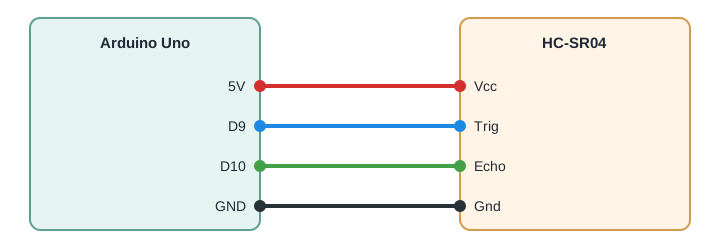
The sensor works at 5 V on all 4 pins, and on an Arduino Uno board, which also has 5 V logic, it connects directly, without a level converter or additional resistors.
| Product Pin | Arduino Uno Pin | Role |
|---|---|---|
| Vcc | 5V | Sensor power supply |
| Trig | D9 | Trigger command to start the measurement |
| Echo | D10 | Reading the duration of the reflected pulse |
| Gnd | GND | Common ground |
Code:
Upload the program below to your Arduino Uno, which generates the trigger pulse, reads the echo duration, and displays the calculated distance on the serial monitor.
// HC-SR04 Ultrasonic Distance Sensor with Arduino Uno
// Wiring:
// HC-SR04 Vcc -> Arduino 5V
// HC-SR04 Trig -> Arduino D9
// HC-SR04 Echo -> Arduino D10
// HC-SR04 Gnd -> Arduino GND
// No library required
const int trigPin = 9;
const int echoPin = 10;
long duration;
float distanceCm;
void setup() {
  Serial.begin(9600);
  pinMode(trigPin, OUTPUT);
  pinMode(echoPin, INPUT);
  digitalWrite(trigPin, LOW);
}
void loop() {
  // Send a clean LOW pulse before triggering
  digitalWrite(trigPin, LOW);
  delayMicroseconds(2);
  // Send the 10 microsecond trigger pulse required by the sensor
  digitalWrite(trigPin, HIGH);
  delayMicroseconds(10);
  digitalWrite(trigPin, LOW);
  // Measure the duration of the HIGH pulse on the echo pin, in microseconds
  duration = pulseIn(echoPin, HIGH);
  // Convert the duration to distance in centimeters
  distanceCm = duration / 58.0;
  Serial.print("Distance: ");
  Serial.print(distanceCm);
  Serial.println(" cm");
  // Wait before the next measurement, more than the recommended 60 ms
  delay(100);
}
How the code works:
At the beginning of the program, the constants trigPin and echoPin are defined, which store the numbers of the digital pins D9 and D10 used for the connection, along with the variable duration for the pulse duration and distanceCm for the result in centimeters.
In the setup function, the serial communication is initialized at 9600 baud, the trigPin is configured as an output, and the echoPin as an input, then trigPin is explicitly brought to LOW to start from a known state.
In the loop function, the program first brings trigPin to LOW for 2 microseconds, then raises it to HIGH for 10 microseconds and brings it back to LOW, respecting exactly the minimum trigger duration required by the sensor. The pulseIn function is called on echoPin to measure, in microseconds, how long the pin stays HIGH, this value being stored in duration.
The distance distanceCm is calculated by dividing duration by 58, according to the formula from the datasheet, and the result is displayed on the serial monitor together with the unit of measurement. A 100 millisecond pause at the end of loop ensures a safe interval between two successive measurements, longer than the recommended 60 ms.
Result:
Open the serial monitor at 9600 baud and you will see the measured distance, updated approximately 10 times per second, with values decreasing or increasing as you bring an object closer to or farther from the sensor.
Distance: 23.45 cm
Distance: 23.38 cm
Distance: 45.12 cm
Distance: 120.67 cm
Distance: 118.90 cm
Distance: 450.00 cm
Distance: 8.62 cm
Distance: 8.55 cm
Common issues:
If nothing appears on the serial monitor, check that the speed selected in the monitor is 9600 baud and that you have chosen the correct COM port for the connected board.
If the displayed distance is always 0 or a very large number, check the wires on Trig and Echo, as they are easy to swap, and pulseIn is waiting for the signal on the wrong pin.
If the values are unstable or jump suddenly, move the target object away from edges and angled surfaces, as these reflect the sound in a different direction than towards the sensor.
If the sensor does not react when there is nothing in front of it, the pulseIn function has a default timeout of one second, and the code will wait for this interval before continuing, which slows down the display, being normal in the absence of an object within the measuring range.
If the distance is constantly smaller than the real one, check that the target surface has at least 0.5 square meters, otherwise part of the ultrasonic wave bypasses the object and does not return to the receiver.
Limitations and tips:
The sensor measures correctly only in front of the two transducers, on a cone of about 15 degrees, and soft or absorbent materials such as textiles or foam strongly reduce the echo. The usable distance starts from 2 cm and can reach up to about 450 cm under good conditions, with a resolution on the order of 0.3 cm, sufficient for most robotics and automation projects, however for higher precision measurements or in environments with strong acoustic noise, a specialized ultrasonic or laser sensor is recommended.