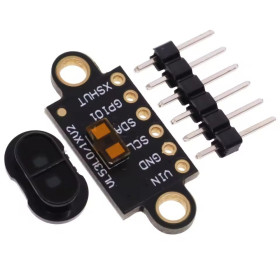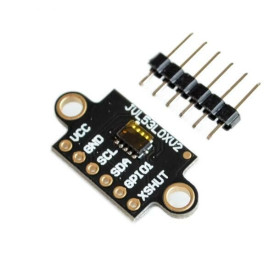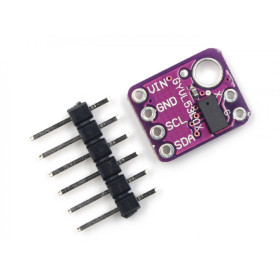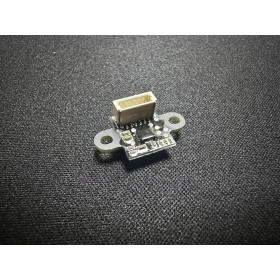


Product images are for informational purposes only and may vary slightly depending on the batch and supplier. Product specifications and prices may be subject to change without notice. We do our best to provide accurate and complete product specifications, but they may not be completely accurate. If you encounter any such situation, please let us know.
The product is intended for specialists and requires qualified and authorized personnel. The product does not include assembly/use instructions . Putting the product into operation by unqualified persons leads to the loss of the warranty according to the Terms and Conditions on the site.
The specified technical parameters (current, power, etc.) represent maximum allowable values under ideal operating conditions. For safe use and optimal lifespan, it is recommended to operate the product continuously at no more than 50% of the specified maximum values.
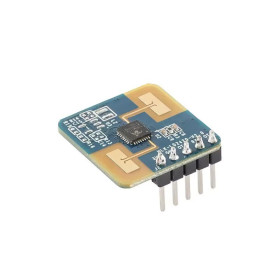
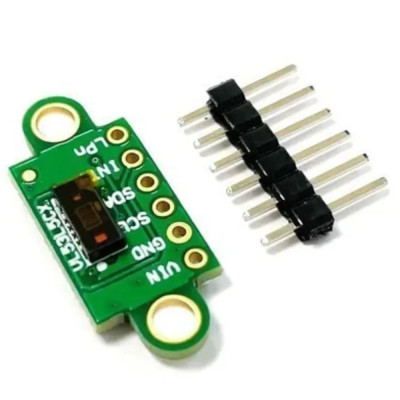
ToF Sensor Module VL53L5CX, 8x8 zone, I2C, 3–5 VDC
High-precision VL53L5CX Time-of-Flight sensor with configurable multi-zone detection up to 8x8 (64 zones), measures distance up to 4 meters using an invisible VCSEL laser and operates at frequencies up to 60 Hz. I2C interface, 3 - 5 VDC power supply, compatible with Arduino, ESP32, Raspberry Pi and other platforms, suitable for robotics, environment mapping, obstacle detection and smart systems.
Shipping by Thursday 22 October
Buying this product earns you 6.47 RON in loyalty points.

International fast shipping within EU. Free Shipping for orders above 100 EUR in most EU countries.

We ship from our stock within 24H

You earn points with every order, worth 5%.
The VL53L5X V2 sensor module integrates the VL53L5CX chip, a Time-of-Flight (ToF) sensor developed by STMicroelectronics, which measures distance by the flight time of light emitted by a VCSEL laser. Unlike classic IR sensors based on the intensity of reflected light, ToF technology provides an absolute distance measurement, regardless of the color or reflectivity of the target object, making it suitable for robotics, obstacle detection, environmental mapping, access systems, smart devices, and automation.
The sensor offers configurable multi-zone detection, with a grid of up to 8x8 zones, meaning 64 simultaneous measurement zones, or 4x4 zones for simpler applications. Wide 63° diagonal field of view, and each zone allows distance measurement to a target up to 4 meters away, with a maximum frequency of 60 Hz. The emitter is a 940 nm VCSEL laser, invisible to the human eye, and the histogram-type algorithms developed by ST allow detection of multiple distinct objects in the same field of view and improve immunity to reflections from a possible protective window.
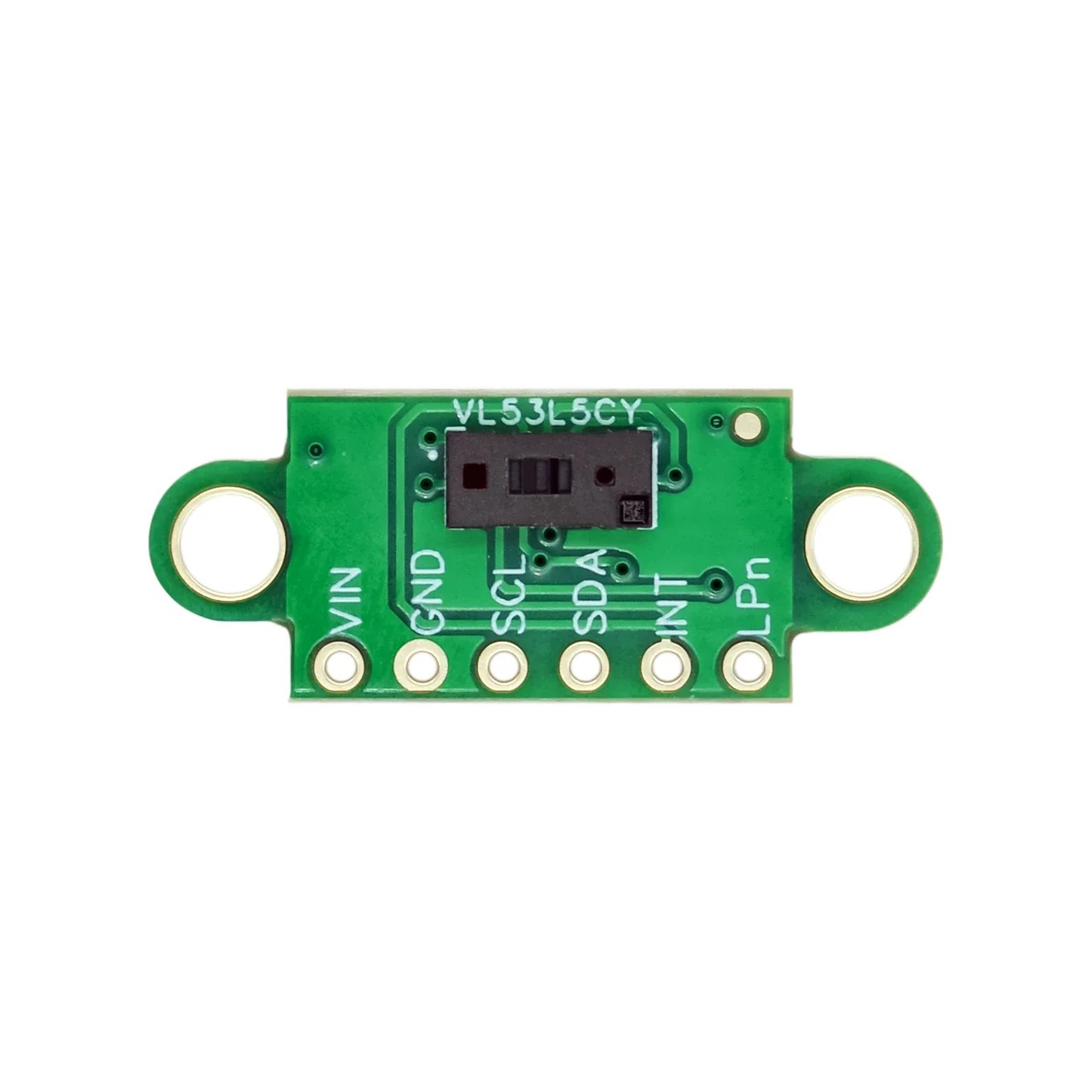
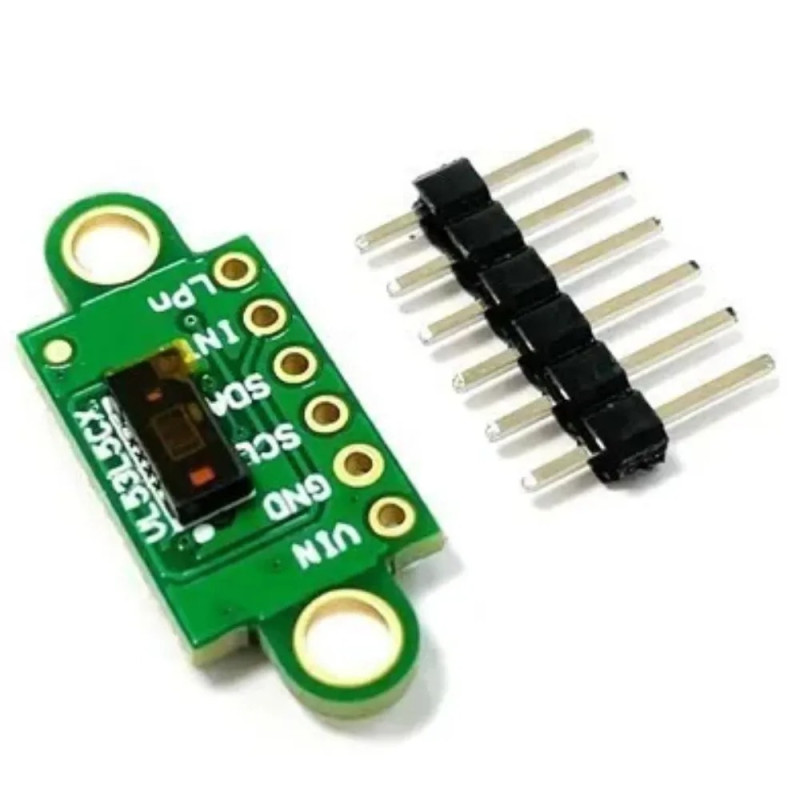
Among the main features are the VIN, GND, SCL, SDA, INT and LPn interface pins marked directly on the board, the optical protective cover mounted over the sensor for dust resistance and increased precision, as well as the two mounting holes on the board. Power is supplied at a voltage in the 3 - 5 VDC range, applied to the VIN pin, and the included pin set allows mounting on a breadboard or soldering wires.
Through the I2C interface, the module is compatible with Arduino, ESP32, STM32, Raspberry Pi and other platforms that have this interface.
Specifications:
Sensor: VL53L5CX (STMicroelectronics)
Technology: Time-of-Flight (ToF), 940 nm VCSEL laser
Supply voltage: 3 - 5 VDC
Communication interface: I2C
Measurement rate: up to 60 Hz
Field of view (FoV): 63° diagonal, software configurable
Multi-zone detection: 8x8 zones (64 zones) or 4x4 zones (16 zones), configurable
Absolute distance: 0 - 400 cm
Distance resolution: 1 mm (typical)
Protection: Optical cover for dust resistance and increased precision
Dimensions: 10.5 x 25 mm
Pinout:
| Connector | Pin | Function |
|---|---|---|
| Communication header | VIN | Sensor power supply 3 - 5 VDC |
| Communication header | GND | Ground |
| Communication header | SCL | Clock for I2C communication |
| Communication header | SDA | Data for I2C communication |
| Communication header | INT | Interrupt signal, for waking the host upon object detection |
| Communication header | LPn | Low Power control and sensor reset, active LOW |
Usage:
Solder the pin set onto the board if you want to mount it on a breadboard, respecting the orientation of the holes marked on the PCB.
Connect the module to the microcontroller via the I2C interface, wiring SDA and SCL to the corresponding pins on the development board.
Power the module with a voltage in the 3 - 5 VDC range on the VIN pin and connect GND to the system common ground.
Do not reverse the power polarity and do not exceed the maximum allowed voltage of 5 VDC.
Initialize the sensor using a dedicated VL53L5CX library, available for Arduino, ESP32 or other platforms.
Set the desired resolution, 4x4 or 8x8 zones, and the measurement rate, up to 60 Hz, before starting data acquisition.
Read the distance values for each zone and process them according to the application, whether for obstacle detection, mapping, or gesture recognition.
Use the INT pin to wake the microcontroller upon detection of a nearby object when low-power mode is enabled.
Use the LPn pin to enable or disable the sensor, keeping it HIGH for normal operation.
For stable results, keep the optical cover clean, free of dust or fingerprints, and avoid highly reflective surfaces in front of the sensor at short distances.
- Chipset
- VL53L5CX
Produs destinat utilizarii in proiecte electronice, automatizari, prototipare, educatie si cercetare.
Produsul trebuie utilizat numai conform specificatiilor tehnice mentionate in descriere si/sau in documentatia produsului.
Avertismente generale de siguranta:
Nu utilizati produsul la tensiuni, curenti sau temperaturi peste valorile specificate.
Montajul si conectarea trebuie realizate de persoane cu cunostinte tehnice minime in domeniul electric/electronic.
Evitati scurtcircuitele, inversarea polaritatii si conectarea gresita a alimentarii.
Nu lasati produsul alimentat nesupravegheat in timpul testelor.
Produsul nu este jucarie si nu este destinat copiilor.
Pentru modulele electronice, se recomanda utilizarea in carcase, panouri sau montaje protejate, dupa caz.
Identificare produs:
Denumirea produsului, codul/SKU-ul si caracteristicile tehnice sunt mentionate in pagina produsului si/sau pe eticheta ambalajului.
Producator / Importator / Distribuitor:
Sigmanortec S.R.L.
Calea Bucuresti nr. 9, Targu Jiu, Gorj, Romania
E-mail: [email protected]
Website: www.sigmanortec.ro
Persoana responsabila in UE:
Sigmanortec S.R.L.
Calea Bucuresti nr. 9, Targu Jiu, Gorj, Romania
E-mail: [email protected]
Documentatie si siguranta:
Pentru informatii suplimentare, fise tehnice, declaratii de conformitate sau instructiuni, ne puteti contacta la [email protected].
/*
  Arduino sketch for the VL53L5CX 8x8-zone Time-of-Flight sensor module
  Board used: Arduino Uno (or any 5V/3.3V compatible board with I2C)

  Wiring (module pin -> Arduino pin):
    VIN -> 5V   (module accepts 3 - 5 VDC)
    GND -> GND
    SCL -> A4 (SDA) ... see below, SCL -> A5
    SDA -> A4
    SCL -> A5
    INT -> D2   (optional, interrupt output, active LOW)
    LPn -> D3   (optional, keep HIGH for normal operation)

  Library required (install from Arduino Library Manager):
    "SparkFun VL53L5CX Arduino Library"
    (search for VL53L5CX in the Library Manager and install the SparkFun version)

  This sketch initializes the sensor, sets the 8x8 zone resolution,
  starts ranging and prints the distance of every zone on the Serial Monitor.
*/

#include <Wire.h>
#include <SparkFun_VL53L5CX_Library.h>

SparkFun_VL53L5CX imager;
VL53L5CX_ResultsData measurementData;

int imageResolution = 0;
int imageWidth = 0;

const int INT_PIN = 2;
const int LPN_PIN = 3;

void setup()
{
  Serial.begin(115200);
  delay(1000);
  Serial.println("VL53L5CX 8x8 zone Time-of-Flight sensor test");

  pinMode(LPN_PIN, OUTPUT);
  digitalWrite(LPN_PIN, HIGH); // keep sensor enabled, HIGH = normal operation

  pinMode(INT_PIN, INPUT);

  Wire.begin();
  Wire.setClock(400000); // fast I2C mode

  Serial.println("Initializing sensor, this can take a few seconds...");
  if (imager.begin() == false)
  {
    Serial.println("Sensor not found, check wiring and power. Freezing...");
    while (1)
      ;
  }

  imager.setResolution(64); // 8x8 = 64 zones, use 16 for 4x4
  imageResolution = imager.getResolution();
  imageWidth = sqrt(imageResolution);

  imager.setRangingFrequency(15); // Hz, up to 60 Hz depending on resolution
  imager.startRanging();

  Serial.println("Sensor ready, starting measurements.");
}

void loop()
{
  if (imager.isDataReady() == true)
  {
    if (imager.getRangingData(&measurementData))
    {
      Serial.println("---- New frame ----");
      for (int y = 0; y < imageWidth; y++)
      {
        for (int x = 0; x < imageWidth; x++)
        {
          int index = x + y * imageWidth;
          Serial.print(measurementData.distance_mm[index]);
          Serial.print("\t");
        }
        Serial.println();
      }
    }
  }

  delay(5);
}
The VL53L5CX sensor module is a Time-of-Flight (ToF) distance camera that splits its field of view into a grid of up to 8x8 zones and returns the distance measured in each zone at the same time, not just a single value like classic distance sensors.
It is useful in obstacle detection projects for mobile robots, counting people at a door, gesture control, automatically stopping a machine when a hand gets close, or simple room mapping, wherever a single distance reading is not enough.
How it works:
The sensor emits pulses of invisible laser light with a 940 nm VCSEL emitter and measures how long it takes the light to reach the object and return to the SPAD photodetector array inside the chip.
The basic principle of any ToF sensor is that the distance equals the speed of light multiplied by the time of flight and divided by two, that is d = (c x t) / 2, where c is the speed of light, approximately 3 x 10 to the power of 8 meters per second, and t is the measured round-trip time.
In the case of the VL53L5CX this calculation is done internally, by the sensor's own electronics, and the result arrives already processed over I2C, in millimeters, for each of the up to 64 zones, at a rate of up to 60 Hz.
The sensor can work in 4x4 zone resolution, for simple and fast applications, or 8x8 zones, for more detail of the scene. The maximum useful distance is approximately 4 meters, with a typical accuracy of around 5 percent of the measured distance, depending on the target's reflectance and the ambient light conditions.
What you need:
- 1 x ToF Sensor Module VL53L5CX, 8x8 zone, I2C, 3–5 VDC
- 1 x Placa dezvoltare Uno R3 cu Wifi ESP8266, compatibila Arduino
- 1 x 40 Fire Dupont 20cm, Tata-Mama
- 1 x Breadboard 830 puncte MB-102
Wiring:
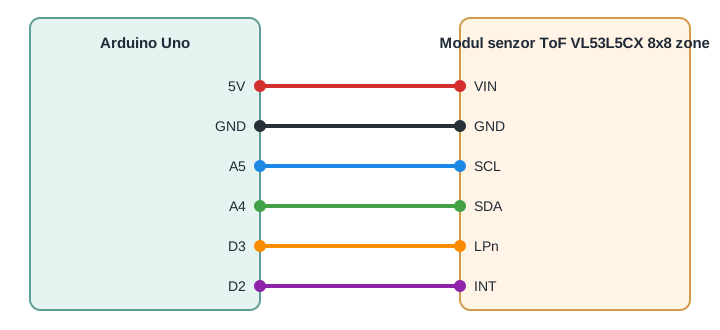
The module is powered on the VIN pin with a voltage in the 3 - 5 VDC range, so it can be connected directly to the 5 V output of an Arduino Uno, without an additional level converter, since the board already has the regulator and the logic level adaptation needed for SDA and SCL. The LPn and INT pins are optional for a basic connection, but we use them in this tutorial to show how to control the sensor's power-up and how to read the interrupt state.
| Product pin | Arduino Uno pin | Role |
|---|---|---|
| VIN | 5V | Module power supply |
| GND | GND | Common ground |
| SCL | A5 | I2C clock |
| SDA | A4 | I2C data |
| LPn | D3 | Sensor enable, HIGH for normal operation |
| INT | D2 | Interrupt signal when an object is detected |
Libraries:
From the Library Manager, install the SparkFun VL53L5CX Arduino Library, author SparkFun Electronics, minimum version 1.0.3, searching for this exact name. The Wire library for I2C communication is already included in the Arduino IDE and does not need to be installed separately.
The code:
The following program initializes the sensor, sets the resolution to 8x8 zones and prints the grid of distances read in each frame to the serial monitor.
/*
  VL53L5CX 8x8 Multizone Time-of-Flight Sensor - Basic Reading Example
  Board: Arduino Uno
  Library: SparkFun VL53L5CX Arduino Library (by SparkFun Electronics)
  This sketch initializes the VL53L5CX sensor over I2C, sets the
  resolution to 8x8 zones and continuously prints the distance grid
  (in millimeters) to the Serial Monitor.
*/
#include <Wire.h>
#include <SparkFun_VL53L5CX_Library.h>
// Pins used to control the sensor from the Arduino Uno
const int LPN_PIN = 3; // Low power / enable pin, HIGH = sensor enabled
const int INT_PIN = 2; // Interrupt output pin from the sensor
SparkFun_VL53L5CX myImager;
VL53L5CX_ResultsData measurementData; // Holds one frame of ranging data
int imageResolution = 0; // Current resolution reported by the sensor (16 or 64)
int imageWidth = 0;      // Grid width used only for pretty printing
void setup()
{
  Serial.begin(115200);
  delay(1000);
  Serial.println("VL53L5CX 8x8 Zone Distance Example");
  // Configure control pins
  pinMode(LPN_PIN, OUTPUT);
  digitalWrite(LPN_PIN, HIGH); // Enable the sensor (LPn HIGH = normal operation)
  pinMode(INT_PIN, INPUT_PULLUP);
  Wire.begin();
  Wire.setClock(400000); // Optional, use 400kHz I2C for faster frame transfer
  Serial.println("Initializing sensor, this can take up to 10 seconds...");
  if (myImager.begin() == false)
  {
    Serial.println("Sensor not found - check wiring and LPn pin. Freezing.");
    while (1)
      ;
  }
  myImager.setResolution(8 * 8); // Enable all 64 zones
  imageResolution = myImager.getResolution(); // Confirm resolution (16 or 64)
  imageWidth = sqrt(imageResolution);         // 4 or 8
  myImager.startRanging();
  Serial.println("Sensor ready, starting measurements.");
}
void loop()
{
  // Just for demonstration, read the interrupt pin state
  bool interruptActive = (digitalRead(INT_PIN) == LOW);
  if (myImager.isDataReady())
  {
    if (myImager.getRangingData(&measurementData))
    {
      Serial.print("Interrupt active: ");
      Serial.println(interruptActive ? "yes" : "no");
      // Print the distance grid, row by row
      for (int row = 0; row < imageWidth; row++)
      {
        for (int col = 0; col < imageWidth; col++)
        {
          int index = row * imageWidth + col;
          Serial.print(measurementData.distance_mm[index]);
          Serial.print("\t");
        }
        Serial.println();
      }
      Serial.println();
    }
  }
  delay(50); // Small delay between polling cycles
}
How the code works:
At the beginning of the program the LPN_PIN and INT_PIN pins are defined, the myImager object is created from the SparkFun_VL53L5CX class, along with the measurementData structure, where the library will put the data read from the sensor. The imageResolution and imageWidth variables hold the current resolution and the side length of the grid for neat output.
In the setup function, serial communication is started at 115200 baud, LPN_PIN is configured as an output and set to HIGH to enable the sensor, and INT_PIN is configured as an input with the internal pull-up. After Wire.begin, myImager.begin is called, which initializes the sensor and loads the internal firmware. Then myImager.setResolution(8 * 8) enables all 64 zones and myImager.startRanging() starts continuous measurements.
In the loop function, the state of INT_PIN is checked first, only to show that the sensor is actively signaling new data. Then myImager.isDataReady() is used to know when a new frame is ready, and myImager.getRangingData(&measurementData) brings the distance values in mm into the measurementData.distance_mm array, which the program goes through line by line to print the grid on the serial monitor.
Result:
Open the serial monitor at 115200 baud. After uploading the code and after the sensor initializes, you will periodically see an 8x8 grid of values, each representing the distance in millimeters measured in that zone of the field of view.
VL53L5CX 8x8 Zone Distance Example
Initializing sensor, this can take up to 10 seconds...
Sensor ready, starting measurements.
Interrupt active: no
512    498    505    511    620    615    609    598
520    501    499    507    611    602    598    590
530    510    495    500    600    590    585    580
545    522    501    498    588    579    570    565
560    535    510    495    575    566    560    552
578    548    520    500    562    555    548    540
595    562    530    505    550    542    535    528
610    578    540    512    540    532    525    518
Common problems:
If the serial monitor shows a message that the sensor was not found, first check the SDA and SCL connections, since wires swapped between them are the most common cause, and make sure LPn is HIGH, not floating or tied to ground.
If the displayed values are always 0 or very large and unstable, check whether you called myImager.startRanging() after setting the resolution and whether you leave a small delay between readings. A loop function that runs too fast without checking isDataReady may read partial frames.
If the module works correctly at first power-up but freezes after a while, check the power supply. A VIN wire that is too thin or an unstable source can cause sensor resets, especially when there are several I2C modules on the same bus.
If you use several VL53L5CX sensors on the same I2C bus and only one responds, keep LPn LOW on all sensors except one, change its I2C address in the code, then enable the next sensor one at a time, each one needing a unique address.
If the distances read differ from a measurement made with a tape measure, keep in mind that the sensor reports the distance perpendicular to the target surface, not the straight-line distance to an angled point. Very reflective or very dark surfaces can also reduce the useful range.
Limitations and tips:
The sensor measures useful distances of up to approximately 4 meters, with a typical accuracy of around 5 percent of the distance, which drops in strong direct sunlight on the target or on the lens.
The 60 Hz rate is a theoretical maximum available mainly at 4x4 resolution. At 8x8 zones the processing time per frame is longer, so for fast applications choose 4x4 resolution if you do not need fine scene detail.
The protective optical cover must be kept clean, since dust or fingerprints on it can introduce measurement errors or reduce the sensor's range.
Starting from this basic setup you can build a multi-zone presence detector, a simple obstacle avoidance system for a mobile robot, or a people counting application for people passing through a doorway, using the 64-zone grid to distinguish several targets in the same field of view.