





Product images are for informational purposes only and may vary slightly depending on the batch and supplier. Product specifications and prices may be subject to change without notice. We do our best to provide accurate and complete product specifications, but they may not be completely accurate. If you encounter any such situation, please let us know.
The product is intended for specialists and requires qualified and authorized personnel. The product does not include assembly/use instructions . Putting the product into operation by unqualified persons leads to the loss of the warranty according to the Terms and Conditions on the site.
The specified technical parameters (current, power, etc.) represent maximum allowable values under ideal operating conditions. For safe use and optimal lifespan, it is recommended to operate the product continuously at no more than 50% of the specified maximum values.
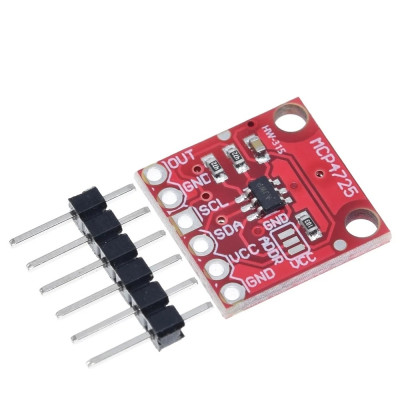
MCP4725 DAC module, I2C, 12-bit, with EEPROM, HW-315
Breakout module with the MCP4725 converter, a 12-bit DAC with I2C interface, which converts a digital value into a real analog voltage on the OUT pin, useful for signal generation, adjustable voltage references, and analog control in projects with Arduino, ESP32, STM32, or Raspberry Pi. It features internal EEPROM memory, an I2C address selectable via the ADDR jumper, and disableable pull-ups for setups with multiple modules on the same bus, with a supply of 2.7 - 5.5 VDC.
Buying this product earns you 0.58 RON in loyalty points.

International fast shipping within EU. Free Shipping for orders above 100 EUR in most EU countries.

We ship from our stock within 24H

You earn points with every order, worth 5%.
The MCP4725 module is a 12-bit digital-to-analog converter with an I2C interface, which allows a development board or a computer to produce a real analog voltage at the output, not just a filtered PWM signal. It is useful where an adjustable reference voltage is needed, an analog control signal for an amplifier or motor, or a digitally generated waveform such as a sine wave or ramp, for audio projects, measurement instruments, automation, and process control.
The main circuit is the MCP4725, a 12-bit DAC with internal EEPROM memory for retaining the output value and configuration after power-off, and a rail-to-rail output referenced to the VCC supply voltage. Communication is done via I2C, with support for Standard 100 kbps, Fast 400 kbps, and High-Speed 3.4 Mbps modes, and the typical output settling time is 6 us. The bus address is selectable through the A0 address pin, which allows multiple MCP4725 modules to be used on the same I2C bus.
Among the main features are the 6-pin header with OUT, GND, SCL, SDA, VCC and a second GND, the ADDR jumper for selecting the state of the A0 address pin, and the I2C pull-up resistors, which can be disabled when multiple modules are connected to the same bus. The module is powered from a voltage between 2.7 and 5.5 VDC, applied to the VCC and GND pins.
Through the I2C interface, the module is compatible with Arduino, ESP32, STM32, Raspberry Pi and any other development board or computer with an available I2C port.
Specifications:
Supply voltage: 2.7 - 5.5 VDC
Output current: maximum 25 mA
Chip: MCP4725
Type: digital-to-analog converter (DAC) with EEPROM
Resolution: 12 bits (4096 steps)
Interface: I2C (Standard 100 kbps, Fast 400 kbps, High-Speed 3.4 Mbps)
Default I2C address: 0x60 (ADDR / A0 pin tied to ground)
Settling time: 6 us (typical)
I2C pull-up: disableable, for connecting multiple modules on the same bus
Output: rail-to-rail analog voltage, referenced to VCC
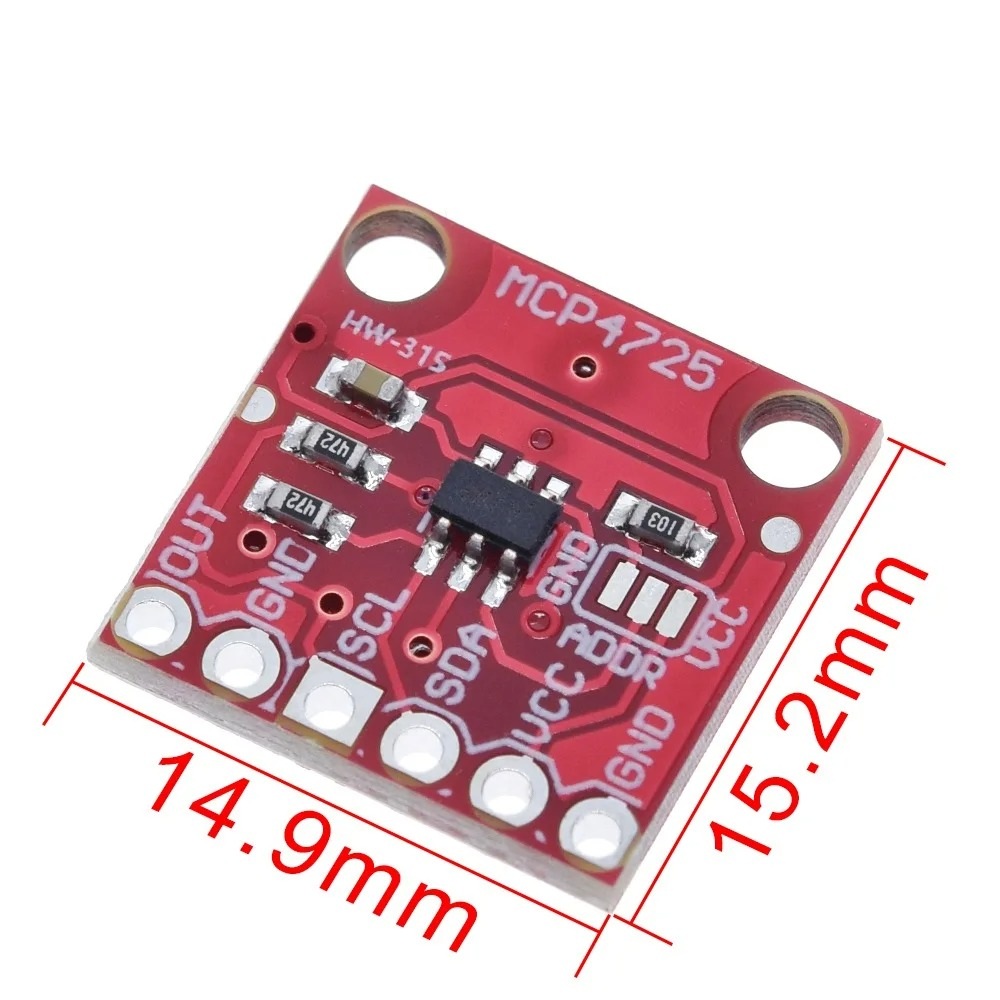
Dimensions: 14.9 x 15.2 mm
Layout:
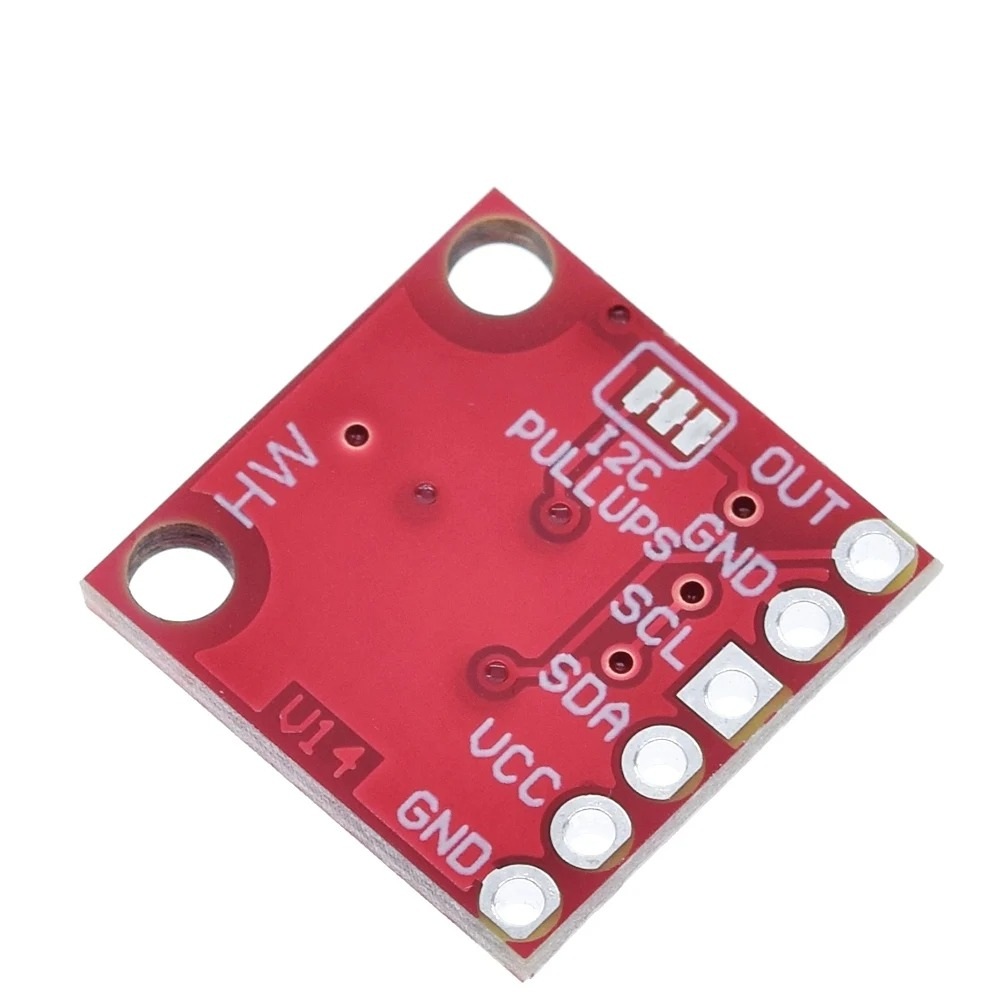
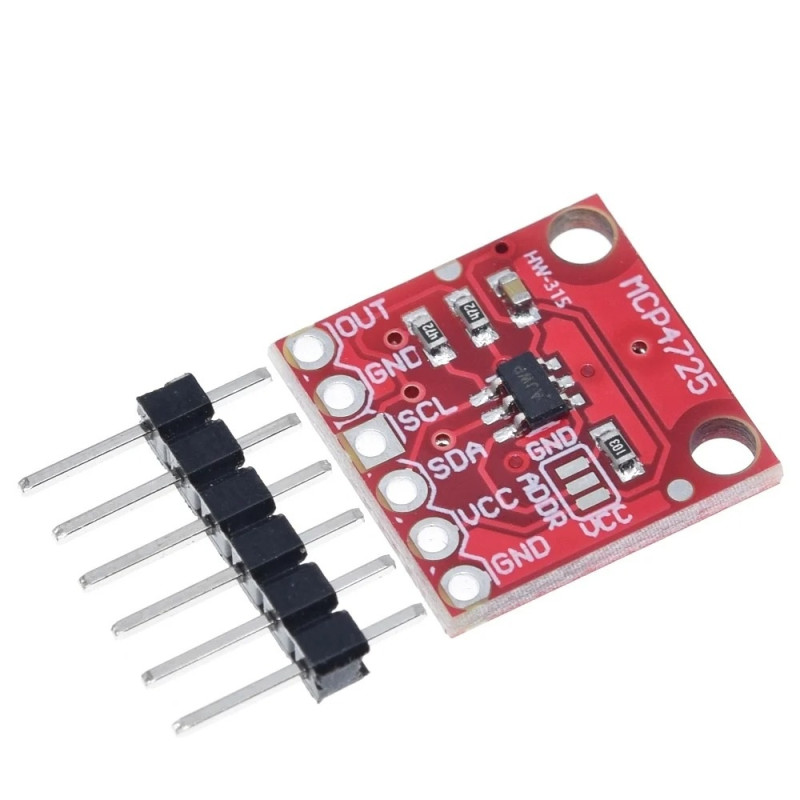
1. 6-pin header: Supplied unsoldered, for mounting on a breadboard or connecting with Dupont wires.
2. OUT: The analog voltage output generated by the converter.
3. GND: Output signal ground, next to the OUT pin.
4. SCL: I2C clock line.
5. SDA: I2C data line.
6. VCC: Positive supply for the module, between 2.7 and 5.5 VDC.
7. ADDR: Jumper for the A0 address pin state, default tied to ground for address 0x60.
8. GND: Power ground, next to the VCC and ADDR pins.
9. MCP4725 circuit: The original digital-to-analog converter, mounted in a SOT-23-6 package.
10. Mounting holes: Two holes for mechanically securing the board.
Pinout:
| Connector | Pin | Function |
|---|---|---|
| J1 Header | OUT | Analog voltage output (DAC) |
| J1 Header | GND | Output signal ground |
| J1 Header | SCL | I2C clock |
| J1 Header | SDA | I2C data |
| J1 Header | VCC | 2.7 - 5.5 VDC supply |
| J1 Header | GND | Power ground |
| ADDR (A0) | I2C address |
|---|---|
| Default, tied to GND | 0x60 |
| Jumper to VCC | 0x61 |
Usage:
Connect VCC and GND to a 2.7 - 5.5 VDC source, for example the 5V or 3.3V pin of the development board, observing polarity.
Connect SCL and SDA to the I2C pins of the development board, for example A4 and A5 on an Arduino Uno, or the dedicated I2C pins on an ESP32, STM32 or Raspberry Pi.
If the development board operates at 3.3 V and the module is powered at 5 V, power the module at 3.3 V instead of using a level shifter on SCL and SDA.
Leave the ADDR jumper unchanged for address 0x60, or bridge it to VCC when you need the second address, 0x61, on the same bus.
If you are using multiple MCP4725 modules on the same I2C bus, disable the pull-up resistors on all modules except one.
From the program, initialize I2C communication and send a value between 0 and 4095 to the module; this will be converted into a proportional voltage available on the OUT pin.
Measure the output voltage between the OUT pin and the adjacent GND pin with a multimeter or an oscilloscope.
To generate a waveform, update the transmitted value at short and regular intervals in the program loop, keeping in mind that the typical output settling time is 6 us, with the real speed being mainly limited by the I2C bus speed.
Do not exceed the maximum supply voltage of 5.5 VDC and do not reverse the polarity on the VCC and GND pins.
Dimension diagram:
- Main IC
- MCP4725
- Communication interface
- I2C
- Converter resolution
- 12 bit
Produs destinat utilizarii in proiecte electronice, automatizari, prototipare, educatie si cercetare.
Produsul trebuie utilizat numai conform specificatiilor tehnice mentionate in descriere si/sau in documentatia produsului.
Avertismente generale de siguranta:
Nu utilizati produsul la tensiuni, curenti sau temperaturi peste valorile specificate.
Montajul si conectarea trebuie realizate de persoane cu cunostinte tehnice minime in domeniul electric/electronic.
Evitati scurtcircuitele, inversarea polaritatii si conectarea gresita a alimentarii.
Nu lasati produsul alimentat nesupravegheat in timpul testelor.
Produsul nu este jucarie si nu este destinat copiilor.
Pentru modulele electronice, se recomanda utilizarea in carcase, panouri sau montaje protejate, dupa caz.
Identificare produs:
Denumirea produsului, codul/SKU-ul si caracteristicile tehnice sunt mentionate in pagina produsului si/sau pe eticheta ambalajului.
Producator / Importator / Distribuitor:
Sigmanortec S.R.L.
Calea Bucuresti nr. 9, Targu Jiu, Gorj, Romania
E-mail: [email protected]
Website: www.sigmanortec.ro
Persoana responsabila in UE:
Sigmanortec S.R.L.
Calea Bucuresti nr. 9, Targu Jiu, Gorj, Romania
E-mail: [email protected]
Documentatie si siguranta:
Pentru informatii suplimentare, fise tehnice, declaratii de conformitate sau instructiuni, ne puteti contacta la [email protected].
/*
  Test code for MCP4725 I2C DAC Breakout Module (HW-315)

  Board: Arduino Uno (Arduino AVR Boards package, Tools > Board > Arduino Uno)
  Library: Adafruit MCP4725 by Adafruit (Library Manager), requires Wire (built in)

  Wiring:
    Arduino 5V  -> MCP4725 VCC
    Arduino GND -> MCP4725 GND
    Arduino A4 (SDA) -> MCP4725 SDA
    Arduino A5 (SCL) -> MCP4725 SCL
  Output is read between MCP4725 OUT and the GND pin next to it.
*/

#include <Wire.h>
#include <Adafruit_MCP4725.h>

Adafruit_MCP4725 dac;

const uint8_t MCP4725_I2C_ADDRESS = 0x60; // default address, ADDR pad tied to GND
const float VCC = 5.0;                    // Arduino 5V rail used as DAC reference

void setup() {
  Serial.begin(9600);
  while (!Serial) {
    // wait for native USB serial ports
  }

  Wire.begin(); // start I2C as master on A4 (SDA) and A5 (SCL)

  Serial.println("MCP4725 test starting...");

  if (!dac.begin(MCP4725_I2C_ADDRESS)) {
    Serial.println("Error: MCP4725 not found on the I2C bus, check wiring and address");
    while (1) {
      // stop here, nothing else to test without the DAC
    }
  }

  Serial.println("MCP4725 found and initialized");
}

void loop() {
  // Slowly ramp the output from 0 to full scale and back, printing the approximate voltage
  for (int32_t code = 0; code <= 4095; code += 256) {
    dac.setVoltage(code, false); // update DAC register only, do not write to EEPROM
    float voltage = code * VCC / 4095.0;

    Serial.print("Code: ");
    Serial.print(code);
    Serial.print("  Approx voltage: ");
    Serial.print(voltage, 2);
    Serial.println(" V");

    delay(300);
  }

  for (int32_t code = 4095; code >= 0; code -= 256) {
    dac.setVoltage(code, false);
    float voltage = code * VCC / 4095.0;

    Serial.print("Code: ");
    Serial.print(code);
    Serial.print("  Approx voltage: ");
    Serial.print(voltage, 2);
    Serial.println(" V");

    delay(300);
  }
}
The MCP4725 module is a digital-to-analog converter with I2C interface that generates a real analog voltage on the OUT pin, starting from a digital value sent from a development board. This tutorial shows how to connect and program the module with an Arduino Uno board, to obtain an adjustable voltage between 0 V and the supply voltage.
How it works:
MCP4725 is a 12-bit DAC, which means it accepts digital values between 0 and 4095. The output voltage is calculated approximately with the formula Vout = code x VCC / 4096, where VCC is the module's supply voltage. At a 5 V supply, code 0 produces approximately 0 V, code 2048 produces approximately 2.5 V, and code 4095 produces approximately 5 V. The module retains the last value written in the internal EEPROM memory, so it can restart with the same output without the microcontroller having sent anything yet after power up.
What you need:
- 1 x MCP4725 I2C DAC Breakout Module
- 1 x Arduino Uno R3 Development Board with Wifi ESP8266, Arduino compatible
- 1 x Mini USB Cable, 30cm
- 1 x 40 Dupont wires 10cm, Female-Female
Connection:
The module is powered directly from the 5 V pin of the Arduino Uno board, and the I2C lines are connected to the dedicated pins A4 and A5.
| Product pin | Connects to | Role |
|---|---|---|
| VCC | Arduino Uno 5V | Module power supply, within 2.7 - 5.5 VDC limits |
| GND | Arduino Uno GND | Common ground |
| SDA | Arduino Uno A4 | I2C data line |
| SCL | Arduino Uno A5 | I2C clock line |
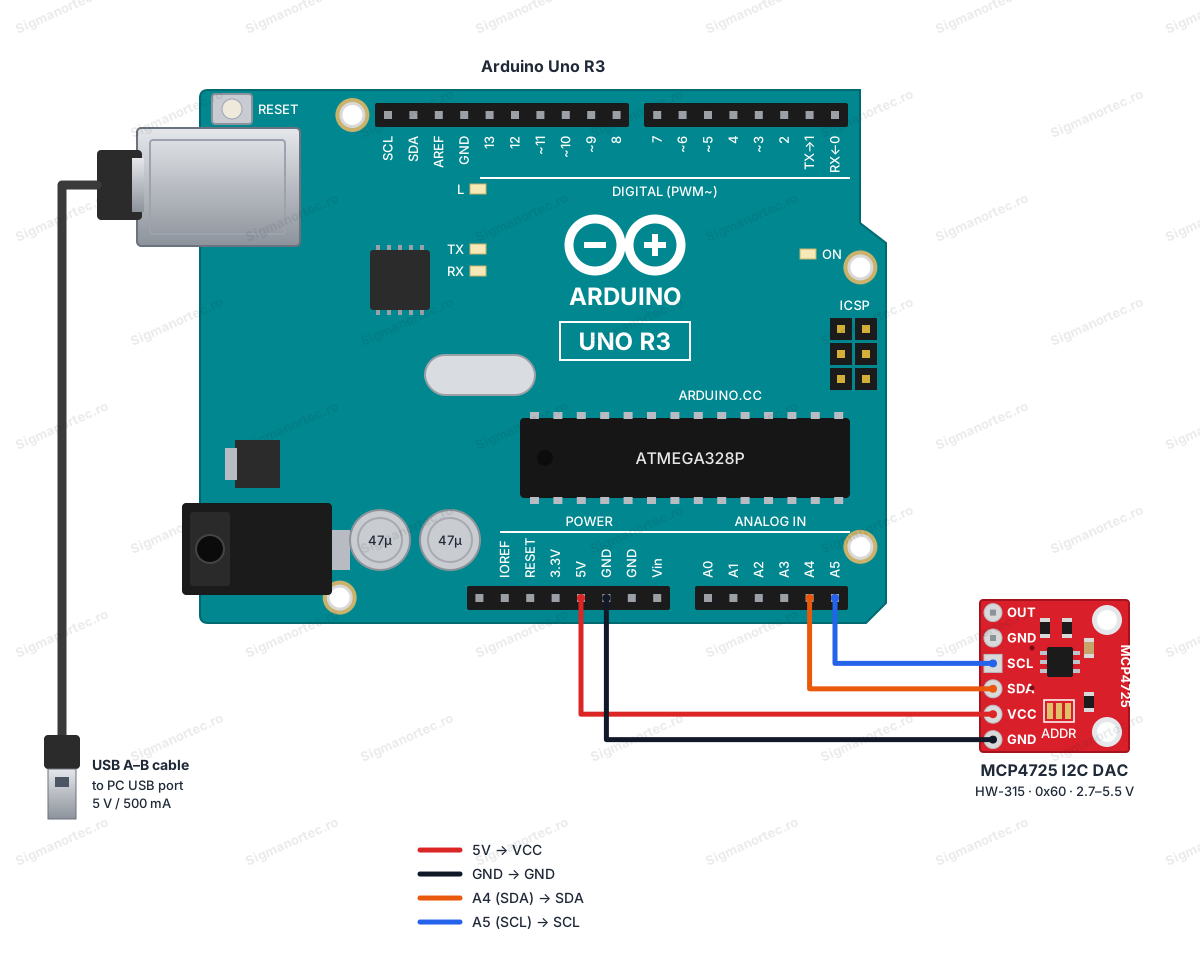
Arduino Uno operates at 5 V logic, the same level accepted by the module, so no level converter is needed on SDA and SCL. Pins A4 and A5 have internal pull-up automatically enabled by the Wire library, sufficient for a single module on the bus.
Board and libraries:
From Arduino IDE select the Arduino Uno board, available by default in the Arduino AVR Boards package. No additional address is needed in File Preferences for this board. Install from Library Manager the Adafruit MCP4725 library from Adafruit, which also requires the Wire library, already included in Arduino IDE.
Code:
The code initializes the module at I2C address 0x60, sends a few known values in turn and then generates a sine wave cycle on the output.
/*
  Board: Arduino Uno (Arduino AVR Boards package)
  Library: Adafruit MCP4725 by Adafruit (requires Wire, included with Arduino IDE)
  Wiring:
    Arduino 5V  -> MCP4725 VCC
    Arduino GND -> MCP4725 GND
    Arduino A4 (SDA) -> MCP4725 SDA
    Arduino A5 (SCL) -> MCP4725 SCL
*/
#include <Wire.h>
#include <Adafruit_MCP4725.h>
Adafruit_MCP4725 dac;
const uint8_t MCP4725_I2C_ADDRESS = 0x60; // default address, ADDR pad tied to GND
const float VCC = 5.0; // Arduino 5V rail used as the DAC reference
void setup() {
  Serial.begin(9600);
  while (!Serial) {
    // wait for the serial port on boards that need it
  }
  Wire.begin(); // join the I2C bus as master on A4 (SDA) and A5 (SCL)
  if (!dac.begin(MCP4725_I2C_ADDRESS)) {
    Serial.println("MCP4725 not found, check wiring and I2C address");
    while (1) {
      // halt here, nothing useful can be done without the DAC
    }
  }
  Serial.println("MCP4725 ready");
}
void loop() {
  // Step through a few known DAC codes and print the expected output voltage
  uint16_t steps[] = {0, 1024, 2048, 3072, 4095};
  for (uint8_t i = 0; i < 5; i++) {
    uint16_t code = steps[i];
    dac.setVoltage(code, false); // write the code to the DAC register only, not to EEPROM
    float voltage = code * VCC / 4095.0;
    Serial.print("DAC code: ");
    Serial.print(code);
    Serial.print(" -> approx output: ");
    Serial.print(voltage, 2);
    Serial.println(" V");
    delay(1000);
  }
  // Generate one slow sine wave cycle to show a continuously changing analog output
  Serial.println("Generating sine wave cycle...");
  for (uint16_t angleDeg = 0; angleDeg < 360; angleDeg += 5) {
    float angleRad = angleDeg * PI / 180.0;
    float normalized = (sin(angleRad) + 1.0) * 0.5; // normalize sine to 0..1
    uint16_t code = (uint16_t)(normalized * 4095);
    dac.setVoltage(code, false);
    delay(20);
  }
}
How the code works:
At the beginning of the program the Wire and Adafruit_MCP4725 libraries are included, the dac object of type Adafruit_MCP4725 is created and the MCP4725_I2C_ADDRESS constant is defined with the value 0x60, the default address of the module with the ADDR pin tied to ground.
In the setup function the serial communication is initialized, the I2C bus is started with Wire.begin, and then dac.begin is called with the module address. If the module does not respond, the error message is displayed on the serial monitor and the program remains stuck in a wait loop.
In the loop function, the steps array contains five representative digital codes between 0 and 4095. For each value, dac.setVoltage sends the code to the module, and the program calculates and displays on the serial monitor the approximate expected voltage at the output, using the formula code x VCC / 4095.
After going through the five values, the code generates a complete sine wave cycle, calculating for each angle between 0 and 360 degrees a normalized value between 0 and 1 with the sin function, which it transforms into a digital code between 0 and 4095 sent to the module with dac.setVoltage.
Result:
Open the serial monitor at 9600 baud. You will see the module initialization confirmation message, then the five digital codes together with the approximate voltage calculated for each, followed by the message announcing the generation of the sine wave cycle. If you measure the OUT and GND pins with a multimeter during each one-second pause, you will read a voltage close to that displayed on the monitor.
MCP4725 ready
DAC code: 0 -> approx output: 0.00 V
DAC code: 1024 -> approx output: 1.25 V
DAC code: 2048 -> approx output: 2.50 V
DAC code: 3072 -> approx output: 3.75 V
DAC code: 4095 -> approx output: 5.00 V
Generating sine wave cycle...
DAC code: 0 -> approx output: 0.00 V
DAC code: 1024 -> approx output: 1.25 V
DAC code: 2048 -> approx output: 2.50 V
DAC code: 3072 -> approx output: 3.75 V
DAC code: 4095 -> approx output: 5.00 V
Common issues:
If the serial monitor displays a message that the module was not found, check that SDA and SCL are not reversed with each other and that the module ground is connected to the Arduino board ground.
If the voltage measured on OUT is always 0 V, check if the module is powered correctly on VCC and if you have written a value different from 0 in the code to the setVoltage function.
If the module does not respond at I2C address 0x60, check the ADDR jumper, because an accidental bridge to VCC moves the module address to 0x61.
If the values read on OUT seem unstable or noisy, check that the wires used for power and I2C are short and well secured, and the module is not powered simultaneously from two different sources.
If you use two MCP4725 modules on the same bus and one of them does not respond correctly, check that you have disabled the pull-up resistors on all modules except one.
Limitations and tips:
The module's output voltage is limited between 0 V and the supply voltage VCC, it cannot generate negative voltages or voltages greater than the supply. The 12-bit resolution offers steps of approximately 1.2 mV at a 5 V supply, sufficient for most control and signal generation applications, but insufficient for very high precision measurements. The output update speed is limited by the I2C bus speed and the 6 us settling time of the converter, which makes the module suitable for slow signals or control, not for high-frequency audio signals. Starting from this setup, you can build a signal generator with various waveforms, an adjustable reference voltage source for other circuits, or an analog control loop for an amplifier or motor driver.