

Product images are for informational purposes only and may vary slightly depending on the batch and supplier. Product specifications and prices may be subject to change without notice. We do our best to provide accurate and complete product specifications, but they may not be completely accurate. If you encounter any such situation, please let us know.
The product is intended for specialists and requires qualified and authorized personnel. The product does not include assembly/use instructions . Putting the product into operation by unqualified persons leads to the loss of the warranty according to the Terms and Conditions on the site.
The specified technical parameters (current, power, etc.) represent maximum allowable values under ideal operating conditions. For safe use and optimal lifespan, it is recommended to operate the product continuously at no more than 50% of the specified maximum values.
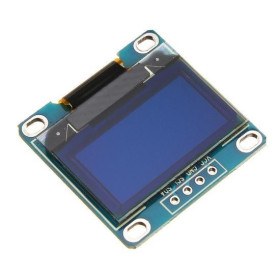
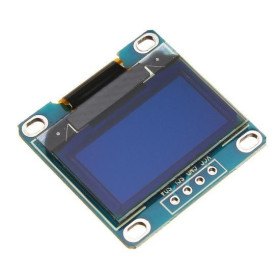
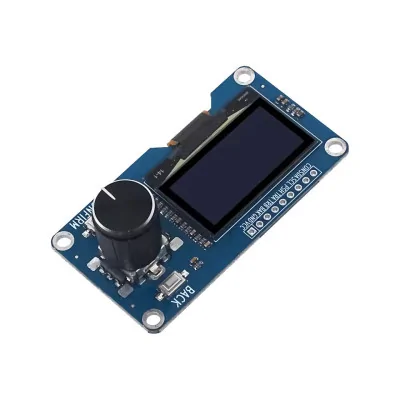
1.3-inch OLED display module, SH1106, EC11 rotary encoder, I2C
Compact solution for HMI interfaces and DIY projects, it combines a high-contrast 1.3-inch OLED with an EC11 rotary encoder for precise navigation in menus and adjustments. I2C communication reduces wiring and allows quick integration with Arduino and similar boards. It includes encoder push-button and confirm and back buttons for clear control and immediate visual feedback.
Shipping by Thursday 22 October
Buying this product earns you 0.40 € in loyalty points.

International fast shipping within EU. Free Shipping for orders above 100 EUR in most EU countries.

We ship from our stock within 24H

You earn points with every order, worth 5%.
The module combines a 1.3-inch OLED display with an EC11 rotary encoder on a single board, accepting both rotation signals and push-button presses, for quickly building a user interface in electronic projects. It is suitable for control panels, configuration menus, parameter adjustments, and any application where clear navigation and immediate visual feedback are needed.
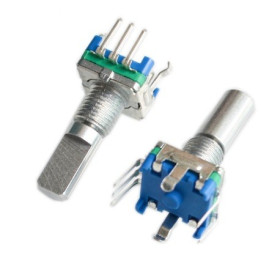
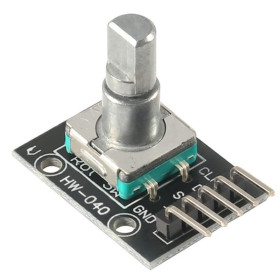
The display is provided by an OLED screen with an SH1106 driver, with a resolution of 128 x 64 pixels, connected via the I2C interface at the default address 0x3C. The EC11 rotary encoder has a plum blossom-style knob and offers 20 positions (pulses) per full rotation, with an integrated push switch, the rotation signals being available separately on the TRA and TRB pins, and the encoder push on the PSH pin.
Among the main features are the 1.3-inch OLED display with SH1106 driver, the EC11 rotary encoder with built-in button, the two additional tactile buttons CONFIRM and BACK, the pin header for I2C and encoder signals, as well as the mounting holes in the board corner. Power is supplied through the VCC and GND pins, at a voltage of 3.3 - 5 V.
Through the I2C interface and the encoder’s digital signals and buttons, the module is compatible with Arduino, ESP32, STM32, Raspberry Pi, and other development boards that have I2C pins and digital inputs.
Specifications:
Supply voltage: 3.3 - 5 V
Display type: OLED
OLED driver: SH1106
Screen size: 1.3 inch
Screen resolution: 128 x 64 pixels
Control type: EC11 rotary encoder
Encoder resolution: 20 pulses per rotation, with built-in switch
Communication interface: I2C, default address 0x3C
Additional buttons: CONFIRM (CON) and BACK (BAK)
Board dimensions: 56 x 97 mm
Pinout:
| Connector | Pin | Function |
|---|---|---|
| P1 Header pini | CON | CONFIRM button |
| P1 Header pini | SDA | I2C data line for OLED |
| P1 Header pini | SCL | I2C clock line for OLED |
| P1 Header pini | PSH | EC11 encoder push |
| P1 Header pini | TRA | EC11 encoder A signal |
| P1 Header pini | TRB | EC11 encoder B signal |
| P1 Header pini | BAK | RETURN button |
| P1 Header pini | GND | Ground |
| P1 Header pini | VCC | Power supply |
| Module pin | Arduino UNO | Role |
|---|---|---|
| GND | GND | Common ground |
| VCC | 3.3V | Module power supply |
| SCL | A5 | I2C clock |
| SDA | A4 | I2C data |
| TRA | D2 | Encoder channel A, recommended on interrupt pin |
| TRB | D3 | Encoder channel B, recommended on interrupt pin |
| PSH | D4 | Encoder push (select) |
| CON | D5 | Optional CONFIRM button |
| BAK | D6 | Optional RETURN button |
Usage:
Connect the module’s VCC and GND pins to the power supply and to the common ground with the control board, respecting the 3.3 - 5 V voltage and correct polarity.
Connect SDA and SCL to the microcontroller’s I2C pins, for example A4 and A5 on Arduino UNO.
Connect TRA and TRB to two digital pins, preferably interrupt-capable, for accurate reading of the direction and rotation steps of the encoder.
Connect PSH to a digital pin with a pull-up resistor to read the encoder press.
Optionally connect CON and BAK to separate digital pins if you want dedicated confirm and back buttons, independent of the encoder press.
Program the OLED display as you would for any other module with an SH1106 driver, using a compatible library such as Adafruit_SH110X.h together with Adafruit_GFX and the default I2C address 0x3C.
Read the TRA and TRB signals through an interrupt routine to determine the rotation direction, and PSH, CON, and BAK as digital inputs with software debounce.
Do not reverse the VCC and GND connections and do not exceed the module’s maximum allowed voltage.
For stable results, use short cables between the module and the control board and keep the pull-up resistors active on the encoder and button digital lines.
Produs destinat utilizarii in proiecte electronice, automatizari, prototipare, educatie si cercetare.
Produsul trebuie utilizat numai conform specificatiilor tehnice mentionate in descriere si/sau in documentatia produsului.
Avertismente generale de siguranta:
Nu utilizati produsul la tensiuni, curenti sau temperaturi peste valorile specificate.
Montajul si conectarea trebuie realizate de persoane cu cunostinte tehnice minime in domeniul electric/electronic.
Evitati scurtcircuitele, inversarea polaritatii si conectarea gresita a alimentarii.
Nu lasati produsul alimentat nesupravegheat in timpul testelor.
Produsul nu este jucarie si nu este destinat copiilor.
Pentru modulele electronice, se recomanda utilizarea in carcase, panouri sau montaje protejate, dupa caz.
Identificare produs:
Denumirea produsului, codul/SKU-ul si caracteristicile tehnice sunt mentionate in pagina produsului si/sau pe eticheta ambalajului.
Producator / Importator / Distribuitor:
Sigmanortec S.R.L.
Calea Bucuresti nr. 9, Targu Jiu, Gorj, Romania
E-mail: [email protected]
Website: www.sigmanortec.ro
Persoana responsabila in UE:
Sigmanortec S.R.L.
Calea Bucuresti nr. 9, Targu Jiu, Gorj, Romania
E-mail: [email protected]
Documentatie si siguranta:
Pentru informatii suplimentare, fise tehnice, declaratii de conformitate sau instructiuni, ne puteti contacta la [email protected].
/*
  Quick verification sketch for the SH1106 1.3 inch OLED module with EC11 rotary encoder
  Board: Arduino Uno
  Wiring:
    Module VCC  -> Arduino 3.3V
    Module GND  -> Arduino GND
    Module SDA  -> Arduino A4
    Module SCL  -> Arduino A5
    Module TRA  -> Arduino D2 (interrupt pin)
    Module TRB  -> Arduino D3
    Module PSH  -> Arduino D4
    Module CON  -> Arduino D5
    Module BAK  -> Arduino D6
  Libraries (Library Manager):
    Adafruit SH110X by Adafruit
    Adafruit GFX Library by Adafruit
*/

#include <Wire.h>
#include <Adafruit_GFX.h>
#include <Adafruit_SH110X.h>

#define OLED_ADDRESS 0x3C

Adafruit_SH1106G display(128, 64, &Wire, -1);

const int PIN_TRA = 2;
const int PIN_TRB = 3;
const int PIN_PSH = 4;
const int PIN_CON = 5;
const int PIN_BAK = 6;

volatile long encoderCount = 0;
volatile uint8_t lastStateA = 0;

void encoderISR() {
  uint8_t stateA = digitalRead(PIN_TRA);
  if (stateA == lastStateA) return;
  lastStateA = stateA;
  uint8_t stateB = digitalRead(PIN_TRB);
  if (stateB != stateA) {
    encoderCount++;
  } else {
    encoderCount--;
  }
}

void setup() {
  Serial.begin(9600);
  Serial.println("Scanning I2C bus...");

  Wire.begin();
  byte foundAddress = 0;
  for (byte address = 1; address < 127; address++) {
    Wire.beginTransmission(address);
    if (Wire.endTransmission() == 0) {
      Serial.print("Device found at address 0x");
      Serial.println(address, HEX);
      foundAddress = address;
    }
  }
  if (foundAddress == 0) {
    Serial.println("No I2C device found, check wiring");
  }

  pinMode(PIN_TRA, INPUT_PULLUP);
  pinMode(PIN_TRB, INPUT_PULLUP);
  pinMode(PIN_PSH, INPUT_PULLUP);
  pinMode(PIN_CON, INPUT_PULLUP);
  pinMode(PIN_BAK, INPUT_PULLUP);

  lastStateA = digitalRead(PIN_TRA);
  attachInterrupt(digitalPinToInterrupt(PIN_TRA), encoderISR, CHANGE);

  if (!display.begin(OLED_ADDRESS, true)) {
    Serial.println("SH1106 display not found at 0x3C");
  } else {
    display.clearDisplay();
    display.setTextSize(2);
    display.setTextColor(SH110X_WHITE);
    display.setCursor(0, 20);
    display.print("TEST OK");
    display.display();
    Serial.println("Display initialized");
  }
}

void loop() {
  static long lastCount = -1;
  if (encoderCount != lastCount) {
    lastCount = encoderCount;
    Serial.print("Encoder count: ");
    Serial.println(encoderCount);
  }

  if (digitalRead(PIN_PSH) == LOW) {
    Serial.println("Encoder button pressed");
    delay(200);
  }
  if (digitalRead(PIN_CON) == LOW) {
    Serial.println("CONFIRM button pressed");
    delay(200);
  }
  if (digitalRead(PIN_BAK) == LOW) {
    Serial.println("BACK button pressed");
    delay(200);
  }
}
The module combines a 1.3 inch OLED display with an SH1106 driver and an EC11 rotary encoder with built-in button, plus two extra tactile buttons CONFIRM and BACK, all on a single board. It is designed for user interfaces in microcontroller projects, where you need to display a menu or a value and the user has to navigate and confirm a selection without a keyboard or touchscreen.
The tutorial uses an Arduino Uno board, because the module communicates through I2C and simple digital inputs, interfaces that the Arduino Uno already has available, without needing WiFi or extra memory.
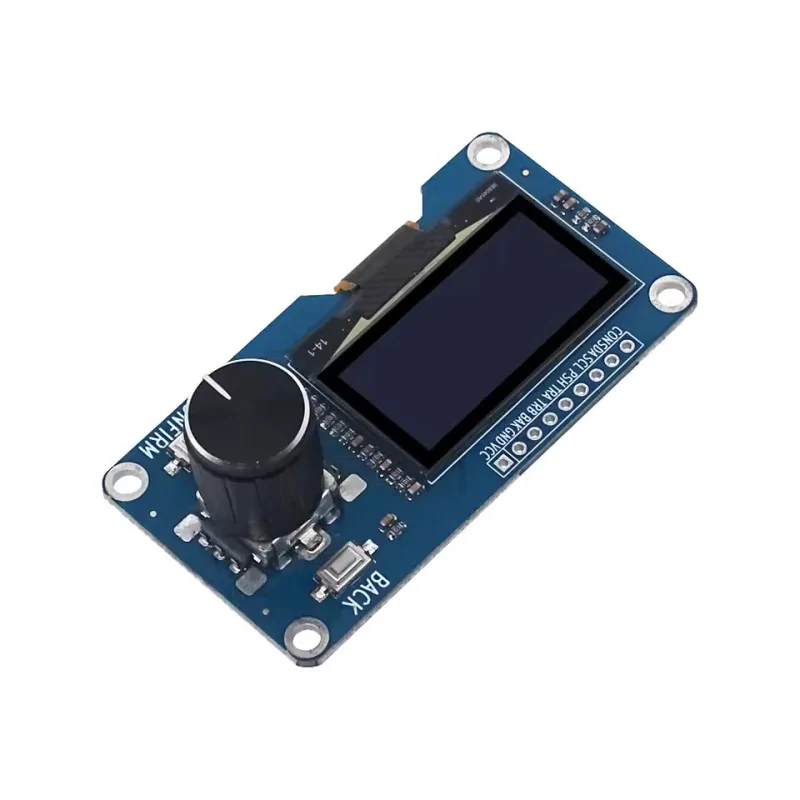
How it works:
The display is controlled by the SH1106 driver, which manages an internal pixel memory organized as 128 x 64 dots and receives commands and data through the I2C protocol, on the SDA and SCL lines, at address 0x3C. The microcontroller does not draw directly on the panel, instead it sends blocks of bytes representing the display's memory pages, which is handled automatically by a compatible SH1106 library.
The EC11 encoder has two internal offset contacts, TRA and TRB, which close in turn during rotation. The order in which the two signals go from high to low shows the direction of rotation, and each pair of transitions corresponds to a single mechanical step, the module having 20 positions per full rotation, meaning approximately 18 degrees per step, 360 degrees divided by 20 positions. The code reads these transitions through an interrupt routine attached to TRA and determines whether TRB is in the same state as TRA or in the opposite state, to figure out whether the rotation is clockwise or counterclockwise.
The encoder's built-in button, on the PSH pin, as well as the independent CON and BAK buttons, work as simple digital inputs that go low when pressed, the module already having built-in pull-up resistors, and the code reads their state at short intervals and applies software debounce to eliminate false triggers caused by mechanical contact.
What you need:
- 1 x OLED display module 1.3 inch, SH1106, EC11 rotary encoder, I2C
- 1 x Uno R3 development board with WiFi ESP8266, Arduino compatible
- 1 x Male-female jumper wires
Wiring:
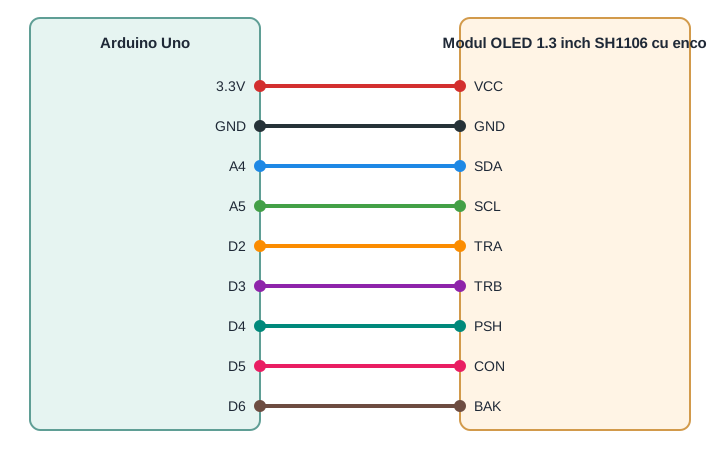
The module is powered between 3.3 V and 5 V, and the I2C signals and digital inputs are already compatible with the logic level of the Arduino Uno, so there is no need for a level converter or external pull-up resistors for the buttons. First connect power and ground, then the I2C lines, then the encoder and button signals.
| Product pin | Connects to | Role |
|---|---|---|
| VCC | 3.3V | Module power supply |
| GND | GND | Common ground |
| SDA | A4 | I2C data |
| SCL | A5 | I2C clock |
| TRA | D2 | Encoder channel A, interrupt pin |
| TRB | D3 | Encoder channel B |
| PSH | D4 | Encoder press |
| CON | D5 | CONFIRM button |
| BAK | D6 | BACK button |
Libraries:
Install the Adafruit SH110X library, from Adafruit, from the Library Manager for controlling the OLED display with the SH1106 driver, along with the Adafruit GFX Library, from Adafruit, which it depends on for drawing text and shapes.
The code:
The program below displays a menu with three options on the OLED screen, which you can navigate by rotating the encoder, confirm by pressing PSH or CON, and reset to the first item by pressing BAK, while also showing debug messages on the serial monitor.
/*
 Tutorial sketch for the SH1106 1.3 inch OLED module with EC11 rotary encoder
 Board: Arduino Uno
 Wiring:
   Module VCC  -> Arduino 3.3V
   Module GND  -> Arduino GND
   Module SDA  -> Arduino A4
   Module SCL  -> Arduino A5
   Module TRA  -> Arduino D2 (interrupt pin)
   Module TRB  -> Arduino D3
   Module PSH  -> Arduino D4
   Module CON  -> Arduino D5
   Module BAK  -> Arduino D6
 Libraries (Library Manager):
   Adafruit SH110X by Adafruit
   Adafruit GFX Library by Adafruit
*/
#include <Wire.h>
#include <Adafruit_GFX.h>
#include <Adafruit_SH110X.h>
#define OLED_ADDRESS 0x3C
#define OLED_WIDTH   128
#define OLED_HEIGHT  64
Adafruit_SH1106G display(OLED_WIDTH, OLED_HEIGHT, &Wire, -1);
const int PIN_TRA = 2;
const int PIN_TRB = 3;
const int PIN_PSH = 4;
const int PIN_CON = 5;
const int PIN_BAK = 6;
volatile int encoderDelta = 0;
volatile uint8_t lastStateA = 0;
const char *menuItems[] = {"Status", "Settings", "About"};
const uint8_t menuCount = sizeof(menuItems) / sizeof(menuItems[0]);
int menuIndex = 0;
unsigned long lastPshTime = 0;
unsigned long lastConTime = 0;
unsigned long lastBakTime = 0;
const unsigned long debounceDelay = 180;
// Interrupt routine, called on every change of PIN_TRA
void encoderISR() {
  uint8_t stateA = digitalRead(PIN_TRA);
  if (stateA == lastStateA) return;
  lastStateA = stateA;
  uint8_t stateB = digitalRead(PIN_TRB);
  if (stateB != stateA) {
    encoderDelta++;
  } else {
    encoderDelta--;
  }
}
// Generic debounced button check
bool buttonPressed(int pin, unsigned long &lastTime) {
  if (digitalRead(pin) == LOW) {
    unsigned long now = millis();
    if (now - lastTime > debounceDelay) {
      lastTime = now;
      return true;
    }
  }
  return false;
}
// Draws the menu with the current selection highlighted
void drawMenu() {
  display.clearDisplay();
  display.setTextSize(1);
  display.setTextColor(SH110X_WHITE);
  display.setCursor(0, 0);
  display.print("Sigmanortec Demo");
  display.drawLine(0, 10, 127, 10, SH110X_WHITE);
  int y = 16;
  for (uint8_t i = 0; i < menuCount; i++) {
    if (i == menuIndex) {
      display.fillRect(0, y - 1, 128, 9, SH110X_WHITE);
      display.setTextColor(SH110X_BLACK);
    } else {
      display.setTextColor(SH110X_WHITE);
    }
    display.setCursor(4, y);
    display.print(menuItems[i]);
    y += 10;
  }
  display.display();
}
void setup() {
  Serial.begin(9600);
  pinMode(PIN_TRA, INPUT_PULLUP);
  pinMode(PIN_TRB, INPUT_PULLUP);
  pinMode(PIN_PSH, INPUT_PULLUP);
  pinMode(PIN_CON, INPUT_PULLUP);
  pinMode(PIN_BAK, INPUT_PULLUP);
  lastStateA = digitalRead(PIN_TRA);
  attachInterrupt(digitalPinToInterrupt(PIN_TRA), encoderISR, CHANGE);
  if (!display.begin(OLED_ADDRESS, true)) {
    Serial.println("OLED not found at address 0x3C");
    while (true) delay(1000);
  }
  Serial.println("OLED SH1106 + EC11 encoder demo ready");
  drawMenu();
}
void loop() {
  noInterrupts();
  int delta = encoderDelta;
  encoderDelta = 0;
  interrupts();
  if (delta > 0) {
    menuIndex = (menuIndex + 1) % menuCount;
    Serial.println("Encoder turned clockwise");
    drawMenu();
  } else if (delta < 0) {
    menuIndex = (menuIndex - 1 + menuCount) % menuCount;
    Serial.println("Encoder turned counter-clockwise");
    drawMenu();
  }
  if (buttonPressed(PIN_PSH, lastPshTime) || buttonPressed(PIN_CON, lastConTime)) {
    Serial.print("Selected menu item: ");
    Serial.println(menuItems[menuIndex]);
  }
  if (buttonPressed(PIN_BAK, lastBakTime)) {
    Serial.println("Back button pressed");
    menuIndex = 0;
    drawMenu();
  }
}
How the code works:
At the beginning of the code, the display object from the Adafruit_SH1106G class is defined, together with the OLED_ADDRESS address and the PIN_TRA, PIN_TRB, PIN_PSH, PIN_CON and PIN_BAK pins, along with the menuItems array which contains the three menu options and the menuIndex variable which stores the currently selected option.
The encoderISR function is attached as an interrupt on the state change of the PIN_TRA pin, compares the new state with lastStateA and, if it has changed, checks the state of PIN_TRB to decide whether the encoderDelta variable increases or decreases, thus accumulating the rotation steps between two passes through loop.
The buttonPressed function receives the pin to check and applies a debounce based on millis, returning true only if the pin is low and enough time has passed since the last reading taken for that pin.
The drawMenu function clears the screen, writes a title and a separator line, then goes through menuItems and draws each option, highlighting the option at the menuIndex position with a filled rectangle.
In setup, the serial port is initialized, the pins are configured as inputs with pull-up, the initial state of PIN_TRA is read into lastStateA, the encoderISR interrupt is attached, and the display is initialized with display.begin using OLED_ADDRESS, after which the initial menu is drawn.
In loop, encoderDelta is read and reset within a region protected by noInterrupts and interrupts, menuIndex is updated and the menu is redrawn at each rotation step, then buttonPressed is checked for PIN_PSH, PIN_CON and PIN_BAK to display on serial the selected option or the return to the first item.
Result:
Open the serial monitor at 9600 baud, rotate the encoder to see the selection move between the menu options on the screen, press PSH or CON to confirm an option and BAK to return to the first option, watching the corresponding messages on the serial monitor.
OLED SH1106 + EC11 encoder demo ready
Encoder turned clockwise
Encoder turned clockwise
Selected menu item: Settings
Encoder turned counter-clockwise
Selected menu item: Status
Encoder turned clockwise
Encoder turned clockwise
Selected menu item: About
Back button pressed
Common issues:
The display stays off or display.begin returns false, in this case check first the SDA and SCL connections and the VCC and GND power supply, then confirm through an I2C scan that the module responds at address 0x3C.
The menu jumps several positions with a single light rotation of the encoder, in this case TRA or TRB are not connected correctly or the wires are too long and pick up noise, use short wires and check that both signals reach the indicated digital pins.
A button seems to trigger multiple times for a single press, a sign that the debounce interval is too short for that particular mechanical contact, slightly increase the debounceDelay value in the code.
Rotating the encoder produces no reaction, check that the interrupt is correctly attached on the PIN_TRA pin and that it is a pin capable of interrupts on the board being used, on Arduino Uno only D2 and D3 provide this function.
Nothing appears on the serial monitor, confirm that the speed selected in the monitor is 9600 baud, matching the one in Serial.begin, and that the board is connected on the correct port.
Limitations and tips:
The monochrome 1.3 inch display and the 128 x 64 pixel resolution limit the number of menu lines that can be clearly shown at the same time, for longer menus it is useful to add scrolling or split the content across multiple pages. The encoder offers 20 positions per rotation, enough for fine parameter adjustments, but without an absolute position sensor, so at startup the current value has to be initialized from the code or read from a non-volatile memory if you want to keep the last setting. Starting from this example, you can build a multi-level menu, display values read from sensors, or control external modules through selections confirmed with PSH or CON.