
Product images are for informational purposes only and may vary slightly depending on the batch and supplier. Product specifications and prices may be subject to change without notice. We do our best to provide accurate and complete product specifications, but they may not be completely accurate. If you encounter any such situation, please let us know.
The product is intended for specialists and requires qualified and authorized personnel. The product does not include assembly/use instructions . Putting the product into operation by unqualified persons leads to the loss of the warranty according to the Terms and Conditions on the site.
The specified technical parameters (current, power, etc.) represent maximum allowable values under ideal operating conditions. For safe use and optimal lifespan, it is recommended to operate the product continuously at no more than 50% of the specified maximum values.
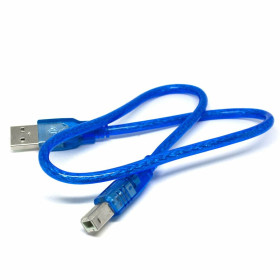
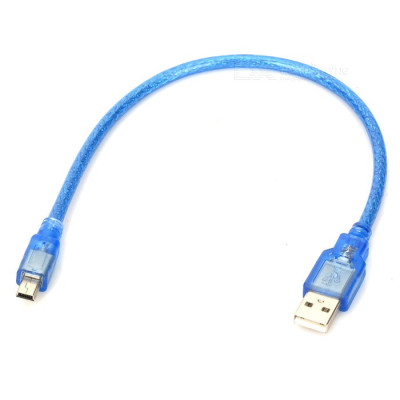
MiniUSB Cable, USB-A to Mini-USB, 30cm
Ideal for connecting and transferring data between Arduino development boards and a PC, this 30 cm MiniUSB cable provides a stable link for programming and serial communication. It has a Mini-USB connector compatible with many modules and devices, a compact length for the workbench and a flexible cable that is easy to handle.
Shipping by Wednesday 11 November
Buying this product earns you 0.35 RON in loyalty points.

International fast shipping within EU. Free Shipping for orders above 100 EUR in most EU countries.

We ship from our stock within 24H

You earn points with every order, worth 5%.
The USB cable with a male USB-A plug at one end and a male Mini-USB plug at the other end connects a computer USB port, hub or charger to a device with a Mini-USB connector. The same cable carries both the 5 V power supply and the data, so it is suitable for data transfer, serial communication, programming devices with a Mini-USB port and powering small equipment.
The cable connects the four contacts of the USB-A plug (VBUS, D-, D+ and GND) to the corresponding contacts of the 5-pin Mini-USB plug. The 5 V supply passes through the VBUS and GND lines, and the data travels on the differential pair D+ and D-. The ID pin of the Mini-USB plug is not used. The 30 cm length keeps the voltage drop on the small power wires low and is suitable for desktop setups, where the device is located close to the computer.
The main features include the male USB-A plug, male Mini-USB plug, transparent blue outer insulation and 30 cm length. The cable does not need its own power supply, and the 5 V voltage is provided by the USB port to which it is connected.
Specifications:
Power supply: 5 VDC (from the USB port)
Connector end 1: USB-A male
Connector end 2: Mini-USB male, 5 pins
Power lines: VBUS (5 V) and GND
Data lines: D+ and D-
Color: Transparent blue
Length: 30 cm
Pinout:
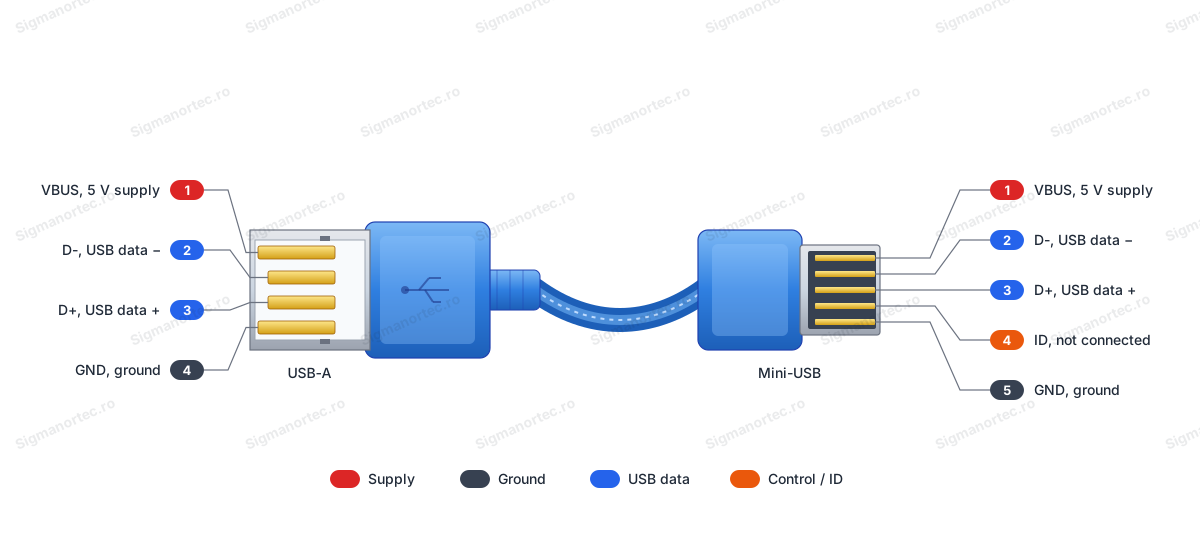
| Connector | Pin | Function |
|---|---|---|
| USB-A male | 1 | VBUS, 5 V power supply, connected to pin 1 of the Mini-USB plug |
| USB-A male | 2 | D-, negative data line, connected to pin 2 of the Mini-USB plug |
| USB-A male | 3 | D+, positive data line, connected to pin 3 of the Mini-USB plug |
| USB-A male | 4 | GND, ground, connected to pin 5 of the Mini-USB plug |
| Mini-USB male | 1 | VBUS, 5 V power supply |
| Mini-USB male | 2 | D-, negative data line |
| Mini-USB male | 3 | D+, positive data line |
| Mini-USB male | 4 | ID, not used in this cable |
| Mini-USB male | 5 | GND, ground |
Usage:
Insert the Mini-USB plug into the device connector until it clicks into place. The plug fits in only one orientation. Do not force it. If it does not go in, rotate it and try again.
Insert the USB-A plug into a USB port of the computer, a powered hub or a 5 V charger.
Prefer a direct computer port instead of an unpowered hub, especially for devices with higher consumption.
Before connecting, check that the device has a Mini-USB connector, because Micro-USB has a different shape and is not compatible with this plug.
If the device has a power LED, it should light up after connection, which shows that the 5 V supply reaches the device.
For data transfer or serial communication, wait for the operating system to detect the device and install its driver if needed.
Do not apply any voltage to the cable other than the 5 V supplied by the USB port.
Keep the device consumption below the limit of the port used. A computer USB port normally provides up to 500 mA.
Disconnect the plugs by holding their plastic bodies, without pulling on the cable, and avoid sharply bending the cable near the plugs.
- Supply voltage
- 5 V DC (de la portul USB)
- Colour
- Transparent blue
- Length
- 30 cm
- Connector type
- USB-A male, Mini-USB male, 5 pins
Produs destinat utilizarii in proiecte electronice, automatizari, prototipare, educatie si cercetare.
Produsul trebuie utilizat numai conform specificatiilor tehnice mentionate in descriere si/sau in documentatia produsului.
Avertismente generale de siguranta:
Nu utilizati produsul la tensiuni, curenti sau temperaturi peste valorile specificate.
Montajul si conectarea trebuie realizate de persoane cu cunostinte tehnice minime in domeniul electric/electronic.
Evitati scurtcircuitele, inversarea polaritatii si conectarea gresita a alimentarii.
Nu lasati produsul alimentat nesupravegheat in timpul testelor.
Produsul nu este jucarie si nu este destinat copiilor.
Pentru modulele electronice, se recomanda utilizarea in carcase, panouri sau montaje protejate, dupa caz.
Identificare produs:
Denumirea produsului, codul/SKU-ul si caracteristicile tehnice sunt mentionate in pagina produsului si/sau pe eticheta ambalajului.
Producator / Importator / Distribuitor:
Sigmanortec S.R.L.
Calea Bucuresti nr. 9, Targu Jiu, Gorj, Romania
E-mail: [email protected]
Website: www.sigmanortec.ro
Persoana responsabila in UE:
Sigmanortec S.R.L.
Calea Bucuresti nr. 9, Targu Jiu, Gorj, Romania
E-mail: [email protected]
Documentatie si siguranta:
Pentru informatii suplimentare, fise tehnice, declaratii de conformitate sau instructiuni, ne puteti contacta la [email protected].
Reviews (2) - Review moderation

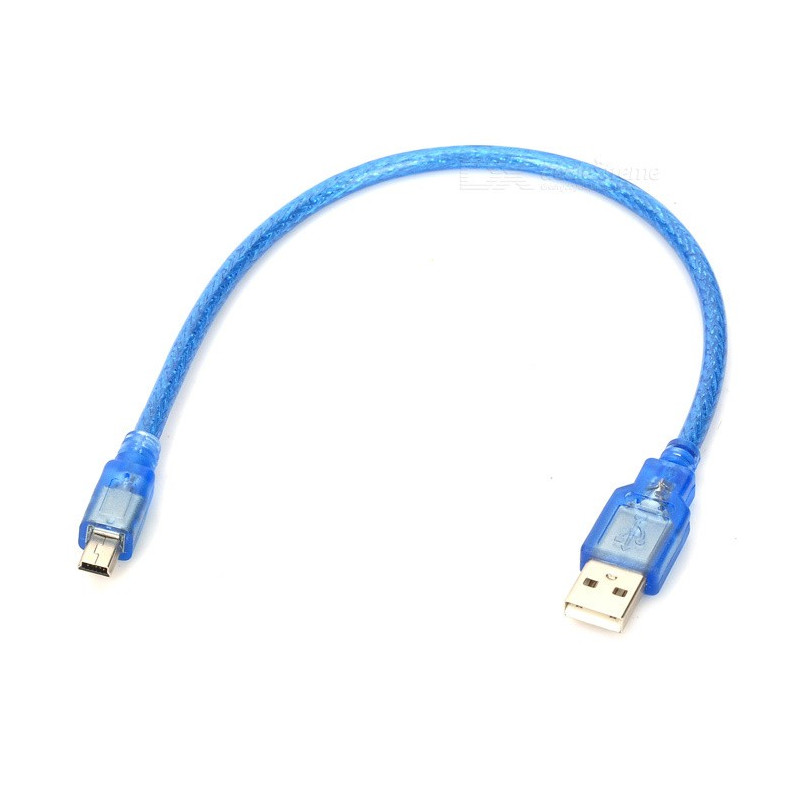
The 30 cm MiniUSB cable has a male USB-A connector at one end, for the computer, charger or hub, and a male Mini-USB connector at the other end, for the device to be connected. It is used for data transfer, for serial communication with the computer, for programming devices with a Mini-USB port and for powering them at 5 V.
The tutorial shows how to put the cable into operation with a computer and a device with a Mini-USB connector. The cable does not need a development board, a program or its own power supply.
How it works:
The cable carries both power and data on the same wires. The power is 5 V and reaches the device from the USB port on the VBUS and GND lines. Data travels on the differential pair D+ and D-, over which the computer and the device exchange messages.
The power wires have a small resistance, and a voltage drop appears across them, calculated with the formula U = I x R, where I is the current drawn by the device and R is the resistance of the power wires (VBUS and GND together). As a calculation example, if the total resistance were 0.2 ohms and the device drew 300 mA, the drop would be U = 0.3 A x 0.2 ohms = 0.06 V, so the device would receive approximately 4.94 V.
The resistance increases in proportion to the length, so a 30 cm cable loses less voltage than a long one, at the same current and with the same wires. The value of 0.2 ohms is only an assumption for the example.
Connecting:
The cable has different connectors at each end, and each one fits into its own socket in only one orientation. The data signal level is the standard USB level, and the power is 5 V. No level converter, resistors or separate power supply are needed for a device with low consumption.
| Product pin | Connects to | Role |
|---|---|---|
| USB-A connector, pin 1 | Mini-USB connector, pin 1 | VBUS, 5 V power supply |
| USB-A connector, pin 2 | Mini-USB connector, pin 2 | D-, negative data line |
| USB-A connector, pin 3 | Mini-USB connector, pin 3 | D+, positive data line |
| USB-A connector, pin 4 | Mini-USB connector, pin 5 | GND, ground |
| Mini-USB connector, pin 4 | Not used | ID, used only for the OTG function of devices |
Usage example:
The example shows connecting a device with a Mini-USB connector to a computer for data transfer. Insert the Mini-USB connector into the device's socket until you feel it click into place.
Insert the USB-A connector into a port of the computer. Prefer a direct port on the computer, not an unpowered hub.
If the device has a power LED, it should light up, which confirms that VBUS reaches it.
Wait for the operating system to announce a new device and, if necessary, install the driver indicated by the device manufacturer. The device then appears in the computer's list of devices or serial ports, which shows that the D+ and D- lines of the cable are working.
Finally, close the application that uses the device and remove the connectors by holding their plastic bodies.
Common problems:
The device is not detected by the computer. The most common cause is a missing driver for the device's USB circuit, or a connector that is not fully inserted. Install the right driver, reinsert the connectors all the way and try another USB port on the computer.
The device does not power on and the power LED stays off. The cause may be an unpowered USB port or an overloaded hub. Connect the cable directly to the computer or to a 5 V USB charger and check whether the LED lights up.
The data transfer stops with an error or the device resets itself. The cause may be a poor contact at the connector or an excessive consumption, which lowers the supply voltage. Check the connection, temporarily disconnect the consuming modules and try again.
The device periodically appears and disappears from the list of devices. The cause is usually a loose connector or a cable pulled sideways. Secure the device and the cable so that they are not stressed, then reconnect.
The Mini-USB connector fits with difficulty or does not stay in place. The cause may be a different connector, for example Micro-USB, which has another shape. Check the connector type of the device before using the cable.
Limitations and tips:
The cable is 30 cm long, suitable for setups on a desk, where the device sits close to the computer. For longer distances use a longer cable, but keep in mind that each increase in length brings a larger voltage drop at the same current.
A computer USB port usually provides up to 500 mA, so the consumption of the device together with the attached modules must stay below this value. For higher consumption, power the modules separately and use the cable only for data.
Do not pull the cable to remove the connector and do not bend the cable sharply near the connectors.
With this cable you can transfer data, use serial communication with the computer and power small setups directly from a 5 V USB charger.