
Product images are for informational purposes only and may vary slightly depending on the batch and supplier. Product specifications and prices may be subject to change without notice. We do our best to provide accurate and complete product specifications, but they may not be completely accurate. If you encounter any such situation, please let us know.
The product is intended for specialists and requires qualified and authorized personnel. The product does not include assembly/use instructions . Putting the product into operation by unqualified persons leads to the loss of the warranty according to the Terms and Conditions on the site.
The specified technical parameters (current, power, etc.) represent maximum allowable values under ideal operating conditions. For safe use and optimal lifespan, it is recommended to operate the product continuously at no more than 50% of the specified maximum values.
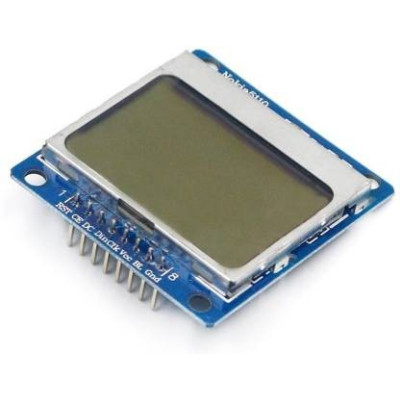
LCD display Nokia 5110, 1.6 inch, Blue, 3.3V
84x48 LCD screen with PCD8544 driver, ideal for Arduino projects and other development boards, displays clear text and images on a blue background. Communicates via SPI and operates at 3.3V logic with low consumption, the 1.6 inch size makes it suitable for compact interfaces and portable instrumentation.
Buying this product earns you Ft138.36 in loyalty points.

International fast shipping within EU. Free Shipping for orders above 100 EUR in most EU countries.

We ship from our stock within 24H

You earn points with every order, worth 5%.
LCD display, Nokia 5110, with an 84x48 pixel resolution, compatible with Arduino and other development boards.
It operates on a 3.3V logic level and is capable of displaying both alphanumeric characters and images. To use it together with a 5V development board, a logic level converter to 3.3VDC. is recommended.
NOTE: The power supply voltage on VCC is 3.3VDC. DO NOT power it with 5V!
These displays come from old Nokia 5110 stock, they are not newly manufactured, which is why they may show scratches that do not affect the functionality of the displays.
Specifications:
Supply voltage: 3.3VDC
Current consumption: 6mA
Logic voltage: 3.3VDC
Driver IC: PCD8544
Interface: SPI
Resolution: 84 x 48 pixels
Dimensions: 1.6inch
Color: Blue
Number of pins: 8
Pins:
CE, DC, DIN, CLK, VCC, BL, GND
Usage:
Install from Arduino IDE → Library Manager:
Adafruit PCD8544 Nokia 5110 LCD library
Adafruit GFX Library (installed automatically together with the one above)
WARNING: The logic voltage is 3.3V. Direct connection to the Arduino's 5V digital pins may damage the display over time. For long-term projects, a level shifter or voltage divider resistors are recommended on the CE, DC, DIN, CLK lines.
WARNING: The BL (backlight) pin requires a 330Ω resistor in series. Direct connection without a resistor can destroy the backlight within a few hours of operation.
WARNING: The RST pin must be connected to an Arduino digital pin. If left unconnected, the display will show nothing.
Arduino Nano connection:
| Nokia 5110 | Arduino Nano | Notes |
|---|---|---|
| VCC | 3.3V | NOT 5V |
| GND | GND | |
| CE | D10 | Chip Select |
| DC | D9 | Data/Command |
| DIN | D11 | MOSI |
| CLK | D13 | SCK |
| RST | D8 | |
| BL | 3.3V | Through 330Ω resistor |
Test code available in the Test sheet.
Check the pin definition in the code: Adafruit_PCD8544 display = Adafruit_PCD8544(13, 11, 9, 10, 8);
Common issues:
Screen lit but blank: most often RST is not connected. Connect RST to D8. If RST is connected correctly, the issue may be too low contrast — increase the value in setContrast() up to 80-85.
Faded or hard-to-read characters: the contrast is too low. Increase the value in setContrast() gradually. Nokia displays from old stock may require different values between 60 and 85.
Completely black screen: the contrast is too high. Decrease the value in setContrast().
Completely off screen, no backlight: check the VCC (3.3V) and GND connections. If the backlight worked before and suddenly went out, the 330Ω resistor on the BL pin is missing or the backlight has burned out (connecting BL directly without a resistor destroys the backlight within a few hours).
Nothing displayed, backlight functional, RST connected: check the SPI connections: DIN to D11, CLK to D13, CE to D10, DC to D9. A single wrong wire or a missing one prevents any display. Check the pin definition: Adafruit_PCD8544 display = Adafruit_PCD8544(13, 11, 9, 10, 8);
- Input Voltage
- 3.3 V
- Input Voltage Type
- “DC” in Romanian can mean **“de ce”**, which translates to **“why”** in English.
Produs destinat utilizarii in proiecte electronice, automatizari, prototipare, educatie si cercetare.
Produsul trebuie utilizat numai conform specificatiilor tehnice mentionate in descriere si/sau in documentatia produsului.
Avertismente generale de siguranta:
Nu utilizati produsul la tensiuni, curenti sau temperaturi peste valorile specificate.
Montajul si conectarea trebuie realizate de persoane cu cunostinte tehnice minime in domeniul electric/electronic.
Evitati scurtcircuitele, inversarea polaritatii si conectarea gresita a alimentarii.
Nu lasati produsul alimentat nesupravegheat in timpul testelor.
Produsul nu este jucarie si nu este destinat copiilor.
Pentru modulele electronice, se recomanda utilizarea in carcase, panouri sau montaje protejate, dupa caz.
Identificare produs:
Denumirea produsului, codul/SKU-ul si caracteristicile tehnice sunt mentionate in pagina produsului si/sau pe eticheta ambalajului.
Producator / Importator / Distribuitor:
Sigmanortec S.R.L.
Calea Bucuresti nr. 9, Targu Jiu, Gorj, Romania
E-mail: [email protected]
Website: www.sigmanortec.ro
Persoana responsabila in UE:
Sigmanortec S.R.L.
Calea Bucuresti nr. 9, Targu Jiu, Gorj, Romania
E-mail: [email protected]
Documentatie si siguranta:
Pentru informatii suplimentare, fise tehnice, declaratii de conformitate sau instructiuni, ne puteti contacta la [email protected].
Reviews (6) - Review moderation

Display-ul merge foarte bine pe 5 V. Pe 3.3 nici macar nu afiseaza bine caracterele, este foarte sters. Scrie si pe marginea de sus Nokia5110 3v-5v ...
Foarte multumit
Excelent
Pentru reglarea intensitatii luminoase, conectezi un potentiometru (1k) pe alimentarea (3.5v), cu cursorul pe pinul LIGHT, printr-o rezistenta de 330ohm. FARA REZISTENTA IL DISTRUGI dupa 5-6 ore de functionare !!! Vezi aici : https://create.arduino.cc/projecthub/muhammad-aqib/interfacing-nokia-5110-lcd-with-arduino-7bfcdd Am scris asta, pentru ca am vazut multi care au distrus LCD-ul !
Componente de calitate. OK
/*********************************************************************
This is an example sketch for our Monochrome Nokia 5110 LCD Displays
Pick one up today in the adafruit shop!
------> http://www.adafruit.com/products/338
These displays use SPI to communicate, 4 or 5 pins are required to
interface
Adafruit invests time and resources providing this open source code,
please support Adafruit and open-source hardware by purchasing
products from Adafruit!
Written by Limor Fried/Ladyada for Adafruit Industries.
BSD license, check license.txt for more information
All text above, and the splash screen must be included in any redistribution
*********************************************************************/
#include <SPI.h>
#include <Adafruit_GFX.h>
#include <Adafruit_PCD8544.h>
// Software SPI (slower updates, more flexible pin options):
// pin 7 - Serial clock out (SCLK)
// pin 6 - Serial data out (DIN)
// pin 5 - Data/Command select (D/C)
// pin 4 - LCD chip select (CS)
// pin 3 - LCD reset (RST)
Adafruit_PCD8544 display = Adafruit_PCD8544(13, 11, 9, 10, 8);
// Hardware SPI (faster, but must use certain hardware pins):
// SCK is LCD serial clock (SCLK) - this is pin 13 on Arduino Uno
// MOSI is LCD DIN - this is pin 11 on an Arduino Uno
// pin 5 - Data/Command select (D/C)
// pin 4 - LCD chip select (CS)
// pin 3 - LCD reset (RST)
// Adafruit_PCD8544 display = Adafruit_PCD8544(5, 4, 3);
// Note with hardware SPI MISO and SS pins aren't used but will still be read
// and written to during SPI transfer. Be careful sharing these pins!
#define NUMFLAKES 10
#define XPOS 0
#define YPOS 1
#define DELTAY 2
#define LOGO16_GLCD_HEIGHT 16
#define LOGO16_GLCD_WIDTH 16
static const unsigned char PROGMEM logo16_glcd_bmp[] =
{ 0B00000000, 0B11000000,
0B00000001, 0B11000000,
0B00000001, 0B11000000,
0B00000011, 0B11100000,
0B11110011, 0B11100000,
0B11111110, 0B11111000,
0B01111110, 0B11111111,
0B00110011, 0B10011111,
0B00011111, 0B11111100,
0B00001101, 0B01110000,
0B00011011, 0B10100000,
0B00111111, 0B11100000,
0B00111111, 0B11110000,
0B01111100, 0B11110000,
0B01110000, 0B01110000,
0B00000000, 0B00110000 };
void testdrawbitmap(const uint8_t *bitmap, uint8_t w, uint8_t h) {
uint8_t icons[NUMFLAKES][3];
randomSeed(666); // whatever seed
// initialize
for (uint8_t f=0; f< NUMFLAKES; f++) {
icons[f][XPOS] = random(display.width());
icons[f][YPOS] = 0;
icons[f][DELTAY] = random(5) + 1;
Serial.print("x: ");
Serial.print(icons[f][XPOS], DEC);
Serial.print(" y: ");
Serial.print(icons[f][YPOS], DEC);
Serial.print(" dy: ");
Serial.println(icons[f][DELTAY], DEC);
}
while (1) {
// draw each icon
for (uint8_t f=0; f< NUMFLAKES; f++) {
display.drawBitmap(icons[f][XPOS], icons[f][YPOS], bitmap, w, h, BLACK);
}
display.display();
delay(200);
while(Serial.available()) {
switch (Serial.read()) {
case 'w':display.setContrast(display.getContrast() + 1);
break;
case 's':if(display.getContrast()) display.setContrast(display.getContrast() - 1);
break;
case 'e':display.setBias(display.getBias() + 1);
break;
case 'd':if(display.getBias()) display.setBias(display.getBias() - 1);
break;
case 'R':display.setReinitInterval(10);
break;
case 'r':display.initDisplay();
display.setReinitInterval(0);
break;
}
}
Serial.print("contrast (w/s): 0x");
Serial.print(display.getContrast(), HEX);
Serial.print(" bias (e/d): 0x");
Serial.print(display.getBias(), HEX);
Serial.print(" reinitialize display (r/R): 0x");
Serial.print(display.getReinitInterval(), HEX);
Serial.print(" \r");
// then erase it + move it
for (uint8_t f=0; f< NUMFLAKES; f++) {
display.drawBitmap(icons[f][XPOS], icons[f][YPOS], logo16_glcd_bmp, w, h, WHITE);
// move it
icons[f][YPOS] += icons[f][DELTAY];
// if its gone, reinit
if (icons[f][YPOS] > display.height()) {
icons[f][XPOS] = random(display.width());
icons[f][YPOS] = 0;
icons[f][DELTAY] = random(5) + 1;
}
}
}
}
void testdrawchar(void) {
display.setTextSize(1);
display.setTextColor(BLACK);
display.setCursor(0,0);
for (uint8_t i=0; i < 168; i++) {
if (i == '\n') continue;
display.write(i);
//if ((i > 0) && (i % 14 == 0))
//display.println();
}
display.display();
}
void testdrawcircle(void) {
for (int16_t i=0; i<display.height(); i+=2) {
display.drawCircle(display.width()/2, display.height()/2, i, BLACK);
display.display();
}
}
void testfillrect(void) {
uint8_t color = 1;
for (int16_t i=0; i<display.height()/2; i+=3) {
// alternate colors
display.fillRect(i, i, display.width()-i*2, display.height()-i*2, color%2);
display.display();
color++;
}
}
void testdrawtriangle(void) {
for (int16_t i=0; i<min(display.width(),display.height())/2; i+=5) {
display.drawTriangle(display.width()/2, display.height()/2-i,
display.width()/2-i, display.height()/2+i,
display.width()/2+i, display.height()/2+i, BLACK);
display.display();
}
}
void testfilltriangle(void) {
uint8_t color = BLACK;
for (int16_t i=min(display.width(),display.height())/2; i>0; i-=5) {
display.fillTriangle(display.width()/2, display.height()/2-i,
display.width()/2-i, display.height()/2+i,
display.width()/2+i, display.height()/2+i, color);
if (color == WHITE) color = BLACK;
else color = WHITE;
display.display();
}
}
void testdrawroundrect(void) {
for (int16_t i=0; i<display.height()/2-2; i+=2) {
display.drawRoundRect(i, i, display.width()-2*i, display.height()-2*i, display.height()/4, BLACK);
display.display();
}
}
void testfillroundrect(void) {
uint8_t color = BLACK;
for (int16_t i=0; i<display.height()/2-2; i+=2) {
display.fillRoundRect(i, i, display.width()-2*i, display.height()-2*i, display.height()/4, color);
if (color == WHITE) color = BLACK;
else color = WHITE;
display.display();
}
}
void testdrawrect(void) {
for (int16_t i=0; i<display.height()/2; i+=2) {
display.drawRect(i, i, display.width()-2*i, display.height()-2*i, BLACK);
display.display();
}
}
void testdrawline() {
for (int16_t i=0; i<display.width(); i+=4) {
display.drawLine(0, 0, i, display.height()-1, BLACK);
display.display();
}
for (int16_t i=0; i<display.height(); i+=4) {
display.drawLine(0, 0, display.width()-1, i, BLACK);
display.display();
}
delay(250);
display.clearDisplay();
for (int16_t i=0; i<display.width(); i+=4) {
display.drawLine(0, display.height()-1, i, 0, BLACK);
display.display();
}
for (int8_t i=display.height()-1; i>=0; i-=4) {
display.drawLine(0, display.height()-1, display.width()-1, i, BLACK);
display.display();
}
delay(250);
display.clearDisplay();
for (int16_t i=display.width()-1; i>=0; i-=4) {
display.drawLine(display.width()-1, display.height()-1, i, 0, BLACK);
display.display();
}
for (int16_t i=display.height()-1; i>=0; i-=4) {
display.drawLine(display.width()-1, display.height()-1, 0, i, BLACK);
display.display();
}
delay(250);
display.clearDisplay();
for (int16_t i=0; i<display.height(); i+=4) {
display.drawLine(display.width()-1, 0, 0, i, BLACK);
display.display();
}
for (int16_t i=0; i<display.width(); i+=4) {
display.drawLine(display.width()-1, 0, i, display.height()-1, BLACK);
display.display();
}
delay(250);
}
void setup() {
Serial.begin(9600);
Serial.println("PCD test");
display.begin();
// init done
// you can change the contrast around to adapt the display
// for the best viewing!
display.setContrast(75);
display.display(); // show splashscreen
delay(2000);
display.clearDisplay(); // clears the screen and buffer
// draw a single pixel
display.drawPixel(10, 10, BLACK);
display.display();
delay(2000);
display.clearDisplay();
// draw many lines
testdrawline();
display.display();
delay(2000);
display.clearDisplay();
// draw rectangles
testdrawrect();
display.display();
delay(2000);
display.clearDisplay();
// draw multiple rectangles
testfillrect();
display.display();
delay(2000);
display.clearDisplay();
// draw mulitple circles
testdrawcircle();
display.display();
delay(2000);
display.clearDisplay();
// draw a circle, 10 pixel radius
display.fillCircle(display.width()/2, display.height()/2, 10, BLACK);
display.display();
delay(2000);
display.clearDisplay();
testdrawroundrect();
delay(2000);
display.clearDisplay();
testfillroundrect();
delay(2000);
display.clearDisplay();
testdrawtriangle();
delay(2000);
display.clearDisplay();
testfilltriangle();
delay(2000);
display.clearDisplay();
// draw the first ~12 characters in the font
testdrawchar();
display.display();
delay(2000);
display.clearDisplay();
// text display tests
display.setTextSize(1);
display.setTextColor(BLACK);
display.setCursor(0,0);
display.println("Hello, world!");
display.setTextColor(WHITE, BLACK); // 'inverted' text
display.println(3.141592);
display.setTextSize(2);
display.setTextColor(BLACK);
display.print("0x"); display.println(0xDEADBEEF, HEX);
display.display();
delay(2000);
// rotation example
display.clearDisplay();
display.setRotation(1); // rotate 90 degrees counter clockwise, can also use values of 2 and 3 to go further.
display.setTextSize(1);
display.setTextColor(BLACK);
display.setCursor(0,0);
display.println("Rotation");
display.setTextSize(2);
display.println("Example!");
display.display();
delay(2000);
// revert back to no rotation
display.setRotation(0);
// miniature bitmap display
display.clearDisplay();
display.drawBitmap(30, 16, logo16_glcd_bmp, 16, 16, 1);
display.display();
// invert the display
display.invertDisplay(true);
delay(1000);
display.invertDisplay(false);
delay(1000);
// draw a bitmap icon and 'animate' movement
testdrawbitmap(logo16_glcd_bmp, LOGO16_GLCD_WIDTH, LOGO16_GLCD_HEIGHT);
}
void loop() {
}