
Produktbilder dienen ausschließlich zu Informationszwecken und können je nach Charge und Lieferant geringfügige Unterschiede aufweisen. Produktspezifikationen und Preise können ohne vorherige Ankündigung geändert werden. Wir tun unser Bestes, um der Produktseite möglichst genaue und richtige Spezifikationen hinzuzufügen, es ist jedoch möglich, dass diese nicht ganz korrekt sind. Sollten Sie einen solchen Fall feststellen, melden Sie ihn uns bitte.
Das Produkt ist für Fachleute bestimmt und erfordert qualifiziertes und autorisiertes Personal. Dem Produkt liegt keine Montage-/Gebrauchsanleitung bei . Die Inbetriebnahme des Produktes durch nicht qualifizierte Personen führt zum Verlust der Garantie gemäß den AGB auf der Seite.
Die angegebenen technischen Spezifikationen (Strom, Leistung usw.) stellen maximale zulässige Werte unter idealen Betriebsbedingungen dar. Für einen sicheren Betrieb und eine optimale Lebensdauer wird empfohlen, das Produkt im Dauerbetrieb mit höchstens 50 % der angegebenen Maximalwerte zu verwenden.
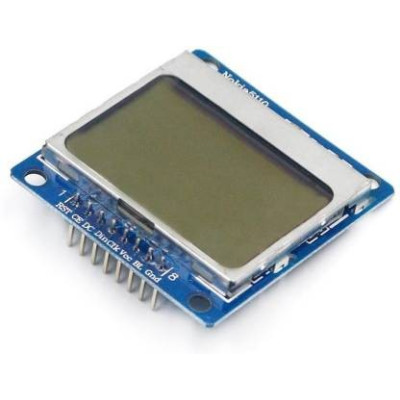
Nokia 5110 LCD-Display, 1,6 Zoll, blau, 3,3 V
Das 84x48-LCD-Display mit PCD8544-Treiber eignet sich ideal für Arduino-Projekte und andere Entwicklungsboards und zeigt Text und Bilder klar auf blauem Hintergrund an. Es kommuniziert über SPI, arbeitet mit 3,3-V-Logik und zeichnet sich durch geringen Stromverbrauch aus. Dank seiner Größe von 1,6 Zoll ist es für kompakte Schnittstellen und tragbare Messgeräte geeignet.
Mit dem Kauf dieses Produkts erhalten Sie 138,36 Ft an Treuepunkten.

International fast shipping within EU. Free Shipping for orders above 100 EUR in most EU countries.

We ship from our stock within 24H

Sie erhalten bei jeder Bestellung Punkte im Wert von 5 %.
LCD-Display vom Typ Nokia 5110 mit einer Auflösung von 84x48 Pixeln, kompatibel mit Arduino und anderen Entwicklungsboards.
Es arbeitet mit einer Logikspannung von 3,3 V und kann sowohl alphanumerische Zeichen als auch Bilder anzeigen. Um es zusammen mit einem 5-V-Entwicklungsboard zu verwenden, wird ein Pegelwandler auf 3.3VDC. empfohlen.
HINWEIS: Die Versorgungsspannung an VCC beträgt 3.3VDC. NICHT mit 5 V versorgen!
Diese Displays stammen aus alten Nokia-5110-Beständen, sie sind nicht neu gefertigt. Daher können sie Kratzer aufweisen, die die Funktion der Displays nicht beeinträchtigen.
Spezifikationen:
Versorgungsspannung: 3.3VDC
Stromverbrauch: 6mA
Logikspannung: 3.3VDC
Treiber-IC: PCD8544
Schnittstelle: SPI
Auflösung: 84 x 48 Pixel
Abmessungen: 1.6inch
Farbe: Blau
Anzahl der Pins: 8
Pins:
CE, DC, DIN, CLK, VCC, BL, GND
Verwendung:
Im Arduino IDE → Library Manager installieren:
Adafruit PCD8544 Nokia 5110 LCD library
Adafruit GFX Library (wird automatisch mit der oben genannten installiert)
ACHTUNG: Die Logikspannung beträgt 3.3V. Der direkte Anschluss an die 5-V-Digitalpins des Arduino kann das Display langfristig beschädigen. Für dauerhafte Projekte wird ein Level-Shifter oder Spannungsteiler an den Leitungen CE, DC, DIN, CLK empfohlen.
ACHTUNG: Der Pin BL (Backlight) benötigt unbedingt einen 330Ω-Widerstand in Serie. Ein direkter Anschluss ohne Widerstand kann die Hintergrundbeleuchtung innerhalb weniger Betriebsstunden zerstören.
ACHTUNG: Der Pin RST muss unbedingt mit einem digitalen Pin des Arduino verbunden werden. Wenn er nicht angeschlossen bleibt, zeigt das Display nichts an.
Arduino-Nano-Verbindung:
| Nokia 5110 | Arduino Nano | Hinweise |
|---|---|---|
| VCC | 3.3V | NICHT 5V |
| GND | GND | |
| CE | D10 | Chip Select |
| DC | D9 | Data/Command |
| DIN | D11 | MOSI |
| CLK | D13 | SCK |
| RST | D8 | |
| BL | 3.3V | Über 330Ω-Widerstand |
Testcode ist im Test-Datenblatt verfügbar.
Prüfen Sie die Pin-Definition im Code: Adafruit_PCD8544 display = Adafruit_PCD8544(13, 11, 9, 10, 8);
Häufige Probleme:
Bildschirm eingeschaltet, aber leer: Am häufigsten ist RST nicht angeschlossen. Verbinden Sie RST mit D8. Wenn RST korrekt verbunden ist, kann das Problem ein zu niedriger Kontrast sein — erhöhen Sie den Wert in setContrast() bis 80-85.
Ausgefranste oder schwer lesbare Zeichen: Der Kontrast ist zu niedrig. Erhöhen Sie den Wert in setContrast() schrittweise. Alte Nokia-Displays können unterschiedliche Werte zwischen 60 und 85 benötigen.
Vollständig schwarzer Bildschirm: Der Kontrast ist zu hoch. Verringern Sie den Wert in setContrast().
Bildschirm komplett aus, ohne Backlight: Überprüfen Sie die Verbindungen von VCC (3.3V) und GND. Wenn das Backlight zuvor funktioniert hat und plötzlich ausgegangen ist, fehlt der 330Ω-Widerstand am BL-Pin oder die Hintergrundbeleuchtung ist durchgebrannt (ein direkter Anschluss von BL ohne Widerstand zerstört die Beleuchtung innerhalb weniger Stunden).
Nichts angezeigt, Backlight funktioniert, RST verbunden: Überprüfen Sie die SPI-Verbindungen: DIN an D11, CLK an D13, CE an D10, DC an D9. Schon ein falsch angeschlossenes oder fehlendes Kabel verhindert jede Anzeige. Prüfen Sie die Pin-Definition: Adafruit_PCD8544 display = Adafruit_PCD8544(13, 11, 9, 10, 8);
- Eingangsspannung
- 3.3 V
- Eingangsspannungstyp
- DC → **DC**
Produs destinat utilizarii in proiecte electronice, automatizari, prototipare, educatie si cercetare.
Produsul trebuie utilizat numai conform specificatiilor tehnice mentionate in descriere si/sau in documentatia produsului.
Avertismente generale de siguranta:
Nu utilizati produsul la tensiuni, curenti sau temperaturi peste valorile specificate.
Montajul si conectarea trebuie realizate de persoane cu cunostinte tehnice minime in domeniul electric/electronic.
Evitati scurtcircuitele, inversarea polaritatii si conectarea gresita a alimentarii.
Nu lasati produsul alimentat nesupravegheat in timpul testelor.
Produsul nu este jucarie si nu este destinat copiilor.
Pentru modulele electronice, se recomanda utilizarea in carcase, panouri sau montaje protejate, dupa caz.
Identificare produs:
Denumirea produsului, codul/SKU-ul si caracteristicile tehnice sunt mentionate in pagina produsului si/sau pe eticheta ambalajului.
Producator / Importator / Distribuitor:
Sigmanortec S.R.L.
Calea Bucuresti nr. 9, Targu Jiu, Gorj, Romania
E-mail: [email protected]
Website: www.sigmanortec.ro
Persoana responsabila in UE:
Sigmanortec S.R.L.
Calea Bucuresti nr. 9, Targu Jiu, Gorj, Romania
E-mail: [email protected]
Documentatie si siguranta:
Pentru informatii suplimentare, fise tehnice, declaratii de conformitate sau instructiuni, ne puteti contacta la [email protected].
Bewertungen (6) - Überprüfung der Moderation

Display-ul merge foarte bine pe 5 V. Pe 3.3 nici macar nu afiseaza bine caracterele, este foarte sters. Scrie si pe marginea de sus Nokia5110 3v-5v ...
Foarte multumit
Excelent
Pentru reglarea intensitatii luminoase, conectezi un potentiometru (1k) pe alimentarea (3.5v), cu cursorul pe pinul LIGHT, printr-o rezistenta de 330ohm. FARA REZISTENTA IL DISTRUGI dupa 5-6 ore de functionare !!! Vezi aici : https://create.arduino.cc/projecthub/muhammad-aqib/interfacing-nokia-5110-lcd-with-arduino-7bfcdd Am scris asta, pentru ca am vazut multi care au distrus LCD-ul !
Componente de calitate. OK
/*********************************************************************
This is an example sketch for our Monochrome Nokia 5110 LCD Displays
Pick one up today in the adafruit shop!
------> http://www.adafruit.com/products/338
These displays use SPI to communicate, 4 or 5 pins are required to
interface
Adafruit invests time and resources providing this open source code,
please support Adafruit and open-source hardware by purchasing
products from Adafruit!
Written by Limor Fried/Ladyada for Adafruit Industries.
BSD license, check license.txt for more information
All text above, and the splash screen must be included in any redistribution
*********************************************************************/
#include <SPI.h>
#include <Adafruit_GFX.h>
#include <Adafruit_PCD8544.h>
// Software SPI (slower updates, more flexible pin options):
// pin 7 - Serial clock out (SCLK)
// pin 6 - Serial data out (DIN)
// pin 5 - Data/Command select (D/C)
// pin 4 - LCD chip select (CS)
// pin 3 - LCD reset (RST)
Adafruit_PCD8544 display = Adafruit_PCD8544(13, 11, 9, 10, 8);
// Hardware SPI (faster, but must use certain hardware pins):
// SCK is LCD serial clock (SCLK) - this is pin 13 on Arduino Uno
// MOSI is LCD DIN - this is pin 11 on an Arduino Uno
// pin 5 - Data/Command select (D/C)
// pin 4 - LCD chip select (CS)
// pin 3 - LCD reset (RST)
// Adafruit_PCD8544 display = Adafruit_PCD8544(5, 4, 3);
// Note with hardware SPI MISO and SS pins aren't used but will still be read
// and written to during SPI transfer. Be careful sharing these pins!
#define NUMFLAKES 10
#define XPOS 0
#define YPOS 1
#define DELTAY 2
#define LOGO16_GLCD_HEIGHT 16
#define LOGO16_GLCD_WIDTH 16
static const unsigned char PROGMEM logo16_glcd_bmp[] =
{ 0B00000000, 0B11000000,
0B00000001, 0B11000000,
0B00000001, 0B11000000,
0B00000011, 0B11100000,
0B11110011, 0B11100000,
0B11111110, 0B11111000,
0B01111110, 0B11111111,
0B00110011, 0B10011111,
0B00011111, 0B11111100,
0B00001101, 0B01110000,
0B00011011, 0B10100000,
0B00111111, 0B11100000,
0B00111111, 0B11110000,
0B01111100, 0B11110000,
0B01110000, 0B01110000,
0B00000000, 0B00110000 };
void testdrawbitmap(const uint8_t *bitmap, uint8_t w, uint8_t h) {
uint8_t icons[NUMFLAKES][3];
randomSeed(666); // whatever seed
// initialize
for (uint8_t f=0; f< NUMFLAKES; f++) {
icons[f][XPOS] = random(display.width());
icons[f][YPOS] = 0;
icons[f][DELTAY] = random(5) + 1;
Serial.print("x: ");
Serial.print(icons[f][XPOS], DEC);
Serial.print(" y: ");
Serial.print(icons[f][YPOS], DEC);
Serial.print(" dy: ");
Serial.println(icons[f][DELTAY], DEC);
}
while (1) {
// draw each icon
for (uint8_t f=0; f< NUMFLAKES; f++) {
display.drawBitmap(icons[f][XPOS], icons[f][YPOS], bitmap, w, h, BLACK);
}
display.display();
delay(200);
while(Serial.available()) {
switch (Serial.read()) {
case 'w':display.setContrast(display.getContrast() + 1);
break;
case 's':if(display.getContrast()) display.setContrast(display.getContrast() - 1);
break;
case 'e':display.setBias(display.getBias() + 1);
break;
case 'd':if(display.getBias()) display.setBias(display.getBias() - 1);
break;
case 'R':display.setReinitInterval(10);
break;
case 'r':display.initDisplay();
display.setReinitInterval(0);
break;
}
}
Serial.print("contrast (w/s): 0x");
Serial.print(display.getContrast(), HEX);
Serial.print(" bias (e/d): 0x");
Serial.print(display.getBias(), HEX);
Serial.print(" reinitialize display (r/R): 0x");
Serial.print(display.getReinitInterval(), HEX);
Serial.print(" \r");
// then erase it + move it
for (uint8_t f=0; f< NUMFLAKES; f++) {
display.drawBitmap(icons[f][XPOS], icons[f][YPOS], logo16_glcd_bmp, w, h, WHITE);
// move it
icons[f][YPOS] += icons[f][DELTAY];
// if its gone, reinit
if (icons[f][YPOS] > display.height()) {
icons[f][XPOS] = random(display.width());
icons[f][YPOS] = 0;
icons[f][DELTAY] = random(5) + 1;
}
}
}
}
void testdrawchar(void) {
display.setTextSize(1);
display.setTextColor(BLACK);
display.setCursor(0,0);
for (uint8_t i=0; i < 168; i++) {
if (i == '\n') continue;
display.write(i);
//if ((i > 0) && (i % 14 == 0))
//display.println();
}
display.display();
}
void testdrawcircle(void) {
for (int16_t i=0; i<display.height(); i+=2) {
display.drawCircle(display.width()/2, display.height()/2, i, BLACK);
display.display();
}
}
void testfillrect(void) {
uint8_t color = 1;
for (int16_t i=0; i<display.height()/2; i+=3) {
// alternate colors
display.fillRect(i, i, display.width()-i*2, display.height()-i*2, color%2);
display.display();
color++;
}
}
void testdrawtriangle(void) {
for (int16_t i=0; i<min(display.width(),display.height())/2; i+=5) {
display.drawTriangle(display.width()/2, display.height()/2-i,
display.width()/2-i, display.height()/2+i,
display.width()/2+i, display.height()/2+i, BLACK);
display.display();
}
}
void testfilltriangle(void) {
uint8_t color = BLACK;
for (int16_t i=min(display.width(),display.height())/2; i>0; i-=5) {
display.fillTriangle(display.width()/2, display.height()/2-i,
display.width()/2-i, display.height()/2+i,
display.width()/2+i, display.height()/2+i, color);
if (color == WHITE) color = BLACK;
else color = WHITE;
display.display();
}
}
void testdrawroundrect(void) {
for (int16_t i=0; i<display.height()/2-2; i+=2) {
display.drawRoundRect(i, i, display.width()-2*i, display.height()-2*i, display.height()/4, BLACK);
display.display();
}
}
void testfillroundrect(void) {
uint8_t color = BLACK;
for (int16_t i=0; i<display.height()/2-2; i+=2) {
display.fillRoundRect(i, i, display.width()-2*i, display.height()-2*i, display.height()/4, color);
if (color == WHITE) color = BLACK;
else color = WHITE;
display.display();
}
}
void testdrawrect(void) {
for (int16_t i=0; i<display.height()/2; i+=2) {
display.drawRect(i, i, display.width()-2*i, display.height()-2*i, BLACK);
display.display();
}
}
void testdrawline() {
for (int16_t i=0; i<display.width(); i+=4) {
display.drawLine(0, 0, i, display.height()-1, BLACK);
display.display();
}
for (int16_t i=0; i<display.height(); i+=4) {
display.drawLine(0, 0, display.width()-1, i, BLACK);
display.display();
}
delay(250);
display.clearDisplay();
for (int16_t i=0; i<display.width(); i+=4) {
display.drawLine(0, display.height()-1, i, 0, BLACK);
display.display();
}
for (int8_t i=display.height()-1; i>=0; i-=4) {
display.drawLine(0, display.height()-1, display.width()-1, i, BLACK);
display.display();
}
delay(250);
display.clearDisplay();
for (int16_t i=display.width()-1; i>=0; i-=4) {
display.drawLine(display.width()-1, display.height()-1, i, 0, BLACK);
display.display();
}
for (int16_t i=display.height()-1; i>=0; i-=4) {
display.drawLine(display.width()-1, display.height()-1, 0, i, BLACK);
display.display();
}
delay(250);
display.clearDisplay();
for (int16_t i=0; i<display.height(); i+=4) {
display.drawLine(display.width()-1, 0, 0, i, BLACK);
display.display();
}
for (int16_t i=0; i<display.width(); i+=4) {
display.drawLine(display.width()-1, 0, i, display.height()-1, BLACK);
display.display();
}
delay(250);
}
void setup() {
Serial.begin(9600);
Serial.println("PCD test");
display.begin();
// init done
// you can change the contrast around to adapt the display
// for the best viewing!
display.setContrast(75);
display.display(); // show splashscreen
delay(2000);
display.clearDisplay(); // clears the screen and buffer
// draw a single pixel
display.drawPixel(10, 10, BLACK);
display.display();
delay(2000);
display.clearDisplay();
// draw many lines
testdrawline();
display.display();
delay(2000);
display.clearDisplay();
// draw rectangles
testdrawrect();
display.display();
delay(2000);
display.clearDisplay();
// draw multiple rectangles
testfillrect();
display.display();
delay(2000);
display.clearDisplay();
// draw mulitple circles
testdrawcircle();
display.display();
delay(2000);
display.clearDisplay();
// draw a circle, 10 pixel radius
display.fillCircle(display.width()/2, display.height()/2, 10, BLACK);
display.display();
delay(2000);
display.clearDisplay();
testdrawroundrect();
delay(2000);
display.clearDisplay();
testfillroundrect();
delay(2000);
display.clearDisplay();
testdrawtriangle();
delay(2000);
display.clearDisplay();
testfilltriangle();
delay(2000);
display.clearDisplay();
// draw the first ~12 characters in the font
testdrawchar();
display.display();
delay(2000);
display.clearDisplay();
// text display tests
display.setTextSize(1);
display.setTextColor(BLACK);
display.setCursor(0,0);
display.println("Hello, world!");
display.setTextColor(WHITE, BLACK); // 'inverted' text
display.println(3.141592);
display.setTextSize(2);
display.setTextColor(BLACK);
display.print("0x"); display.println(0xDEADBEEF, HEX);
display.display();
delay(2000);
// rotation example
display.clearDisplay();
display.setRotation(1); // rotate 90 degrees counter clockwise, can also use values of 2 and 3 to go further.
display.setTextSize(1);
display.setTextColor(BLACK);
display.setCursor(0,0);
display.println("Rotation");
display.setTextSize(2);
display.println("Example!");
display.display();
delay(2000);
// revert back to no rotation
display.setRotation(0);
// miniature bitmap display
display.clearDisplay();
display.drawBitmap(30, 16, logo16_glcd_bmp, 16, 16, 1);
display.display();
// invert the display
display.invertDisplay(true);
delay(1000);
display.invertDisplay(false);
delay(1000);
// draw a bitmap icon and 'animate' movement
testdrawbitmap(logo16_glcd_bmp, LOGO16_GLCD_WIDTH, LOGO16_GLCD_HEIGHT);
}
void loop() {
}