

Product images are for informational purposes only and may vary slightly depending on the batch and supplier. Product specifications and prices may be subject to change without notice. We do our best to provide accurate and complete product specifications, but they may not be completely accurate. If you encounter any such situation, please let us know.
The product is intended for specialists and requires qualified and authorized personnel. The product does not include assembly/use instructions . Putting the product into operation by unqualified persons leads to the loss of the warranty according to the Terms and Conditions on the site.
The specified technical parameters (current, power, etc.) represent maximum allowable values under ideal operating conditions. For safe use and optimal lifespan, it is recommended to operate the product continuously at no more than 50% of the specified maximum values.
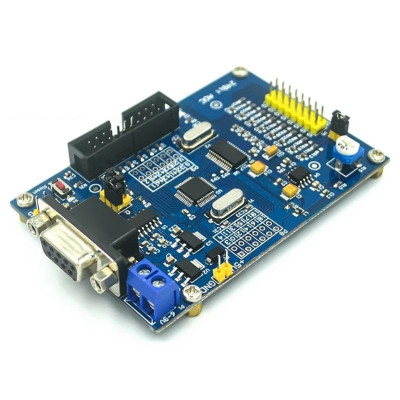
ADS1256 24-bit data acquisition module with STM32F103C8T6, 8 channels, RS232, UART
Compact solution for precise measurements of weak analog signals from sensors, load cells or Wheatstone bridges, with 24-bit ADS1256 ADC, up to 30 kSPS and PGA 1-64 for amplification, 8 channels configurable as single-ended or differential, fast data transmission via RS232 DB9 or UART to PC, PLC or development boards, integrated stable 2.5 V reference.
Shipping by Thursday 22 October
Buying this product earns you 2.03 € in loyalty points.

International fast shipping within EU. Free Shipping for orders above 100 EUR in most EU countries.

We ship from our stock within 24H

You earn points with every order, worth 5%.
The high-precision data acquisition module combines the ADS1256 analog-to-digital converter and the STM32F103C8T6 microcontroller on the same board, providing a complete solution for reading weak analog signals from sensors, load cells, thermocouples, Wheatstone bridges, or precision voltage sources. The converted data is sent to a computer or another development board via RS232 or UART, making the module suitable for laboratory applications, industrial monitoring, weighing, testing, and precision measurement projects.
The ADS1256 converter is a 24-bit delta-sigma type, with a sampling rate of up to 30 kSPS and an integrated programmable gain amplifier (PGA), adjustable from 1 to 64, which amplifies low-level signals before conversion. The converter is clocked by a dedicated 7.68 MHz crystal, and the on-board 2.5 V reference source ensures measurement stability. The board provides 8 analog input channels, marked I0 - I7, each with a nearby G ground pin, usable as single-ended inputs or configured as up to 4 differential pairs. The input filter includes 0603 footprints for attenuation resistors (not installed by default), allowing dividers to be built for measuring higher voltages.
The STM32F103C8T6 microcontroller manages the converter and external communication. Main features include the DB9 connector for RS232 implemented with the MAX3232 circuit, the UART connector (TX, RX, G) for USB-TTL adapters, the 20-pin JTAG interface compatible with J-Link V8 and J-Link V9, two GPIO pin headers for the STM32 (P8 and P9), reset button, BOOT0 and BOOT1 jumpers for selecting the boot mode, power LED, and a test potentiometer that can be connected via jumper to input I0 for quick functional checks. Power is supplied at 6 - 9 VDC through the screw terminal block or directly at 5 VDC through the +5V and GND pins.
Through the UART interface, the module is compatible with Arduino, ESP32, STM32, Raspberry Pi, and other platforms that have a serial port, and through RS232 it can be connected directly to computers, PLCs, and industrial equipment with a classic serial port.
Specifications:
ADC chip: ADS1256
Microcontroller: STM32F103C8T6
Converter type: Delta-sigma
Resolution: 24 bits
Analog input channels: 8 single-ended (I0 - I7) or 4 differential
Amplifier: Integrated PGA, gain 1 - 64
Sampling rate: up to 30 kSPS
ADC clock: 7.68 MHz crystal
Reference voltage: 2.5 V
Supply voltage: 6 - 9 VDC (P1 terminal) or 5 VDC (+5V / GND pins)
Communication interfaces: RS232 (DB9, MAX3232), UART (TX / RX / G)
Programming / debugging: 20-pin JTAG (J-Link V8 / V9), UART bootloader
Startup control: BOOT0 and BOOT1 jumpers, Reset button
Extras: Test potentiometer on I0, power LED, 0603 attenuation footprints
Dimensions: 59 x 87 mm
Layout:

1. Power terminal: Power input with voltage between 6 and 9 VDC.
2. 5 V power input
3. STM32F103C8T6 GPIO pins
4. Main microcontroller: original STM32F103C8T6.
5. 2.5 V reference source
6. Adjustable potentiometer: Allows adjustment of the output voltage, connected to AIN0 / I0 input
7. 8-channel analog inputs: The I0-I7 channels are used for analog signal acquisition. The G pin is the ground (GND) for the analog signals.
8. Input filter and attenuation resistors: Circuit intended for filtering and attenuating the input signal. In the default configuration, the attenuation resistors are not installed. The component footprint is 0603.
9. ADS1256IDB acquisition circuit: High-precision analog-to-digital converter (ADC), original component
10. Indicator LED
11. JTAG interface: Compatible with J-Link V8 and J-Link V9 programmers and debuggers
12. Mounting holes
13. STM32F103C8T6 RESET button: Button for resetting the microcontroller
14. USB-TTL interface: Connector for serial communication with the computer, providing access to the microcontroller’s TX, RX and GND signals
15. MAX3232 serial circuit: Integrated circuit for RS-232 serial communication
16. DB9 serial connector: Connector for the serial interface
17. Potentiometer connection control to I0 / AIN0: Allows connecting or disconnecting the voltage provided by the adjustable potentiometer to I0 / AIN0 input. When the connection is open, the I0 pin remains unconnected, and when connected, I0 measures the voltage set by the potentiometer.
18. BOOT0 and BOOT1 jumpers for STM32: Allow selection of the STM32 microcontroller boot mode
Pinout:
| Connector | Pin | Function |
|---|---|---|
| P1 Power terminal | + | 6–9 VDC supply |
| P1 Power terminal | − | GND |
| J2 Power header | +5V | Direct 5 VDC supply |
| J2 Power header | GND | Ground |
| P5 Analog inputs | I0 | Analog channel 0 (AIN0, can be connected to the potentiometer) |
| P5 Analog inputs | I1–I7 | Analog channels 1–7 (AIN1–AIN7) |
| P5 Analog inputs | G | Signal ground (one G pin next to each channel) |
| P4 UART (USB-TTL) | TX | STM32 data transmission (to adapter RX) |
| P4 UART (USB-TTL) | RX | STM32 data reception (to adapter TX) |
| P4 UART (USB-TTL) | G | Ground |
| J1 DB9 | − | RS232 via MAX3232 |
| J3 Jumper | − | Connects potentiometer R15 to I0 |
| P8/P9 | − | STM32F103C8T6 GPIO pins |
| JTAG | 20 pins | Programming/debugging with J-Link V8/V9 |
| BOOT0 | BOOT1 | STM32 boot mode |
|---|---|---|
| 0 | X | Run program from Flash memory (normal operation) |
| 1 | 0 | System bootloader (programming via UART) |
| 1 | 1 | Boot from SRAM |
Usage:
Connect the signals to be measured to inputs I0 - I7, with the ground of each signal to the adjacent G pin of the channel, and for differential measurements use channel pairs (for example I0 - I1).
Do not apply negative voltages relative to G or above 5 V to the analog inputs, and for higher voltages install attenuation resistors in the dedicated 0603 footprints.
For a quick test, install jumper J3 to connect potentiometer R15 to I0 and rotate the potentiometer to observe the variation of the measured value.
Remove jumper J3 when using input I0 for an external signal.
Power the board at 6 - 9 VDC through terminal P1 or at 5 VDC through the +5V and GND pins of J2, observing polarity and using only one power source, and the power LED will light up.
Connect the board to the computer through the DB9 connector with an RS232 cable or through connector P4 with a 3.3 V USB-TTL adapter (board TX to adapter RX, board RX to adapter TX, G to GND).
To connect to Arduino, ESP32, or other boards, use connector P4 with a common ground, and for boards with 5 V logic a logic level converter is recommended.
For normal operation, leave BOOT0 at 0 and press the RESET button.
To upload your own firmware via UART, set BOOT0 to 1 and BOOT1 to 0, press RESET, program the microcontroller with STM32CubeProgrammer, then set BOOT0 back to 0 and reset the board.
Alternatively, programming and debugging can be done through the JTAG interface with a J-Link V8 or V9 programmer.
For stable results, use short, shielded cables for weak signals and avoid noise sources near the board.
Dimensions diagram:

- Microcontroller
- STM32F103C8T6
- Communication interface
- RS232, UART
- Number of channels
- 8
- ADC resolution
- 24 bit
Produs destinat utilizarii in proiecte electronice, automatizari, prototipare, educatie si cercetare.
Produsul trebuie utilizat numai conform specificatiilor tehnice mentionate in descriere si/sau in documentatia produsului.
Avertismente generale de siguranta:
Nu utilizati produsul la tensiuni, curenti sau temperaturi peste valorile specificate.
Montajul si conectarea trebuie realizate de persoane cu cunostinte tehnice minime in domeniul electric/electronic.
Evitati scurtcircuitele, inversarea polaritatii si conectarea gresita a alimentarii.
Nu lasati produsul alimentat nesupravegheat in timpul testelor.
Produsul nu este jucarie si nu este destinat copiilor.
Pentru modulele electronice, se recomanda utilizarea in carcase, panouri sau montaje protejate, dupa caz.
Identificare produs:
Denumirea produsului, codul/SKU-ul si caracteristicile tehnice sunt mentionate in pagina produsului si/sau pe eticheta ambalajului.
Producator / Importator / Distribuitor:
Sigmanortec S.R.L.
Calea Bucuresti nr. 9, Targu Jiu, Gorj, Romania
E-mail: [email protected]
Website: www.sigmanortec.ro
Persoana responsabila in UE:
Sigmanortec S.R.L.
Calea Bucuresti nr. 9, Targu Jiu, Gorj, Romania
E-mail: [email protected]
Documentatie si siguranta:
Pentru informatii suplimentare, fise tehnice, declaratii de conformitate sau instructiuni, ne puteti contacta la [email protected].
/*
  ADS1256 + STM32F103C8T6 data acquisition module
  First bring-up test, no extra parts required to run it, only to see its output

  Board: the module itself (STM32F103C8T6, Blue Pill style MCU)
  Programmed with Arduino IDE after installing the "STM32 cores by
  STMicroelectronics" package from the Boards Manager
  Board selection: "Generic STM32F1 series", Board part number: "BluePill F103C8"
  Upload method: "STM32CubeProgrammer (Serial)"

  Before uploading:
  set jumper BOOT0 = 1 and BOOT1 = 0, press the RESET button, then upload
  After uploading:
  set jumper BOOT0 back to 0 and press RESET again to run this program

  Wiring needed only to see the output, connect to a 3.3V USB-TTL adapter
  or to a host board such as Arduino Uno:
  P4 TX (module) -> RX of the adapter or host
  P4 RX (module) -> TX of the adapter or host
  P4 G  (module) -> GND of the adapter or host

  No external library is used, only the built in Serial1 object, which on
  this chip uses USART1 on pins PA9 (TX) and PA10 (RX), the same UART used
  by the factory UART bootloader described in the product page
*/

unsigned long counter = 0;

void setup() {
  Serial1.begin(9600);
  Serial1.println("ADS1256 module - firmware test");
  Serial1.println("Waiting for your own ADS1256 driver code");
}

void loop() {
  counter = counter + 1;
  Serial1.print("Counter: ");
  Serial1.println(counter);
  delay(1000);
}
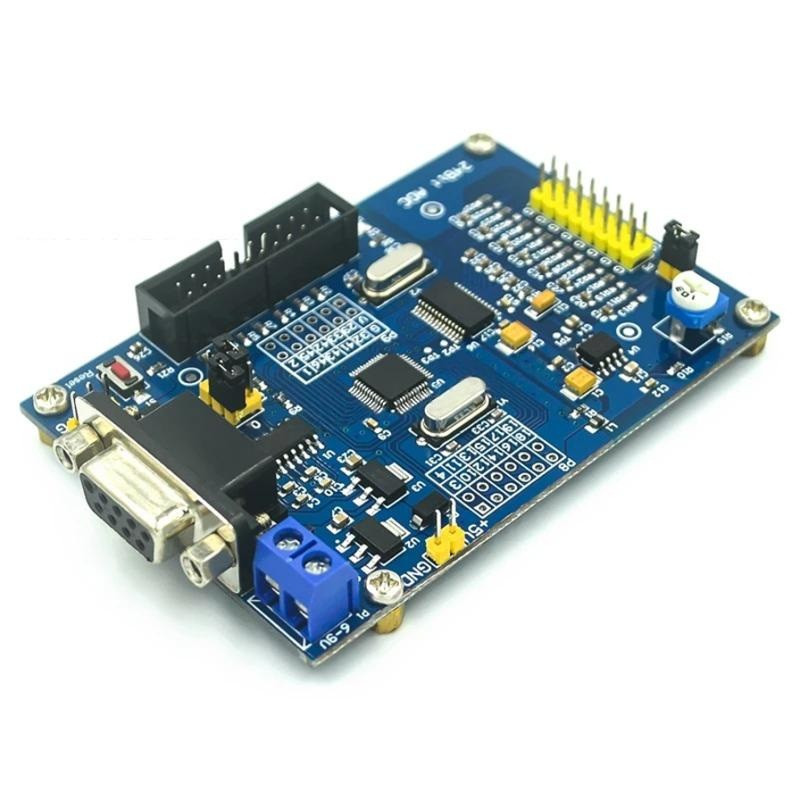
The module combines on the same board the 24-bit ADS1256 analog-to-digital converter and the STM32F103C8T6 microcontroller, being designed as a starting point for your own precision data acquisition, weighing, industrial monitoring or laboratory measurement projects. Unlike a ready-programmed module, this board breaks out all the microcontroller's resources to pins, so you can write your own program for reading the ADS1256 and sending the results to a computer or to another board.
In this tutorial we do the first power-up of the module, check the programming chain through the UART bootloader and the serial connection to an Arduino Uno used as a monitor, before moving on to writing your own driver for the ADS1256.
How it works:
ADS1256 is a 24-bit delta-sigma converter with an integrated programmable gain amplifier (PGA), with adjustable gain between 1 and 64. Clocked by the dedicated 7.68 MHz crystal mounted on the board, the converter can deliver up to 30 kSPS. The result of each conversion is a 24-bit code in two's complement, and the measured voltage is obtained from the formula Voltage = Code x Reference_voltage / (Gain x 2^23). With the 2.5 V reference on the board and gain 1, one step (LSB) means approximately 0.3 uV, and at gain 64 the step drops to approximately 0.0047 uV, which is why high gains are useful for very weak signals, but also require short cables and a clean power supply.
The STM32F103C8T6 microcontroller reads the ADS1256 over its internal bus and sends the results further through UART to the P4 connector (TX, RX, G) or, through the MAX3232 chip, to the DB9 connector for RS232. The board breaks out all the microcontroller's input/output ports to pins, including the P8 and P9 headers, precisely so you can write and load your own data acquisition firmware, the board being designed as a development base and not as an instrument with fixed firmware from the manufacturer.
What you need:
- 1 x ADS1256 24-bit data acquisition module with STM32F103C8T6, 8 channels, RS232, UART
- 1 x Uno R3 development board with ESP8266 Wifi, Arduino compatible
- 1 x UART TTL to USB HID converter, CH9329, 5V
- 1 x 40 Dupont wires, 20cm, Male-Female
- 1 x MiniUSB cable, 30cm
Wiring:
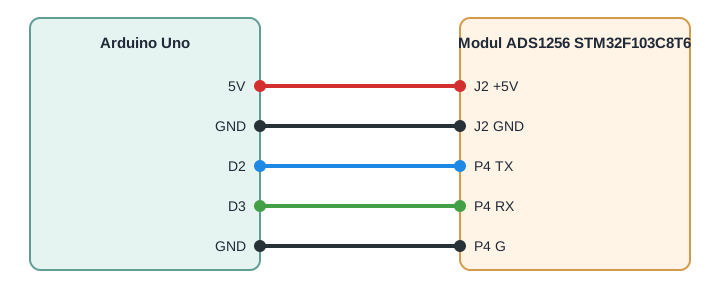
The module's UART signals (P4: TX, RX, G) work in 3.3 V logic, but the STM32F103's USART1 pins are 5 V tolerant, so they can be connected directly to the Arduino Uno without a level converter. The module can be powered either separately at 6 - 9 VDC through the P1 terminal, or directly at 5 VDC through the J2 pins, in which case you can use the Arduino Uno's 5V output, provided you don't power it through P1 at the same time.
| Product pin | Arduino Uno pin | Role |
|---|---|---|
| J2 +5V | 5V | 5 VDC power supply for the module |
| J2 GND | GND | Common ground |
| P4 TX | D2 | Data from the module to Arduino (software RX) |
| P4 RX | D3 | Data from Arduino to the module (software TX) |
| P4 G | GND | UART signal ground |
Libraries:
The code on the Arduino Uno only uses the SoftwareSerial library, included by default in the Arduino IDE, with no separate installation needed. The firmware loaded on the STM32F103C8T6 doesn't use any external library, only the Serial1 object made available by the STM32 boards package for the Arduino IDE.
The code:
First load the test firmware onto the module, then the program below onto the Arduino Uno, to see on the serial monitor the messages sent by the module.
/*
  Arduino Uno - serial monitor bridge for the
  ADS1256 + STM32F103C8T6 data acquisition module
  Wiring:
  Module P4 TX  -> Arduino Uno pin D2 (SoftwareSerial RX)
  Module P4 RX  -> Arduino Uno pin D3 (SoftwareSerial TX)
  Module P4 G   -> Arduino Uno GND
  Module J2 +5V -> Arduino Uno 5V
  Module J2 GND -> Arduino Uno GND
  Library used: SoftwareSerial, bundled with the Arduino IDE,
  no separate installation needed
*/
#include <SoftwareSerial.h>
const int MODULE_RX_PIN = 2;
const int MODULE_TX_PIN = 3;
const long MODULE_BAUD = 9600;
SoftwareSerial moduleSerial(MODULE_RX_PIN, MODULE_TX_PIN);
void setup() {
  Serial.begin(9600);
  moduleSerial.begin(MODULE_BAUD);
  Serial.println("Listening to the ADS1256 module...");
}
void loop() {
  if (moduleSerial.available()) {
    char c = moduleSerial.read();
    Serial.write(c);
  }
}
How the code works:
The firmware on the STM32F103C8T6 initializes Serial1, that is USART1 on pins PA9 and PA10, exactly the interface also used by the board's UART bootloader, then sends a start message and, in the loop, increments the counter variable and sends it every second through Serial1.println. This firmware doesn't read the ADS1256 yet, it only serves to check the programming and the serial connection, before adding your own acquisition code.
On the Arduino Uno, the moduleSerial object, of type SoftwareSerial, is defined on the MODULE_RX_PIN and MODULE_TX_PIN pins and initialized at the MODULE_BAUD speed. In the loop function, whenever moduleSerial.available() shows that a character has arrived, it is read with moduleSerial.read() and immediately sent to the computer with Serial.write(c), so the serial monitor in the Arduino IDE shows exactly what the module is sending.
Result:
Open the serial monitor in the Arduino IDE at 9600 baud, on the Arduino Uno's COM port. After resetting the module you should see the start message followed by the counter value increasing second by second.
Listening to the ADS1256 module...
ADS1256 module - firmware test
Waiting for your own ADS1256 driver code
Counter: 1
Counter: 2
Counter: 3
Counter: 4
Counter: 5
Counter: 6
Common issues:
Nothing appears on the serial monitor: check that you have correctly crossed the wires, meaning the module's P4 TX goes to D2, not D3, and that the speed in Serial1.begin, in moduleSerial.begin and in the serial monitor is the same, 9600 baud.
STM32CubeProgrammer doesn't detect the board when loading the firmware: make sure the jumpers are set to BOOT0 on 1 and BOOT1 on 0 and that you pressed the RESET button after changing the jumpers, before starting the connection in the program.
After programming the board seems stuck and doesn't send anything anymore: most likely BOOT0 stayed on 1, so the board keeps starting in the bootloader, set the BOOT0 jumper back to 0 and press RESET again to run the loaded program.
The characters on the serial monitor are mixed up or unreadable: the cause is almost always a baud rate mismatch between the two sides, check all three places where the speed is set.
The power LED doesn't turn on and the board seems dead: check the polarity on the P1 terminal or on the J2 pins and use only one power source at a time, never P1 and J2 at the same time.
You're losing characters or the text comes through truncated even though the speeds seem correct: SoftwareSerial on the Arduino Uno isn't stable at high speeds, keep the connection at 9600 baud for consistent results.
Limitations and tips:
This test validates the power supply, the programming through the UART bootloader and the serial connection, not the actual reading of the ADS1256, for which you will need to write your own driver following the commands from the ADS1256 datasheet (RREG, WREG, SELFCAL, RDATA), because the internal connection between the STM32F103C8T6 and the ADS1256 is fixed by the manufacturer on the board and is not accessible from outside.
Keep in mind that increasing the PGA gain improves resolution but reduces the input range and increases sensitivity to noise, while increasing the sampling rate reduces the averaging time of each conversion, so for very weak signals (thermocouples, Wheatstone bridges) choose a high gain together with a lower sampling rate.
For stable measurements use short, shielded cables between the sensor and the I0 - I7 inputs, keep the module away from sources of electromagnetic interference such as relays, motors or switching power supplies, and around high gains make sure the signal ground is common with the power supply ground.