

Product images are for informational purposes only and may vary slightly depending on the batch and supplier. Product specifications and prices may be subject to change without notice. We do our best to provide accurate and complete product specifications, but they may not be completely accurate. If you encounter any such situation, please let us know.
The product is intended for specialists and requires qualified and authorized personnel. The product does not include assembly/use instructions . Putting the product into operation by unqualified persons leads to the loss of the warranty according to the Terms and Conditions on the site.
The specified technical parameters (current, power, etc.) represent maximum allowable values under ideal operating conditions. For safe use and optimal lifespan, it is recommended to operate the product continuously at no more than 50% of the specified maximum values.
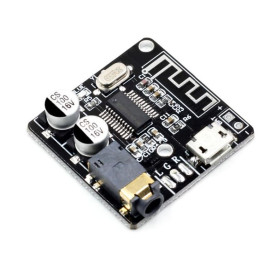
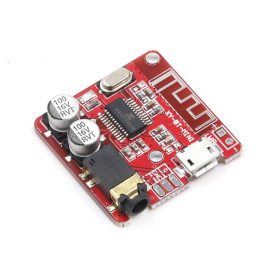
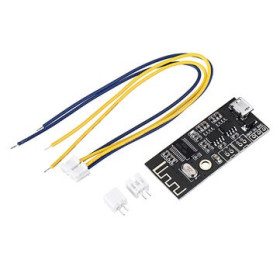
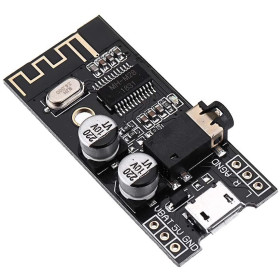
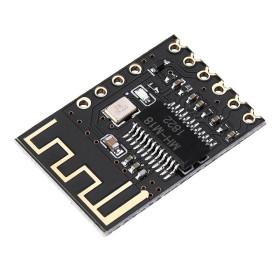
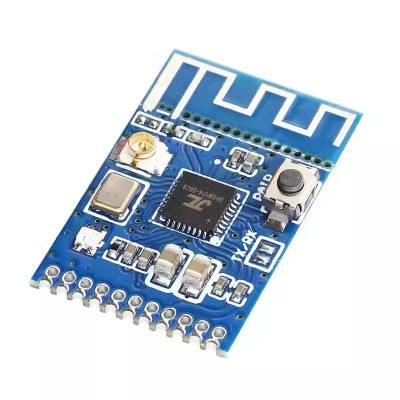
Audio transmitter module, Bluetooth 5.1, BLE
Bluetooth 5.1 BLE audio transmitter with integrated USB sound card, ideal for quickly sending sound from PC, TV or other sources to Bluetooth headphones or speakers, without cables. It offers stable stereo signal through GFSK modulation and antenna on PCB, is powered at 3.3-5V and has easy pairing without password, with support for AT commands via serial for integration into Arduino projects.
Shipping by Thursday 22 October
Buying this product earns you 0.38 € in loyalty points.

International fast shipping within EU. Free Shipping for orders above 100 EUR in most EU countries.

We ship from our stock within 24H

You earn points with every order, worth 5%.
Bluetooth audio transmission module integrated with a USB sound card, which adopts Bluetooth version 4.1 to ensure the quality and stability of the transmitted audio signal.
This module can receive any audio signal from any audio source such as computer USB port, phones, TV, AUX, etc... This is then modulated by GFSK modulation and transmitted through the antenna built into the PCB. To complete the setup, you also need an audio receiver, portable speaker, bluetooth headphones, or bluetooth audio reception modules (MH-M18, MH-M28, MH-M38, etc...). Pairing is simple and password-free.
It can be used, for example, to transmit the audio signal to a speaker without the need for wires.
By connecting to the computer's USB port, the module is recognized as a sound card, so it will implicitly be able to transmit the audio signal coming from the computer.
The module supports AT commands via the serial port. It can also be connected to an Arduino compatible development board that will be able to communicate with the module via the serial interface.
AT commands:
AT+ REST, GMR, STATUS, CONADD=0x'12-CHARACTER MAC ADDRESS` (if it is not 12 characters, it may be necessary to add a 0 at the beginning of the address), DISCONN, SCAN, ADDLINKADD=0x'12-CHARACTER MAC ADDRESS` (if it is not 12 characters, it may be necessary to add a 0 at the beginning of the address), ADDLINKNAME=......, VMLINK?, DELVMLINK
Specifications:
Model: KCX_BT_EMITTER
Version: 1.1
Supply voltage: 3.3 - 5VDC
Current consumption: 35mA
Channel: Stereo
Bluetooth version: 5.1
Operating frequency: 2400 - 2485MHz
Effective communication distance: 10 meters
Modulation: GFSK
Pin spacing: 1.27mm
PCB dimensions mm: 15 x 23.7 x 2.7mm
Instructions:
The default pairing mode of the module, without AT commands, is via the CON button. Bringing it to the LOW state (connected to GND) will initiate the automatic connection procedure to the nearest device.
This setting will be stored in the module's non-volatile memory so that upon subsequent connections, even after a power outage, the module will reconnect to the same device.
To connect it to another device, all you have to do is trigger the CON pin again (via GND).
A physical button can be mounted between the CON pin and GND. See image below.

Information:


Spacers Pins:

Example code for Arduino :
// Test code for bluetooth module
//Serial communication and sending AT commands
// Arduino UNO
#include
#define RxD 2 // Arduino RX pin
#define TxD 3 // Arduino TX pin
#define BoardSpeed 9600
#define UNOSpeed 9600
SoftwareSerial SSerial(RxD,TxD);
void setup()
{
pinMode(RxD, INPUT); //TX from module
pinMode(TxD, OUTPUT); //RX from module
pinMode(8,OUTPUT); //test audio signal output
SSerial.begin(BoardSpeed);
Serial.begin(UNOSpeed);
tone(8,1000); //generate a tone on pin 8, from where the audio signal will be taken
}
void loop()
{
if(Serial.available())
{
SSerial.print((char)Serial.read());
}
if(SSerial.available())
{
Serial.print((char)SSerial.read());
}
}
Produs destinat utilizarii in proiecte electronice, automatizari, prototipare, educatie si cercetare.
Produsul trebuie utilizat numai conform specificatiilor tehnice mentionate in descriere si/sau in documentatia produsului.
Avertismente generale de siguranta:
Nu utilizati produsul la tensiuni, curenti sau temperaturi peste valorile specificate.
Montajul si conectarea trebuie realizate de persoane cu cunostinte tehnice minime in domeniul electric/electronic.
Evitati scurtcircuitele, inversarea polaritatii si conectarea gresita a alimentarii.
Nu lasati produsul alimentat nesupravegheat in timpul testelor.
Produsul nu este jucarie si nu este destinat copiilor.
Pentru modulele electronice, se recomanda utilizarea in carcase, panouri sau montaje protejate, dupa caz.
Identificare produs:
Denumirea produsului, codul/SKU-ul si caracteristicile tehnice sunt mentionate in pagina produsului si/sau pe eticheta ambalajului.
Producator / Importator / Distribuitor:
Sigmanortec S.R.L.
Calea Bucuresti nr. 9, Targu Jiu, Gorj, Romania
E-mail: [email protected]
Website: www.sigmanortec.ro
Persoana responsabila in UE:
Sigmanortec S.R.L.
Calea Bucuresti nr. 9, Targu Jiu, Gorj, Romania
E-mail: [email protected]
Documentatie si siguranta:
Pentru informatii suplimentare, fise tehnice, declaratii de conformitate sau instructiuni, ne puteti contacta la [email protected].