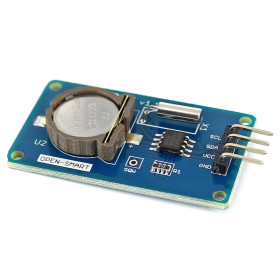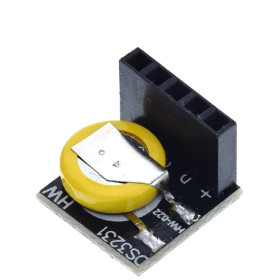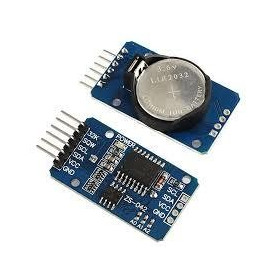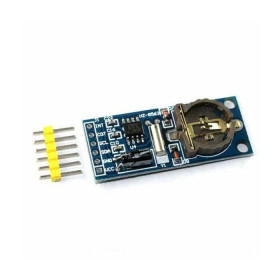


Product images are for informational purposes only and may vary slightly depending on the batch and supplier. Product specifications and prices may be subject to change without notice. We do our best to provide accurate and complete product specifications, but they may not be completely accurate. If you encounter any such situation, please let us know.
The product is intended for specialists and requires qualified and authorized personnel. The product does not include assembly/use instructions . Putting the product into operation by unqualified persons leads to the loss of the warranty according to the Terms and Conditions on the site.
The specified technical parameters (current, power, etc.) represent maximum allowable values under ideal operating conditions. For safe use and optimal lifespan, it is recommended to operate the product continuously at no more than 50% of the specified maximum values.
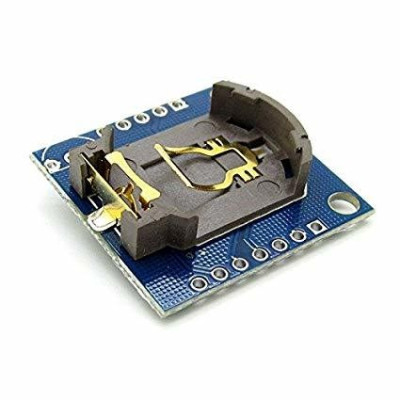
Precision RTC Module, DS1307, I2C, 3.3-5V
The DS1307 RTC module provides accurate time and date measurement for Arduino and other boards, with easy-to-integrate I2C communication. It operates at 3.3-5V and keeps time with a CR2032 backup battery, includes an AT24C32 EEPROM for additional storage, and a SQ output for square wave signal, ideal for automation, monitoring, and IoT projects.
Shipping by Thursday 22 October
Buying this product earns you Ft18.92 in loyalty points.

International fast shipping within EU. Free Shipping for orders above 100 EUR in most EU countries.

We ship from our stock within 24H

You earn points with every order, worth 5%.
The Real Time Clock RTC DS1307 module is a practical solution for Arduino projects and other development boards, providing precise time measurement and real-time calendar management. This module allows reading the time in hours, minutes, and seconds format, as well as the full date, including day, month, and year.
It integrates the DS1307 chip for the clock function and the AT24C32 memory, useful for storing additional data directly on the module. Communication is done through the I2C interface, which greatly simplifies connection and use in electronic applications, automation, monitoring systems, or IoT projects.
The module operates with a power supply between 3.3 and 5.5 VDC, being compatible with a wide range of development platforms. It includes support for a backup battery type CR2032 or LIR2032 (not included), so that time and date are preserved even in case of power interruption. The integrated calendar ensures correct long-term operation, and the 1 Hz update frequency provides stable and precise readings. Its compact dimensions make it easy to integrate into projects where available space is limited.
Specifications:
Power supply voltage: 3.3 - 5.5 VDC
Clock chip: DS1307
Memory chip: AT24C32
EEPROM memory capacity: 32 KB
Communication interface: I2C / IIC / TWI
Interface lines: SDA, SCL
Data update frequency: 1 Hz
Available data: hour, minute, second, day, month, year
Compatible backup battery: CR2032 or LIR2032 (not included)
Output signal: SQ for square wave
Accurate calendar: up to the year 2100
Board dimensions: 28 x 28 mm
Pinout:
| Pin | Description |
|---|---|
| SQ | Square wave signal output |
| DS | Output for DS18B20 temperature sensor |
| SCL | Clock line for I2C interface |
| SDA | Data line for I2C interface |
| VCC | Module power supply 3.3 - 5.5 VDC |
| GND | System ground |
| BAT | Connection for backup battery |
Usage:
Connect the VCC pin to the development board power source.
Connect the GND pin to the system ground.
Connect the SDA and SCL lines to the board's I2C interface.
The SQ pin can be used for square wave signal output, depending on configuration.
Install a compatible battery to keep time when the main power is off.
Time Setting:
For the initial setting of time and date, use the setRegister(...) lines in the setup() section.
The order of registers is as follows: setRegister(0, value) for seconds, setRegister(1, value) for minutes, setRegister(2, value) for hours, setRegister(3, value) for day of the week, setRegister(4, value) for day of the month, setRegister(5, value) for month, setRegister(6, value) for year.
Example for the date 17/03/2026 and time 14:30:00: setRegister(0, 0), setRegister(1, 30), setRegister(2, 14), setRegister(3, 2), setRegister(4, 17), setRegister(5, 3), setRegister(6, 26).
After uploading the code with the desired values, the setting lines should be commented out and the sketch should be re-uploaded to avoid rewriting the time at every restart.
The module will automatically keep the set time and date with the help of the backup battery, even in case of power interruption.
Day Numbering:
| Value | Day |
|---|---|
| 1 | Monday |
| 2 | Tuesday |
| 3 | Wednesday |
| 4 | Thursday |
| 5 | Friday |
| 6 | Saturday |
| 7 | Sunday |
Arduino Example:
| Module Pin | Arduino Uno Pin |
|---|---|
| VCC | 5V |
| GND | GND |
| SDA | A4 |
| SCL | A5 |
| SQ | D2 |
Code available in the product's test section.
- tension
- AD
- Supply Voltage
- 3.3
- Maximum Input Voltage
- 5
Produs destinat utilizarii in proiecte electronice, automatizari, prototipare, educatie si cercetare.
Produsul trebuie utilizat numai conform specificatiilor tehnice mentionate in descriere si/sau in documentatia produsului.
Avertismente generale de siguranta:
Nu utilizati produsul la tensiuni, curenti sau temperaturi peste valorile specificate.
Montajul si conectarea trebuie realizate de persoane cu cunostinte tehnice minime in domeniul electric/electronic.
Evitati scurtcircuitele, inversarea polaritatii si conectarea gresita a alimentarii.
Nu lasati produsul alimentat nesupravegheat in timpul testelor.
Produsul nu este jucarie si nu este destinat copiilor.
Pentru modulele electronice, se recomanda utilizarea in carcase, panouri sau montaje protejate, dupa caz.
Identificare produs:
Denumirea produsului, codul/SKU-ul si caracteristicile tehnice sunt mentionate in pagina produsului si/sau pe eticheta ambalajului.
Producator / Importator / Distribuitor:
Sigmanortec S.R.L.
Calea Bucuresti nr. 9, Targu Jiu, Gorj, Romania
E-mail: [email protected]
Website: www.sigmanortec.ro
Persoana responsabila in UE:
Sigmanortec S.R.L.
Calea Bucuresti nr. 9, Targu Jiu, Gorj, Romania
E-mail: [email protected]
Documentatie si siguranta:
Pentru informatii suplimentare, fise tehnice, declaratii de conformitate sau instructiuni, ne puteti contacta la [email protected].
Reviews (6) - Review moderation

Am incercat ma multe variante de soft si am gasit una utila. https://arduinogetstarted.com/tutorials/arduino-ds1307-rtc-module Am modificat-o pentru a o folosi la o Ministatie meteo, sa afiseze data, ora...
Nu m-a necajit asa nicio alta componenta: o data il vedea Arduino, de trei ori nu-l vedea. Am cositorit toate conexiunile: degeaba. Am schimbat placa Arduino: nicio imbunatatire. Am mai cumparat un RTC: acelasi rezultat. Pana la urma le-am facut cadou (gratis) numai sa nu le mai vad.
totul ok .recomand
Prea convenabil
foarte multumit 5
#include <Wire.h>
#define RTC_I2C_ADDRESS 0x68
byte decToBcd(byte val) {
return ((val / 10 * 16) + (val % 10));
}
byte bcdToDec(byte val) {
return ((val / 16 * 10) + (val % 16));
}
void setRegister(byte reg, byte value) {
Wire.beginTransmission(RTC_I2C_ADDRESS);
Wire.write(reg);
Wire.write(decToBcd(value));
Wire.endTransmission();
}
void readRTC(byte *second,
byte *minute,
byte *hour,
byte *dayOfWeek,
byte *dayOfMonth,
byte *month,
byte *year) {
Wire.beginTransmission(RTC_I2C_ADDRESS);
Wire.write(0);
Wire.endTransmission();
Wire.requestFrom(RTC_I2C_ADDRESS, 7);
*second = bcdToDec(Wire.read() & 0x7F);
*minute = bcdToDec(Wire.read());
*hour = bcdToDec(Wire.read() & 0x3F);
*dayOfWeek = bcdToDec(Wire.read());
*dayOfMonth = bcdToDec(Wire.read());
*month = bcdToDec(Wire.read());
*year = bcdToDec(Wire.read());
}
void printDateTime() {
byte second, minute, hour, dayOfWeek, dayOfMonth, month, year;
readRTC(&second, &minute, &hour, &dayOfWeek, &dayOfMonth, &month, &year);
Serial.print("Time: ");
if (hour < 10) Serial.print("0");
Serial.print(hour);
Serial.print(":");
if (minute < 10) Serial.print("0");
Serial.print(minute);
Serial.print(":");
if (second < 10) Serial.print("0");
Serial.println(second);
Serial.print("Date: ");
if (dayOfMonth < 10) Serial.print("0");
Serial.print(dayOfMonth);
Serial.print("/");
if (month < 10) Serial.print("0");
Serial.print(month);
Serial.print("/20");
if (year < 10) Serial.print("0");
Serial.println(year);
Serial.println();
}
void setup() {
Wire.begin();
Serial.begin(9600);
// Set time and date once, then comment these lines and upload again
// Example: Tuesday, 17/03/2026, 14:30:00
// setRegister(0, 0); // seconds
// setRegister(1, 30); // minutes
// setRegister(2, 14); // hours
// setRegister(3, 2); // day of week
// setRegister(4, 17); // day of month
// setRegister(5, 3); // month
// setRegister(6, 26); // year
delay(200);
}
void loop() {
printDateTime();
delay(1000);
}