Product images are for informational purposes only and may vary slightly depending on the batch and supplier. Product specifications and prices may be subject to change without notice. We do our best to provide accurate and complete product specifications, but they may not be completely accurate. If you encounter any such situation, please let us know.
The product is intended for specialists and requires qualified and authorized personnel. The product does not include assembly/use instructions . Putting the product into operation by unqualified persons leads to the loss of the warranty according to the Terms and Conditions on the site.
The specified technical parameters (current, power, etc.) represent maximum allowable values under ideal operating conditions. For safe use and optimal lifespan, it is recommended to operate the product continuously at no more than 50% of the specified maximum values.
WZ5005E-USB step-down voltage module for panel, color LCD, CC-CV, 6–55V to 0–50V, 5A, 250W
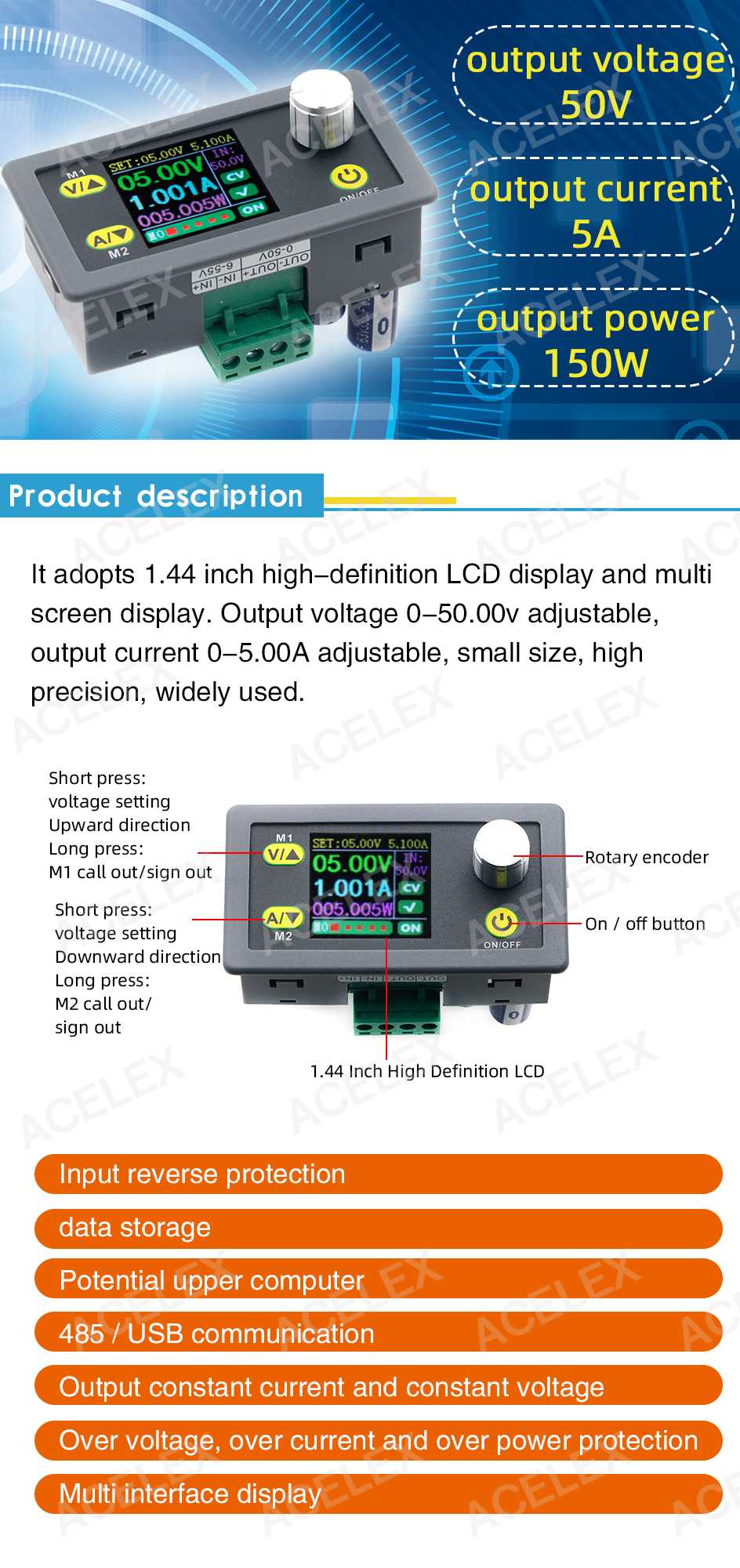
Step-down voltage module for panel mounting, ideal as an adjustable CC-CV power supply in electronic projects and test benches. It offers a 0-50V and 0-5A output with up to 250W power, a 1.44-inch color LCD display for quick monitoring, control and serial interface via USB, and fine adjustment with 0.01V voltage resolution.
Shipping by Thursday 22 October
Buying this product earns you 2.52 € in loyalty points.

International fast shipping within EU. Free Shipping for orders above 100 EUR in most EU countries.

We ship from our stock within 24H

You earn points with every order, worth 5%.
The WZ5005E-USB step-down voltage module is a DC-DC buck power supply with adjustable output in both constant voltage (CV) and constant current (CC) modes, intended for panel mounting or integration into custom equipment. It accepts DC input voltages of up to 55 V and delivers an adjustable output voltage from 0 to 50 V, making it suitable for precision power supply of electronic loads, component testing, battery charging, or powering LED strips and other DC consumers.
The circuit operates as a digital-controlled buck converter, with the output limited simultaneously in voltage and current, automatically switching between constant voltage (CV) and constant current (CC) modes depending on the load. Output voltage and current are adjusted with a resolution of 0.01 V and 0.0001 A respectively, and the maximum delivered power is 250 W at a current of up to 5 A. The module can store multiple parameter sets and retains the last settings after power-off, and it is equipped with overvoltage, overcurrent, overload, and reverse-polarity input protection.
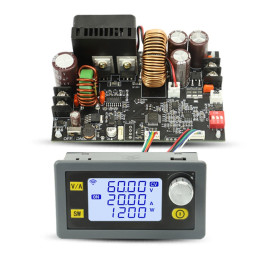
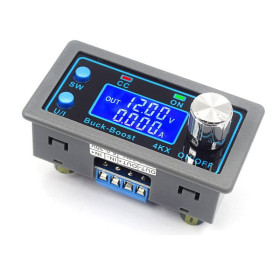
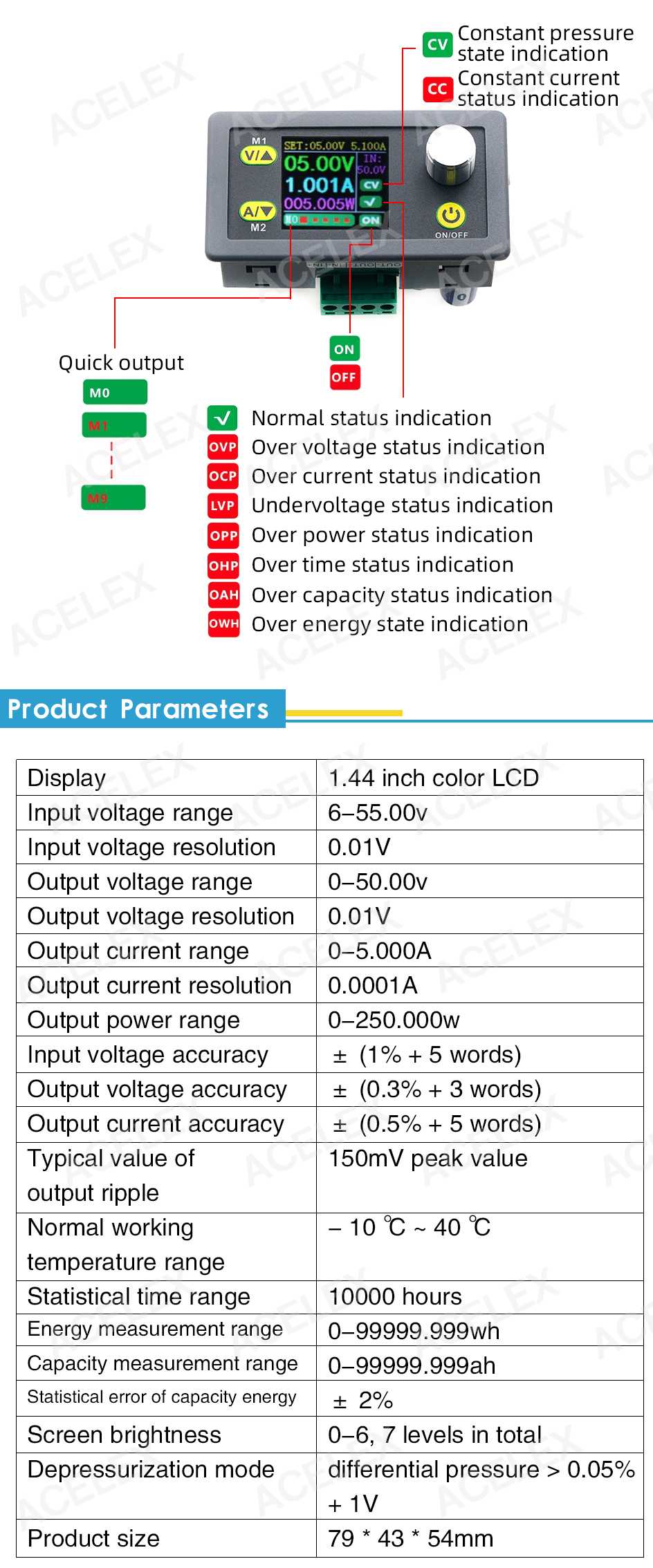
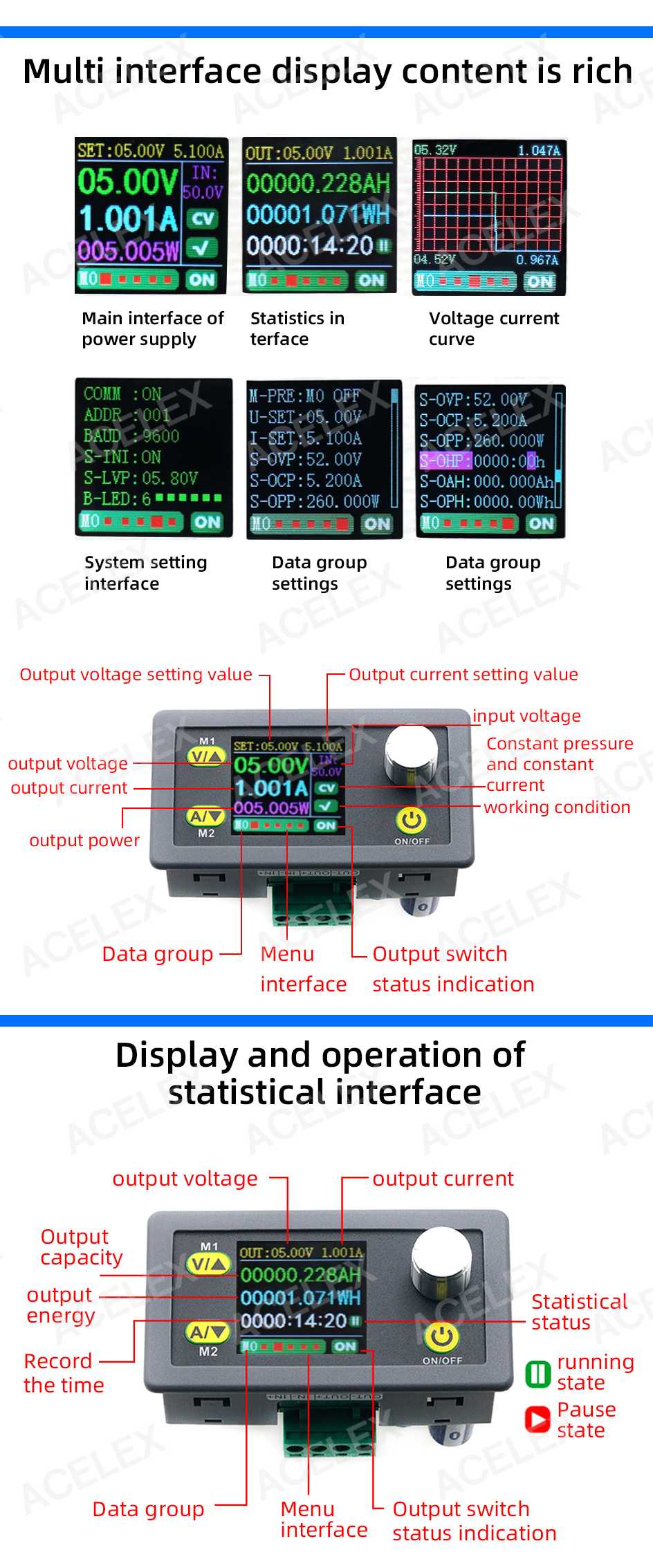
Among the main features are the 1.44-inch color LCD screen with simultaneous display of multiple parameters on multiple pages, the M1 and M2 buttons for adjusting voltage and current, the rotary button for switching between screens, the ON/OFF button for output activation, the screw terminals IN+ / IN- for power input and OUT+ / OUT- for the load, as well as internal energy (Wh) and capacity (Ah) counters accumulated. Power is supplied directly through the IN+ and IN- terminals with a 6 - 55 VDC DC source.
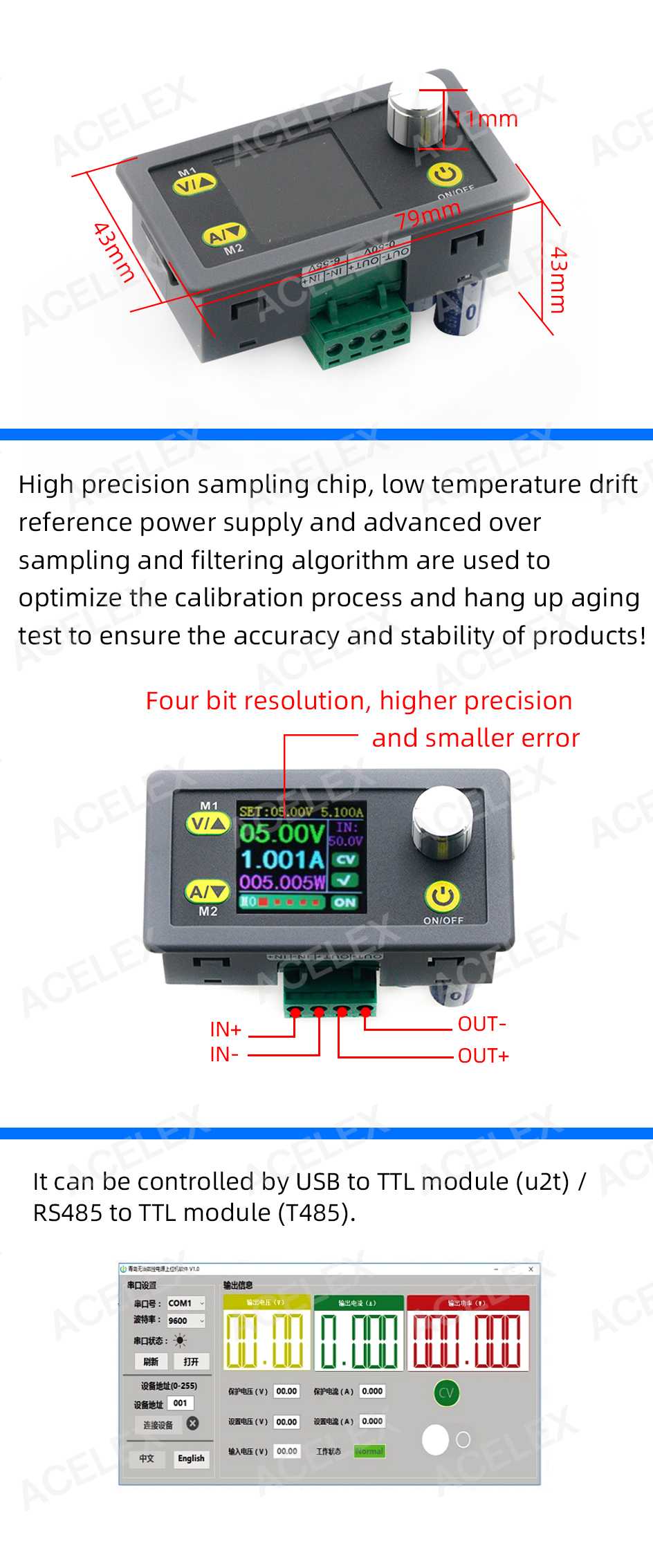
The USB version of the module includes a USB-TTL adapter and a dedicated cable, through which the module can be connected to a computer for remote reading and setting of parameters, the software application being available only for the Windows operating system.
Specifications:
Power supply voltage (input): 6 - 55 VDC
Output current: 0 - 5 A, adjustable as constant current limit
Output voltage: 0 - 50 VDC, continuously adjustable
Output power: 0 - 250 W
Display: 1.44-inch color LCD
Input voltage resolution: 0.01 V
Output voltage resolution: 0.01 V
Current resolution: 0.0001 A
Accuracy: +/- 1%
Output ripple: 150 mV peak
Operating temperature: -1 - 40 degrees C
Measured statistical time: up to 10000 hours
Energy measurement range: 0 - 99999.999 Wh
Measured capacity range: 0 - 999999.999 Ah
Statistical capacity error: +/- 2%
Display brightness: 7 adjustable levels
Serial control: USB-TTL adapter included, dedicated software for Windows
Dimensions: 79 x 43 x 54 mm
Pinout:
| Connector | Pin | Function |
|---|---|---|
| Screw terminal block | IN+ | Input power, positive pole (6 - 55 VDC) |
| Screw terminal block | IN- | Input power, negative pole / source ground |
| Screw terminal block | OUT- | Output, negative pole / load ground (0 - 50 VDC) |
| Screw terminal block | OUT+ | Output, positive pole of the load (0 - 50 VDC) |
Usage:
Connect the DC power supply to the IN+ and IN- terminals of the module, observing polarity and using a voltage between 6 and 55 VDC.
Do not connect the module to the AC mains; it accepts only DC voltage at the input.
Turn on the power and wait for the color LCD screen to light up, which shows the input voltage and the set output values.
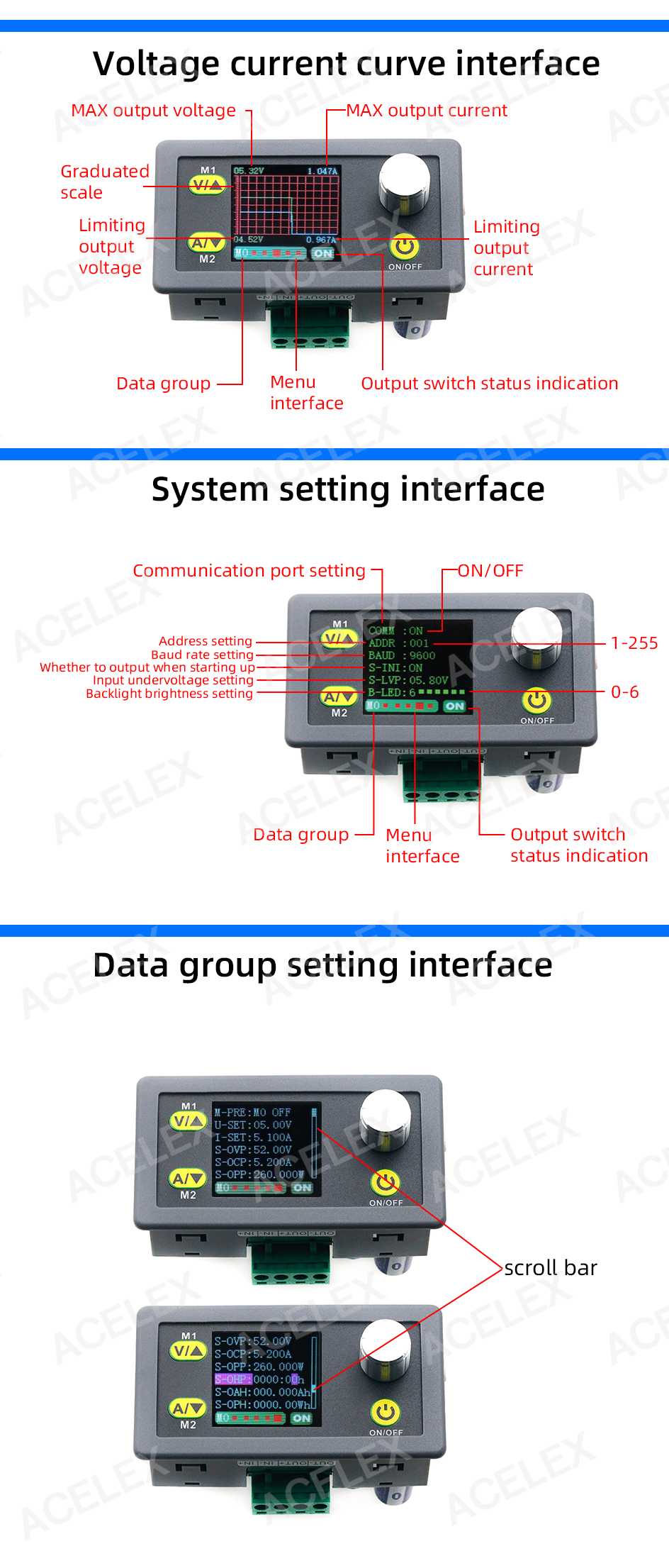
Briefly press the M1 button to set the desired output voltage and briefly press the M2 button to set the constant current limit.
Turn off the power before connecting the load to the OUT+ and OUT- terminals, then restart the module for the settings to become active.
Check that the input voltage is higher than the desired output voltage, since the module is a step-down converter and cannot produce an output voltage higher than the input.
For charging a battery, first connect the module input to the source and only then connect the battery to the output, with the output voltage set above the battery voltage.
Use the rotary button to switch between the display screens for voltage, current, power, energy, and accumulated capacity.
Briefly press the ON/OFF button to turn the output on or off without interrupting the input power supply.
For computer control, connect the module to a PC via the included USB-TTL adapter and use the dedicated application, available only for Windows.
If the module becomes noticeably warm during operation, reduce the power demanded by the load or provide additional cooling.
- tension
- AD
- Power
- Over 20W
- Supply Voltage
- 6
- Maximum Input Voltage
- 55
- Minimum Output Voltage
- 0
- Maximum Output Voltage
- 50
- Source Type
- descend
- Current Adjustment
- Yes
- Voltage Adjustment
- Yes
- Adjustment Type
- Variable
- Maximum Output Current
- 5
- Maximum Controlled Power
- 250 W
- Input Voltage Type
- “DC” in Romanian can mean **“de ce”**, which translates to **“why”** in English.
- Output Voltage Type
- “DC” in Romanian can mean **“de ce”**, which translates to **“why”** in English.
Produs destinat utilizarii in proiecte electronice, automatizari, prototipare, educatie si cercetare.
Produsul trebuie utilizat numai conform specificatiilor tehnice mentionate in descriere si/sau in documentatia produsului.
Avertismente generale de siguranta:
Nu utilizati produsul la tensiuni, curenti sau temperaturi peste valorile specificate.
Montajul si conectarea trebuie realizate de persoane cu cunostinte tehnice minime in domeniul electric/electronic.
Evitati scurtcircuitele, inversarea polaritatii si conectarea gresita a alimentarii.
Nu lasati produsul alimentat nesupravegheat in timpul testelor.
Produsul nu este jucarie si nu este destinat copiilor.
Pentru modulele electronice, se recomanda utilizarea in carcase, panouri sau montaje protejate, dupa caz.
Identificare produs:
Denumirea produsului, codul/SKU-ul si caracteristicile tehnice sunt mentionate in pagina produsului si/sau pe eticheta ambalajului.
Producator / Importator / Distribuitor:
Sigmanortec S.R.L.
Calea Bucuresti nr. 9, Targu Jiu, Gorj, Romania
E-mail: [email protected]
Website: www.sigmanortec.ro
Persoana responsabila in UE:
Sigmanortec S.R.L.
Calea Bucuresti nr. 9, Targu Jiu, Gorj, Romania
E-mail: [email protected]
Documentatie si siguranta:
Pentru informatii suplimentare, fise tehnice, declaratii de conformitate sau instructiuni, ne puteti contacta la [email protected].
Reviews (1) - Review moderation

Surprinzator de precis calibrata, am alimentat-o la 54V si se incalzeste foarte putin pentru 5A deci n-am montat ventilator. Daca apare pe ecran un curent mic fara sarcina se aduce la 0 conform instructiunilor. Usor de folosit si configurat. A fost mai greu de gasit aplicatia PC pentru comanda prin USB dar si asta merge ok cu mentiunea ca imi apare un cate un zero in loc de virgula zecimala. Aplicatia am gasit-o aici: https://drive.google.com/file/d/125fOoEs3ppLBsvNsymcTwIYierVIQpAO/view
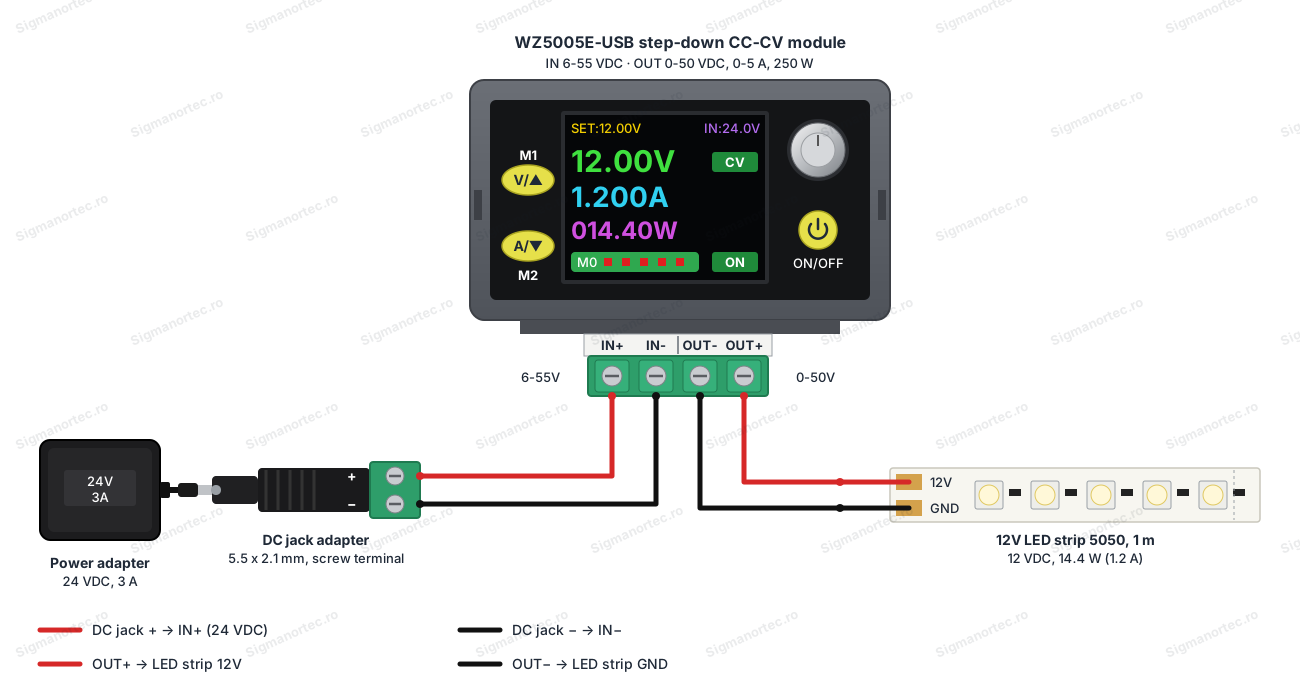
The WZ5005E-USB module is a step-down DC-DC power supply, with independent regulation of the output voltage and current, controlled directly from its own panel through the color LCD screen, the M1 and M2 buttons, the rotary button and the ON/OFF button. It does not need any external microcontroller and does not need programming, it is used like an adjustable bench power supply, you power it, set the desired voltage and current, then connect the load to the output.
In this tutorial we set it up as a standalone power supply, powering a 12 V LED strip, and optionally the module can also be read and set from a Windows computer through the included USB-TTL adapter.

How it works:
The module is a step-down (buck) converter with two regulation loops, one for voltage and one for current. The output voltage is set from the M1 button and stays constant as long as the load draws less current than the limit set from M2, with the module working in constant voltage mode (CV).
If the load were to draw more current than the set CC limit, the module automatically switches to constant current mode (CC) and lets the output voltage drop as much as needed in order not to exceed the limited current, thus protecting both the load and the module.
For the example in this tutorial, a 1 m 12 V 5050 LED strip with a power of 14.4 W draws approximately 14.4 W / 12 V, meaning about 1.2 A, a value below the current limit that we will set, so the module will stay in CV mode and will power the strip at a constant voltage.
What you need:
- 1 x Panel step-down voltage module, color LCD, CC-CV, 6-55V to 0-50V, USB port, 5A, 250W
- 1 x 24V 3A switching power adapter
- 1 x 3.5mm audio jack adapter, male to dual female, splitter
- 1 x 12V LED strip 120 smd 2835, 1m
Connection:
Power the module only with direct current, at a voltage higher than the output voltage you intend to set, respecting the polarity at both the input and output terminals.
| Product pin | Connects to | Role |
|---|---|---|
| IN+ | DC adapter, + pole | Input power supply, positive pole |
| IN- | DC adapter, - pole | Input power supply, ground |
| OUT+ | LED strip, 12V | Regulated output, positive pole to the load |
| OUT- | LED strip, GND | Regulated output, ground to the load |
Setup:
Press the M1 button briefly to enter the output voltage editing mode and use short presses to increase the value, while a long press on M1 (over 3 seconds) accesses or exits a memory group saved on M1.
Press the M2 button briefly to enter the constant current limit editing mode and use short presses to decrease or adjust the value, while a long press on M2 accesses or exits a memory group saved on M2.
Press the rotary button briefly to switch between the available display screens (voltage and current, power, accumulated energy, accumulated capacity), while a long press on this button has a different function depending on the active screen.
Press the ON/OFF button briefly to turn the output on or off, without turning off the module's power supply.
| Button | Short press | Long press |
|---|---|---|
| M1 | Sets / increases the output voltage | Accesses or exits the M1 memory group |
| M2 | Sets / decreases the constant current limit | Accesses or exits the M2 memory group |
| Rotary button | Switches the displayed screen | Different function depending on the active screen |
| ON/OFF | Turns the output on or off | - |
The module can hold several sets of saved parameters and remembers the last settings after the power is turned off, so you don't have to adjust the voltage and current again at every restart.
Usage example:
Power the module with the 24 VDC 3 A adapter connected to the IN+ and IN- terminals.
With the output turned off from ON/OFF, set the output voltage to 12.00 V from M1 and the constant current limit to 1.50 A from M2.
Turn off the power, connect the 12 V LED strip to the OUT+ and OUT- terminals, then turn the module's power back on.
Press ON/OFF to activate the output, the LED strip will light up at a constant voltage of 12.00 V, and the displayed current will be approximately 1.2 A, below the set limit of 1.50 A, so the module stays in CV mode.
If you accidentally short-circuit the output or connect a load that draws more than 1.50 A, the module switches to CC mode and limits the current to 1.50 A, with the output voltage dropping accordingly.
Common issues:
The screen stays off, check that the source connected to IN+ and IN- actually delivers a voltage between 6 and 55 VDC and that the polarity is correct.
The output never reaches the set value, the input voltage is too close to the output voltage, a step-down converter needs the input to be noticeably higher than the desired output, increase the voltage of the power supply.
The load seems weak or the module switches too quickly to CC mode, the current limit set from M2 is lower than the current required by the load, increase the current limit from M2 up to a safe value for the load being used.
The module heats up strongly during operation, a large difference between the input and output voltage multiplied by the delivered current means high dissipated power, reduce the load, choose an input voltage closer to the output voltage or provide additional cooling.
The computer software does not recognize the module, check that you have installed the USB-TTL adapter driver and that you are using a Windows computer, since the application does not work on other operating systems.
Limitations and tips:
The module is a step-down converter, the output voltage can never exceed the input voltage, for example from a 24 VDC adapter you can get at most approximately 22 - 23 V at the output, not 24 V.
The display and regulation accuracy is approximately +/- 1%, and the output ripple is up to 150 mV peak, enough for general powering of electronic loads, but not for very high precision measurements.
The module only works with direct current and must never be connected directly to the 220 VAC mains.
The maximum current of 5 A and the maximum power of 250 W are fixed limits, for larger loads you need a different model with higher capacity.
Besides powering LED strips, the module can be used as an adjustable lab power supply, for controlled battery charging, for testing components with current limiting, or as a power source for modules and DC projects that need a stable voltage below 50 V.