

Product images are for informational purposes only and may vary slightly depending on the batch and supplier. Product specifications and prices may be subject to change without notice. We do our best to provide accurate and complete product specifications, but they may not be completely accurate. If you encounter any such situation, please let us know.
The product is intended for specialists and requires qualified and authorized personnel. The product does not include assembly/use instructions . Putting the product into operation by unqualified persons leads to the loss of the warranty according to the Terms and Conditions on the site.
The specified technical parameters (current, power, etc.) represent maximum allowable values under ideal operating conditions. For safe use and optimal lifespan, it is recommended to operate the product continuously at no more than 50% of the specified maximum values.
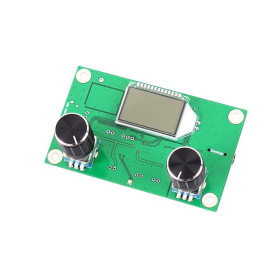
FM radio transmitter module, DSP PLL, 87–108 MHz, LCD, campus mode 76–108 MHz
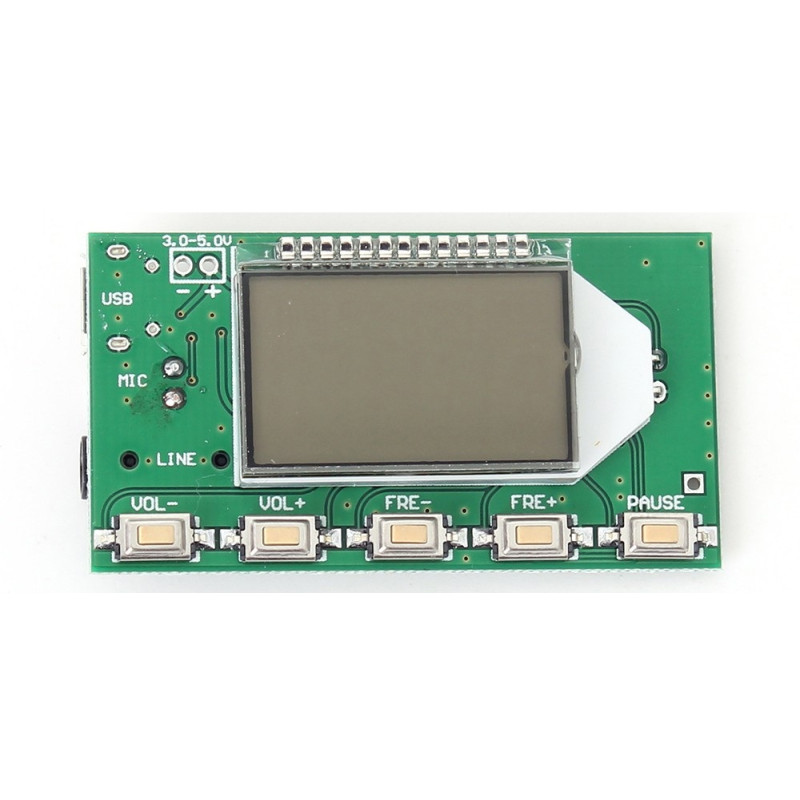
FM radio transmitter module with DSP and PLL technology, with LCD display and 5 buttons, transmits stereo on the 87.0 - 108.0 MHz band or, in campus mode, on the 76.0 - 108.0 MHz band, with an output power of 100 mW. It accepts audio signal from LINE, USB, or the built-in MIC microphone, is powered by 3.0 - 5.0 VDC, and uses a 75 cm antenna. Suitable for wireless microphone, audio broadcasting from a phone or PC, and short-range DIY broadcasting projects.
Buying this product earns you 3.11 RON in loyalty points.

International fast shipping within EU. Free Shipping for orders above 100 EUR in most EU countries.

We ship from our stock within 24H

You earn points with every order, worth 5%.
This FM radio transmitter module uses digital signal processing (DSP) technology and a phase-locked loop (PLL) to transmit the signal without frequency drift and with good sound quality. It accepts audio from a stereo LINE input, from the micro USB port (PC sound card), or from the built-in electret microphone on the MIC channel, making it suitable for wireless microphones, audio broadcasting from a phone or computer, audio surveillance, and other short-range FM transmission projects.
The transmitter has an output power of 100 mW and covers the standard 87.0 - 108.0 MHz band, extended to 76.0 - 108.0 MHz in campus mode (campus radio), for university stations that broadcast below the commercial band limit. The frequency is adjusted with the FRE- and FRE+ buttons, in 0.1 MHz steps with a short press and continuously, in 1.0 MHz steps, with a long press, and the volume is adjusted digitally, in 30 levels, with the VOL- and VOL+ buttons. The modulation is standard FM, the audio frequency response is 50 Hz - 18 kHz, and the signal-to-noise ratio is at least 30 dB. On the back of the board there are two solder pads, M and G, through which transmission can be switched from stereo (default, open bridge) to mono (shorted bridge).
Among the main features are the backlit LCD display, the 5 buttons VOL-, VOL+, FRE-, FRE+ and PAUSE (the latter for mute/unmute), the micro USB port for audio from a PC, the LINE input for external audio sources, the built-in MIC microphone, the ANT port for the antenna, and the TX, RX and GND serial pins for external control via TTL interface. The module retains in memory the last frequency and the last volume set, even after power is turned off. Power supply is 3.0 - 5.0 VDC, with a current consumption of 35 mA, preferably from a battery or from a regulated and filtered power supply, not from an unfiltered phone charger, because power-supply noise affects transmission.
Through the micro USB port, the module connects directly to a computer, which recognizes it as a sound card and can transmit over FM whatever the operating system plays. Through the TX, RX and GND serial pins, with TTL level, the module can be remotely controlled by a microcontroller such as Arduino, ESP32 or STM32, or from a computer through a USB-TTL adapter.
Specifications:
Supply voltage: 3.0 - 5.0 VDC
Consumption: 35 mA
Module type: Stereo FM transmitter with DSP and PLL
Output power: 100 mW
Frequency band (closed campus): 87.0 - 108.0 MHz
Frequency band (open campus): 76.0 - 108.0 MHz
Frequency adjustment step: 0.1 MHz (short press) / 1.0 MHz (long press)
Modulation: Standard FM
Audio frequency response: 50 Hz - 18 kHz
Audio channels: LINE and USB (stereo), MIC (mono, built-in electret microphone)
Signal-to-noise ratio: minimum 30 dB
Volume adjustment: digital, 30 levels, with memory after power off
Stereo/mono selection: M and G solder pads on the back of the board (open bridge = stereo, shorted = mono)
External control: TX, RX, GND TTL serial pins for commands from a microcontroller or computer
Antenna: 75 cm rod or wire, connected to the ANT port
Operating temperature: -30 ~ 85 degrees Celsius
Layout:
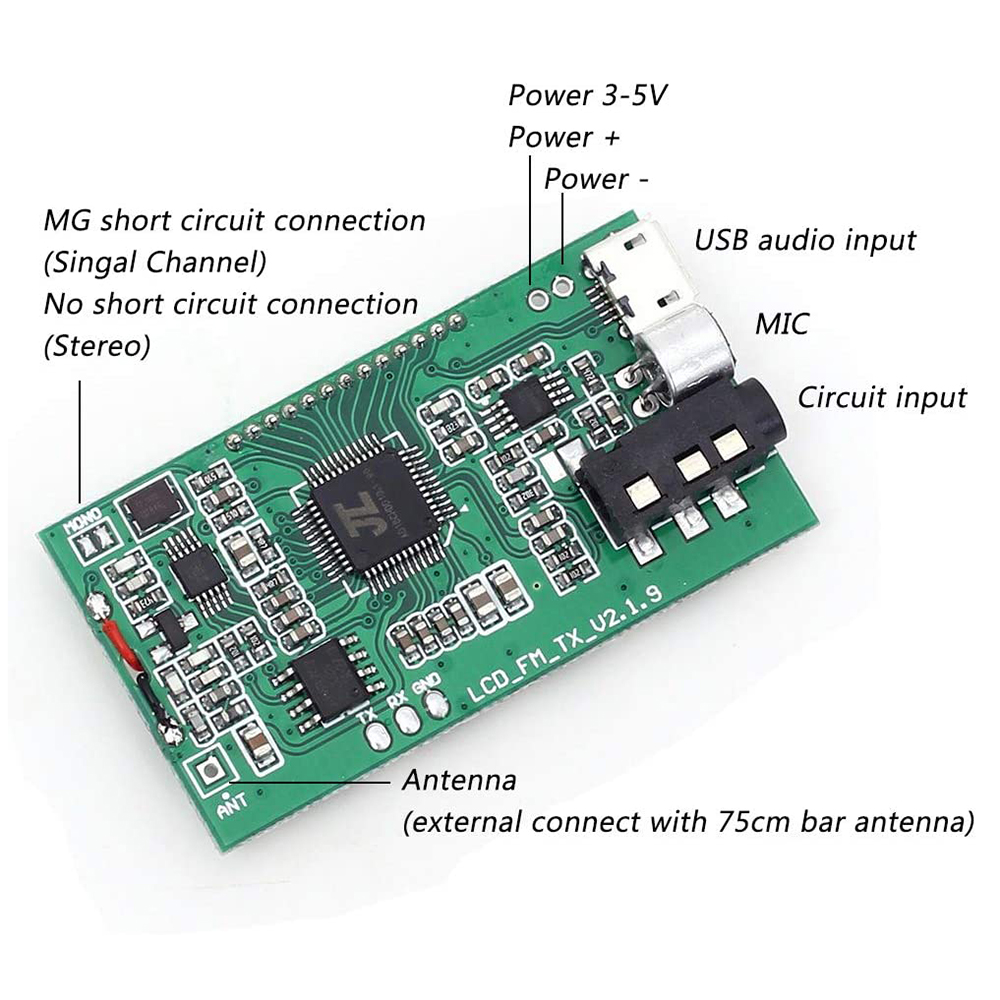
| Element | Function |
|---|---|
| 3.0-5.0V power pins ("-" and "+") | Supplies the board with 3.0 - 5.0 VDC, observing the marked polarity. |
| USB port | Micro USB connector for audio from a computer and for 5V power supply. |
| MIC pins | Input for the built-in stereo electret microphone on the board. |
| LINE pins | Stereo line-level audio input for connecting an external source. |
| LCD display | Shows the current frequency, volume level, and campus mode status. |
| VOL- button | Decreases the volume, by 1 step with a short press and continuously with a long press. |
| VOL+ button | Increases the volume, by 1 step with a short press and continuously with a long press. |
| FRE- button | Decreases the transmission frequency, by 0.1 MHz with a short press and continuously, by 1.0 MHz, with a long press. |
| FRE+ button | Increases the transmission frequency, by 0.1 MHz with a short press and continuously, by 1.0 MHz, with a long press. |
| PAUSE button | Toggles transmission between mute and unmute. |
| ANT antenna (back) | Pad for connecting the 75 cm antenna, also accessible through the hole on the front of the board, next to the PAUSE button. |
| M and G pads (back) | Stereo/mono selection by shorting the two solder pads. |
| TX, RX, GND pins (back) | TTL serial interface for external control from a microcontroller or computer. |
Pinout:
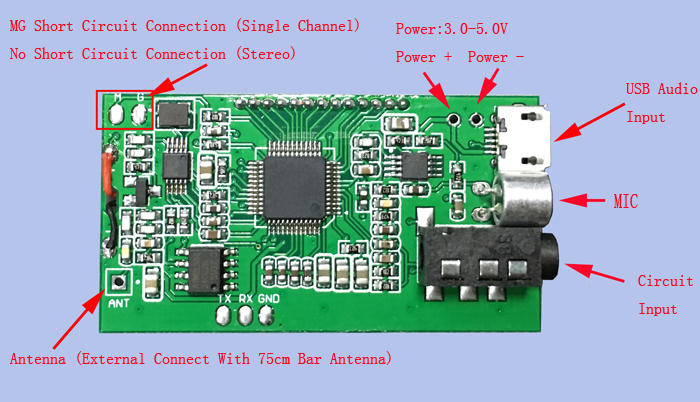
| Connector | Pin | Function |
|---|---|---|
| Power | - | Negative power supply, 3.0 - 5.0 VDC |
| Power | + | Positive power supply, 3.0 - 5.0 VDC |
| USB | micro USB | Audio from computer and 5V power supply |
| MIC | - | Built-in stereo electret microphone input |
| LINE | - | Stereo line-level audio input |
| ANT | ANT | RF output, for connecting the 75 cm antenna |
| TTL Serial (back) | TX | Module TTL serial output |
| TTL Serial (back) | RX | TTL serial input, for control commands |
| TTL Serial (back) | GND | Common ground for the serial port |
| Jumper (back) | M | Solder pad for mono selection, shorted with G |
| Jumper (back) | G | Ground for jumper M, normally unconnected (stereo) |
| Buttons | VOL- | Decrease volume |
| Buttons | VOL+ | Increase volume |
| Buttons | FRE- | Decrease frequency |
| Buttons | FRE+ | Increase frequency |
| Buttons | PAUSE | Mute / unmute |
| Action on startup | Result |
|---|---|
| Normal power on, with no buttons pressed | The module starts on the last frequency and last volume used, in the previously set band |
| Hold VOL- and VOL+ simultaneously while connecting power | Switches the transmission band: LCD shows C1 for the extended 76.0 - 108.0 MHz band (open campus) or C0 for the standard 87.0 - 108.0 MHz band (closed campus), and the setting remains active after restart |
Use:
Connect the module’s "-" and "+" terminals to a battery or to a regulated and filtered power supply, with a voltage of 3.0 - 5.0 VDC, observing the polarity marked on the board.
Do not exceed 5.0 VDC and do not use an unfiltered phone charger, because noise from a poor-quality power supply affects transmission clarity.
Attach a 75 cm antenna to the ANT port and orient it as far as possible from obstacles for optimal transmission.
Connect the audio source to the LINE input with a 3.5 mm stereo cable, from a phone or other audio equipment, or connect the module to a computer via the micro USB cable to transmit the operating system sound.
If no cable is connected to LINE or USB, the module automatically transmits the sound picked up by the built-in MIC microphone.
Set the desired frequency with the FRE- and FRE+ buttons, using a short press for 0.1 MHz steps and a long press for continuous adjustment with 1.0 MHz steps, then adjust the volume with VOL- and VOL+ and use PAUSE to temporarily stop audio transmission.
To activate the extended campus band (76.0 - 108.0 MHz), turn off the power, then hold VOL- and VOL+ simultaneously while reconnecting power until the LCD shows C1. Repeat the procedure to return to the standard band (87.0 - 108.0 MHz), in which case the LCD will show C0.
For mono transmission instead of stereo, short the M and G pads on the back of the board. Leave them unconnected for stereo transmission.
For remote control, connect the TX, RX and GND pins to a microcontroller or, via a USB-TTL adapter, to the serial port of a computer.
Tune an FM receiver to the same frequency shown on the module’s LCD to listen to the transmitted signal.
- Frequency band
- 87 - 108 MHz
- Circuit technology
- DSP PLL
- Module function
- Transmitator FM
Produs destinat utilizarii in proiecte electronice, automatizari, prototipare, educatie si cercetare.
Produsul trebuie utilizat numai conform specificatiilor tehnice mentionate in descriere si/sau in documentatia produsului.
Avertismente generale de siguranta:
Nu utilizati produsul la tensiuni, curenti sau temperaturi peste valorile specificate.
Montajul si conectarea trebuie realizate de persoane cu cunostinte tehnice minime in domeniul electric/electronic.
Evitati scurtcircuitele, inversarea polaritatii si conectarea gresita a alimentarii.
Nu lasati produsul alimentat nesupravegheat in timpul testelor.
Produsul nu este jucarie si nu este destinat copiilor.
Pentru modulele electronice, se recomanda utilizarea in carcase, panouri sau montaje protejate, dupa caz.
Identificare produs:
Denumirea produsului, codul/SKU-ul si caracteristicile tehnice sunt mentionate in pagina produsului si/sau pe eticheta ambalajului.
Producator / Importator / Distribuitor:
Sigmanortec S.R.L.
Calea Bucuresti nr. 9, Targu Jiu, Gorj, Romania
E-mail: [email protected]
Website: www.sigmanortec.ro
Persoana responsabila in UE:
Sigmanortec S.R.L.
Calea Bucuresti nr. 9, Targu Jiu, Gorj, Romania
E-mail: [email protected]
Documentatie si siguranta:
Pentru informatii suplimentare, fise tehnice, declaratii de conformitate sau instructiuni, ne puteti contacta la [email protected].
This tutorial uses no development board and no software. The FM transmitter module DSP PLL (board marked LCD_FM_TX_V2.2.0) and an FM receiver module DSP PLL with LCD and 2 x 3 W output each work on their own, immediately after power-up, and are adjusted from buttons or rotary knobs. Here we use them together as a wireless audio link. The transmitter receives sound from the computer through the micro USB cable, and the receiver plays it through two speakers.
The pair is used in projects for short-distance audio broadcasting, for example music from the computer in another room, a wireless microphone or a simple intercom system. The transmitter has 100 mW output power, and the receiver has its own amplifier for 4 ohm speakers.
How it works:
The transmitter generates a radio carrier at the selected frequency and modulates it to the rhythm of sound, that is it uses frequency modulation (FM). The PLL circuit (phase-locked loop) keeps the carrier exactly on the displayed frequency, so the signal does not drift. The digital signal processor (DSP) prepares the sound before modulation. The receiver does the inverse operation. It tunes to the same frequency, extracts the sound from the carrier, amplifies it and sends it to the speakers.
The antenna is 75 cm long because the simplest antenna is a quarter wavelength. The wavelength in meters is calculated with the formula 300 / f, where f is the frequency in MHz. At 100 MHz it gives 300 / 100 = 3 m, and a quarter is 0.75 m, or 75 cm. At 87 MHz the quarter wave is about 86 cm, and at 108 MHz about 69 cm. The 75 cm antenna fits well across the entire band. Use it fully extended on both modules.
The operating band has two variants. In the standard variant (C0) the modules cover 87.0 - 108.0 MHz. In the extended campus variant (C1) they cover 76.0 - 108.0 MHz. The transmitter and receiver must be in the same variant, otherwise the receiver cannot tune to frequencies below 87.0 MHz where the transmitter broadcasts.
Power consumption is calculated simply. The transmitter draws 35 mA at 5 V, so about 0.175 W, power easily provided by the computer's USB port. The receiver draws about 60 mA at minimum volume and up to 1000 mA at maximum volume. That is why its power supply must deliver 1 A. A 18650 cell of 2500 mAh (approximate value) would theoretically last about 41 hours at 60 mA, but only about 2.5 hours at 1000 mA.
Connection:
The transmitter is powered at 5 V from the computer's USB port via the USB-A to micro USB cable, and the computer sees it as a sound card. The receiver is powered by a single Li-ion 18650 cell (3.0 - 4.2 V) mounted in a holder, a voltage in the 3.0 - 5.0 V range of the module. The signals are analog and radio, so there are no logic levels, level converter or pull-up resistors to choose. The serial pins TX, RX and GND of the transmitter are not used in this setup.
| Product pin | Connects to | Role |
|---|---|---|
| Transmitter USB (micro USB) | USB-A to micro USB cable, in the computer's USB port | 5 V power and audio from computer |
| Transmitter ANT (pad on back) | 75 cm telescopic antenna | Radio output |
| Receiver FM_ANT | 75 cm telescopic antenna | Antenna input |
| Receiver + | + terminal of 18650 battery holder | Power 3.0 - 5.0 V |
| Receiver - | - terminal of 18650 battery holder | Ground |
| Receiver SP+_1 | + terminal of left speaker (4 ohm, 3 W) | Left channel audio output |
| Receiver SP-_1 | - terminal of left speaker | Left channel audio output |
| Receiver SP+_2 | + terminal of right speaker (4 ohm, 3 W) | Right channel audio output |
| Receiver SP-_2 | - terminal of right speaker | Right channel audio output |
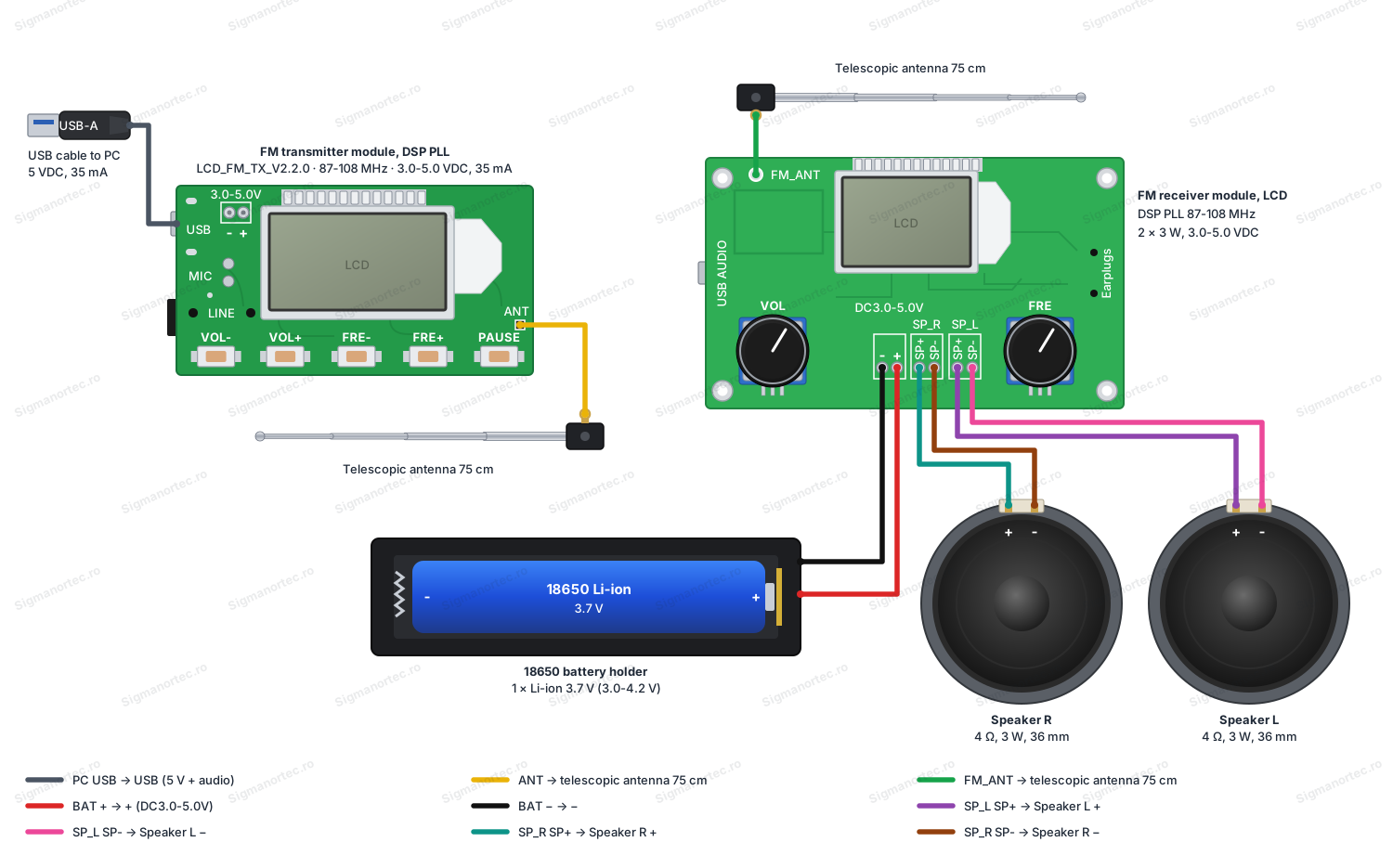
Respect the - and + markings silkscreened on the receiver board, because the terminal order in the diagram may differ slightly from your board. Do not use two Li-ion cells in series, as 7.4 V exceeds the 5.0 V limit and destroys the receiver. Do not use an unfiltered phone charger as a power source either, as its noise gets into the sound.
If you want to power the transmitter from a battery, connect a 3.0 - 5.0 V battery to the - and + pads on the top left of the board, respecting polarity. The audio source, for example a phone, is then connected to the LINE input.
Configuration:
Each module is adjusted separately from its buttons. The transmitter has five buttons (VOL-, VOL+, FRE-, FRE+, PAUSE), and the receiver has two rotary push buttons (VOL and FRE). The last frequency and last volume remain in memory even after power-off, so they do not need to be adjusted at each start.
| Transmitter, command | Action | Result |
|---|---|---|
| FRE- / FRE+ | Short press | Frequency decreases or increases by 0.1 MHz |
| FRE- / FRE+ | Long press | Frequency changes continuously in 1.0 MHz steps |
| VOL- / VOL+ | Press | Digital volume, 30 steps |
| PAUSE | Press | Toggles between mute and unmute |
| VOL- and VOL+ held down when connecting power | Power off, then on with buttons held | Changes band, LCD shows C1 for 76.0 - 108.0 MHz or C0 for 87.0 - 108.0 MHz |
| Points M and G on back | Short circuit with wire or solder drop | Mono transmission, with points free transmission is stereo |
| Receiver, command | Action | Result |
|---|---|---|
| VOL button | Rotate | Volume adjustment, with level displayed on LCD |
| VOL button | Press | Mute or unmute |
| FRE button | Rotate | Tune to frequency, with value displayed on LCD |
| FRE button | Press | Starts or stops automatic squelch, with threshold adjustable between 0 and 20 |
| VOL held down when connecting power | Power off, then on with button held | Changes band, C1 for 76.0 - 108.0 MHz or C0 for 87.0 - 108.0 MHz |
| FRE held down when connecting power | Power off, then on with button held | Changes backlight, B1 for permanent light or B0 for turn off after 20 s |
Band and backlight changes on the receiver are applied after restart and stored in memory. Repeat the procedure to return to the previous setting. The factory default is standard band C0, that is 87.0 - 108.0 MHz.
Usage example:
The purpose of the example is to play the computer sound on two speakers in another room. Mount the 18650 cell in the holder and connect everything as in the diagram above, but leave the holder without the cell for now.
Connect the micro USB cable between the transmitter and the computer. The transmitter LCD lights up and displays the frequency. Verify that both modules are in the same band. For this example leave C0 on both, that is 87.0 - 108.0 MHz.
Choose a free frequency, for example 100.0 MHz. On the transmitter use long presses on FRE+ until you get close, then short presses for 0.1 MHz steps. Set the transmitter volume to about 20 out of 30 steps with VOL+.
In the computer's sound settings select the newly appeared USB device as audio output, then play a song. Insert the cell in the holder. The receiver starts, and the LCD shows the frequency. Rotate the FRE button until the display shows 100.0 MHz. After the song is heard, gradually increase the volume with the VOL button.
If the sound is weak, increase the receiver volume and not the transmitter volume above 20 out of 30 steps, as too high a level on the transmitter can distort the sound. If you want to temporarily stop the sound, press PAUSE on the transmitter or press the receiver VOL button.
Common problems:
The receiver plays only noise. The usual cause is a different frequency or a different band. The solution is to check that both LCDs show the same frequency, then check the letter C0 or C1 on restart so the modules are in the same band. If the frequency is occupied by a local station, choose another.
Nothing is heard, even though the frequencies match. The computer may be playing sound on another output, and the transmitter may be muted. Select the USB audio device as output in sound settings and press PAUSE on the transmitter until the mute state disappears. Also check the volume on both modules.
Sound cuts out or noise appears. Usually the antennas are loose or missing, or the power supply produces noise. Fully extend the 75 cm antennas and keep them away from metal objects. On the receiver use a battery or a regulated and filtered power supply, not a phone charger.
Weak signal disappears completely. The receiver's automatic squelch cuts weak signals if the threshold is too high. Press the receiver FRE button to turn off the function or reduce the threshold between 0 and 20.
Receiver turns off or restarts at high volume. At maximum volume current rises to 1000 mA, and a discharged cell or poor holder no longer maintains voltage above 3.0 V. Use a charged cell and short wires, and if the problem persists, reduce the volume.
Speakers remain silent. If something is inserted in the headphone jack, the receiver automatically stops the speakers. Remove the plug from the jack. Also check that the speakers are 4 ohm and connected to terminals SP+_1, SP-_1, SP+_2 and SP-_2.
Limitations and tips:
The transmitter has 100 mW power, so the range is small and depends heavily on walls, antenna and radio noise in the area. The frequency response is 50 Hz - 18 kHz, and the signal-to-noise ratio is at least 30 dB. It is sufficient for voice and everyday music, but not for high-fidelity listening. FM broadcasting in the band is regulated, so find out about local rules and use the setup over short distance on a free frequency.
The receiver provides 3 W per channel only on 4 ohm speakers. For this it uses a power supply that can deliver 1 A and a Li-ion cell with voltage between 3.0 and 4.2 V. Keep the transmitter and receiver speakers apart if you use the transmitter microphone, as sound from the speaker enters the microphone and produces echo.
The setup can be extended. The transmitter accepts sound through the LINE input from a phone, and the MIC microphone turns it into a wireless microphone. The transmitter also has serial TTL pins (TX, RX, GND) on the back for control from a microcontroller. The receiver in turn has a TTL serial interface (UART_RX, UART_TX, GND) at 38400 baud with AT commands for frequency, volume and squelch. The level is TTL, so a USB-TTL adapter is used from a computer.