

Product images are for informational purposes only and may vary slightly depending on the batch and supplier. Product specifications and prices may be subject to change without notice. We do our best to provide accurate and complete product specifications, but they may not be completely accurate. If you encounter any such situation, please let us know.
The product is intended for specialists and requires qualified and authorized personnel. The product does not include assembly/use instructions . Putting the product into operation by unqualified persons leads to the loss of the warranty according to the Terms and Conditions on the site.
The specified technical parameters (current, power, etc.) represent maximum allowable values under ideal operating conditions. For safe use and optimal lifespan, it is recommended to operate the product continuously at no more than 50% of the specified maximum values.
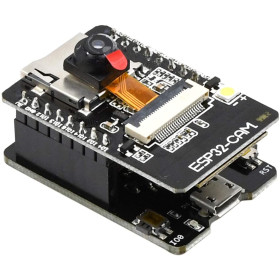
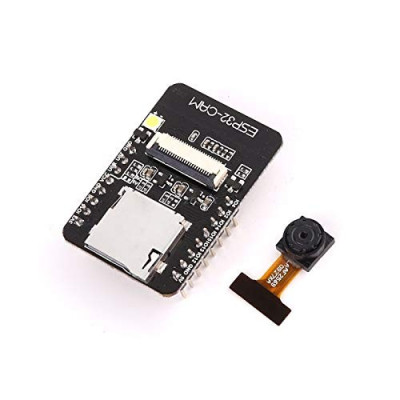
ESP32-CAM development board, Wi‑Fi, Bluetooth, OV5640 5MP
Compact solution for computer vision projects, video streaming and IoT, with WiFi 802.11b/g/n and Bluetooth 4.2 LE connectivity for wireless applications. It integrates a dual-core processor up to 240MHz and 4MB PSRAM for fast image processing, a 5MP OV5640 camera for detailed frames, TF card support and JPEG, BMP, grayscale formats, compatible with Arduino IDE for rapid development.
Shipping by Thursday 22 October
Buying this product earns you Ft311.06 in loyalty points.

International fast shipping within EU. Free Shipping for orders above 100 EUR in most EU countries.

We ship from our stock within 24H

You earn points with every order, worth 5%.
The ESP32-CAM development board is a compact module that combines an ESP32 WiFi and Bluetooth processor with a 5MP OV5640 camera attached via an FPC connector, providing a complete solution for image capture and transmission in artificial vision, video streaming, and IoT projects. The board can operate independently, sending images and video streams over WiFi, or it can be programmed to respond to commands received via UART, making it suitable for surveillance, object recognition, remote monitoring, and automated photography projects.
The processor is a dual-core 32-bit ESP32 LX6, with operating frequencies between 80 and 240 MHz and computing power of up to 600 DMIPS. The internal 520 KB SRAM memory is complemented by 4 MB of external PSRAM, required for processing high-resolution images before compression and transmission. The OV5640 camera offers a maximum resolution of 2592 x 1944 pixels (5 MP) and is connected via a flex cable to a 24-pin FPC connector, the same type of connector used for the older OV2640 camera version.
Among the main features are the FPC camera connector, the microSD card slot of up to 4 GB, a white LED used as a flash, a PCB antenna printed on the board, two rows of pins (16 in total) that expose power, free GPIOs and the UART interface, and a RESET button. Power is supplied at 5 VDC on the 5V pin, with a stable source of at least 2A recommended; the board can also be powered at 3.3 VDC through the 3V3 pin.
Through the UART interface (U0T and U0R pins), the board can be programmed and tested using a USB-to-serial adapter from a computer, and after connecting to the network, images and video streams can be accessed directly from a browser on any computer or phone on the local network. The remaining free GPIO pins also allow connection of additional sensors or modules compatible with Arduino, ESP32, STM32, or Raspberry Pi, using the board's 3.3V logic level.
WARNING
Camera OV5640 (current batch)
This module is supplied with an OV5640 (5MP) camera instead of the OV2640. The sensor heats up significantly during operation and may become hot to the touch. This is normal behavior for this board-camera combination, not a defect.
Mandatory operating conditions:
Heatsink mounted on the back of the camera, with thermal tape or pad.
Good ventilation; do not use the module in closed enclosures without air circulation.
Stable 5V power supply, minimum 2A, on the 5V pin. Do not power the module from the USB-serial adapter on 3.3V.
Recommendations:
In Arduino IDE, select the “AI Thinker ESP32-CAM” board and use the CameraWebServer example.
Use JPEG format. For continuous streaming, choose a reduced resolution (SVGA or HD); use maximum resolution only for photos.
For periodic captures, turn off the sensor between shots (GPIO32 set HIGH).
On the autofocus version, automatic focusing requires 3.3V on pin 24 of the camera connector and a dedicated library. Without these, the camera works with fixed focus.
The module is not recommended for 24/7 continuous streaming. If you need the OV2640 version, contact us before placing the order.
Specifications:

Supply voltage: 5 VDC (5V pin)
Current consumption: 180 mA (Flash LED off) / 310 mA (Flash LED on, maximum brightness)
Deep-sleep current consumption: 6 mA minimum
Modem-sleep current consumption: 20 mA minimum
Light-sleep current consumption: 6.7 mA minimum
Number of pins: 16
WiFi: 802.11 b/g/n
Bluetooth: 4.2 LE
CPU: Dual core LX6, 32-bit
CPU frequency: 80 - 240 MHz
Internal memory: 520 KB SRAM
External memory: 4 MB PSRAM
Supported interfaces: UART, SPI, I2C, PWM, ADC, DAC
Included camera: OV5640, 5 MP, maximum resolution 2592 x 1944 pixels
Image formats: JPEG, BMP, grayscale
Memory card: microSD (TF), up to 4 GB
Low-power modes: Deep-sleep, Modem-sleep, Light-sleep
Integrated software stack: LwIP, FreeRTOS
Network operating modes: STA / AP / STA+AP
Smart Config / AirKiss: Yes
FOTA update: Yes
SPI Flash memory: 32 Mbit
Camera connector: FPC, 24 pins
Programmer included: No, requires an external adapter (FT232 or equivalent recommended)
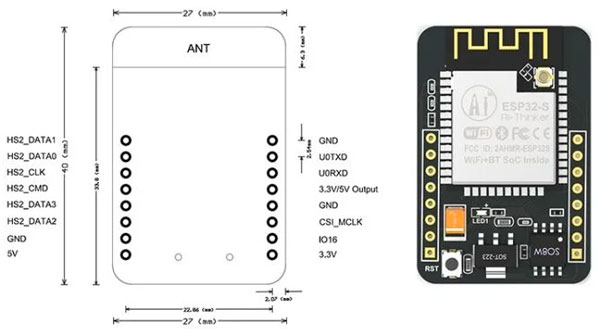
Dimensions: 42 x 27 x 12 mm
Layout:
| Element | Function |
|---|---|
| ESP32-S module with PCB antenna | The dual-core ESP32 processor and the WiFi/Bluetooth antenna printed on the board. |
| White LED | Used as a camera flash, controlled by GPIO4. |
| FPC camera connector | 24-pin connector to which the OV5640 camera flex cable is attached. |
| OV5640 camera | 5 MP camera module, mounted separately from the board and connected via flex cable. |
| microSD (TF) card slot | Local storage for images and files, cards up to 4 GB. |
| Two rows of pins (dual header) | Expose power, free GPIOs and the UART interface, 16 pins in total. |
| RESET button | Resets the ESP32 microcontroller, also used when uploading the program. |
| Voltage regulator | Converts the 5V supply into the 3.3V voltage required by the board circuits. |
| Mounting holes | Two holes between the rows of pins, for securing the board. |
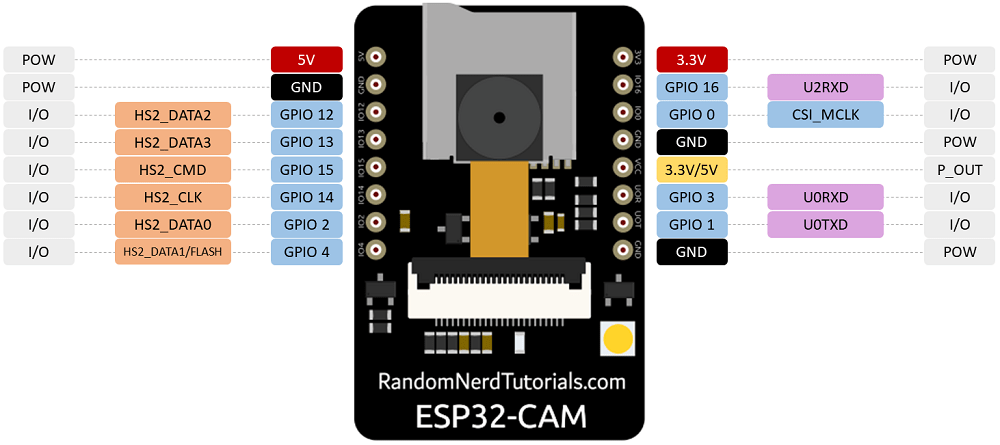
Pinout:
| Connector | Pin | Function |
|---|---|---|
| 5V header | 5V | Board power supply, 5 VDC |
| 5V header | GND | Ground |
| 5V header | IO12 | GPIO12, also used as MicroSD DATA2 |
| 5V header | IO13 | GPIO13, also used as MicroSD DATA3 |
| 5V header | IO15 | GPIO15, also used as MicroSD CMD |
| 5V header | IO14 | GPIO14, also used as MicroSD CLK |
| 5V header | IO2 | GPIO2, also used as MicroSD DATA0 |
| 5V header | IO4 | GPIO4, also used as MicroSD DATA1, controls the flash LED |
| 3V3 header | 3V3 | Board power supply, 3.3 VDC |
| 3V3 header | IO16 | GPIO16, free line, can be UART2 RX |
| 3V3 header | IO0 | GPIO0, selects the boot mode, connected to GND for program upload |
| 3V3 header | GND | Ground |
| 3V3 header | VCC | 3.3V or 5V output, do not power the board through this pin |
| 3V3 header | U0R (IO3) | UART RX, serial data reception |
| 3V3 header | U0T (IO1) | UART TX, serial data transmission |
| 3V3 header | GND | Ground |
| Camera signal (FPC) | ESP32 GPIO | Function |
|---|---|---|
| D0 | GPIO5 | Camera data line (Y2) |
| D1 | GPIO18 | Camera data line (Y3) |
| D2 | GPIO19 | Camera data line (Y4) |
| D3 | GPIO21 | Camera data line (Y5) |
| D4 | GPIO36 | Camera data line (Y6) |
| D5 | GPIO39 | Camera data line (Y7) |
| D6 | GPIO34 | Camera data line (Y8) |
| D7 | GPIO35 | Camera data line (Y9) |
| XCLK | GPIO0 | Input clock for the camera sensor |
| PCLK | GPIO22 | Pixel output clock |
| VSYNC | GPIO25 | Vertical frame synchronization |
| HREF | GPIO23 | Horizontal line synchronization |
| SIOD (SDA) | GPIO26 | I2C/SCCB, sensor configuration |
| SIOC (SCL) | GPIO27 | I2C/SCCB, sensor configuration |
| PWDN | GPIO32 | Sensor power-down, HIGH to turn off between captures |
Use:
If the camera module is not already mounted, attach it to the board's FPC connector, respecting the contact orientation, and close the connector locking latch.
Mount a small heatsink, with thermal tape or pad, on the back of the OV5640 camera before first use, because the sensor heats up significantly during operation and may become hot to the touch; this is normal behavior for this board-camera combination.
Ensure good ventilation around the module and do not use it in a closed enclosure without air circulation.
Power the board with 5 VDC, minimum 2A, on the 5V pin, using a stable supply, and do not power the module from the 3.3V output of a USB-serial adapter.
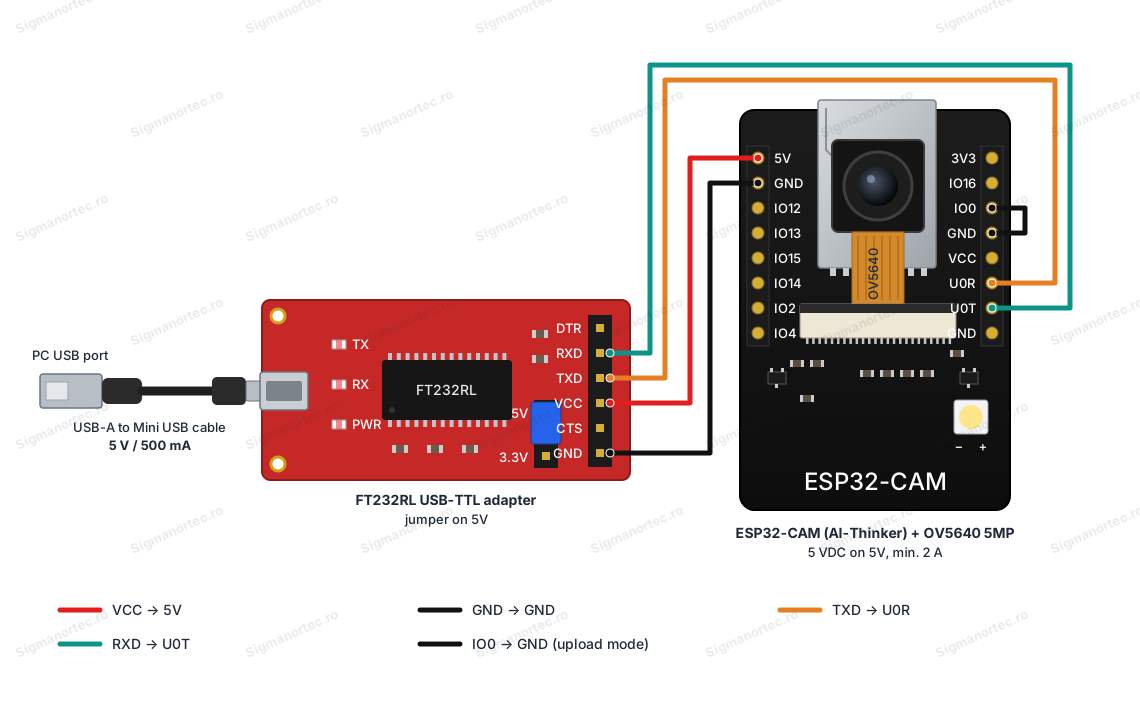
For programming, connect an FT232 or equivalent adapter to the U0R, U0T, and GND pins, with the adapter voltage jumper set to 5V, connecting the adapter TXD to U0R and the adapter RXD to U0T.
In Arduino IDE, install the esp32 board package by Espressif Systems from the Boards Manager, select the AI Thinker ESP32-CAM board, and open the CameraWebServer example from the File - Examples menu.
In the code, select the line #define CAMERA_MODEL_AI_THINKER and enter the WiFi network name and password.
Before uploading, temporarily connect IO0 to GND to put the board into Flash mode, briefly press the RESET button, then start uploading the code from Arduino IDE.
After the upload is complete, remove the connection between IO0 and GND and press RESET again so the board runs the uploaded program.
Open Serial Monitor at 115200 baud, wait for connection to the WiFi network, and note the displayed IP address, then access this address from a browser to view the video stream.
For continuous streaming, use JPEG format at a reduced resolution, such as SVGA or HD, and reserve maximum resolution only for individual photos.
For periodic captures, turn off the sensor between shots by setting GPIO32 HIGH and bring it back LOW before the next capture.
On the autofocus version, power pin 24 of the camera connector at 3.3V and use a dedicated autofocus control library; otherwise, the camera operates with fixed focus.
Do not use the module for 24/7 continuous video streaming; the board is designed for intermittent captures and monitoring.
Dimension diagram:
Tutorial:



Produs destinat utilizarii in proiecte electronice, automatizari, prototipare, educatie si cercetare.
Produsul trebuie utilizat numai conform specificatiilor tehnice mentionate in descriere si/sau in documentatia produsului.
Avertismente generale de siguranta:
Nu utilizati produsul la tensiuni, curenti sau temperaturi peste valorile specificate.
Montajul si conectarea trebuie realizate de persoane cu cunostinte tehnice minime in domeniul electric/electronic.
Evitati scurtcircuitele, inversarea polaritatii si conectarea gresita a alimentarii.
Nu lasati produsul alimentat nesupravegheat in timpul testelor.
Produsul nu este jucarie si nu este destinat copiilor.
Pentru modulele electronice, se recomanda utilizarea in carcase, panouri sau montaje protejate, dupa caz.
Identificare produs:
Denumirea produsului, codul/SKU-ul si caracteristicile tehnice sunt mentionate in pagina produsului si/sau pe eticheta ambalajului.
Producator / Importator / Distribuitor:
Sigmanortec S.R.L.
Calea Bucuresti nr. 9, Targu Jiu, Gorj, Romania
E-mail: [email protected]
Website: www.sigmanortec.ro
Persoana responsabila in UE:
Sigmanortec S.R.L.
Calea Bucuresti nr. 9, Targu Jiu, Gorj, Romania
E-mail: [email protected]
Documentatie si siguranta:
Pentru informatii suplimentare, fise tehnice, declaratii de conformitate sau instructiuni, ne puteti contacta la [email protected].
Reviews (4) - Review moderation

Modulul esp32 cam este mai ciudatel, incercati sa il alimentati de la o sursa de curent separata cand incarcati codul, folosind pinii de 5V (legati la un cablu usb bagat intr-un powered hub sau intr-un incarcator pentru telefon) mie mi-a mers impecabil. Iar pretul este cel mai mic de pe piata clar.
M-am chinuit si eu o saptamana sa instalez o camera si nu am reusit. Am urmarit o mulsime de clipuri de pe YouTube . Eaec dupa eaec ! Atunci am deschis un topic pe Forum Softpedia cu acest nume si am cerut ajutor. Am gasit un bsiat mai priceput decat mine care m-a ajutat si in cele din urma, am reusit sa instalez softul ! ( https://forum.softpedia.com/topic/1218817-camera-de-supraveghere-esp32-camera-sau-similare/ ) Acum am camera funcsionala, dar nu atiu sa o folosesc ! Nu atiu cu as putea vedea anregistrarile de pe card, fara a extrage cardul din camera a Daca ma poate ajuta cineva, ramin recunoscator !
modul total instabil. trebuia sa citesc recenziile inainte de achizitie
Foarte fain modulul, In final am cumparat si modulul fara camera deoarece camera foloseste o mare parte din pinii ESP32. Contrar comentariilor de mai jos, modulul functioneaza perfect si se poate programa / conecta la internet / face stream video.
/*
  Test sketch for ESP32-CAM (AI-Thinker) with OV5640 5MP camera
  Board: "AI Thinker ESP32-CAM" (Tools > Board > ESP32 Arduino)
  Board package: esp32 by Espressif Systems, installed from Boards Manager
  Boards Manager URL: https://dl.espressif.com/dl/package_esp32_index.json
  Library: esp_camera.h, included with the esp32 package, no extra library required
  Wiring: camera attached through the onboard FPC connector, board powered at 5V on the 5V pin
  This sketch does not use Wi-Fi, it only verifies that the camera initializes and captures frames
*/

#include "esp_camera.h"

// ---- AI-Thinker camera pin map ----
#define PWDN_GPIO_NUM   32
#define RESET_GPIO_NUM  -1
#define XCLK_GPIO_NUM    0
#define SIOD_GPIO_NUM   26
#define SIOC_GPIO_NUM   27
#define Y9_GPIO_NUM     35
#define Y8_GPIO_NUM     34
#define Y7_GPIO_NUM     39
#define Y6_GPIO_NUM     36
#define Y5_GPIO_NUM     21
#define Y4_GPIO_NUM     19
#define Y3_GPIO_NUM     18
#define Y2_GPIO_NUM      5
#define VSYNC_GPIO_NUM  25
#define HREF_GPIO_NUM   23
#define PCLK_GPIO_NUM   22

void setup() {
  Serial.begin(115200);
  delay(500);
  Serial.println("ESP32-CAM OV5640 test starting");

  camera_config_t config;
  config.ledc_channel = LEDC_CHANNEL_0;
  config.ledc_timer = LEDC_TIMER_0;
  config.pin_d0 = Y2_GPIO_NUM;
  config.pin_d1 = Y3_GPIO_NUM;
  config.pin_d2 = Y4_GPIO_NUM;
  config.pin_d3 = Y5_GPIO_NUM;
  config.pin_d4 = Y6_GPIO_NUM;
  config.pin_d5 = Y7_GPIO_NUM;
  config.pin_d6 = Y8_GPIO_NUM;
  config.pin_d7 = Y9_GPIO_NUM;
  config.pin_xclk = XCLK_GPIO_NUM;
  config.pin_pclk = PCLK_GPIO_NUM;
  config.pin_vsync = VSYNC_GPIO_NUM;
  config.pin_href = HREF_GPIO_NUM;
  config.pin_sscb_sda = SIOD_GPIO_NUM;
  config.pin_sscb_scl = SIOC_GPIO_NUM;
  config.pin_pwdn = PWDN_GPIO_NUM;
  config.pin_reset = RESET_GPIO_NUM;
  config.xclk_freq_hz = 20000000;
  config.pixel_format = PIXFORMAT_JPEG;
  config.frame_size = psramFound() ? FRAMESIZE_UXGA : FRAMESIZE_CIF;
  config.jpeg_quality = 12;
  config.fb_count = psramFound() ? 2 : 1;

  esp_err_t err = esp_camera_init(&config);
  if (err != ESP_OK) {
    Serial.printf("Camera init failed with error 0x%x\n", err);
    return;
  }
  Serial.println("Camera init OK");
}

void loop() {
  camera_fb_t * fb = esp_camera_fb_get();
  if (!fb) {
    Serial.println("Frame capture failed");
  } else {
    Serial.printf("Captured frame: %u x %u pixels, %u bytes\n", fb->width, fb->height, fb->len);
    esp_camera_fb_return(fb);
  }
  delay(5000);
}
The ESP32-CAM board with the 5MP OV5640 camera is an ESP32 development module with a built-in camera. It is used to capture and transmit images over WiFi without any additional components. This tutorial uses the ESP32-CAM AI-Thinker board as the platform, together with Arduino IDE, to upload a program that starts the camera and serves a simple video stream through an internal web server.
Because the board has no USB port of its own, uploading the program requires an external USB-to-serial adapter, such as the FT232, connected to the serial pins of the board.

How it works:
The OV5640 sensor captures the image over the 8 parallel data lines D0-D7, synchronized by the XCLK, PCLK, VSYNC and HREF signals. The sensor is configured (resolution, exposure, white balance) through an I2C/SCCB link on the SIOD and SIOC lines. The sensor compresses the image into JPEG format before the ESP32 reads it, which greatly reduces the amount of data compared to a raw image.
At SVGA resolution (800 x 600 pixels), a JPEG frame is roughly 20 - 50 KB, depending on the scene and on the quality level chosen in the code. Dividing a typical local WiFi bandwidth of a few hundred KB/s by this frame size gives a stream of a few frames per second. This is enough for video monitoring, but well below the maximum capability of the 2592 x 1944 pixel sensor, which is reserved for individual photos.
Wiring:
The board is programmed through an FT232 adapter connected to the serial pins of the ESP32-CAM, with the adapter's voltage jumper set to 5V. The IO0 pin is temporarily connected to GND only while the code is being uploaded.
| Product pin | Connects to | Function |
|---|---|---|
| 5V | FT232 VCC | Board power supply, 5 VDC |
| GND | FT232 GND | Common ground |
| U0R (GPIO3) | FT232 TXD | Serial data reception (the lines cross over) |
| U0T (GPIO1) | FT232 RXD | Serial data transmission (the lines cross over) |
| IO0 | GND (temporary jumper) | Selects Flash mode for uploading the code |
Board and libraries:
In Arduino IDE, go to File - Preferences and add the address https://dl.espressif.com/dl/package_esp32_index.json in the Additional Boards Manager URLs field. Then open Tools - Board - Boards Manager, search for esp32 and install the esp32 by Espressif Systems package.
After installation, select the AI Thinker ESP32-CAM board from Tools - Board - ESP32 Arduino.
You do not need to install any additional library, because esp_camera.h and WiFi.h are included automatically with the esp32 by Espressif Systems package.
The code:
The code below initializes the camera with the AI-Thinker board pin mapping, connects to the WiFi network and sends the video stream to any client connected on port 80.
/*
  ESP32-CAM (AI-Thinker) with OV5640 5MP camera - WiFi video stream example
  Board: "AI Thinker ESP32-CAM" (Tools > Board > ESP32 Arduino)
  Board package: esp32 by Espressif Systems, installed from Boards Manager
  Boards Manager URL: https://dl.espressif.com/dl/package_esp32_index.json
  Libraries: esp_camera.h and WiFi.h, both included with the esp32 package, no extra library required
  Upload wiring: FT232 VCC->5V, FT232 GND->GND, FT232 TXD->U0R, FT232 RXD->U0T, IO0 bridged to GND only during upload
*/
#include "esp_camera.h"
#include <WiFi.h>
// ---- Wi-Fi credentials ----
const char* ssid = "YOUR_WIFI_SSID";
const char* password = "YOUR_WIFI_PASSWORD";
// ---- AI-Thinker camera pin map ----
#define PWDN_GPIO_NUM   32
#define RESET_GPIO_NUM  -1
#define XCLK_GPIO_NUM    0
#define SIOD_GPIO_NUM   26
#define SIOC_GPIO_NUM   27
#define Y9_GPIO_NUM     35
#define Y8_GPIO_NUM     34
#define Y7_GPIO_NUM     39
#define Y6_GPIO_NUM     36
#define Y5_GPIO_NUM     21
#define Y4_GPIO_NUM     19
#define Y3_GPIO_NUM     18
#define Y2_GPIO_NUM      5
#define VSYNC_GPIO_NUM  25
#define HREF_GPIO_NUM   23
#define PCLK_GPIO_NUM   22
WiFiServer server(80);
void startCamera() {
  camera_config_t config;
  config.ledc_channel = LEDC_CHANNEL_0;
  config.ledc_timer = LEDC_TIMER_0;
  config.pin_d0 = Y2_GPIO_NUM;
  config.pin_d1 = Y3_GPIO_NUM;
  config.pin_d2 = Y4_GPIO_NUM;
  config.pin_d3 = Y5_GPIO_NUM;
  config.pin_d4 = Y6_GPIO_NUM;
  config.pin_d5 = Y7_GPIO_NUM;
  config.pin_d6 = Y8_GPIO_NUM;
  config.pin_d7 = Y9_GPIO_NUM;
  config.pin_xclk = XCLK_GPIO_NUM;
  config.pin_pclk = PCLK_GPIO_NUM;
  config.pin_vsync = VSYNC_GPIO_NUM;
  config.pin_href = HREF_GPIO_NUM;
  config.pin_sscb_sda = SIOD_GPIO_NUM;
  config.pin_sscb_scl = SIOC_GPIO_NUM;
  config.pin_pwdn = PWDN_GPIO_NUM;
  config.pin_reset = RESET_GPIO_NUM;
  config.xclk_freq_hz = 20000000;
  config.pixel_format = PIXFORMAT_JPEG;
  if (psramFound()) {
    config.frame_size = FRAMESIZE_SVGA;   // 800x600, good balance for streaming
    config.jpeg_quality = 12;             // lower number = higher quality, bigger file
    config.fb_count = 2;
  } else {
    config.frame_size = FRAMESIZE_CIF;
    config.jpeg_quality = 15;
    config.fb_count = 1;
  }
  esp_err_t err = esp_camera_init(&config);
  if (err != ESP_OK) {
    Serial.printf("Camera init failed with error 0x%x\n", err);
    return;
  }
  Serial.println("Camera initialized");
}
void sendStreamToClient(WiFiClient &client) {
  client.println("HTTP/1.1 200 OK");
  client.println("Content-Type: multipart/x-mixed-replace; boundary=frame");
  client.println();
  while (client.connected()) {
    camera_fb_t * fb = esp_camera_fb_get();
    if (!fb) {
      Serial.println("Frame capture failed");
      break;
    }
    client.println("--frame");
    client.println("Content-Type: image/jpeg");
    client.printf("Content-Length: %u\n\n", fb->len);
    client.write(fb->buf, fb->len);
    client.println();
    esp_camera_fb_return(fb);
    if (!client.connected()) break;
  }
}
void setup() {
  Serial.begin(115200);
  Serial.println();
  startCamera();
  WiFi.begin(ssid, password);
  Serial.print("Connecting to WiFi");
  while (WiFi.status() != WL_CONNECTED) {
    delay(500);
    Serial.print(".");
  }
  Serial.println();
  Serial.print("WiFi connected, IP address: ");
  Serial.println(WiFi.localIP());
  Serial.println("Open this address in a browser to view the live stream");
  server.begin();
}
void loop() {
  WiFiClient client = server.available();
  if (client) {
    Serial.println("New client connected");
    sendStreamToClient(client);
    client.stop();
    Serial.println("Client disconnected");
  }
}
How the code works:
At the beginning of the file, the WiFi network credentials (ssid, password) and the camera pins for the AI-Thinker board are defined (PWDN_GPIO_NUM, XCLK_GPIO_NUM, Y2_GPIO_NUM - Y9_GPIO_NUM, VSYNC_GPIO_NUM, HREF_GPIO_NUM, PCLK_GPIO_NUM, SIOD_GPIO_NUM, SIOC_GPIO_NUM).
The startCamera function fills in the camera_config_t structure with these pins and selects the FRAMESIZE_SVGA resolution. It also uses two frame buffers when the board has PSRAM available. Then it calls esp_camera_init and prints on Serial whether the initialization succeeded.
The sendStreamToClient function sends the connected client a multipart/x-mixed-replace HTTP header. Then, as long as the client stays connected, it grabs one JPEG frame at a time with esp_camera_fb_get, sends it over the connection and releases it with esp_camera_fb_return.
In the setup function, the serial port is initialized, the camera is started, the board waits to connect to the WiFi network and prints the IP address it received. Then the WiFiServer server is started on port 80. In the loop function, the board waits for a new client and sends it the video stream through sendStreamToClient.
Result:
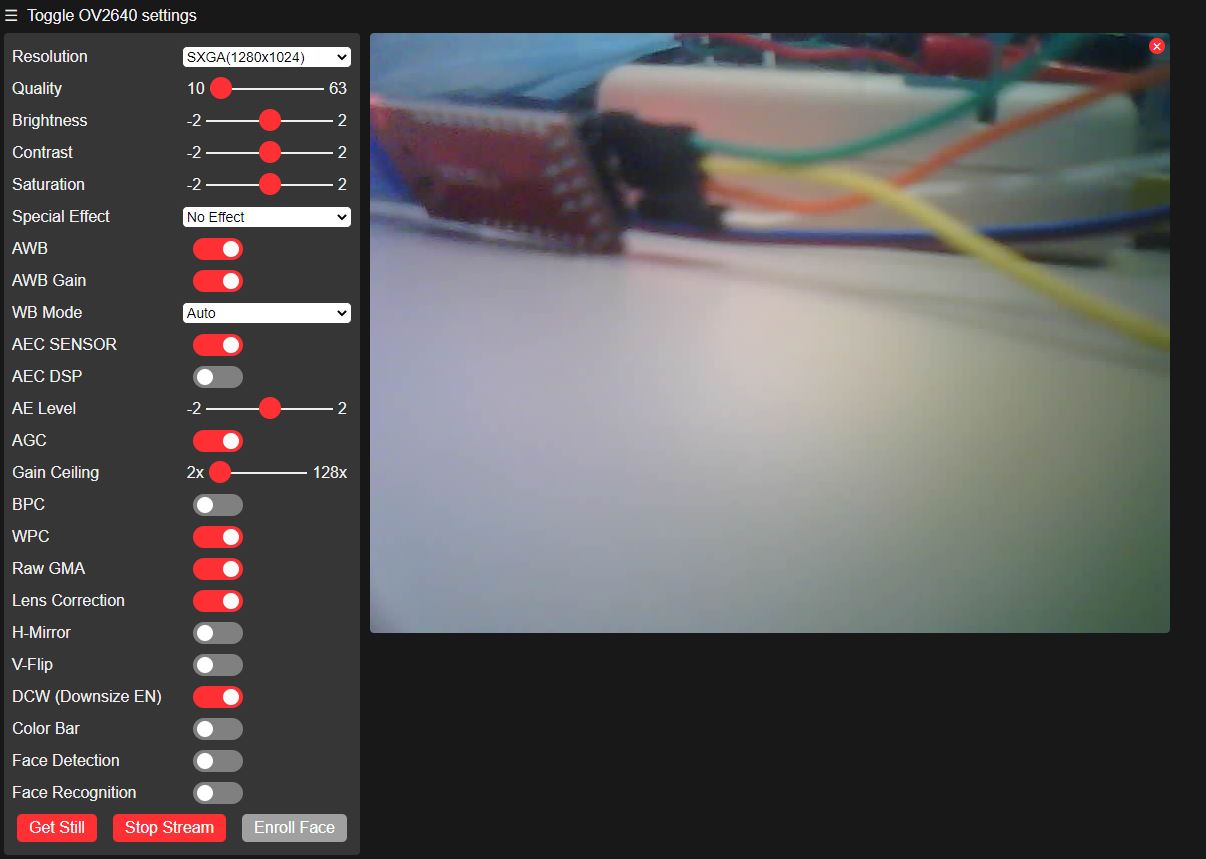
Open Serial Monitor at 115200 baud. After the camera is initialized and the board connects to the network, the board's IP address will be displayed. When you open this address in a browser, the live video stream from the camera will appear.
Camera initialized
Connecting to WiFi.....
WiFi connected, IP address: 192.168.0.114
Open this address in a browser to view the live stream
New client connected
Client disconnected
New client connected
Client disconnected
Common problems:
If Serial Monitor shows nothing, check that the selected speed is 115200 baud and that you removed the connection between IO0 and GND before pressing RESET after the upload.
If an error message appears at startup during camera initialization (camera init failed), check that the camera's flex ribbon is firmly seated in the FPC connector and was not displaced when the heatsink was fitted.
If the board resets by itself or brownout messages appear in Serial Monitor, the power supply is too weak. Replace it with a 5V supply rated for at least 2A, connected directly to the 5V pin.
If the board does not connect to the WiFi network, check that you entered the network name and password correctly and that the WiFi signal is strong enough where the board is installed.
If the image is very dark or full of noise, provide a better light source in the scene, because the camera has no lighting of its own apart from the flash LED.
If the code upload fails with messages about failing to connect to the board, redo the IO0-GND jumper and press RESET again exactly when Arduino IDE starts the upload.
Limitations and tips:
The OV5640 camera reaches its maximum 5MP resolution only for individual photos. For continuous streaming, lower resolutions such as SVGA or HD are recommended, to keep a reasonable number of frames per second.
The board has no USB port of its own, so programming always requires an external USB-to-serial adapter. Also, without the autofocus version, the camera works with a fixed focus.
The sensor gets noticeably warm during operation, which is why the board is not recommended for continuous 24/7 video streaming. It is better suited to monitoring and intermittent captures, with a heatsink fitted and good ventilation.
This setup can be used as a base for projects such as WiFi surveillance cameras, monitoring stations that save images to a microSD card, or simple object recognition systems that process images on an external server.