
Product images are for informational purposes only and may vary slightly depending on the batch and supplier. Product specifications and prices may be subject to change without notice. We do our best to provide accurate and complete product specifications, but they may not be completely accurate. If you encounter any such situation, please let us know.
The product is intended for specialists and requires qualified and authorized personnel. The product does not include assembly/use instructions . Putting the product into operation by unqualified persons leads to the loss of the warranty according to the Terms and Conditions on the site.
The specified technical parameters (current, power, etc.) represent maximum allowable values under ideal operating conditions. For safe use and optimal lifespan, it is recommended to operate the product continuously at no more than 50% of the specified maximum values.
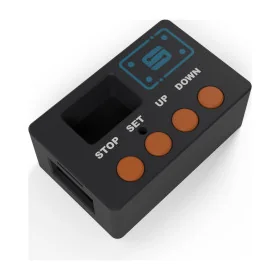
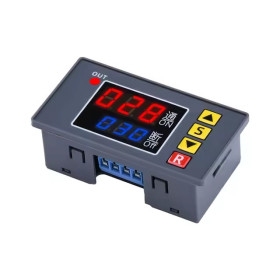
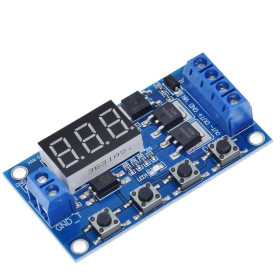
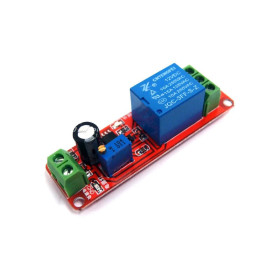
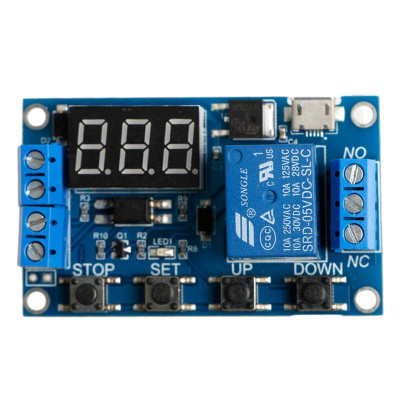
Relay module with delay, HCW-M421, adjustable time, display, 6–30V
Adjustable delay relay module, ideal for automation and timed controls, has a digital display for quick setup and monitoring, is flexibly powered at 5V via MicroUSB or 6-30VDC at the terminals, offers selectable resolution down to tenths of a second and includes 4 operating modes for delay, pulse, or ON/OFF cycle, 5A relay for DC or AC loads.
Shipping by Thursday 22 October
Buying this product earns you 0.19 € in loyalty points.

International fast shipping within EU. Free Shipping for orders above 100 EUR in most EU countries.

We ship from our stock within 24H

You earn points with every order, worth 5%.
The HCW-M421 delay relay module is a programmable timer with a display, used to control an external load after an adjustable time interval or after a cycle of repeated on and off operations. It receives an external High Level trigger signal or can operate independently, directly from the power supply, making it suitable for automation, delayed starting or stopping of pumps, solenoid valves, lighting, motors, chargers, and other equipment that requires timing or cyclic operation.
The accepted trigger signal is High Level, with a voltage between 3 and 24 V, optically isolated from the rest of the circuit for stable operation in environments with interference. The module offers 7 operating modes (P1.1, P1.2, P1.3, P2, P3.1, P3.2 and P4), each using combinations of the OP (activation time), CL (deactivation time), and LOP (number of repeated cycles, between 1 and 999 or unlimited) parameters. Time is set with 0.1-second resolution, in the ranges 0 - 99.9 seconds, 0 - 999 seconds, or 0 - 999 minutes, selected by the decimal point position on the 3-digit display.
Among the main features are the output relay with NO, COM and NC contacts, the 3-digit digital display, the four control buttons STOP, SET, UP and DOWN, the MicroUSB connector, and screw terminals for power supply and trigger signal. Power is supplied either at 5 VDC via the MicroUSB port, or at 6 - 30 VDC via the screw terminal, with the two power supply methods usable alternatively.
Thanks to the High Level trigger signal between 3 and 24 V, the module can be controlled directly from the digital outputs of boards such as Arduino, ESP32, STM32 or Raspberry Pi, and through the relay contacts it can also operate equipment connected to a PLC or to the 220 VAC mains.
Specifications:
Model: HCW-M421
Supply voltage: 5 V via MicroUSB or 6 - 30 VDC via screw terminal
Trigger signal: High Level, 3 - 24 V, optically isolated
Output control: Relay with NO / COM / NC contacts, max 30 VDC 5 A or 220 VAC 5 A
Current consumption: approximately 20 mA at rest, 50 mA in operation
Time resolution: 0 - 99.9 seconds, 0 - 999 seconds, 0 - 999 minutes
Operating modes: P1.1, P1.2, P1.3, P2, P3.1, P3.2, P4
Program parameters: OP (activation time), CL (deactivation time), LOP (number of cycles, 1 - 999 or unlimited)
Relay lifespan: over 100,000 cycles
Operating temperature: -40 - 85 degrees Celsius
Parameter memory: settings are retained after power loss
Time display: Depending on the batch, the time can be displayed in ascending order, from 0 to the set value, or descending, from the set value to 0
STOP button control: Relay enable/disable and display switching between C-P mode (turns off after 5 minutes) and O-d mode (always on)
Dimensions: 62 x 38 x 17 mm
Pinout:
| Connector | Pin | Function |
|---|---|---|
| Power block (screw connector) | + | Power supply 6 - 30 VDC |
| Power block (screw connector) | - | Power ground (GND) |
| Trigger block (screw connector) | IN | Trigger signal, High Level 3 - 24 V |
| Trigger block (screw connector) | G | Trigger signal ground |
| MicroUSB | 5V / GND | Alternative 5 VDC power supply |
| Relay output block | NO | Normally open contact |
| Relay output block | COM | Relay common terminal |
| Relay output block | NC | Normally closed contact |
| Program | Submode | Behavior |
|---|---|---|
| P1 | P1.1 | On signal, the relay activates and remains on for OP, then deactivates. A new signal received during OP is ignored. |
| P1 | P1.2 | On signal, the relay activates and remains on for OP, then deactivates. A new signal received during OP restarts the OP countdown. |
| P1 | P1.3 | On signal, the relay activates and remains on for OP, then deactivates. A new signal received during OP immediately stops the relay and the countdown. |
| P2 | - | On signal, the relay remains off for CL, then activates for OP, after which it deactivates. |
| P3 | P3.1 | On signal, the relay enters an ON (OP) / OFF (CL) cycle, repeated LOP times; a new signal stops the current cycle. |
| P3 | P3.2 | At power-up, without requiring a signal, the relay automatically enters an ON (OP) / OFF (CL) cycle, repeated LOP times. |
| P4 | - | The relay remains active as long as the signal is present. When the signal disappears, the OP countdown begins, after which the relay deactivates. |
Usage:
Warning: the relay output contacts can switch 220 VAC mains voltage, which is dangerous to touch; connections on the 220 VAC side must be made only with the load disconnected from the mains, by a qualified person.
Power the module either through the MicroUSB port at 5 VDC, or through the left screw terminal at a voltage between 6 and 30 VDC, observing the indicated polarity.
Connect the load to the output connector using COM and NO for a device that should be powered when the relay activates, or COM and NC for one that should be powered permanently and interrupted when the relay activates.
Connect the trigger signal between 3 and 24 V to pin IN and the signal ground to pin G, or manually short the two terminals for a quick test, where the selected mode requires an external signal.
Select the operating mode by holding SET for 2 seconds on the main screen, then choose the desired mode (P1.1 - P4) with the UP and DOWN buttons.
Briefly press SET to set the available parameters in the selected mode (OP, CL and LOP), adjusting each value with the UP and DOWN buttons; holding the button allows fast adjustment.
Press STOP during setup to choose the decimal point position and the desired time range, for example display 03.2 corresponds to a value of 3.2 seconds.
After finishing the settings, hold SET for 2 seconds to save the values and return to the main screen.
Briefly press STOP on the main screen to enable or disable relay operation without changing the previously set program and parameters.
Hold STOP for 2 seconds to switch between C-P mode, in which the display turns off after 5 minutes of inactivity, and O-d mode, in which the display remains always on.
Do not exceed the maximum current and voltage allowed by the relay contacts, namely 30 VDC 5 A or 220 VAC 5 A, and do not touch the output terminals while the module is powered.
For stable trigger signal operation, use short cables between the signal source and pins IN and G, especially in environments with high electrical noise.
- Supply Voltage
- 6
- Maximum Input Voltage
- 30
- Output Type Voltage
- Closed-Open Contact
- Input Voltage Type
- “DC” in Romanian can mean **“de ce”**, which translates to **“why”** in English.
Produs destinat utilizarii in proiecte electronice, automatizari, prototipare, educatie si cercetare.
Produsul trebuie utilizat numai conform specificatiilor tehnice mentionate in descriere si/sau in documentatia produsului.
Avertismente generale de siguranta:
Nu utilizati produsul la tensiuni, curenti sau temperaturi peste valorile specificate.
Montajul si conectarea trebuie realizate de persoane cu cunostinte tehnice minime in domeniul electric/electronic.
Evitati scurtcircuitele, inversarea polaritatii si conectarea gresita a alimentarii.
Nu lasati produsul alimentat nesupravegheat in timpul testelor.
Produsul nu este jucarie si nu este destinat copiilor.
Pentru modulele electronice, se recomanda utilizarea in carcase, panouri sau montaje protejate, dupa caz.
Identificare produs:
Denumirea produsului, codul/SKU-ul si caracteristicile tehnice sunt mentionate in pagina produsului si/sau pe eticheta ambalajului.
Producator / Importator / Distribuitor:
Sigmanortec S.R.L.
Calea Bucuresti nr. 9, Targu Jiu, Gorj, Romania
E-mail: [email protected]
Website: www.sigmanortec.ro
Persoana responsabila in UE:
Sigmanortec S.R.L.
Calea Bucuresti nr. 9, Targu Jiu, Gorj, Romania
E-mail: [email protected]
Documentatie si siguranta:
Pentru informatii suplimentare, fise tehnice, declaratii de conformitate sau instructiuni, ne puteti contacta la [email protected].
Reviews (15) - Review moderation

Recomand acest releu color pasionati de electronica , fiind foarte calitativ si un pret foarte mic . Recomand Sigmanortec.ro
Ce mi-ati trimis nu porneste la alimentarea cu 12V ! Porneste doar cu alimentare de la un USB charger cu conector micro USB. Ori eu am nevoie sa al folosesc pentru off grid. an documentatie ati scris ca se alimenteaza si de la la 6...30V DC, ceea ce nu corespunde realitasii...Userul Axelforce a scris de un atrap de facut antre GND si GBD. Ar fi indicat pe viitor sa testati produsele anainte sa le trimitesi si sa corectati manualul de utilizare... ing. Neagu Ioan
Foarte multumit de produse si de servicii . Multumesc
Funcsioneaza perfect! Poate fi programat in diferite moduri! Recomand
Merge bine.
The HCW-M421 delay relay module is a compact board used to turn an external load on or off after an adjustable time, either on a single command or in repeated on-off cycles. It is useful in Arduino automation projects, where the microcontroller only needs to send a short trigger signal, while the rest of the timing is handled independently by the module, without using up the development board's resources.

How it works:
The module receives on the IN pin a High Level type signal, between 3 and 24 V, passed through an optocoupler that electrically isolates the input from the rest of the circuit. The microcontroller on the board detects the signal edge, starts an internal counter and controls the relay according to the operating mode chosen from P1.1, P1.2, P1.3, P2, P3.1, P3.2 and P4. Each mode uses the parameters OP (duration the relay stays active), CL (duration it stays inactive between cycles) and LOP (number of repeated cycles), set directly on the module using the STOP, SET, UP and DOWN buttons. In the test from this tutorial we use mode P1.1, where a single trigger pulse on IN activates the relay for exactly the set OP duration, after which it deactivates automatically, regardless of how long the received signal lasts.
What you need:
- 1 x HCW-M421 delay relay module, adjustable time, display, 6-30V
- 1 x Uno R3 development board with ESP8266 Wifi, Arduino compatible
- 1 x 9V power supply for the module
- 1 x 40 Dupont wires 10cm, Male-Female
- 1 x Breadboard 830 points MB-102
Wiring:
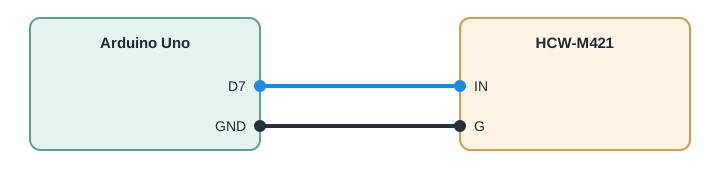
The HCW-M421 module is not powered from Arduino, it needs a separate 6 - 30 VDC power source on the screw terminal connector or 5 VDC through the MicroUSB port. The Arduino Uno is used only to send the trigger signal on the IN pin, connecting the Arduino ground to the module's G pin for a common reference. If you later connect a load powered from 220 VAC to the relay output, only work with that load unplugged, since the NO, COM and NC relay contacts can switch dangerous voltages to the touch.
| Product pin | Arduino Uno pin | Role |
|---|---|---|
| IN | D7 | Trigger signal sent by Arduino to the module |
| G | GND | Common ground between Arduino and module |
| + / - | Not connected | Module power supply from external 6 - 30 VDC source, separate from Arduino |
The code:
The program below periodically sends a short pulse on pin D7, connected to the module's IN input, and displays on the serial monitor each pulse sent.
// HCW-M421 Timer Relay Trigger Demo
// Sends periodic HIGH pulses to the module IN pin to start one timing cycle
// Use together with the module set to mode P1.1 for a simple delay ON test
const int TRIGGER_PIN = 7;                     // Digital pin connected to module IN pin
const unsigned long PULSE_DURATION_MS = 200;   // Length of the trigger pulse in milliseconds
const unsigned long CYCLE_INTERVAL_MS = 10000; // Time between two trigger pulses in milliseconds
unsigned long lastTriggerTime = 0;
unsigned long pulseCount = 0;
void setup() {
  Serial.begin(9600);
  pinMode(TRIGGER_PIN, OUTPUT);
  digitalWrite(TRIGGER_PIN, LOW);
  Serial.println("HCW-M421 trigger demo started");
}
void loop() {
  unsigned long now = millis();
  if (now - lastTriggerTime >= CYCLE_INTERVAL_MS) {
    lastTriggerTime = now;
    pulseCount++;
    // Send a short HIGH pulse on the trigger pin
    digitalWrite(TRIGGER_PIN, HIGH);
    delay(PULSE_DURATION_MS);
    digitalWrite(TRIGGER_PIN, LOW);
    Serial.print("Trigger pulse #");
    Serial.print(pulseCount);
    Serial.println(" sent to HCW-M421 IN pin");
  }
}
How the code works:
At the beginning of the program, TRIGGER_PIN is defined as the digital pin connected to IN, PULSE_DURATION_MS as the duration of the sent pulse and CYCLE_INTERVAL_MS as the interval between two successive triggers. In the setup function, serial communication is initialized at 9600 baud, TRIGGER_PIN is configured as an output and a startup message is displayed on the serial monitor.
In the loop function, the current time is read with millis and compared to lastTriggerTime, using CYCLE_INTERVAL_MS to decide when a new pulse must be sent, without blocking the rest of the program with a long delay. When the interval has passed, pulseCount is incremented, the TRIGGER_PIN is set HIGH for the PULSE_DURATION_MS duration and then returns to LOW, and the serial monitor displays the number of the pulse sent to the HCW-M421 module.
Result:
Open the serial monitor at 9600 baud, after uploading the program. Every 10 seconds you should hear the click of the relay on the module, and a message with the number of the sent pulse should appear on the serial monitor.
HCW-M421 trigger demo started
Trigger pulse #1 sent to HCW-M421 IN pin
Trigger pulse #2 sent to HCW-M421 IN pin
Trigger pulse #3 sent to HCW-M421 IN pin
Trigger pulse #4 sent to HCW-M421 IN pin
Trigger pulse #5 sent to HCW-M421 IN pin
Trigger pulse #6 sent to HCW-M421 IN pin
Common issues:
No relay click is heard, even though pulse sent messages appear on the serial monitor. Check that the module is properly powered at 6 - 30 VDC or 5 VDC through MicroUSB, since without this separate power supply the module's processor does not function, regardless of the signal received on IN.
The relay activates only once and then no longer responds to the following pulses. Check the operating mode selected on the display, modes P1.2 and P1.3 handle a new signal appearing during OP differently from P1.1, and if mode P4 was accidentally left set, the relay directly follows the signal state, not a short pulse.
The module's display remains off even though the module appears to be powered. Check if C-P mode has been activated, in which the display turns off automatically after 5 minutes of inactivity, a normal situation which can be changed by holding STOP pressed for 2 seconds to return to O-d mode.
Pulses appear to be sent by Arduino, but the module does not react at all. Check the common ground connection between Arduino GND and the module's G pin, a High Level signal without a common ground with the module's power source is not correctly recognized by the optoisolated input.
The time measured by the relay does not match the expected one. Check the position of the decimal point displayed during setting, since the same number can represent seconds or minutes depending on the position of the point, as described in the OP and CL parameter setting mode.
Limitations and tips:
The module times intervals between 0.1 seconds and 999 minutes, with a resolution of 0.1 seconds on short intervals, sufficient for most home or laboratory automation applications, but not for millisecond-range timing. The relay contacts can switch DC or AC loads, but the current and voltage must stay within the limits indicated in the module's specifications, and the 220 VAC side must only be wired with the load unplugged. For more complex projects, the same triggering principle can be extended by using multiple HCW-M421 modules controlled by different digital pins of the same Arduino board, each with its own timing program.