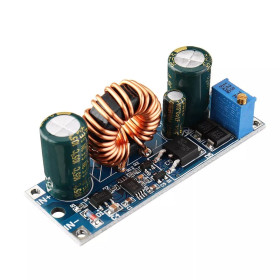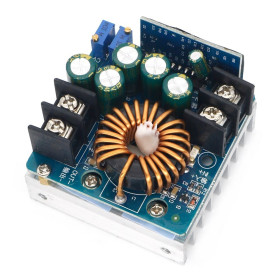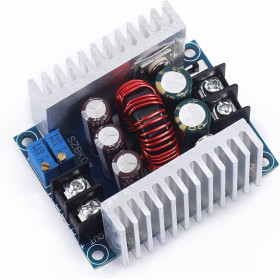


Product images are for informational purposes only and may vary slightly depending on the batch and supplier. Product specifications and prices may be subject to change without notice. We do our best to provide accurate and complete product specifications, but they may not be completely accurate. If you encounter any such situation, please let us know.
The product is intended for specialists and requires qualified and authorized personnel. The product does not include assembly/use instructions . Putting the product into operation by unqualified persons leads to the loss of the warranty according to the Terms and Conditions on the site.
The specified technical parameters (current, power, etc.) represent maximum allowable values under ideal operating conditions. For safe use and optimal lifespan, it is recommended to operate the product continuously at no more than 50% of the specified maximum values.
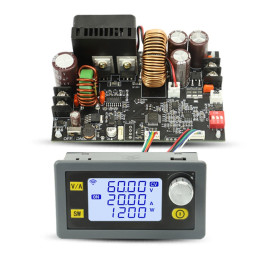
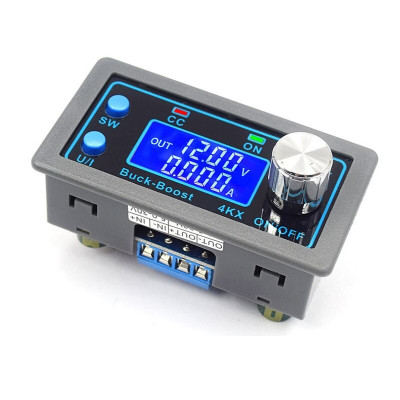
Automatic voltage source module, panel, ZK-4KX, DC-DC, 0.5-30V, 4A, CC-CV, with display
DC-DC panel module for creating an adjustable source with automatic stabilization, offers 0.5-30V output and up to 4A in CC-CV mode, includes backlit LCD display and encoder for fine adjustment, integrates protection and soft start functions for safe power supplies, suitable for laboratory applications, DIY projects and low-power photovoltaic systems.
Shipping by Thursday 22 October
Buying this product earns you 3.91 RON in loyalty points.

International fast shipping within EU. Free Shipping for orders above 100 EUR in most EU countries.

We ship from our stock within 24H

You earn points with every order, worth 5%.
DC-DC step-down-boost power supply module, from 5-30VDC to 0.5-30VDC, with a maximum power of 35W with natural cooling or up to 50W with active cooling.
It has a backlit LCD screen with white characters on a blue background, a selector with encoder for precise setting of operating parameters and a wide variety of functions that can make it useful both in low-power photovoltaic systems and for creating a DC-DC source.
The module maintains the output voltage to input voltage variations and has a "Soft Start" function.
If the displayed values are shifted, they can be calibrated from the module menu. Calibration can only be done at a voltage above 12VDC.
Important:
Do not short IN with OUT.
The maximum amperage can only be reached above 8V. At 5V the module is limited to 15W.
It is not recommended to use more than 35W and 3A.
Specifications:
Supply voltage: 5 - 30VDC
Output voltage: 0.5 - 30VDC, continuously adjustable
Output current: 4A Maximum with active cooling, 3A with natural cooling, continuously adjustable
Voltage adjustment resolution: 0.01V
Current setting resolution: 0.001A
Conversion efficiency: approximately 88%
Operating frequency: 180KHz
Dimensions mm: 79 x 43 x 26mm
Mounting dimensions: 71 x 39mm
Functions:
- PI filter and low output ripple
- Input reverse polarity protection
- Anti-reverse Irrigation on the output, which eliminates the need for a diode mounted on the output when used to charge a battery.
- Set default operating mode Open-Close
- Protection functions settable according to needs
- Low input voltage protection settable between 4.8-30VDC
- High output voltage protection adjustable between 0.5-31VDC
- Output overcurrent protection settable between 0-4.1A
- Power output protection adjustable between 0-50W
- Temperature protection settable between 80-110 degrees C
- Timeout protection time settable between 0-100 hours
- Capacity protection settable between 0-60Ah
Instructions:
5.1. Switching display parameters
In the normal interface, press SW to switch the display below the display screen and switch the displayed content between current A, power W, capacity Ah and time h. Long press the SW button to switch the display on the display screen and switch the displayed content between input voltage IN and output voltage OUT.
5.2. Setting the output voltage
Press the U/I button in the normal interface to enter the constant current voltage setting interface. It can be seen that a certain digit of the output voltage value is flashing. Rotate the encoder left and right to adjust the main and secondary values. Short press the rotary encoder to choose which digit of the output voltage to be set. After setting, press the U/I button 2 times to return to the normal interface, or automatically return to the normal interface after 10 seconds of inactivity.
5.3. Setting the constant current value (i.e. the maximum value of current allowed to be delivered by the module)
Press the U/I button in the normal interface to enter the constant current voltage setting interface. Then press the U/I button and switch to set the constant current value. You can see a digit of the set constant current value flashing. Rotate the encoder left and right to adjust the main and secondary values. Short press the rotary encoder to choose which digit of the constant current value to set. After setting, press U/I to exit the constant current voltage setting interface and return to the normal interface, or automatically return to the normal interface after 10 seconds of inactivity.
5.4. Setting the default ON/OFF state when starting the module
Long press U/I in the normal interface to enter the parameter setting interface. You can see "OPEN OFF" or "OPEN ON" appears. "OPEN OFF" means that the output is disabled by default when the module is powered on, and "OPEN ON" means that the output is enabled by default when the module is powered on. Long press the rotary encoder to switch between the two states. After setting, long press U/I to return to the normal interface.
5.5. Setting protection parameters and threshold
Long press U/I to enter the parameter setting interface in the normal interface. Press SW until the desired protection appears. LUP -- undervoltage protection threshold. OUP -- overvoltage protection threshold. OCP -- overcurrent protection threshold. OPP -- overpower protection threshold. OAP -- overcapacity protection threshold. OHP -- overtime protection threshold. OTP -- overtemperature protection threshold. Short press the rotary encoder to select which digit of the protection parameter you want to set. Long press the rotary encoder to enable or disable the protection parameters (only the overtime protection and overcapacity protection can be set to be enabled/disabled, and the other protection parameters are enabled by default). Rotate the encoder left and right to increase or decrease the parameters. After setting, long press U/I to return to the normal interface.
5.6. Voltage and current calibration
Press the U/I button to enter the parameter setting interface from the normal interface. Press SW until a parameter interface with the CAL symbol appears. Input voltage calibration interface with the CAL+IN+V symbol. Output voltage calibration interface with the CAL+OUT+V symbol. Output current calibration interface with the CAL+OUT+A symbol. Rotate the encoder left and right to adjust the parameter size. After the adjustment is complete, long press the rotary encoder to confirm that the adjustment is complete, and the parameter value no longer flashes. Long press U/I to return to the normal interface.
Note:
To ensure calibration accuracy, voltage calibration -- only starts when the voltage is above 12V. Current calibration -- only starts calibration when the current is above 1A.


- Minimum Output Voltage
- 0.5
- Maximum Output Voltage
- 30
- Source Type
- Automatic
- Current Adjustment
- Yes
- Voltage Adjustment
- Yes
- Adjustment Type
- Variable
- Maximum Output Current
- 4
- Input Voltage Type
- “DC” in Romanian can mean **“de ce”**, which translates to **“why”** in English.
- Output Voltage Type
- “DC” in Romanian can mean **“de ce”**, which translates to **“why”** in English.
- Model
- ZK-4KX
Produs destinat utilizarii in proiecte electronice, automatizari, prototipare, educatie si cercetare.
Produsul trebuie utilizat numai conform specificatiilor tehnice mentionate in descriere si/sau in documentatia produsului.
Avertismente generale de siguranta:
Nu utilizati produsul la tensiuni, curenti sau temperaturi peste valorile specificate.
Montajul si conectarea trebuie realizate de persoane cu cunostinte tehnice minime in domeniul electric/electronic.
Evitati scurtcircuitele, inversarea polaritatii si conectarea gresita a alimentarii.
Nu lasati produsul alimentat nesupravegheat in timpul testelor.
Produsul nu este jucarie si nu este destinat copiilor.
Pentru modulele electronice, se recomanda utilizarea in carcase, panouri sau montaje protejate, dupa caz.
Identificare produs:
Denumirea produsului, codul/SKU-ul si caracteristicile tehnice sunt mentionate in pagina produsului si/sau pe eticheta ambalajului.
Producator / Importator / Distribuitor:
Sigmanortec S.R.L.
Calea Bucuresti nr. 9, Targu Jiu, Gorj, Romania
E-mail: [email protected]
Website: www.sigmanortec.ro
Persoana responsabila in UE:
Sigmanortec S.R.L.
Calea Bucuresti nr. 9, Targu Jiu, Gorj, Romania
E-mail: [email protected]
Documentatie si siguranta:
Pentru informatii suplimentare, fise tehnice, declaratii de conformitate sau instructiuni, ne puteti contacta la [email protected].
Reviews (2) - Review moderation

OK recomand
Am achizitionat un asfel de modul. Este de departe o piesa de exceptie. La capitolul calibrari, ar fi necesare unele echipamente profesionale (ampermetru, voltmetru), daca tinem cont ca atat tensiunea cat si curentul echipamentului au 3 zecimale dupa virgula. Din fericire modulul vine calibrat la ceea ce ne este necesar. O alta observatie (fara mare importanta) este ca pentru a regla tensiunea, este necesara o rotire continua mai mult timp si asta tot datorita acuratetii data de cele 3 zecimale. Eu sunt incantat de performantele si calitatea produsului..