

Product images are for informational purposes only and may vary slightly depending on the batch and supplier. Product specifications and prices may be subject to change without notice. We do our best to provide accurate and complete product specifications, but they may not be completely accurate. If you encounter any such situation, please let us know.
The product is intended for specialists and requires qualified and authorized personnel. The product does not include assembly/use instructions . Putting the product into operation by unqualified persons leads to the loss of the warranty according to the Terms and Conditions on the site.
The specified technical parameters (current, power, etc.) represent maximum allowable values under ideal operating conditions. For safe use and optimal lifespan, it is recommended to operate the product continuously at no more than 50% of the specified maximum values.
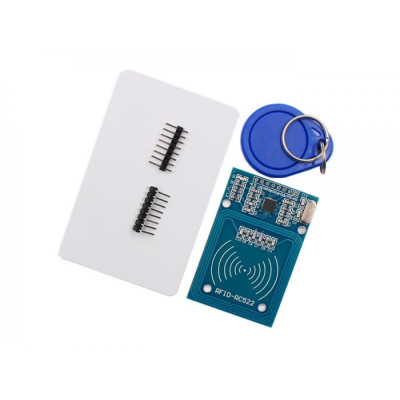
RFID module kit 13.56MHz, RC522 compatible, HW-126, 3.3V
Compatible RC522 RFID module for Arduino projects and other development boards, ideal for reading and writing 13.56MHz cards and key fobs, includes a card and key fob tag plus pins. It operates at 3.3V with low power consumption, supports multiple MIFARE card types, offers fast transfer up to 10Mbit/s, and works reliably between -20 and 80C.
Shipping by Thursday 22 October
Buying this product earns you 0.48 RON in loyalty points.

International fast shipping within EU. Free Shipping for orders above 100 EUR in most EU countries.

We ship from our stock within 24H

You earn points with every order, worth 5%.
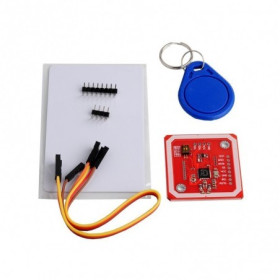
The compatible RFID RC522 kit is a complete solution for projects involving contactless identification, providing everything needed to get started quickly: a compatible RFID RC522 module, a 13.56MHz RFID card, and a 13.56MHz RFID key fob, along with header pins for soldering.
The module uses a compatible RC522 chip (budget version, not the original NXP IC), operates at the standard 13.56MHz frequency, and uses SPI communication to transmit data to the controller board, achieving transfer speeds of up to 10Mbit/s.
Compatible with Arduino (Uno, Mega, Nano and others), STM32, ESP32, and any other platform with a 3.3V SPI interface, the module is easy to integrate into DIY projects, access control systems, attendance systems, or automation. It is powered at 3.3VDC with a typical consumption of 10-13mA in normal operation, under 80uA in sleep mode, and a maximum of 30mA at full load, making it suitable for battery-powered applications as well.
It supports Mifare 1 S50, S70, Ultralight, Pro, and DESFire cards. It can read and write information on RFID cards or key fobs, enabling data storage, authentication, or access control.
The pins included in the kit are soldered onto the unassembled module, offering flexibility for breadboard or PCB mounting.
Specifications:
Model: Compatible RC522 (budget chip, not original NXP IC)
Version: HW-126
Chip type: unmarked
Supply voltage: 3.3VDC
Operating current: 13-26mA
Standby current: 10-13mA
Sleep current: <80uA
Maximum current: 30mA
Operating frequency: 13.56MHz
Supported cards: Mifare 1 S50, S70, Ultralight, Pro, DESFire
Maximum transfer rate: 10Mbit/s
Communication interface: SPI
Operating temperature: -20 - 80 C
Operating humidity: 5 - 95%
Pinout:
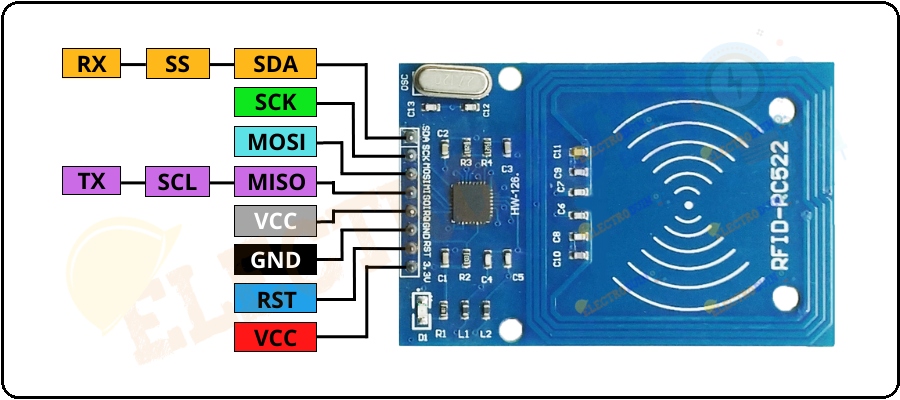
| Pin RC522 | Function |
|---|---|
| SDA | SS / CS (Chip Select) |
| SCK | SPI Clock |
| MOSI | Master Out Slave In |
| MISO | Master In Slave Out |
| IRQ | Optional interrupt |
| GND | Ground |
| RST | Reset |
| 3.3V | 3.3V power supply |
Usage:
Solder the pin header onto the RFID module if it is not already assembled.
Connect the module to the development board according to the pinout: SDA to the selected CS pin, SCK, MOSI, and MISO to the board's SPI pins, RST to a digital pin, GND to ground, and VCC to the 3.3V supply. Warning: do not connect it to 5V, as the module is not tolerant to this voltage.
Install the MFRC522 library in the Arduino IDE environment (available in the Library Manager).
Upload one of the examples included in the library (for example, DumpInfo) to verify operation.
Bring the card or key fob close to the module antenna (optimal distance: 1-5cm).
Monitor the data in the Serial Monitor to confirm the UID has been read.
Use the library functions to read or write data on the card according to your project needs.
- Input Voltage
- 3.3 V
Produs destinat utilizarii in proiecte electronice, automatizari, prototipare, educatie si cercetare.
Produsul trebuie utilizat numai conform specificatiilor tehnice mentionate in descriere si/sau in documentatia produsului.
Avertismente generale de siguranta:
Nu utilizati produsul la tensiuni, curenti sau temperaturi peste valorile specificate.
Montajul si conectarea trebuie realizate de persoane cu cunostinte tehnice minime in domeniul electric/electronic.
Evitati scurtcircuitele, inversarea polaritatii si conectarea gresita a alimentarii.
Nu lasati produsul alimentat nesupravegheat in timpul testelor.
Produsul nu este jucarie si nu este destinat copiilor.
Pentru modulele electronice, se recomanda utilizarea in carcase, panouri sau montaje protejate, dupa caz.
Identificare produs:
Denumirea produsului, codul/SKU-ul si caracteristicile tehnice sunt mentionate in pagina produsului si/sau pe eticheta ambalajului.
Producator / Importator / Distribuitor:
Sigmanortec S.R.L.
Calea Bucuresti nr. 9, Targu Jiu, Gorj, Romania
E-mail: [email protected]
Website: www.sigmanortec.ro
Persoana responsabila in UE:
Sigmanortec S.R.L.
Calea Bucuresti nr. 9, Targu Jiu, Gorj, Romania
E-mail: [email protected]
Documentatie si siguranta:
Pentru informatii suplimentare, fise tehnice, declaratii de conformitate sau instructiuni, ne puteti contacta la [email protected].
Reviews (6) - Review moderation

OK
Foarte multumit.
perfect perfect
Foarte util si usor de folosit in proiecte cu arduino !
Ok
#include <SPI.h>
#include <MFRC522.h>
#define RST_PIN 9
#define SS_PIN 10
MFRC522 rfid(SS_PIN, RST_PIN);
void setup() {
Serial.begin(9600);
SPI.begin();
rfid.PCD_Init();
Serial.println("Place your card or key fob near the reader...");
}
void loop() {
if (!rfid.PICC_IsNewCardPresent() || !rfid.PICC_ReadCardSerial()) return;
Serial.print("UID tag: ");
for (byte i = 0; i < rfid.uid.size; i++) {
Serial.print(rfid.uid.uidByte[i] < 0x10 ? " 0" : " ");
Serial.print(rfid.uid.uidByte[i], HEX);
}
Serial.println();
rfid.PICC_HaltA();
}