
Product images are for informational purposes only and may vary slightly depending on the batch and supplier. Product specifications and prices may be subject to change without notice. We do our best to provide accurate and complete product specifications, but they may not be completely accurate. If you encounter any such situation, please let us know.
The product is intended for specialists and requires qualified and authorized personnel. The product does not include assembly/use instructions . Putting the product into operation by unqualified persons leads to the loss of the warranty according to the Terms and Conditions on the site.
The specified technical parameters (current, power, etc.) represent maximum allowable values under ideal operating conditions. For safe use and optimal lifespan, it is recommended to operate the product continuously at no more than 50% of the specified maximum values.
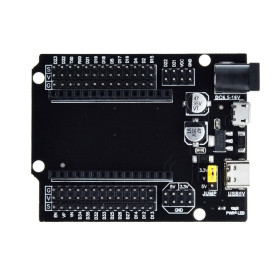
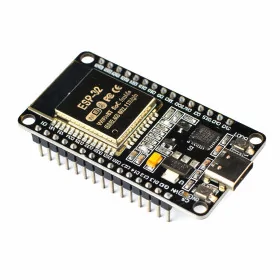
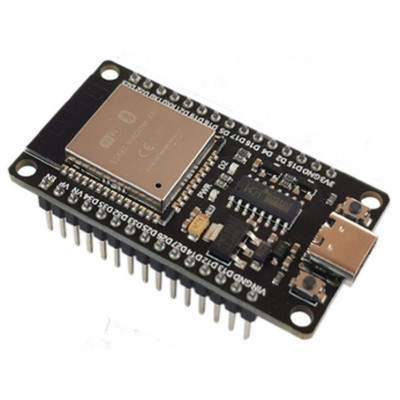
ESP32 Development Board, CH340C, 30P, USB-C, WiFi and Bluetooth
Versatile solution for IoT and automation projects, with integrated 2.4 GHz WiFi and Bluetooth BLE for fast connection to network and devices. Offers dual-core processor up to 240 MHz and 4 MB flash for complex applications, simple programming via USB-C with CH340C. Compatible with Arduino IDE, MicroPython and Lua, includes SPI, I2C and UART interfaces for sensors and modules.
Shipping by Thursday 22 October
Buying this product earns you Ft156.31 in loyalty points.

International fast shipping within EU. Free Shipping for orders above 100 EUR in most EU countries.

We ship from our stock within 24H

You earn points with every order, worth 5%.
Development board compatible with Arduino IDE, Mixly, Python, Lua, ESP32 with integrated Bluetooth and WiFi.
The board uses dual-mode 2.4GHz WiFi and a low-power TSMC Bluetooth integrated circuit.
This is an advanced and versatile hardware solution for projects that require wireless connectivity. Equipped with a powerful dual-core processor and WiFi and Bluetooth BLE capabilities, this board provides developers with the resources needed to create innovative IoT (Internet of Things) applications and implement wireless communication in a variety of scenarios.
With its dual-core Tensilica LX6 processors, running at a base frequency of up to 240 MHz, the ESP32 board ensures excellent performance and increased efficiency in handling complex tasks. The generous 520 KB of SRAM memory allows efficient data handling, while the 4 MB flash memory provides enough space for storing programs and data.
Connectivity is a strong point of this board. The 802.11 b/g/n/e/i WiFi functionality enables wireless communication in local networks, facilitating rapid data transfer and interaction with cloud services. In addition, Bluetooth v4.2 BR/EDR and Bluetooth Low Energy (BLE) allow efficient and secure connections with mobile devices or other Bluetooth-compatible devices.
The ESP-WROOM-32 board features a variety of interfaces for connecting with other components and sensors, including I/O pins, SPI, I2C, I2S, and UART/USART. These make integration with various external devices easier and expand the range of possible applications. The analog input functionality with a 12-bit ADC and DAC channels offers opportunities for capturing and generating analog signals.
In terms of security, the ESP32 board features a cryptography accelerator that ensures the protection of sensitive data, and support for various WiFi and Bluetooth BLE security protocols adds an extra level of safety in communications.
Thanks to extensive software support, developers have access to the Arduino platform and ESP-IDF, which facilitates the development of custom applications and complex functionalities. In addition, programming options via USB or JTAG offer flexibility in choosing the programming method.
Warning - powering the board via USB:
When WiFi or Bluetooth is activated, the ESP32 board has current peaks of up to approximately 500 mA. If the USB port or cable cannot supply this current, the voltage drops and the board does not function properly.
Symptoms of insufficient power supply:
- Repeated resets and the message “Brownout detector was triggered” in Serial Monitor.
- WiFi cannot find any network or the signal in Access Point mode is very weak.
- Uploading the program fails or is interrupted.
- The board runs the code normally, but freezes or resets when the radio part starts.
Recommendations:
Use a short, good-quality USB-C cable (maximum 1 m) with data transfer support (charge-only cables do not allow programming).
Connect the board directly to a USB port on the back of the computer, not to front ports or through unpowered USB hubs.
For standalone operation, use a 5V / minimum 1A power supply.
In high-consumption projects, mount a 470-1000 uF electrolytic capacitor between the 3V3 and GND pins, as close to the module as possible.
These symptoms are caused by the power supply and do not indicate a defect in the board. Please check the power supply before requesting a return or product warranty.
Specifications:
Processor: ESP32-WROOM-32D, dual-core Tensilica LX6
Programmer: CP2102
USB driver: CH340C
Power supply voltage: 5VDC, via USB type C
Connector: USB type C
Logic voltage: 3.3V (For sensors or modules operating at 5V, use a logic converter)
Frequency: up to 240 MHz
SRAM memory: 520 KB
ROM memory: 448 KB of ROM for the boot loader and system libraries
FLASH memory: 4 MB
WiFi: 802.11 b/g/n/e/i (2.4 GHz)
Bluetooth: v4.2 BR/EDR and Bluetooth Low Energy (BLE)
Antenna: integrated
Communication: SPI, I2C, I2S, UART/USART for communication with other devices
ADC: 12-bit ADC (Analog-to-Digital Converter) with up to 18 channels
DAC: 2 DAC channels (Digital-to-Analog Converter)
Security: AES, SHA-2, ECC, RSA, WPA/WPA2/WPA3, AES-CCM encryption for BLE
Weight: 9g
Dimensions: 52 x 28mm
Usage:
After installing the "ESP32 Arduino" library, select the "ESP32 Dev Module" board. Before connecting the board to the PC via the USB type C cable, press and hold the BOOT button (or short the GPIO0 pin to GND). While holding the BOOT button, upload the desired code. Release the button after the upload begins.
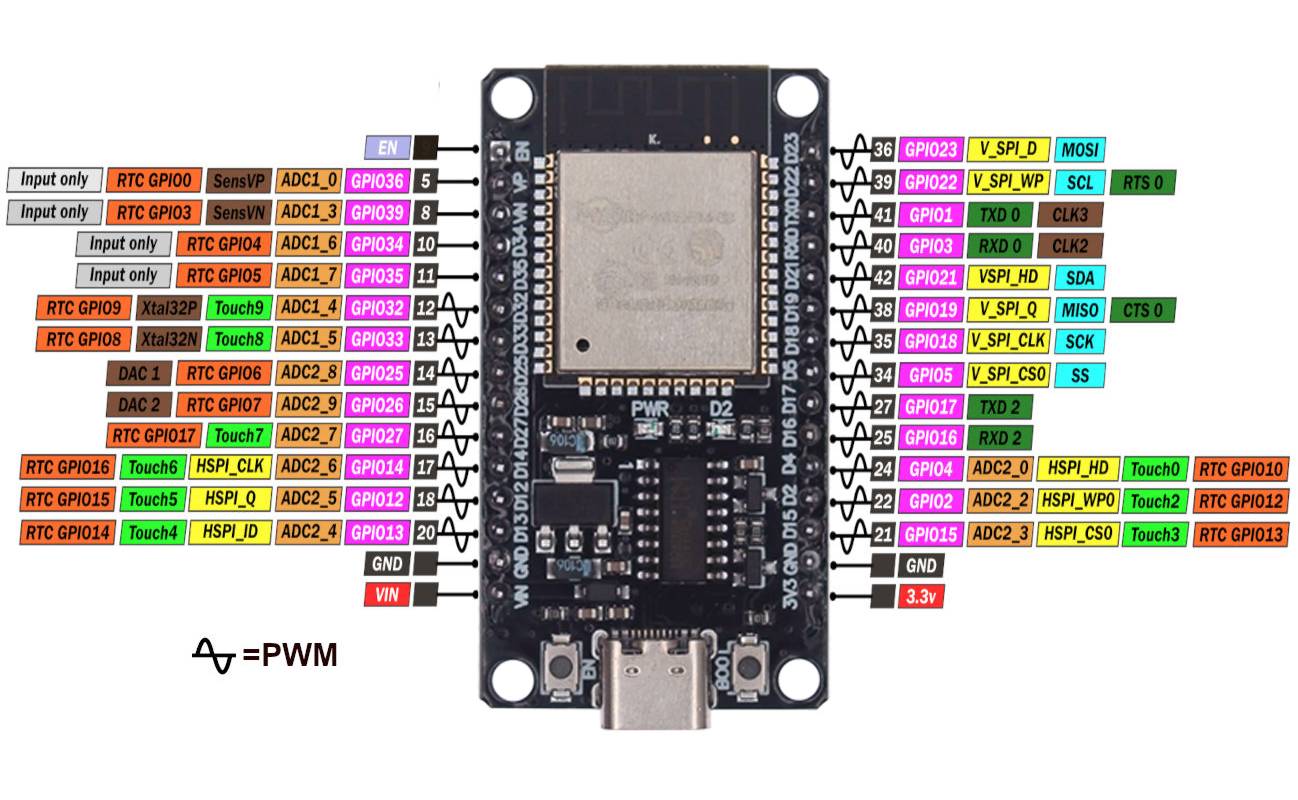
Pinout:
Produs destinat utilizarii in proiecte electronice, automatizari, prototipare, educatie si cercetare.
Produsul trebuie utilizat numai conform specificatiilor tehnice mentionate in descriere si/sau in documentatia produsului.
Avertismente generale de siguranta:
Nu utilizati produsul la tensiuni, curenti sau temperaturi peste valorile specificate.
Montajul si conectarea trebuie realizate de persoane cu cunostinte tehnice minime in domeniul electric/electronic.
Evitati scurtcircuitele, inversarea polaritatii si conectarea gresita a alimentarii.
Nu lasati produsul alimentat nesupravegheat in timpul testelor.
Produsul nu este jucarie si nu este destinat copiilor.
Pentru modulele electronice, se recomanda utilizarea in carcase, panouri sau montaje protejate, dupa caz.
Identificare produs:
Denumirea produsului, codul/SKU-ul si caracteristicile tehnice sunt mentionate in pagina produsului si/sau pe eticheta ambalajului.
Producator / Importator / Distribuitor:
Sigmanortec S.R.L.
Calea Bucuresti nr. 9, Targu Jiu, Gorj, Romania
E-mail: [email protected]
Website: www.sigmanortec.ro
Persoana responsabila in UE:
Sigmanortec S.R.L.
Calea Bucuresti nr. 9, Targu Jiu, Gorj, Romania
E-mail: [email protected]
Documentatie si siguranta:
Pentru informatii suplimentare, fise tehnice, declaratii de conformitate sau instructiuni, ne puteti contacta la [email protected].
/*
  ESP32-WROOM-32D 30-pin DevKit (CH340C, USB-C) - WiFi Access Point test
  Board: "ESP32 Dev Module" (installed from Boards Manager, package "esp32" by Espressif Systems)
  Additional Boards Manager URL (File > Preferences):
  https://raw.githubusercontent.com/espressif/arduino-esp32/gh-pages/package_esp32_index.json
  Libraries: none to install, WiFi.h and WebServer.h are included with the esp32 Arduino core
  Wiring: none, this test only uses the onboard WiFi radio of the ESP32-WROOM-32D module
  Power and programming through the onboard USB Type-C connector (use a good cable, or a 5V/1A supply)
  Usage: connect a phone or laptop to the "ESP32-TEST" WiFi network (password 12345678)
  then open a browser at http://192.168.4.1
*/

#include <WiFi.h>
#include <WebServer.h>
#include "esp_wifi.h"

const char* apSsid = "ESP32-TEST";
const char* apPassword = "12345678";   // Minimum 8 characters
const int apChannel = 6;               // Fixed 2.4 GHz channel

WebServer server(80);
unsigned long lastReport = 0;

// Text for the reason of the last reset (shows if the board restarted because of a weak power supply)
const char* resetReasonText(esp_reset_reason_t reason) {
  switch (reason) {
    case ESP_RST_POWERON:  return "Power on / EN button";
    case ESP_RST_SW:       return "Software reset";
    case ESP_RST_PANIC:    return "Crash (panic)";
    case ESP_RST_BROWNOUT: return "BROWNOUT - power supply too weak";
    case ESP_RST_INT_WDT:
    case ESP_RST_TASK_WDT:
    case ESP_RST_WDT:      return "Watchdog";
    default:               return "Other";
  }
}

// List of connected clients with the signal strength received by the ESP32 from each one
String stationReport() {
  wifi_sta_list_t list;
  if (esp_wifi_ap_get_sta_list(&list) != ESP_OK || list.num == 0) {
    return "No clients connected\n";
  }
  String out;
  for (int i = 0; i < list.num; i++) {
    char line[80];
    snprintf(line, sizeof(line), "Client %d: %02X:%02X:%02X:%02X:%02X:%02X  RSSI: %d dBm\n",
             i + 1,
             list.sta[i].mac[0], list.sta[i].mac[1], list.sta[i].mac[2],
             list.sta[i].mac[3], list.sta[i].mac[4], list.sta[i].mac[5],
             list.sta[i].rssi);
    out += line;
  }
  return out;
}

// Web page served at http://192.168.4.1, refreshes every 2 seconds
void handleRoot() {
  String page = "<!DOCTYPE html><html><head><meta http-equiv='refresh' content='2'>";
  page += "<title>ESP32 AP test</title></head><body>";
  page += "<h2>ESP32 AP test - OK</h2>";
  page += "<p>Signal received by the ESP32 from each client:</p><pre>";
  page += stationReport();
  page += "</pre><p>Uptime: ";
  page += String(millis() / 1000);
  page += " s</p></body></html>";
  server.send(200, "text/html", page);
}

void setup() {
  Serial.begin(115200);     // Start serial communication at 115200 baud
  delay(1000);
  Serial.println();
  Serial.println("ESP32-WROOM-32D WiFi Access Point test starting...");

  Serial.print("Last reset reason: ");
  Serial.println(resetReasonText(esp_reset_reason()));

  WiFi.mode(WIFI_AP);
  bool ok = WiFi.softAP(apSsid, apPassword, apChannel);
  if (!ok) {
    Serial.println("ERROR: softAP() failed to start, check power supply");
  }

  IPAddress ip = WiFi.softAPIP();
  Serial.print("Access Point \"");
  Serial.print(apSsid);
  Serial.print("\" started, IP address: ");
  Serial.println(ip);

  server.on("/", handleRoot);
  server.begin();
  Serial.println("Web server started, connect a phone and open http://192.168.4.1");
}

void loop() {
  server.handleClient();

  // Print a short status line every 5 seconds, useful to spot brownouts
  if (millis() - lastReport > 5000) {
    lastReport = millis();
    Serial.print("Uptime: ");
    Serial.print(millis() / 1000);
    Serial.print(" s  Free heap: ");
    Serial.print(ESP.getFreeHeap());
    Serial.println(" bytes");
  }
}
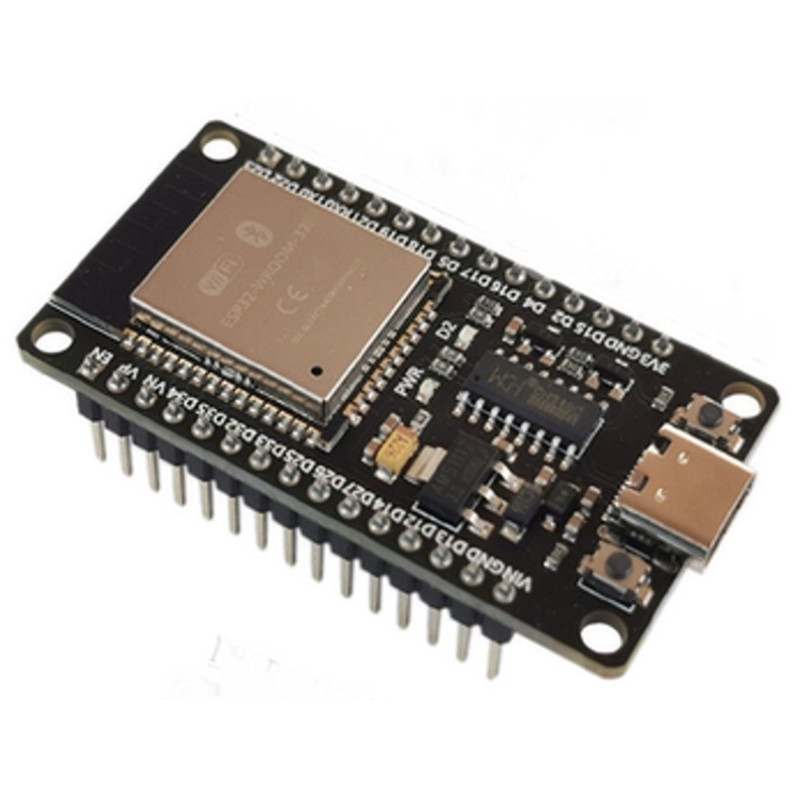
The ESP32-WROOM-32D development board with CH340C and USB-C is a complete platform, with processor, WiFi and Bluetooth built in, so this tutorial uses the board by itself, without any other development board alongside it. The goal is to get it up and running for the first time and check that the WiFi radio works correctly, by starting up an access point that a phone or laptop can connect to.
How it works:
The ESP32-WROOM-32D module can act as a WiFi access point (Access Point), creating its own network without a router, which other devices can connect to directly. In this mode the board automatically assigns the IP address 192.168.4.1 to its own web server, and any phone or laptop connected to the network created can open this address in a browser to see a page generated by the board. The esp_wifi_ap_get_sta_list function reads the list of connected clients from the WiFi driver, together with the signal strength received from each one, expressed in dBm, a typical value being between -40 dBm (strong signal, close to the board) and -80 dBm (weak signal, at a large distance). The test also reads the reason for the board's last restart, useful for noticing if the power supply is too weak, in which case the brownout message appears.
What you need:
- 1 x ESP32 Development Board, CH340C, 30P, USB-C, WiFi and Bluetooth
- 1 x Smart Charge Data Cable, USB to USB-C, Fast Charging
- 1 x 5V 1A USB Power Adapter
Wiring:
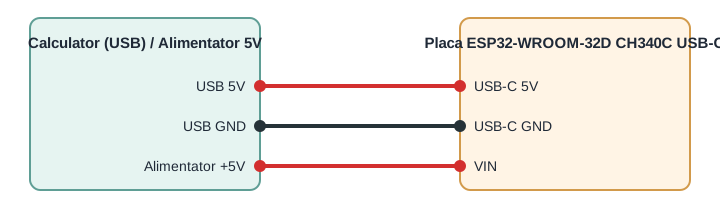
For this test no sensor or external module is connected, the board only uses the built-in WiFi radio. The only connection needed is power and the data link through the USB-C port, to the computer for programming or to a 5V power adapter for standalone operation.
| Board pin | Connects to | Role |
|---|---|---|
| USB-C (5V / GND / D+ / D-) | Computer's USB port | 5V power and programming through CH340C |
| VIN | External 5V, 1A power adapter (optional) | Power for standalone operation |
| GND | Common ground with external source (optional) | Ground reference |
Board and libraries:
In Arduino IDE select from Tools - Board the ESP32 Dev Module board, provided by the esp32 package from Espressif Systems, installed from Boards Manager. If the package does not appear in the list, add in File - Preferences, under Additional Boards Manager URLs, the address https://raw.githubusercontent.com/espressif/arduino-esp32/gh-pages/package_esp32_index.json and then search for esp32 in Boards Manager. The code below does not need any manually installed library, it only uses WiFi.h and WebServer.h, included automatically by the esp32 package for Arduino.
The code:
The program starts the board in Access Point mode, runs a small web server at the address 192.168.4.1 and displays on the serial monitor the connection status and the reason for the last restart.
/*
  ESP32-WROOM-32D 30-pin DevKit (CH340C, USB-C) - WiFi Access Point test
  Board: "ESP32 Dev Module" (installed from Boards Manager, package "esp32" by Espressif Systems)
  Additional Boards Manager URL (File > Preferences):
  https://raw.githubusercontent.com/espressif/arduino-esp32/gh-pages/package_esp32_index.json
  Libraries: none to install, WiFi.h and WebServer.h are included with the esp32 Arduino core
  Wiring: none, this test only uses the onboard WiFi radio of the ESP32-WROOM-32D module
  Power and programming through the onboard USB Type-C connector (use a good cable, or a 5V/1A supply)
  Usage: connect a phone or laptop to the "ESP32-TEST" WiFi network (password 12345678)
  then open a browser at http://192.168.4.1
*/
#include <WiFi.h>
#include <WebServer.h>
#include "esp_wifi.h"
const char* apSsid = "ESP32-TEST";
const char* apPassword = "12345678";   // Minimum 8 characters
const int apChannel = 6;               // Fixed 2.4 GHz channel
WebServer server(80);
unsigned long lastReport = 0;
// Text for the reason of the last reset (shows if the board restarted because of a weak power supply)
const char* resetReasonText(esp_reset_reason_t reason) {
  switch (reason) {
    case ESP_RST_POWERON:  return "Power on / EN button";
    case ESP_RST_SW:       return "Software reset";
    case ESP_RST_PANIC:    return "Crash (panic)";
    case ESP_RST_BROWNOUT: return "BROWNOUT - power supply too weak";
    case ESP_RST_INT_WDT:
    case ESP_RST_TASK_WDT:
    case ESP_RST_WDT:      return "Watchdog";
    default:               return "Other";
  }
}
// List of connected clients with the signal strength received by the ESP32 from each one
String stationReport() {
  wifi_sta_list_t list;
  if (esp_wifi_ap_get_sta_list(&list) != ESP_OK || list.num == 0) {
    return "No clients connected\n";
  }
  String out;
  for (int i = 0; i < list.num; i++) {
    char line[80];
    snprintf(line, sizeof(line), "Client %d: %02X:%02X:%02X:%02X:%02X:%02X  RSSI: %d dBm\n",
             i + 1,
             list.sta[i].mac[0], list.sta[i].mac[1], list.sta[i].mac[2],
             list.sta[i].mac[3], list.sta[i].mac[4], list.sta[i].mac[5],
             list.sta[i].rssi);
    out += line;
  }
  return out;
}
// Web page served at http://192.168.4.1, refreshes every 2 seconds
void handleRoot() {
  String page = "<!DOCTYPE html><html><head><meta http-equiv='refresh' content='2'>";
  page += "<title>ESP32 AP test</title></head><body>";
  page += "<h2>ESP32 AP test - OK</h2>";
  page += "<p>Signal received by the ESP32 from each client:</p><pre>";
  page += stationReport();
  page += "</pre><p>Uptime: ";
  page += String(millis() / 1000);
  page += " s</p></body></html>";
  server.send(200, "text/html", page);
}
void setup() {
  Serial.begin(115200);     // Start serial communication at 115200 baud
  delay(1000);
  Serial.println();
  Serial.println("ESP32-WROOM-32D WiFi Access Point test starting...");
  Serial.print("Last reset reason: ");
  Serial.println(resetReasonText(esp_reset_reason()));
  WiFi.mode(WIFI_AP);
  bool ok = WiFi.softAP(apSsid, apPassword, apChannel);
  if (!ok) {
    Serial.println("ERROR: softAP() failed to start, check power supply");
  }
  IPAddress ip = WiFi.softAPIP();
  Serial.print("Access Point \"");
  Serial.print(apSsid);
  Serial.print("\" started, IP address: ");
  Serial.println(ip);
  server.on("/", handleRoot);
  server.begin();
  Serial.println("Web server started, connect a phone and open http://192.168.4.1");
}
void loop() {
  server.handleClient();
  // Print a short status line every 5 seconds, useful to spot brownouts
  if (millis() - lastReport > 5000) {
    lastReport = millis();
    Serial.print("Uptime: ");
    Serial.print(millis() / 1000);
    Serial.print(" s  Free heap: ");
    Serial.print(ESP.getFreeHeap());
    Serial.println(" bytes");
  }
}
How the code works:
In the definitions section, apSsid and apPassword set the name and password of the network created by the board, while apChannel fixes the 2.4 GHz WiFi channel used by the access point. The server object, of type WebServer, handles requests received on port 80. The resetReasonText function translates the internal code of the last restart into an easy to read text, including the brownout warning when the power supply is too weak. The stationReport function queries the list of connected clients through esp_wifi_ap_get_sta_list and builds a text with the MAC address and signal strength (RSSI) for each client. The handleRoot function builds the HTML page sent to the browser, including the client report and the uptime. In setup, the board starts serial communication, displays the reason for the last restart, enables WIFI_AP mode, starts the access point with WiFi.softAP and then the web server with server.begin. In loop, server.handleClient processes incoming requests, and every 5 seconds the board displays on the serial monitor the uptime and the free RAM memory, useful for noticing any power supply issues.
Result:
Open the serial monitor at 115200 baud, you will see the startup message, the IP address of the access point and then a report every 5 seconds. Connect a phone to the ESP32-TEST network with the password 12345678 and open in a browser the address 192.168.4.1, the page should display the confirmation message and the signal strength received by the board from the phone.
ESP32-WROOM-32D WiFi Access Point test starting...
Last reset reason: Power on / EN button
Access Point "ESP32-TEST" started, IP address: 192.168.4.1
Web server started, connect a phone and open http://192.168.4.1
Uptime: 5 s  Free heap: 212340 bytes
Uptime: 10 s  Free heap: 211980 bytes
Client 1: A4:C1:38:5E:2F:9B  RSSI: -52 dBm
Uptime: 15 s  Free heap: 211980 bytes
Uptime: 20 s  Free heap: 211976 bytes
Common issues:
Nothing appears on the serial monitor: check that you have selected the correct COM port and the 115200 baud speed, and if the port does not appear at all, install the CH340C driver for the operating system you are using.
Uploading the program fails or gets stuck at the start: hold down the BOOT button exactly at the moment Arduino IDE starts the upload, then release it after a few seconds, or use a USB-C cable with data wires, not just a charging one.
The board resets itself or displays the brownout message right when WiFi starts up: the almost certain cause is a power supply or USB cable that cannot provide the current peak of up to 500 mA, try another USB port at the back of the computer or a separate 5V 1A power adapter.
The ESP32-TEST access point does not appear in the phone's WiFi network list: wait a few seconds after startup, check that the phone is searching for networks on the 2.4 GHz band and that the board has not reset due to a weak power supply.
The page at 192.168.4.1 does not load even though the phone is connected to the network: temporarily disable the phone's mobile data, since some phones try to use the internet instead of the local network created by the board.
Limitations and tips:
The board only works at 3.3V on all data pins, and applying 5V directly to a GPIO pin can destroy the ESP32 module, use logic level converters for sensors or modules running at 5V. The 4 MB flash memory and the 520 KB of SRAM are enough for most IoT projects, but applications that combine WiFi, Bluetooth and intensive graphics processing can reach the limit of available RAM memory. Starting from this test, the board can be extended with sensors over I2C or SPI, relay modules for automation, or it can send data to a cloud server through WiFi, using the same local network instead of Access Point mode.