

Product images are for informational purposes only and may vary slightly depending on the batch and supplier. Product specifications and prices may be subject to change without notice. We do our best to provide accurate and complete product specifications, but they may not be completely accurate. If you encounter any such situation, please let us know.
The product is intended for specialists and requires qualified and authorized personnel. The product does not include assembly/use instructions . Putting the product into operation by unqualified persons leads to the loss of the warranty according to the Terms and Conditions on the site.
The specified technical parameters (current, power, etc.) represent maximum allowable values under ideal operating conditions. For safe use and optimal lifespan, it is recommended to operate the product continuously at no more than 50% of the specified maximum values.
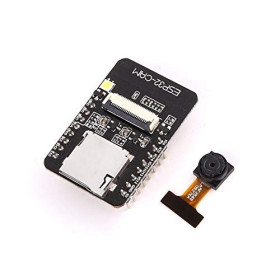
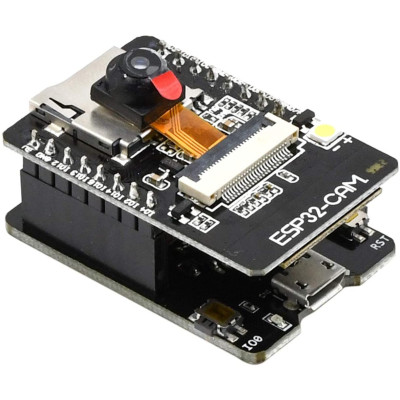
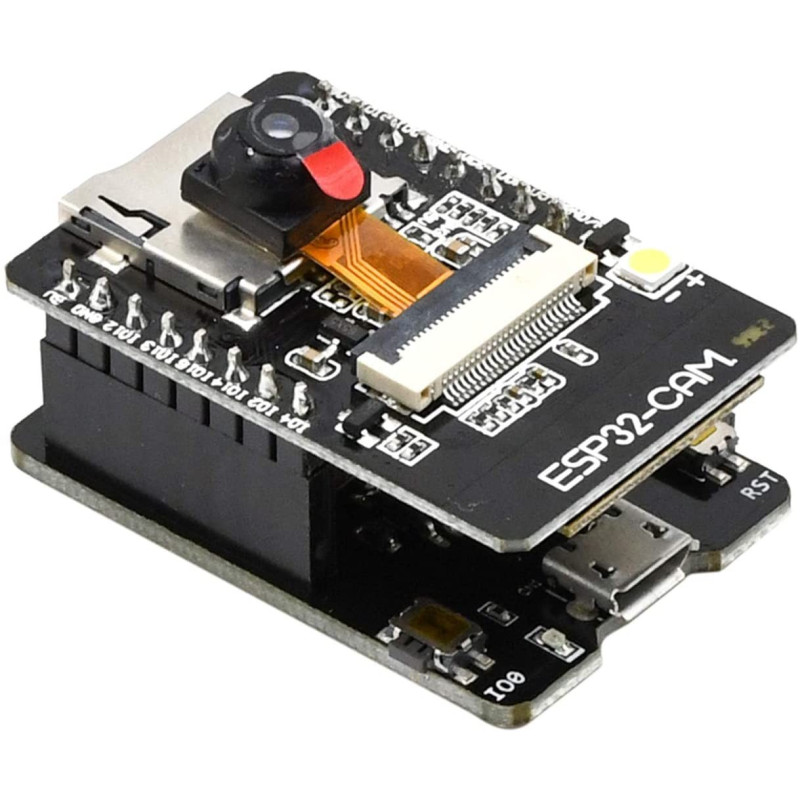
ESP32-CAM development board with CH340G, WiFi, Bluetooth, OV5640 5MP
Compact solution for artificial vision projects, video streaming and IoT, with an ESP32 dual-core processor up to 240MHz, WiFi 802.11 b g n and Bluetooth 4.2 LE connectivity for wireless control and transmission, a 5MP OV5640 camera for detailed images, 4MB PSRAM memory for efficient capture and processing, easy programming in Arduino IDE via CH340G with USB Type C.
Shipping by Thursday 22 October
Buying this product earns you 0.91 € in loyalty points.

International fast shipping within EU. Free Shipping for orders above 100 EUR in most EU countries.

We ship from our stock within 24H

You earn points with every order, worth 5%.
The ESP32-CAM development board combines an ESP32 module with a dual-core processor and a 5 MP OV5640 camera, offering WiFi and Bluetooth connectivity in a compact form factor. The board supports video signals from its own optical sensor, commands and data via UART, SPI, I2C, PWM, ADC, and DAC, making it suitable for artificial vision projects, video streaming, surveillance, facial recognition, automated photography, and IoT applications in general.
The 32-bit dual-core LX6 processor runs at frequencies of up to 240 MHz, with computing power of up to 600 DMIPS, enough for image processing and simultaneously managing the WiFi 802.11 b/g/n and Bluetooth 4.2 LE connection. The internal 520 KB SRAM memory is supplemented by 4 MB of external PSRAM, needed for capturing and framing high-resolution images from the OV5640 camera. The board supports JPEG, BMP, and grayscale image formats, can upload photos via WiFi, can store data on an external TF card of up to 4 GB, and features several low-power modes, Deep-sleep, Modem-sleep, and Light-sleep, useful for battery-powered projects.
Among the main features are the FPC connector for the OV5640 camera, the microSD card slot, the onboard flash LED, the reset button, two rows of extension pins with 16 pins in total, of which 9 are usable as inputs/outputs, the Hall sensor and temperature sensor integrated into the ESP32 chip, support for Smart Config/AirKiss and FOTA, as well as the STA, AP, and STA+AP operating modes. The board is powered at 5 VDC through the 5V pin, and the kit also includes a USB-TTL serial converter with a CH340G chip and Type-C connector, used for programming and serial communication with a computer.
Through the UART interface and the software package provided by Espressif, the board is compatible with the Arduino IDE environment, being recognized as "AI Thinker ESP32-CAM". The serial connection also allows communication with a computer or other microcontrollers, and WiFi connectivity allows integration into networks together with other ESP32 boards, IoT modules, or applications on a computer or phone.
ATTENTION
Camera OV5640 (current batch)
This module is shipped with an OV5640 (5MP) camera instead of the OV2640. The sensor heats up significantly during operation and may become hot to the touch. This is normal behavior for this board-camera combination, not a defect.
Mandatory usage conditions:
Heatsink mounted on the back of the camera, with thermal tape or pad.
Good ventilation; do not use the module in closed enclosures without air circulation.
Stable 5V power supply, minimum 2A, on the 5V pin. Do not power the module from the USB-serial adapter at 3.3V.
Recommendations:
In Arduino IDE, select the “AI Thinker ESP32-CAM” board and use the CameraWebServer example.
Use the JPEG format. For continuous streaming, choose a reduced resolution (SVGA or HD); use the maximum resolution only for photos.
For periodic captures, turn off the sensor between shots (GPIO32 HIGH).
On the autofocus version, automatic focusing requires 3.3V on pin 24 of the camera connector and a dedicated library. Without these, the camera operates with fixed focus.
The module is not recommended for 24/7 continuous streaming. If you need the OV2640 version, contact us before placing the order.
Specifications:
Supply voltage: 5 V (power pin)
Current consumption (Flash LED off): 180 mA at 5 V
Current consumption (Flash LED on, maximum brightness): 310 mA at 5 V
Current consumption (Deep-sleep): 6 mA at 5 V, minimum
Current consumption (Modem-sleep): 20 mA at 5 V, minimum
Current consumption (Light-sleep): 6.7 mA at 5 V, minimum
Number of pins: 16
I/O ports: 9
WiFi: 802.11 b/g/n
Bluetooth: 4.2 LE
CPU: Dual-core 32-bit, Xtensa LX6
CPU frequency: 80 - 240 MHz
Computing power: up to 600 DMIPS
Integrated memory: 520 KB SRAM
External memory: 4 MB PSRAM
Supported protocols: UART / SPI / I2C / PWM / ADC / DAC
Included camera: Yes, OV5640, 5 MP
Camera connector: FPC
Image formats: JPEG, BMP, grayscale
Image upload over WiFi support: Yes
TF card support: Yes, up to 4 GB
Low-power modes: Deep-sleep, Modem-sleep, Light-sleep
Integrated software stack: LwIP and FreeRTOS
Operating modes: STA / AP / STA+AP
Smart Config / AirKiss support: Yes
FOTA support: Yes
SPI Flash: 32 Mbit
PSRAM: 4 Mbit
Programmer: CH340G
Programmer connector: Type-C
Dimensions: 42 x 27 x 12 mm
Layout:

| Element | Function |
|---|---|
| OV5640 camera (on the ESP32-CAM board) | 5 MP optical sensor, connected to the board via the FPC ribbon cable. |
| microSD card slot (on the ESP32-CAM board) | Local image storage, TF card up to 4 GB. |
| Flash LED (on the ESP32-CAM board) | Illumination LED, controlled by GPIO4. |
| Reset button (on the ESP32-CAM board) | Resets the ESP32 microcontroller. |
| 5V pin header (on the ESP32-CAM board) | Power supply and pins used by the microSD card, marked 5V, GND, IO12, IO13, IO15, IO14, IO2, IO4. |
| 3V3 pin header (on the ESP32-CAM board) | 3.3 V output pins, GPIO and UART, marked 3V3, IO16, IO0, GND, VCC, U0R, U0T, GND. |
| Download / IO0 button (on the CH340G module) | Connects GPIO0 to GND to start the ESP32-CAM board in code upload mode. |
| Power indicator (on the CH340G module) | LED on when the module is powered via USB. |
| Micro USB interface (on the CH340G module) | Connection to a computer for power and serial communication. |
| Reset button (on the CH340G module) | Resets the ESP32-CAM board connected to the module. |
| CH340G circuit (on the CH340G module) | USB-to-serial converter, provides UART communication with the computer. |
| Connector for ESP32-CAM (on the CH340G module) | Two female connectors into which the ESP32-CAM board is inserted, with pins 5V, GND, U0R, U0T and IO0 connected to the CH340G circuit. |
Pinout:

| Connector | Pin | Function |
|---|---|---|
| Left header | 5V | Board power supply, 5 V, recommended minimum 2 A |
| Left header | GND | Ground |
| Left header | IO12 (GPIO12) | SD card Data2, HSPI_Q, ADC2_5, MTDI strapping pin |
| Left header | IO13 (GPIO13) | SD card Data3, HSPI_ID, ADC2_4 |
| Left header | IO15 (GPIO15) | SD card CMD, HSPI_CS0, ADC2_3, MTDO strapping pin |
| Left header | IO14 (GPIO14) | SD card CLK, HSPI_CLK, ADC2_6, MTMS strapping pin |
| Left header | IO2 (GPIO2) | SD card Data0, HSPI_WP, ADC2_2, strapping pin |
| Left header | IO4 (GPIO4) | SD card Data1, HSPI_HD, ADC2_0, controls the flash LED |
| Right header | 3V3 | 3.3 V output from the board regulator |
| Right header | IO16 (GPIO16) | U2_RXD, also used as Chip Select for PSRAM |
| Right header | IO0 (GPIO0) | Boot mode selection, LOW at reset for code upload mode, also used as XCLK for the camera |
| Right header | GND | Ground |
| Right header | VCC | P_OUT output, 3.3 V or 5 V, do not power the board through this pin |
| Right header | U0R (GPIO3) | UART0 RX, data reception, used for programming |
| Right header | U0T (GPIO1) | UART0 TX, data transmission, used for programming |
| Right header | GND | Ground |
Usage:
Mount the ESP32-CAM board on the CH340G programmer module so that the 5V, GND, U0R, U0T and IO0 pins of the two boards overlap, or connect them separately with wires if you are using another USB-to-serial converter.
Power the assembly with a stable 5 VDC supply, minimum 2 A, applied to the 5V and GND pins of the ESP32-CAM board, for example through a mains adapter with a DC plug and a screw-terminal DC adapter. Do not power the board from the 3.3 V output of the USB-serial converter and do not use the VCC pin as a power input, as it is an output.
Mount a heatsink on the back of the OV5640 camera, secured with thermal tape or pad, and ensure good ventilation around the board, because the OV5640 camera heats up significantly during operation, which is normal behavior for this board-camera combination and not a defect. Avoid using the module in closed enclosures without air circulation, and avoid continuous streaming for long periods.
Download and install the appropriate CH340G driver for your operating system from the Download section of the product page, because the board may be incompatible with the latest 2023 CH340 driver version.
In Arduino IDE, add the ESP32 boards from File -> Preferences by entering the address https://dl.espressif.com/dl/package_esp32_index.json, in Additional Boards Manager URLs, then install the "esp32 by Espressif Systems" package from Tools -> Board -> Boards Manager.
Select the "AI Thinker ESP32-CAM" board from Tools -> Board -> ESP32 and open the CameraWebServer example from File -> Examples -> ESP32 -> Camera.
In the code, leave the CAMERA_MODEL_AI_THINKER definition enabled and fill in the WiFi network name and password in the ssid and password variables.
Prepare a female-to-female Dupont cable before uploading the program, so you can connect GPIO0 to GND if needed.
To upload the code, hold down the Download button on the CH340G module while starting the upload, or, if the module does not have this button, connect GPIO0 to GND with the Dupont wire, power the board, upload the code, then remove the connection and power the board again to return to normal operation.
If code upload fails, check that Flash Mode DIO is selected from Tools -> Flash Mode and try again.
After the upload confirmation message, press the Reset button, open the Serial Monitor at 115200 baud, and wait for the WiFi network connection; the IP address and server ports will be displayed in the window, as shown below.

Open a browser and access the IP address shown in the Serial Monitor, followed by the server port, to see the live video stream and adjust the camera parameters, in a page similar to the one in the image below.
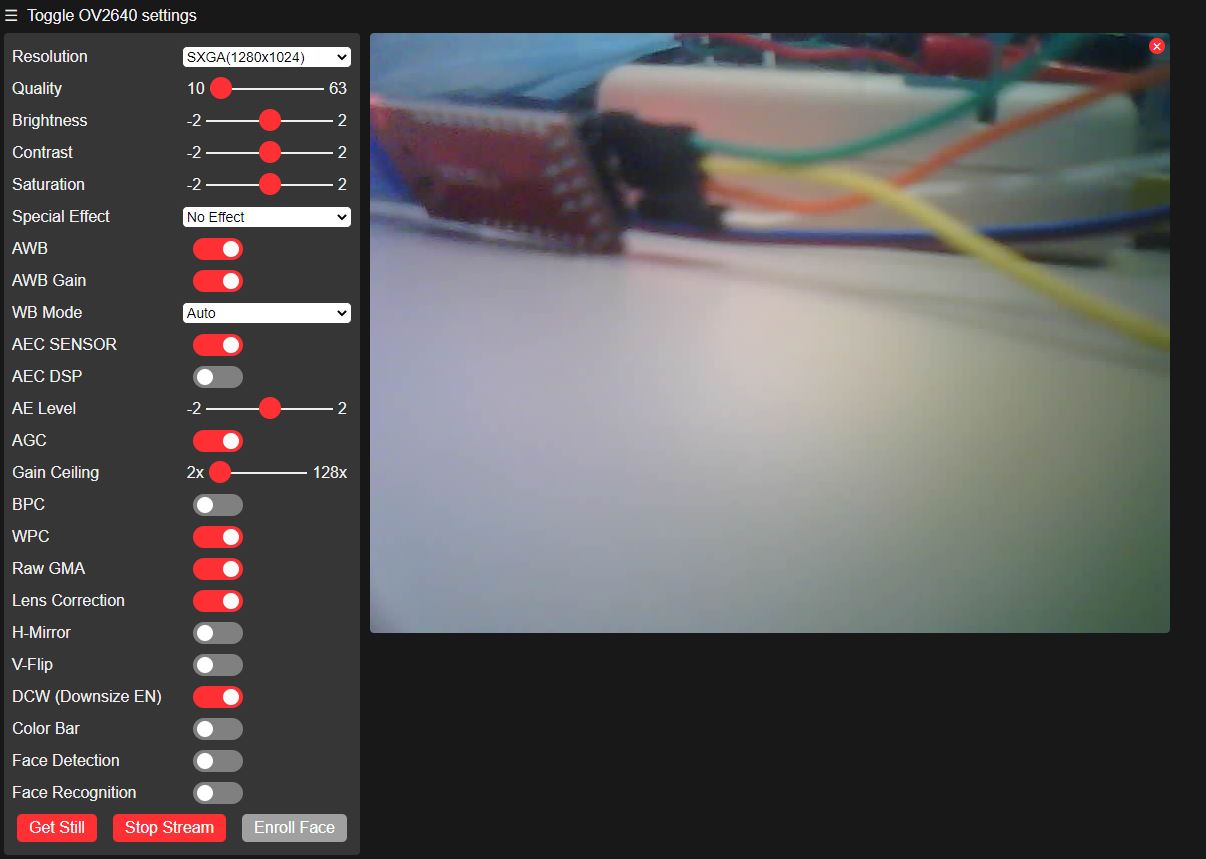
For continuous streaming, choose a reduced resolution, for example SVGA or HD, and the JPEG format; use the maximum resolution only for individual photos.
For periodic captures, turn off the sensor between shots by setting GPIO32 to HIGH, to reduce camera heating and power consumption.
If the board is equipped with the autofocus camera version, the autofocus function requires 3.3 V on pin 24 of the camera connector and a dedicated library. Without this power supply and library, the camera operates with fixed focus.
Produs destinat utilizarii in proiecte electronice, automatizari, prototipare, educatie si cercetare.
Produsul trebuie utilizat numai conform specificatiilor tehnice mentionate in descriere si/sau in documentatia produsului.
Avertismente generale de siguranta:
Nu utilizati produsul la tensiuni, curenti sau temperaturi peste valorile specificate.
Montajul si conectarea trebuie realizate de persoane cu cunostinte tehnice minime in domeniul electric/electronic.
Evitati scurtcircuitele, inversarea polaritatii si conectarea gresita a alimentarii.
Nu lasati produsul alimentat nesupravegheat in timpul testelor.
Produsul nu este jucarie si nu este destinat copiilor.
Pentru modulele electronice, se recomanda utilizarea in carcase, panouri sau montaje protejate, dupa caz.
Identificare produs:
Denumirea produsului, codul/SKU-ul si caracteristicile tehnice sunt mentionate in pagina produsului si/sau pe eticheta ambalajului.
Producator / Importator / Distribuitor:
Sigmanortec S.R.L.
Calea Bucuresti nr. 9, Targu Jiu, Gorj, Romania
E-mail: [email protected]
Website: www.sigmanortec.ro
Persoana responsabila in UE:
Sigmanortec S.R.L.
Calea Bucuresti nr. 9, Targu Jiu, Gorj, Romania
E-mail: [email protected]
Documentatie si siguranta:
Pentru informatii suplimentare, fise tehnice, declaratii de conformitate sau instructiuni, ne puteti contacta la [email protected].
Reviews (9) - Review moderation

Placa de fericire funcționează :) doar ca camera are un fading alb permanent pe partea stânga (indiferent de setari sau alte chestii), si cip-ul camerei se încălzește FOARTE tare dupa vreo 5 secunde (nu stiu daca e normal asta dar totuși) :(
Produsul exact ca in descriere. Livrare rapida. Multumesc pentru bombonica!!!aa
Modul (nu chiar scump si) excelent pentru proiecte de filmare de durata/continua . Obiectivul se poate (cu multa blindete) desuruba . 3 ture de extensie focalizeaza rezonabil o suprafata de ~ 10x13mm la o distanta de sub ~ 2cm. Poate vor aparea in stoc si camere cu banda conectoare mai lunga .
Daca respecti pasii descrisi, functioneaza din prima. Nu mai este nevoie de fir pentru RST, ai pe placa! Personal amabil. multumesc!
Works as expected
/*
  ESP32-CAM OV5640 5MP - camera self test
  Board: AI Thinker ESP32-CAM (Tools > Board > ESP32 > AI Thinker ESP32-CAM)
  Board package: esp32 by Espressif Systems, installed from Boards Manager
  Additional Boards Manager URL: https://dl.espressif.com/dl/package_esp32_index.json
  Libraries: none to install separately, esp_camera.h is part of the esp32 board package
  Wiring: power the board on the 5V and GND pins with a stable 5V / 2A supply,
  program it through U0R, U0T, IO0 and GND using the included ESP32-CAM-MB CH340G programmer
  This sketch does not use WiFi, it only checks that the OV5640 camera initializes
  and captures frames correctly, printing the result on the Serial Monitor
*/

#include "esp_camera.h"

// Camera pin map for the AI Thinker ESP32-CAM board
#define PWDN_GPIO_NUM     32
#define RESET_GPIO_NUM    -1
#define XCLK_GPIO_NUM      0
#define SIOD_GPIO_NUM     26
#define SIOC_GPIO_NUM     27
#define Y9_GPIO_NUM       35
#define Y8_GPIO_NUM       34
#define Y7_GPIO_NUM       39
#define Y6_GPIO_NUM       36
#define Y5_GPIO_NUM       21
#define Y4_GPIO_NUM       19
#define Y3_GPIO_NUM       18
#define Y2_GPIO_NUM        5
#define VSYNC_GPIO_NUM    25
#define HREF_GPIO_NUM     23
#define PCLK_GPIO_NUM     22
#define FLASH_LED_GPIO_NUM 4

void setup() {
  Serial.begin(115200);
  Serial.println();
  Serial.println("ESP32-CAM OV5640 self test starting");

  // Keep the flash LED off during the test
  pinMode(FLASH_LED_GPIO_NUM, OUTPUT);
  digitalWrite(FLASH_LED_GPIO_NUM, LOW);

  // Report whether PSRAM is detected, required for larger frame buffers
  if (psramFound()) {
    Serial.println("PSRAM detected");
  } else {
    Serial.println("PSRAM not detected, using smaller frame size");
  }

  // Camera configuration structure
  camera_config_t config;
  config.ledc_channel = LEDC_CHANNEL_0;
  config.ledc_timer = LEDC_TIMER_0;
  config.pin_d0 = Y2_GPIO_NUM;
  config.pin_d1 = Y3_GPIO_NUM;
  config.pin_d2 = Y4_GPIO_NUM;
  config.pin_d3 = Y5_GPIO_NUM;
  config.pin_d4 = Y6_GPIO_NUM;
  config.pin_d5 = Y7_GPIO_NUM;
  config.pin_d6 = Y8_GPIO_NUM;
  config.pin_d7 = Y9_GPIO_NUM;
  config.pin_xclk = XCLK_GPIO_NUM;
  config.pin_pclk = PCLK_GPIO_NUM;
  config.pin_vsync = VSYNC_GPIO_NUM;
  config.pin_href = HREF_GPIO_NUM;
  config.pin_sccb_sda = SIOD_GPIO_NUM;
  config.pin_sccb_scl = SIOC_GPIO_NUM;
  config.pin_pwdn = PWDN_GPIO_NUM;
  config.pin_reset = RESET_GPIO_NUM;
  config.xclk_freq_hz = 20000000;
  config.pixel_format = PIXFORMAT_JPEG;
  config.frame_size = psramFound() ? FRAMESIZE_SVGA : FRAMESIZE_QVGA;
  config.jpeg_quality = 12;
  config.fb_count = psramFound() ? 2 : 1;

  // Initialize the camera and report the result
  esp_err_t err = esp_camera_init(&config);
  if (err != ESP_OK) {
    Serial.printf("Camera init FAILED with error 0x%x\n", err);
  } else {
    Serial.println("Camera init OK");
  }
}

void loop() {
  // Capture one frame every 5 seconds and print its size
  camera_fb_t *fb = esp_camera_fb_get();
  if (!fb) {
    Serial.println("Capture failed, no frame buffer");
  } else {
    Serial.printf("Frame captured: %u x %u pixels, %u bytes JPEG\n",
                  fb->width, fb->height, fb->len);
    esp_camera_fb_return(fb);
  }
  delay(5000);
}
The ESP32-CAM board with the 5 MP OV5640 camera is a complete ESP32 development board, with a microcontroller, camera, microSD card slot and antenna all on the same board. It is designed for video streaming projects, surveillance, event-triggered photography and other IoT applications that need an image sent over WiFi to a phone, a computer or a local server.
Since this is an ESP32 board, the tutorial uses the ESP32-CAM board directly, programmed in Arduino IDE as "AI Thinker ESP32-CAM", together with the CH340G programmer module included in the kit. No other development board is needed.
How it works:
The OV5640 camera sends the image to the ESP32 over an 8-bit parallel bus (pins D0-D7), accompanied by the PCLK, VSYNC and HREF synchronization signals and by the I2C-compatible SCCB bus (SIOD/SIOC), through which the microcontroller configures the sensor's resolution, exposure and white balance. The ESP32 stores the frames in the external 4 MB PSRAM, compresses them to JPEG using the integrated hardware encoder and makes them available through an HTTP server running over WiFi, at the IP address received from the router.
The resolution chosen in the code, for example SVGA (800x600) or VGA (640x480), determines the size of each JPEG frame, and therefore the transmission speed over WiFi. That is why a lower resolution is used for a continuous video stream, while the maximum resolution of the OV5640 sensor, 2592x1944 (5 MP), is used only for individual photos.
Wiring:
The ESP32-CAM board is powered separately at 5 V, and programming is done through the CH340G programmer module, which connects the board's serial pins to the computer's USB port.
| Product pin | Connects to | Function |
|---|---|---|
| 5V | The + output of the DC terminal adapter, powered by the 5 VDC 2 A power supply | ESP32-CAM board power supply |
| GND (next to 5V) | The - output of the DC terminal adapter | Power supply ground |
| IO0 | IO0 on the CH340G programmer module | Code upload mode selection |
| GND (next to U0T) | GND on the CH340G programmer module | Common ground with the programmer |
| U0R | U0R on the CH340G programmer module | Serial data reception (RX) |
| U0T | U0T on the CH340G programmer module | Serial data transmission (TX) |
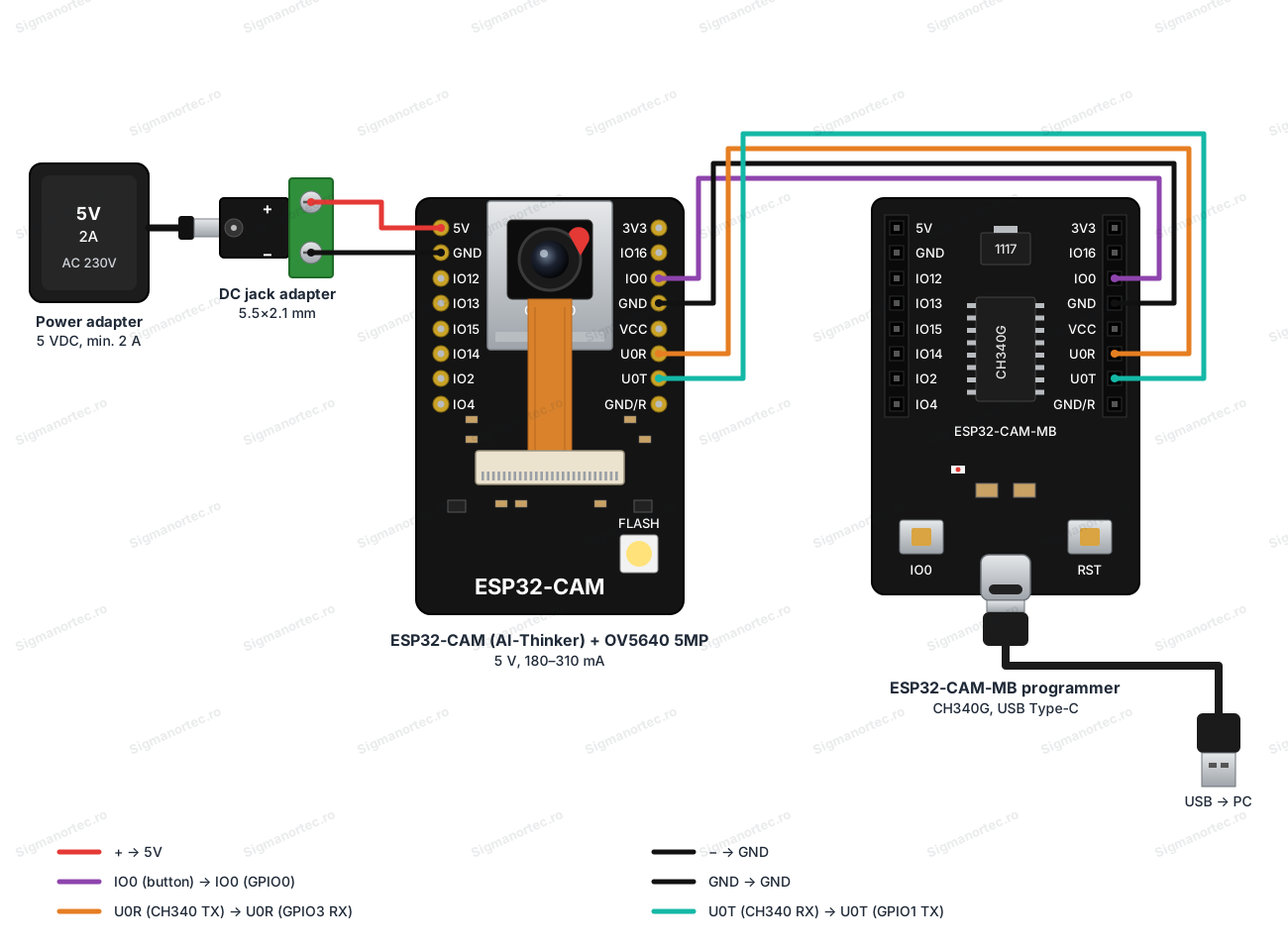
All the electronics on the board work at 3.3 V, and the CH340G programmer module uses the same logic level on its serial pins, so no level shifter is needed between the two boards. The VCC pin on the ESP32-CAM board is a 3.3 V or 5 V output and must not be used to power the board. A 5 V power supply of at least 2 A is mandatory for stable operation of the OV5640 camera. A computer USB port is often not enough for normal operation, although it can be used temporarily just for programming.
Board and libraries:
Select the "AI Thinker ESP32-CAM" board from the Tools > Board menu, after installing the "esp32 by Espressif Systems" package from Tools > Board > Boards Manager. If the package does not appear in the list, add the address https://dl.espressif.com/dl/package_esp32_index.json in File > Preferences, under Additional Boards Manager URLs.
You do not need to install any additional library from Library Manager. The esp_camera.h, WiFi.h and WebServer.h libraries are part of the esp32 package installed above.
The code:
The code initializes the camera with the AI Thinker model's pin mapping, connects to the WiFi network and starts a simple HTTP server with a main page and an address from which a photo can be downloaded in JPEG format.
/*
  ESP32-CAM OV5640 5MP - simple snapshot web server
  Board: AI Thinker ESP32-CAM (install package "esp32 by Espressif Systems" from Boards Manager,
  Additional Boards Manager URL: https://dl.espressif.com/dl/package_esp32_index.json)
  Libraries: none to install separately, esp_camera.h, WiFi.h and WebServer.h are part of the esp32 board package
  Wiring: camera and microSD pins are fixed on board, programming uses U0R, U0T, IO0 and GND
  through the included ESP32-CAM-MB CH340G programmer, power is supplied on the 5V/GND pins
*/
#include "esp_camera.h"
#include <WiFi.h>
#include <WebServer.h>
// Camera pin map for the AI Thinker ESP32-CAM board
#define PWDN_GPIO_NUM     32
#define RESET_GPIO_NUM    -1
#define XCLK_GPIO_NUM      0
#define SIOD_GPIO_NUM     26
#define SIOC_GPIO_NUM     27
#define Y9_GPIO_NUM       35
#define Y8_GPIO_NUM       34
#define Y7_GPIO_NUM       39
#define Y6_GPIO_NUM       36
#define Y5_GPIO_NUM       21
#define Y4_GPIO_NUM       19
#define Y3_GPIO_NUM       18
#define Y2_GPIO_NUM        5
#define VSYNC_GPIO_NUM    25
#define HREF_GPIO_NUM     23
#define PCLK_GPIO_NUM     22
#define FLASH_LED_GPIO_NUM 4
// WiFi credentials, replace with your own network
const char* ssid = "YOUR_WIFI_SSID";
const char* password = "YOUR_WIFI_PASSWORD";
WebServer server(80);
// Serve a simple HTML page with a link to the snapshot
void handleRoot() {
  String html = "<html><body><h1>ESP32-CAM OV5640</h1>";
  html += "<p><a href=\"/capture\">Get snapshot</a></p></body></html>";
  server.send(200, "text/html", html);
}
// Capture one JPEG frame and send it to the browser
void handleCapture() {
  camera_fb_t *fb = esp_camera_fb_get();
  if (!fb) {
    Serial.println("Camera capture failed");
    server.send(503, "text/plain", "Camera capture failed");
    return;
  }
  server.sendHeader("Content-Disposition", "inline; filename=capture.jpg");
  server.send_P(200, "image/jpeg", (const char *)fb->buf, fb->len);
  esp_camera_fb_return(fb);
  Serial.printf("Snapshot sent, size %u bytes\n", fb->len);
}
void setup() {
  Serial.begin(115200);
  Serial.println();
  // Flash LED pin kept off at startup
  pinMode(FLASH_LED_GPIO_NUM, OUTPUT);
  digitalWrite(FLASH_LED_GPIO_NUM, LOW);
  // Camera configuration structure
  camera_config_t config;
  config.ledc_channel = LEDC_CHANNEL_0;
  config.ledc_timer = LEDC_TIMER_0;
  config.pin_d0 = Y2_GPIO_NUM;
  config.pin_d1 = Y3_GPIO_NUM;
  config.pin_d2 = Y4_GPIO_NUM;
  config.pin_d3 = Y5_GPIO_NUM;
  config.pin_d4 = Y6_GPIO_NUM;
  config.pin_d5 = Y7_GPIO_NUM;
  config.pin_d6 = Y8_GPIO_NUM;
  config.pin_d7 = Y9_GPIO_NUM;
  config.pin_xclk = XCLK_GPIO_NUM;
  config.pin_pclk = PCLK_GPIO_NUM;
  config.pin_vsync = VSYNC_GPIO_NUM;
  config.pin_href = HREF_GPIO_NUM;
  config.pin_sccb_sda = SIOD_GPIO_NUM;
  config.pin_sccb_scl = SIOC_GPIO_NUM;
  config.pin_pwdn = PWDN_GPIO_NUM;
  config.pin_reset = RESET_GPIO_NUM;
  config.xclk_freq_hz = 20000000;
  config.pixel_format = PIXFORMAT_JPEG;
  // Use a larger frame and double buffering when PSRAM is available
  if (psramFound()) {
    config.frame_size = FRAMESIZE_SVGA;
    config.jpeg_quality = 12;
    config.fb_count = 2;
  } else {
    config.frame_size = FRAMESIZE_VGA;
    config.jpeg_quality = 15;
    config.fb_count = 1;
  }
  // Initialize the camera
  esp_err_t err = esp_camera_init(&config);
  if (err != ESP_OK) {
    Serial.printf("Camera init failed with error 0x%x\n", err);
    return;
  }
  Serial.println("Camera initialized");
  // Connect to WiFi
  WiFi.begin(ssid, password);
  Serial.print("Connecting to WiFi");
  while (WiFi.status() != WL_CONNECTED) {
    delay(500);
    Serial.print(".");
  }
  Serial.println();
  Serial.print("WiFi connected, IP address: ");
  Serial.println(WiFi.localIP());
  // Register HTTP routes and start the server
  server.on("/", handleRoot);
  server.on("/capture", handleCapture);
  server.begin();
  Serial.println("HTTP server started");
  Serial.println("Open the IP address above in a browser, then click Get snapshot");
}
void loop() {
  server.handleClient();
}
How the code works:
At the beginning of the file the camera pin constants are defined, PWDN_GPIO_NUM, RESET_GPIO_NUM, XCLK_GPIO_NUM, SIOD_GPIO_NUM, SIOC_GPIO_NUM, Y2_GPIO_NUM-Y9_GPIO_NUM, VSYNC_GPIO_NUM, HREF_GPIO_NUM and PCLK_GPIO_NUM, with the fixed values used on the AI Thinker board, plus FLASH_LED_GPIO_NUM for the LED on GPIO4. The ssid and password variables must be filled in with your WiFi network details, and the server object, of type WebServer, is created on port 80.
In the setup function, after starting serial communication, the camera_config_t structure is filled in with the camera pins, the PIXFORMAT_JPEG image format and, depending on the result of psramFound, the FRAMESIZE_SVGA resolution with two frame buffers when the board has PSRAM, or FRAMESIZE_VGA with a single buffer otherwise. The esp_camera_init function starts the camera, and in case of an error the message is displayed on Serial. Next comes the WiFi connection with WiFi.begin, a loop that waits until WiFi.status returns WL_CONNECTED, and the registration of the two routes, handleRoot for the main page and handleCapture for the photo, before server.begin is called.
The handleCapture function requests a new frame with esp_camera_fb_get, sends it to the browser with server.send_P using the image/jpeg type, then releases the frame memory with esp_camera_fb_return. In the loop function, server.handleClient is called continuously to respond to requests received over HTTP.
Result:
On the Serial Monitor, at 115200 baud, you can see the connection to the WiFi network and the IP address received by the board, followed by the confirmation that the HTTP server has started. If you open the displayed IP address followed by /capture in a browser, a photo taken at that moment by the OV5640 camera is downloaded.
Camera initialized
Connecting to WiFi.......
WiFi connected, IP address: 192.168.0.115
HTTP server started
Open the IP address above in a browser, then click Get snapshot
Snapshot sent, size 48213 bytes
Snapshot sent, size 51042 bytes
Common problems:
Nothing appears on the Serial Monitor: check that the speed selected in the Serial Monitor is 115200 baud and that the programmer module is connected correctly, with U0R and U0T not swapped.
The code upload fails with a connection or synchronization message: hold down the Download button or connect GPIO0 to GND before starting the upload, and check that Flash Mode DIO is selected in Tools > Flash Mode.
The camera does not start and an initialization error appears on Serial: check the 5 V power supply, at least 2 A, because a weak supply causes resets (brownout) when the camera is initialized.
The image is white, dark or has stripes: let the camera adjust its exposure and white balance automatically for a few seconds, and check that the camera's FPC ribbon is seated correctly in the connector.
The board resets by itself during streaming: reduce the resolution and the JPEG quality in the code and check the power supply again, since a peak current of over 300 mA with a weak supply causes repeated resets.
The camera becomes very hot to the touch: this is normal behavior for the OV5640 sensor, but be sure to fit a heatsink on the back and avoid continuous streaming for long periods.
Limitations and tips:
The maximum 5 MP resolution of the OV5640 sensor is useful for photos, not for continuous streaming, where the WiFi transmission speed and the PSRAM memory practically limit the resolution to SVGA or HD. The module is not recommended for uninterrupted 24/7 operation, and for projects with periodic captures it is a good idea to turn the camera off between photos, using GPIO32, to reduce heating and power consumption. Starting from this code, the board can be extended with saving to the microSD card, motion detection with an external PIR sensor on one of the free pins, or integration into a larger surveillance system with several ESP32-CAM cameras.