
Product images are for informational purposes only and may vary slightly depending on the batch and supplier. Product specifications and prices may be subject to change without notice. We do our best to provide accurate and complete product specifications, but they may not be completely accurate. If you encounter any such situation, please let us know.
The product is intended for specialists and requires qualified and authorized personnel. The product does not include assembly/use instructions . Putting the product into operation by unqualified persons leads to the loss of the warranty according to the Terms and Conditions on the site.
The specified technical parameters (current, power, etc.) represent maximum allowable values under ideal operating conditions. For safe use and optimal lifespan, it is recommended to operate the product continuously at no more than 50% of the specified maximum values.
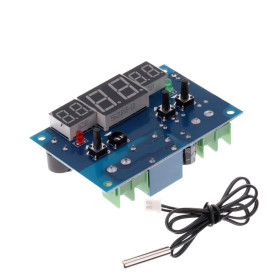
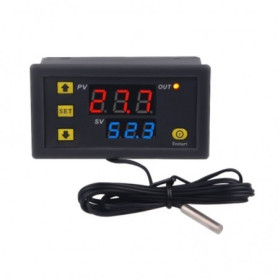
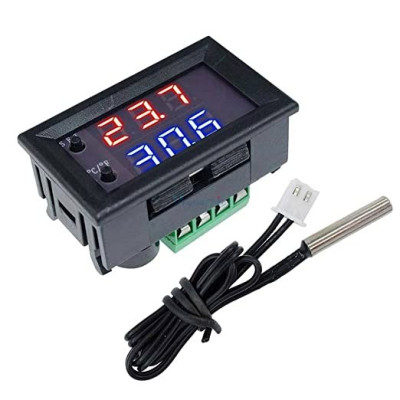
Panel thermostat module, W1209WK, 12V, heating-cooling
Panel thermostat for automatic temperature control in heating or cooling mode, 12V DC power supply, hysteresis adjustment for stable maintenance of the desired range, range -50 to 110C with 0.1C accuracy, dual display that simultaneously shows the current and set temperature, 10A relay output and waterproof NTC 10K probe, ideal for incubators, terrariums, refrigerators and DIY projects.
Shipping by Thursday 22 October
Buying this product earns you 1.90 RON in loyalty points.

International fast shipping within EU. Free Shipping for orders above 100 EUR in most EU countries.

We ship from our stock within 24H

You earn points with every order, worth 5%.
The W1209WK panel thermostat module is an electronic device that can be used for temperature control, both for heating and cooling. It is powered at a voltage of 12V DC and can be integrated in different applications, such as incubators, terrariums, refrigerators or other equipment that requires temperature control.
The module works on the principle of hysteresis (return temperature), that is, the desired temperature is set and, by defining the hysteresis, the module will maintain the temperature in the set range.
The module has a high precision in measuring and setting the temperature, with an accuracy of ± 0.1℃, which makes it suitable for temperature sensitive applications. The temperature measurement and setting range is -50℃ ~ +110℃, and the control mode can be set for both heating and cooling.
This thermostat module can be powered with a voltage of 12V DC and consumes a maximum current of 200mA. Its small dimensions make it easy to integrate into a variety of projects and equipment.
The control buttons are integrated directly into the display, this allows a compact size of the module. The display is on two lines of different colors and displays both the set temperature and the current one at the same time.
Specifications:
Supply voltage: 12VDC
Operating Mode: Hysteresis
Temperature measurement range: -50℃ ~ +110℃
Temperature measurement accuracy: ± 0.1℃
Temperature setting range: -50℃ ~ +110℃
Temperature setting accuracy: ± 0.1℃
Control mode: heating/cooling
Maximum current: 200mA
Probe: NTC 10K, waterproof
Output: Relay 250VAC, 10A
Displayed temperature: Degrees C or F
Display: Dual, different colors, measured temperature and set temperature
Dimensions: 48 x 30 x 32mm
Panel cutout dimensions: 46 x 26.5mm
Login:
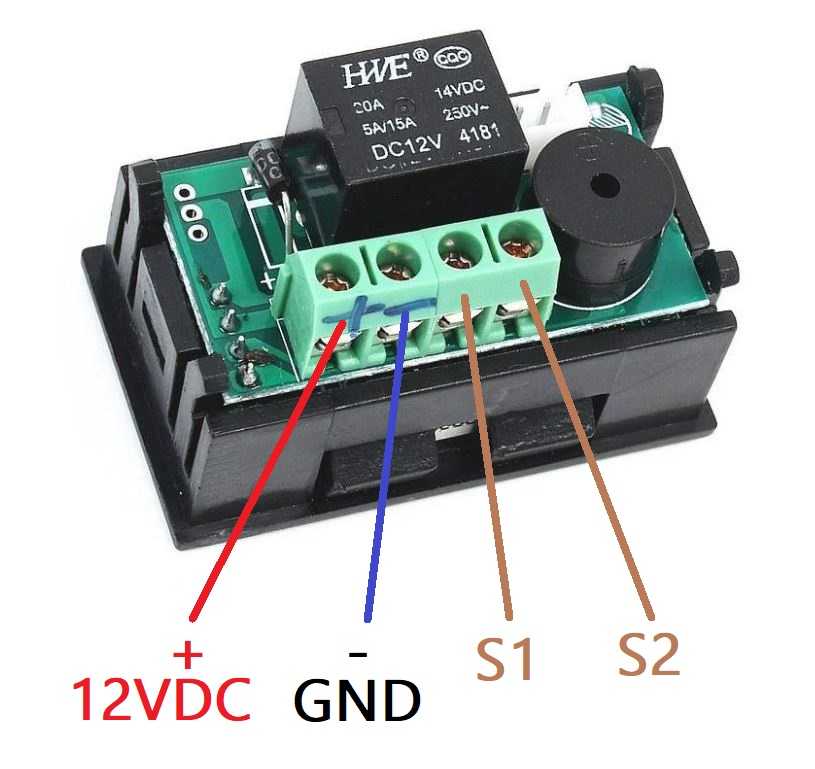
Use:
When not in programming mode, the C/F button allows switching between Celsius and Fahrenheit units.
The P2 and P3 programs on the W1209WK digital thermostat are used to set the upper and lower limits of the temperature that the user can select. These settings help prevent choosing a temperature that might be too high or too low for the desired application, providing a safety measure and preventing improper use of the device.
To set the temperature:
Press the SET button to enter the temperature setting mode. The set temperature will start to flash. Use the SET and C/F buttons to select the desired temperature (when in temperature setting mode, the SET and C/F buttons work as + and -). The temperature selection will be automatically confirmed after 3 seconds.
To program:
Press and hold the SET button for 5 seconds to enter the programming mode.
From the programming mode, use the SET and C/F (+ and -) buttons to navigate through parameters P0 to P8.
Once you have reached the desired parameter (P0-P8), press the SET and C/F buttons simultaneously to confirm.
At this point, your selection will start flashing. Use the SET and C/F buttons to navigate through your options.
Press the SET and C/F buttons simultaneously to confirm the choice made.
Code description and settings:
P0: Heating/cooling mode (H/C) - default setting C
P1: Return difference (0.1-30) - default setting 2.0
P2: Upper setting limit (110) - default setting 110
P3: Lower setting limit (-50) - default setting -50
P4: Temperature correction (-15-15) - default setting 0
P5: Start delay (0-10) - default setting 0
P6: High temperature alarm (-50-110)
P7: Celsius / Fahrenheit (this can also be set by pressing the C/F button) - default setting CS
P8: Reset to factory settings (this can also be done by holding down the SET and C/F buttons simultaneously for a longer period of time) - default setting OFF
Example:
I want to use this device to control a heat source for an incubator for hatching chicken eggs. I want the temperature to remain between 37 and 38 degrees Celsius.
Step 1 , Switch to Celsius:
Assuming the thermostat is set to Fahrenheit, press the C/F button once to switch to Celsius.
Step 2 , Switch to heating mode:
Press and hold SET for 5 seconds to enter programming mode.
From programming mode, use SET and C/F (+ and -) to navigate to P0.
Press the SET and C/F buttons simultaneously to confirm. At this point, the current selection will start flashing.
Use SET and C/F to select H (heat).
Press the SET and C/F buttons simultaneously to confirm the choice made.
Step 3 , Set the rebound difference: This determines how much the temperature must rise before the heat source stops. To prevent the rapid stopping and starting of the heat source, which could lead to its premature damage, set the return difference to a minimum of 0.3 degrees Celsius. Thus, you want the heat source to activate when the temperature drops below 37.5 degrees and to stop when the temperature reaches 37.8 degrees.
Press and hold SET for 5 seconds to enter programming mode.
From programming mode, use SET and C/F (+ and -) to navigate to P1.
Press the SET and C/F buttons simultaneously to confirm. At this point, the current selection will start flashing.
Use SET and C/F to select 0.3.
Press the SET and C/F buttons simultaneously to confirm the choice made.
Step 4 , Set the temperature to 37.8:
Press SET (the set temperature will start flashing).
Use the SET and C/F buttons to set the display to 37.8.
Wait 3 seconds to confirm.
Thus, the thermostat is programmed to maintain an optimal temperature in the incubator, facilitating an efficient hatching of chicken eggs under established temperature conditions.
- Output Type Voltage
- Closed-Open Contact
- Input Voltage
- 12 V
- Input Voltage Type
- “DC” in Romanian can mean **“de ce”**, which translates to **“why”** in English.
Produs destinat utilizarii in proiecte electronice, automatizari, prototipare, educatie si cercetare.
Produsul trebuie utilizat numai conform specificatiilor tehnice mentionate in descriere si/sau in documentatia produsului.
Avertismente generale de siguranta:
Nu utilizati produsul la tensiuni, curenti sau temperaturi peste valorile specificate.
Montajul si conectarea trebuie realizate de persoane cu cunostinte tehnice minime in domeniul electric/electronic.
Evitati scurtcircuitele, inversarea polaritatii si conectarea gresita a alimentarii.
Nu lasati produsul alimentat nesupravegheat in timpul testelor.
Produsul nu este jucarie si nu este destinat copiilor.
Pentru modulele electronice, se recomanda utilizarea in carcase, panouri sau montaje protejate, dupa caz.
Identificare produs:
Denumirea produsului, codul/SKU-ul si caracteristicile tehnice sunt mentionate in pagina produsului si/sau pe eticheta ambalajului.
Producator / Importator / Distribuitor:
Sigmanortec S.R.L.
Calea Bucuresti nr. 9, Targu Jiu, Gorj, Romania
E-mail: [email protected]
Website: www.sigmanortec.ro
Persoana responsabila in UE:
Sigmanortec S.R.L.
Calea Bucuresti nr. 9, Targu Jiu, Gorj, Romania
E-mail: [email protected]
Documentatie si siguranta:
Pentru informatii suplimentare, fise tehnice, declaratii de conformitate sau instructiuni, ne puteti contacta la [email protected].