
Product images are for informational purposes only and may vary slightly depending on the batch and supplier. Product specifications and prices may be subject to change without notice. We do our best to provide accurate and complete product specifications, but they may not be completely accurate. If you encounter any such situation, please let us know.
The product is intended for specialists and requires qualified and authorized personnel. The product does not include assembly/use instructions . Putting the product into operation by unqualified persons leads to the loss of the warranty according to the Terms and Conditions on the site.
The specified technical parameters (current, power, etc.) represent maximum allowable values under ideal operating conditions. For safe use and optimal lifespan, it is recommended to operate the product continuously at no more than 50% of the specified maximum values.
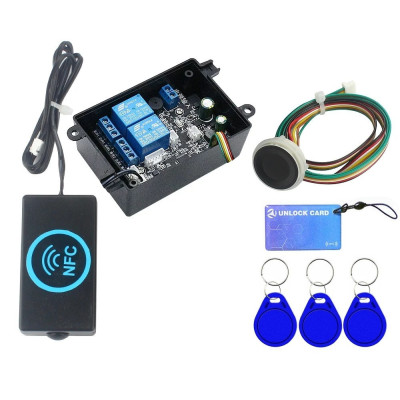
Access control module, NFC, RFID and Fingerprint, 2 channels, 10-120VDC
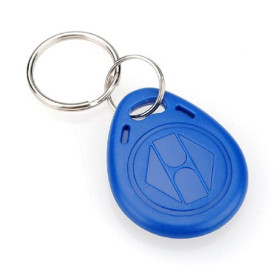
Flexible solution for access control and automation, with authentication by fingerprint, 13.56MHz IC card or NFC phone. Operates at 10-120VDC, stores up to 100 cards and 50 fingerprints, includes 2 relays for controlling gates, doors, electronic projects or automotive applications, with 10 configurable modes and programmable activation times.
Shipping by Thursday 22 October
Buying this product earns you 2.95 € in loyalty points.

International fast shipping within EU. Free Shipping for orders above 100 EUR in most EU countries.

We ship from our stock within 24H

You earn points with every order, worth 5%.
The D231 access control module combines three authentication methods on the same board: fingerprint, 13.56 MHz IC card, and NFC phone, for secure control of electric locks, doors, and gates. It is also suitable for car modifications, forklifts, electric bicycles, scooters, and motorcycles, or for any electronic project that requires secure activation without a mechanical key and without complicated wiring.
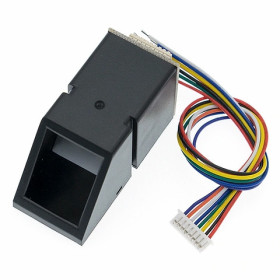
The module reads IC cards at 13.56 MHz and recognizes fingerprints through the dedicated reader, and its memory stores up to 100 fingerprints, of which a maximum of 10 are administrator fingerprints, one administrator card, and up to 1999 user cards or phones. All data remains saved even after power loss. The power supply accepts any DC voltage between 10 and 120 VDC, which allows direct connection to batteries and 12 V, 24 V, 48 V, 60 V, 72 V, or 96 V systems without an additional converter. The board offers 11 operating modes, selectable from the setting button, covering pulse control, latching, or both relays simultaneously, depending on the user type and authentication method.
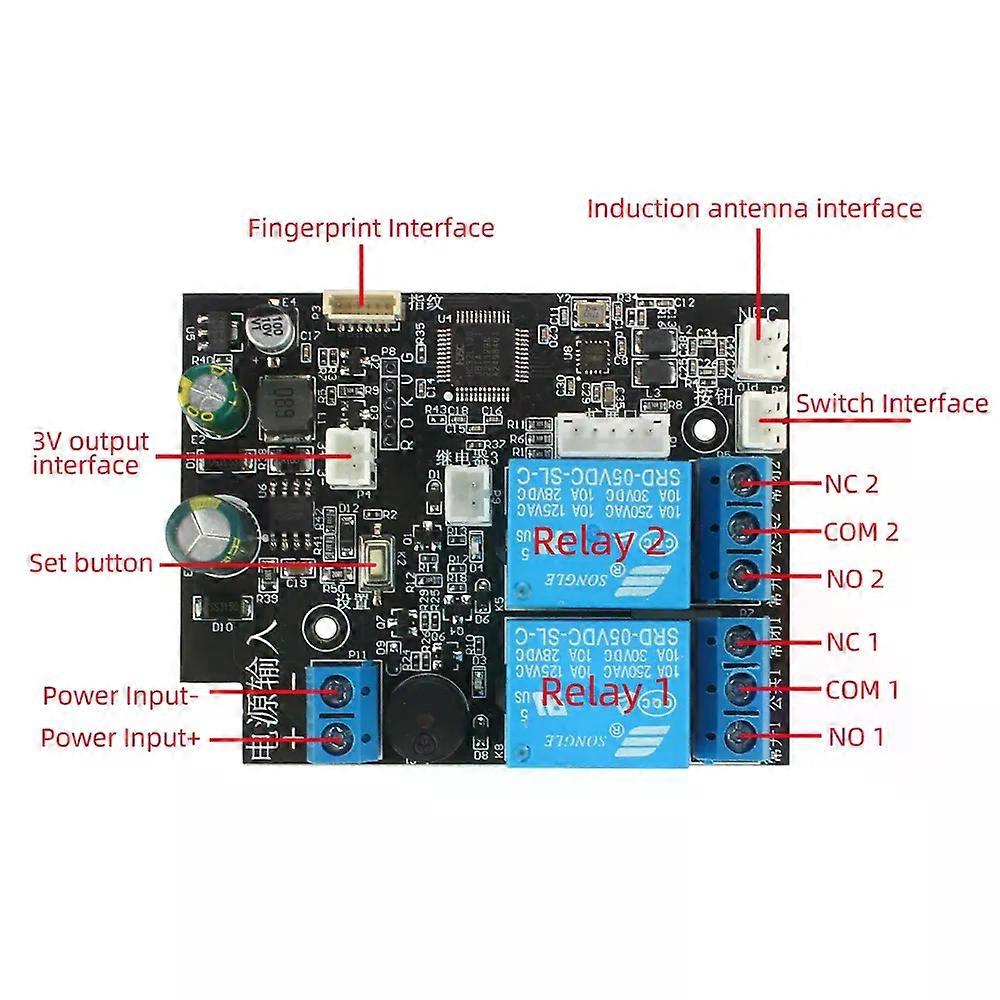
Among the main features are the two integrated 10 A relays with NO, NC, and COM dry contacts, the output for an optional third relay, the controlled 3 V output for powering a car remote, and the input for a mechanical button that activates the relays without verification. Power is supplied directly to the Power input terminals, with a DC voltage between 10 and 120 VDC.
Because the contacts of the two relays are potential-free, dry contacts, the module can also be integrated into a system with Arduino, ESP32, STM32, Raspberry Pi, or other compatible platforms, with the contacts used as a galvanically isolated input. NFC phones work through a card added in the Wallet app; generic NFC apps cannot be used for unlocking.
Specifications:
Power supply voltage: 10 - 120 VDC
Maximum relay load current: 10 A
Model: D231
Card reading frequency: 13.56 MHz
Authentication methods: Fingerprint, IC card, NFC phone
Fingerprint capacity: 100 with the standard reader, of which a maximum of 10 are administrator fingerprints
Administrator card: 1
User card capacity: 1999
Data retention after power loss: Yes
Integrated relays: 2, type SRD-05VDC-SL-C
Relay contacts: NO, NC, COM, dry contact
Relay ratings: 10 A 250 VAC, 10 A 30 VDC
Optional relay: Output for Relay 3, not included
Auxiliary output: Controlled 3 V
Button input: Yes, unlock without verification
Operating modes: 11, default mode 3
Relay pulse time: 0.3 s - 15 minutes, default 0.5 s
Relay 1 delay in modes 1, 8, 9, and 10: 0 - 3 s, default 1 s
Phone compatibility: Android and iPhone with NFC, via a card added in the Wallet app
Fingerprint sensor: Not waterproof
Fingerprint reader diameter: 21 mm
Main board dimensions: 67.3 x 52 x 19.2 mm
Antenna board dimensions: 45.5 x 22.3 x 6.5 mm
Antenna box dimensions: 48 x 26 x 15 mm
Dimensions: 82 x 57 x 34 mm
Pinout:
| Connector | Pin | Function |
|---|---|---|
| Power input | + | Positive power supply, 10 - 120 VDC |
| Power input | - | Negative power supply, ground |
| RELAY 1 | COM1 | Relay 1 common |
| RELAY 1 | NO1 | Relay 1 normally open contact |
| RELAY 1 | NC1 | Relay 1 normally closed contact |
| RELAY 2 | COM2 | Relay 2 common |
| RELAY 2 | NO2 | Relay 2 normally open contact |
| RELAY 2 | NC2 | Relay 2 normally closed contact |
| 3V output | 3V+ | Controlled 3 V output, positive |
| 3V output | 3V- | Controlled 3 V output, ground |
| Optional relay 3 | - | Connector for optional relay 3, not included |
| Fingerprint head | 6 pins | Fingerprint reader connector |
| NFC | - | NFC / RFID antenna connector |
| Button | - | Mechanical button input, unlock without verification |
| Communication port | 5 pins | Expansion / communication port |
| Setting key | - | Mode setting button |
| Mode | LED indication | Operation |
|---|---|---|
| 1 | 1 blink | Car door 1. Upon unlocking, the 3V output is activated; after 1 s Relay 1 closes for 0.5 s and Relay 3 engages. The second unlock closes Relay 2 for 0.5 s, and after 5 s the 3V output is deactivated and Relay 3 disengages |
| 2 | 2 blinks | Start with one button 1. The first unlock engages Relay 1; a subsequent failed verification disengages it. A new successful unlock also engages Relay 2, which disengages immediately when the finger or card is removed. A new verification disengages Relay 1 |
| 3 | 3 blinks | Default, lock and seat. Unlocking engages Relay 1; the next unlock disengages it. If the finger or card is held for about 2 s after unlocking, Relay 2 closes for 0.5 s |
| 4 | 4 blinks | Lock, seat, and optional trunk. The administrator card or fingerprint engages Relay 1; the next unlock disengages it. If held for about 2 s, Relay 2 closes for 0.5 s. The user fingerprint closes Relay 3 for 0.5 s, regardless of Relay 1 state |
| 5 | 5 blinks | Lock, headlights, and optional seat. The administrator engages Relay 1; the next unlock disengages Relay 1 and Relay 2. If held for about 2 s, Relay 2 engages; the next unlock disengages both relays. The user fingerprint closes Relay 3 for 0.5 s, regardless of Relay 1 state |
| 6 | 6 blinks | Double pulse. Any unlock closes Relay 1 and Relay 2 simultaneously for 0.5 s |
| 7 | 7 blinks | Double latching. The first unlock engages Relay 1 and Relay 2 simultaneously; the second unlock disengages them |
| 8 | 8 blinks | Car door 2 and trunk. Upon unlocking, the 3V output is activated; after 1 s Relay 1 closes for 0.5 s. The second unlock closes Relay 2 for 0.5 s, and the 3V output is deactivated after 5 s. If the finger or card is held for 3 s, Relay 3 engages until removal |
| 9 | 9 blinks | Car door 3. The administrator activates the 3V output; after 1 s Relay 1 closes for 0.5 s and Relay 3 engages. The user closes Relay 2 for 0.5 s; after 5 s the 3V output is deactivated and Relay 3 disengages |
| 10 | 10 blinks | Three separate relays. The administrator activates the 3V output; after 1 s Relay 1 closes for 0.5 s. The user card closes Relay 2 for 0.5 s; the 3V output is deactivated after 5 s. The user fingerprint closes Relay 3 for 0.5 s |
| 11 | 11 blinks | Start with one button 2. Unlocking engages Relay 1. If the finger or card is held for another 1 s, Relay 2 also engages, and it disengages immediately upon removal. A new verification disengages Relay 1 |
Usage:
Connect the fingerprint reader to the Fingerprint head connector and the NFC / RFID antenna to the NFC connector.
Power the board at the Power input terminals, observing polarity, with a DC voltage between 10 and 120 VDC; check the power supply voltage in advance so as not to exceed this range.
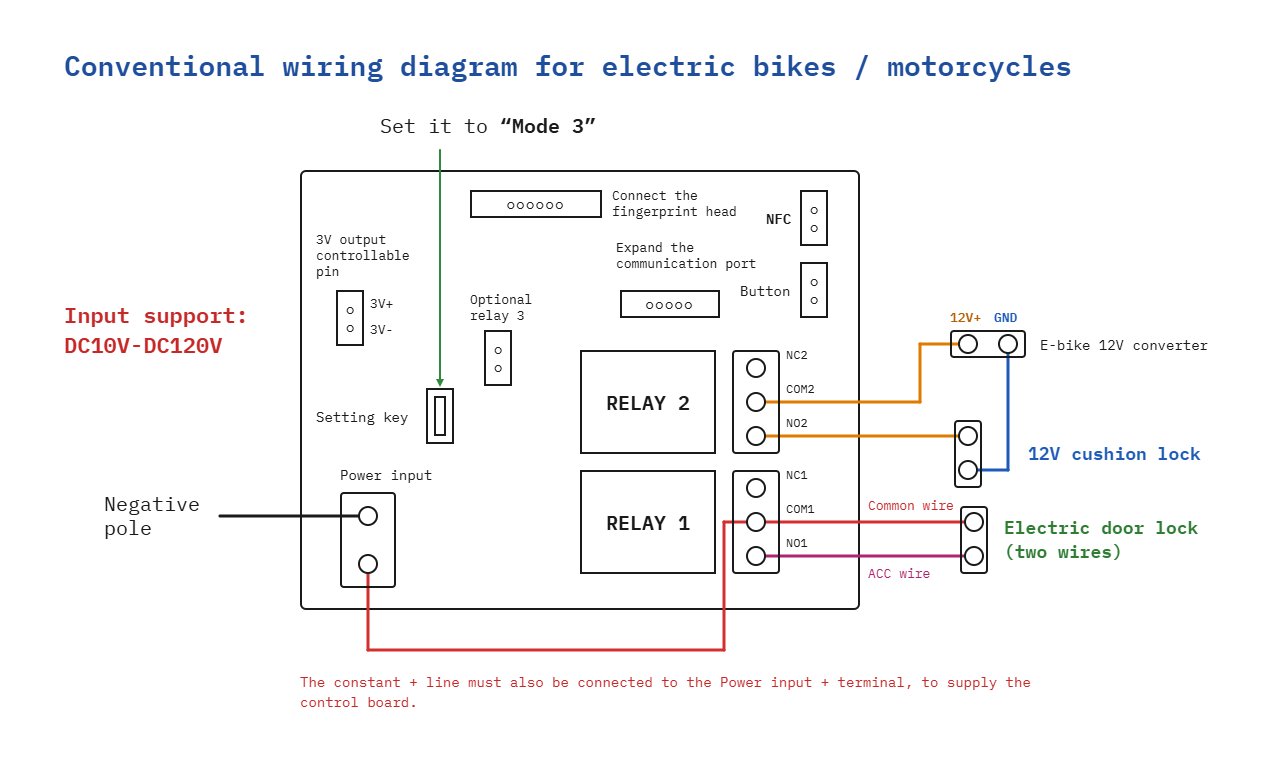
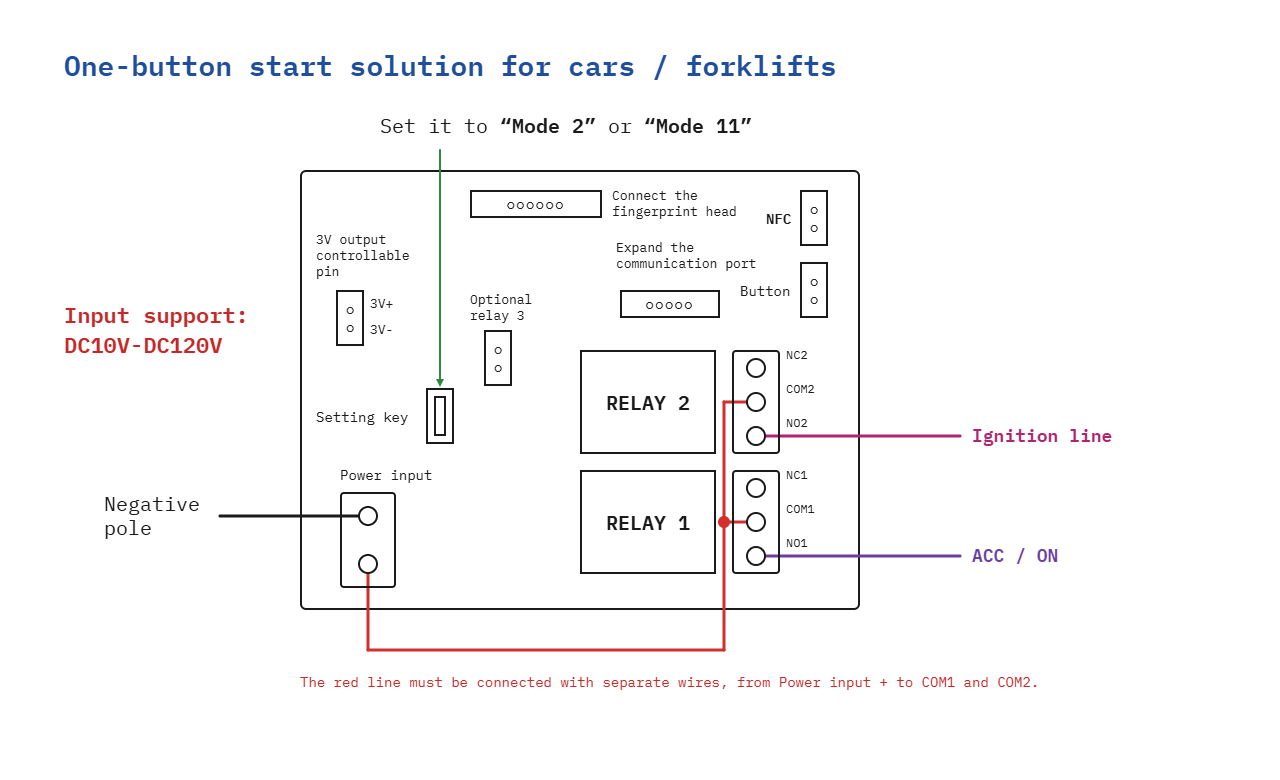
Note that the relays do not provide their own voltage; their contacts are dry contacts. To power a load, connect the positive from the power supply to COM1 or COM2 and the load to NO1 or NO2; normally only the NO and COM contacts are used.
With the board powered, press the setting button; the blue LED blinks as many times as the active mode number. Each press advances to the next mode from 1 to 11, and the selected mode is saved automatically. The factory default mode is mode 3.
Keep in mind that, from the factory and after reset, the module is in demonstration mode, in which any fingerprint or IC card controls the relay. Register the administrator fingerprint and card immediately after installation, before granting access to other users.
For an electric bicycle or motorcycle, in mode 3, connect the battery positive to Power input + and, through a separate wire, to COM1, and connect NO1 to the ACC wire of the ignition switch. For a 12 V seat lock, connect COM2 to the 12V+ from the vehicle's 12 V converter, NO2 to the lock, and the other wire of the lock to GND.
For starting a car or forklift, in mode 2 or 11, connect the permanent positive to Power input + and, through separate wires, to COM1 and COM2, then NO1 to the ACC / ON line, and NO2 to the starter line.
Use the controlled 3V output only to power a low-power car remote, observing the 3V+ and 3V- polarity.
Connect a mechanical button to the Button input when you need direct unlocking, without fingerprint or card verification.
For integration with Arduino, ESP32, STM32, Raspberry Pi, or other platforms, use the relay contacts as a galvanically isolated input, without powering them directly from the module.
Do not expose the fingerprint sensor to water or moisture, and mount it in a protected location.
For stable results, periodically check the fastening of the fingerprint reader and NFC antenna connectors and avoid voltages near the upper limit of the supply range for safer long-term operation.
- Supply Voltage
- 10
- Maximum Input Voltage
- 120
- Input Voltage Type
- “DC” in Romanian can mean **“de ce”**, which translates to **“why”** in English.
Produs destinat utilizarii in proiecte electronice, automatizari, prototipare, educatie si cercetare.
Produsul trebuie utilizat numai conform specificatiilor tehnice mentionate in descriere si/sau in documentatia produsului.
Avertismente generale de siguranta:
Nu utilizati produsul la tensiuni, curenti sau temperaturi peste valorile specificate.
Montajul si conectarea trebuie realizate de persoane cu cunostinte tehnice minime in domeniul electric/electronic.
Evitati scurtcircuitele, inversarea polaritatii si conectarea gresita a alimentarii.
Nu lasati produsul alimentat nesupravegheat in timpul testelor.
Produsul nu este jucarie si nu este destinat copiilor.
Pentru modulele electronice, se recomanda utilizarea in carcase, panouri sau montaje protejate, dupa caz.
Identificare produs:
Denumirea produsului, codul/SKU-ul si caracteristicile tehnice sunt mentionate in pagina produsului si/sau pe eticheta ambalajului.
Producator / Importator / Distribuitor:
Sigmanortec S.R.L.
Calea Bucuresti nr. 9, Targu Jiu, Gorj, Romania
E-mail: [email protected]
Website: www.sigmanortec.ro
Persoana responsabila in UE:
Sigmanortec S.R.L.
Calea Bucuresti nr. 9, Targu Jiu, Gorj, Romania
E-mail: [email protected]
Documentatie si siguranta:
Pentru informatii suplimentare, fise tehnice, declaratii de conformitate sau instructiuni, ne puteti contacta la [email protected].
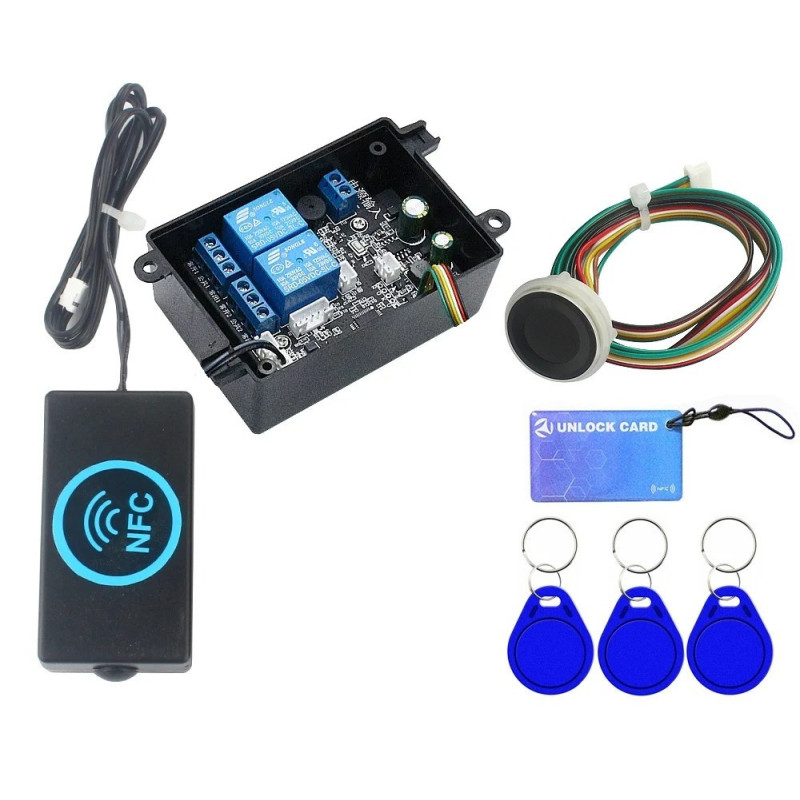
The D231 module is a standalone access control board that combines three authentication methods on the same board: fingerprint, 13.56 MHz IC card and NFC phone, to control one or two relays without a mechanical key. It is suitable for doors, gates, electric locks or for immobilizing an electric vehicle, bicycle, scooter, motorcycle or forklift, wherever you want to replace or double the classic key with a system that is harder to copy.
The module works independently, it does not need an external microcontroller or a user loaded program, it is powered directly between 10 and 120 VDC and is configured from the single button on the board, Setting key. Depending on the mode chosen from the 11 available, the two built in relays can work in pulse, latching or simultaneous mode, and the registered fingerprints and cards remain in memory even after the power is cut. In this tutorial we put the board into operation as a standalone module, without a development board and without a program, exactly as it is designed to work.
How it works:
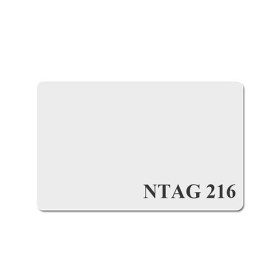
At each fingerprint placed on the sensor, the board compares the read pattern with the fingerprints already registered in its own memory, which can store up to 100 fingerprints, of which a maximum of 10 with administrator rights. IC cards are read through the antenna connected to the NFC socket, at a frequency of 13.56 MHz, and the same principle is used for NFC phones, provided they have a card added in the Wallet application, in which case the phone behaves towards the module like a regular IC card.
If the fingerprint or card read is found in memory, the module controls Relay 1 and, in some modes, Relay 2, following a fixed sequence, different for each of the 11 modes. In the factory default mode, mode 3, designed for a lock and a door, the first valid reading closes Relay 1, the second reading opens it back up, and if the finger or card is held for about 2 seconds after unlocking, Relay 2 is additionally activated for 0.5 seconds. The other modes only change the control logic of the relays and of the 3 V output, not the way the fingerprint or card is read.
What you need:
- 1 x Access control module, NFC, RFID and Fingerprint, 2 channels, 10-120VDC
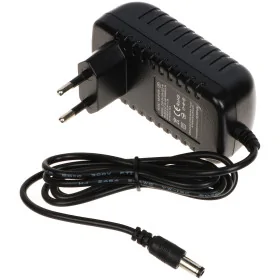
- 1 x AC-DC power supply, 13.8V, 5A
- 2 x multi-strand electrical wires for mounting
- 1 x PCB connector set, terminal, with screw, 2 pins, 5.08-2P, 90 degrees
- 1 x Digital multimeter Q1, True-RMS, NVC, temperature sensor, automatic
- 1 x 12V relay module with light sensor
Connection:
All connections must be made with the module disconnected from the power supply. The board has separate connectors for power, for the two relays, for the 3 V output, for the fingerprint reader, for the NFC antenna and for an optional mechanical button, each clearly marked on the board.
| Product pin | Connects to | Role |
|---|---|---|
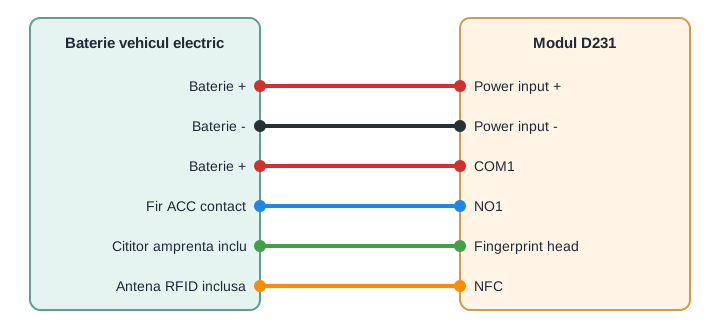
| Power input + | Positive terminal of the battery or power supply, 10 - 120 VDC | Board power supply |
| Power input - | Negative terminal of the battery or power supply | Power supply ground |
| Fingerprint head | Included fingerprint reader, 6 pin connector | Fingerprint sensor signal |
| NFC | Included RFID / NFC antenna | Reading of IC cards and NFC phones |
| RELAY 1 (COM1, NO1, NC1) | Controlled circuit, for example the ACC wire of the ignition | Relay 1 output, dry contact, potential free |
| RELAY 2 (COM2, NO2, NC2) | Second controlled circuit, for example an electric lock | Relay 2 output, dry contact, potential free |
| 3V output (3V+, 3V-) | Battery terminals of a car remote control, removed from its case | Controlled power supply for simulating the remote button press |
| Button | Optional mechanical button, mounted in a hidden spot | Emergency unlock, without verification |
| Setting key | - | Operating mode selection, 1 - 11 |
Configuration:
Briefly press the Setting key button while the board is powered, the blue LED blinks a number of times equal to the active mode, one blink for mode 1 and so on up to 11 blinks for mode 11. Each press moves to the next mode, and after the blinking stops the chosen mode is saved automatically, without any other confirmation. From the factory the board starts in mode 3, designed for a regular lock and an electric door.
| Mode | LED blinks | Typical use |
|---|---|---|
| 1 | 1 | Car door 1, with 3V output and Relay 3 |
| 2 | 2 | Start with a single button 1 |
| 3 (default) | 3 | Lock and door |
| 4 | 4 | Lock, door and optional trunk |
| 5 | 5 | Lock, light and optional door |
| 6 | 6 | Double pulse, both relays simultaneously |
| 7 | 7 | Double latching, both relays simultaneously |
| 8 | 8 | Car door 2 and trunk |
| 9 | 9 | Car door 3 |
| 10 | 10 | Three separate relays |
| 11 | 11 | Start with a single button 2 |
Keep in mind that from the factory and after a reset the module starts in demonstration mode, in which any fingerprint or any IC card controls the relays without identity verification. The first step after installation is registering the administrator's fingerprint and card, following the steps in the printed manual included with the board, only after that register the fingerprints and cards of regular users, one by one, up to the limit of 100 fingerprints and 1999 cards or phones.
There is no separate pairing for NFC phones, unlocking uses a card added in the phone's Wallet application, which behaves towards the module like a regular IC card, generic NFC apps are not recognized by the module.
If you change the operating mode, check again the behavior of the two relays with a multimeter before connecting the actual load, each mode has its own activation logic and can be surprising if you were used to the previous mode.
Usage example:
A frequent example is replacing the ignition key on an electric bicycle or scooter, using mode 3, the factory default. Connect Power input + to the permanent positive terminal of the battery and, through a separate wire, to COM1, with NO1 connected to the ACC wire of the original ignition, so that the vehicle receives voltage on ACC only after a validated fingerprint or card. Power input - is connected to the negative terminal of the battery, the same ground point used by the rest of the vehicle's electrical system.
After powering up, place the administrator's finger on the sensor, Relay 1 closes and the ACC wire receives voltage, just like turning the ignition key. A second touch of the fingerprint opens Relay 1 and interrupts the power to the ACC circuit, blocking the vehicle from starting until the next successful authentication. If the vehicle also has an electric lock, it is connected separately on COM2 and NO2, using the vehicle's 12 V supply, and is activated by holding the finger or card for about 2 seconds after Relay 1 unlocks.
Common issues:
The module does not respond to any fingerprint or card after the first power up, check if the board is still in demonstration mode, in which any fingerprint or card should control the relay, and if it still does not respond check the polarity on Power input and the connection of the Fingerprint head connector.
The blue LED does not blink at all when pressing the Setting key button, the cause is usually missing power or a voltage below 10 VDC on Power input, measure the voltage directly on the two terminals with a multimeter.
The relay does not engage even though the fingerprint or card seem recognized, check that you have selected the right mode for your application, some modes require holding the finger or card for an additional 1 - 2 seconds after the first reading to activate the second relay.
The card or phone is not recognized by the antenna, check that it is a 13.56 MHz IC card and not a 125 kHz card, and for the phone check that you have added the card in the Wallet application and are not trying to read it with a generic NFC app.
The fingerprint sensor seems to respond inconsistently, a wet, dirty or crooked finger on the sensor can reduce the recognition rate, and the sensor is not water resistant, so do not mount it exposed directly to rain or dust.
The settings or registered fingerprints seem lost after a power interruption, check the power supply, voltage drops below the minimum threshold during operation can cause the board to restart, not an actual loss of memory.
Limitations and tips:
The two built in relays support a maximum of 10 A on the NO and COM contacts, for larger loads or for directly controlling a motor use a contactor or an external auxiliary relay controlled by the board.
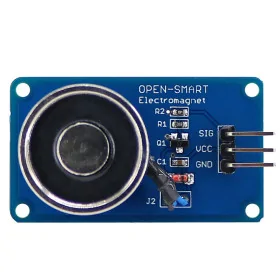
The third relay, mentioned on the board as Optional relay 3, is not included in the package and must be added separately if you need a third output, for example for a trunk.
The fingerprint sensor is not water resistant, mount it in an area protected from the weather, under a cover or in the cabin, not directly outdoors.
The board accepts any DC voltage between 10 and 120 VDC, but does not accept AC voltage, before connecting a new power supply check the type and value of the voltage with a multimeter.
The 5 pin communication port on the board is reserved for extensions, with no protocol documented by the manufacturer in the verified sources, for integration with an Arduino, an ESP32 or a PLC use the relay contacts, which are galvanically isolated and can be read as a simple dry contact input.