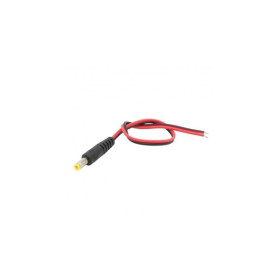
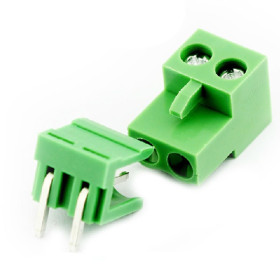
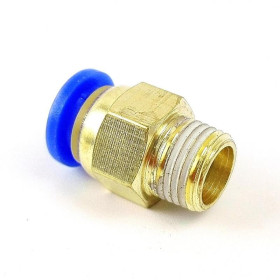
Product images are for informational purposes only and may vary slightly depending on the batch and supplier. Product specifications and prices may be subject to change without notice. We do our best to provide accurate and complete product specifications, but they may not be completely accurate. If you encounter any such situation, please let us know.
The product is intended for specialists and requires qualified and authorized personnel. The product does not include assembly/use instructions . Putting the product into operation by unqualified persons leads to the loss of the warranty according to the Terms and Conditions on the site.
The specified technical parameters (current, power, etc.) represent maximum allowable values under ideal operating conditions. For safe use and optimal lifespan, it is recommended to operate the product continuously at no more than 50% of the specified maximum values.
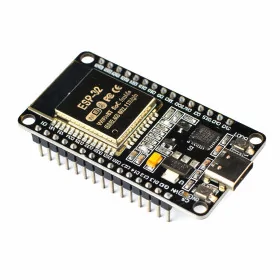
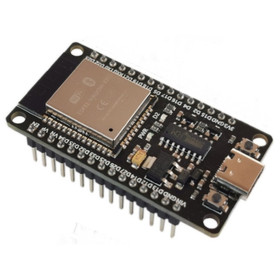
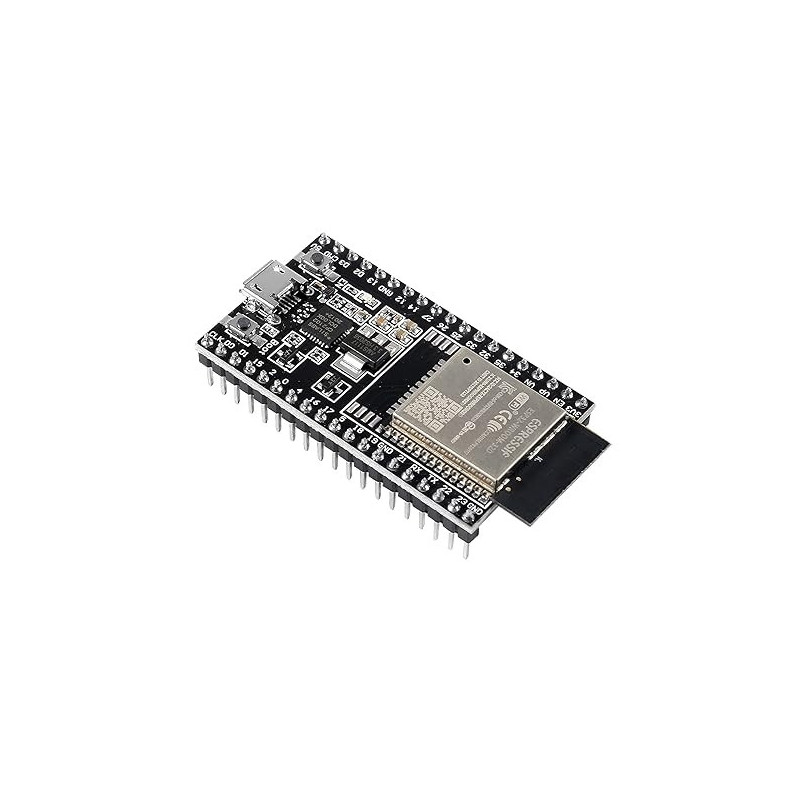
ESP32-DevKitC development board, ESP32-WROOM-32D, 38P
Ideal for prototyping and rapid development of IoT projects, the board with the ESP32-WROOM-32D module offers WiFi and Bluetooth connectivity, programming and power supply via Type-C with integrated CP2102, easy access to pins through side headers and breadboard compatibility, while the EN and BOOT buttons simplify resetting and firmware uploading.
Shipping by Thursday 22 October
Buying this product earns you 2.19 RON in loyalty points.

International fast shipping within EU. Free Shipping for orders above 100 EUR in most EU countries.

We ship from our stock within 24H

You earn points with every order, worth 5%.
The ESP32-DevKitC development board is a base board for the ESP32 microcontroller, combining WiFi and Bluetooth connectivity on the same circuit with a large number of I/O pins directly accessible on two side headers. It is designed for rapid prototyping of IoT projects, automation, sensor reading, actuator control, and wireless communication, being one of the most widely used development boards for hobby and professional projects based on ESP32.
The board uses the ESP32-WROOM-32D module, built around the ESP32-D0WD processor, a dual-core Xtensa LX6 that can run at frequencies up to 240 MHz. The module integrates WiFi 802.11 b/g/n in the 2.4 - 2.5 GHz band and Bluetooth 4.2 including BLE, 448 KB ROM, 520 KB SRAM, and 4 MB external SPI flash memory on the module. Of the processor's 34 GPIO pins, most are brought out to the two rows of pins on the edges, and the board also offers 2 12-bit ADC converters with up to 18 channels, 2 8-bit DAC outputs, and 10 pins with capacitive touch sensor function.
Among the main features are the CP2102 USB-UART bridge for programming and serial communication at speeds of up to 3 Mbps, the USB Type-C connector used both for power supply and program loading, the EN (reset) and BOOT (firmware download mode entry) buttons, and the LED indicating power presence. The board is powered either through the USB Type-C port, through the 5V/GND pins, or through the 3V3/GND pins, provided that only one power source is used at a time.
Through the USB Type-C interface, the board connects directly to a computer for programming and serial monitoring using Arduino IDE, PlatformIO, or ESP-IDF, and through the I/O pins exposed on the headers it communicates via UART, I2C, SPI, or GPIO with external modules and sensors, and can also function as a host board for projects that require interconnection with other microcontrollers or with a Raspberry Pi.
Attention - powering the board via USB:
When WiFi or Bluetooth is activated, the ESP32 board has current peaks of up to approximately 500 mA. If the USB port or cable cannot supply this current, the voltage drops and the board does not work properly.
Symptoms of insufficient power supply:
- Repeated resets and the message “Brownout detector was triggered” in Serial Monitor.
- WiFi cannot find any network or the signal in Access Point mode is very weak.
- Program upload fails or is interrupted.
- The board runs the code normally, but freezes or resets when the radio part starts.
Recommendations:
Use a short USB-C cable (maximum 1 m), of good quality, with data transfer (charge-only cables do not allow programming).
Connect the board directly to a USB port on the back of the computer, not to front ports or through unpowered USB hubs.
For standalone operation, use a 5V / minimum 1A power supply.
In high-consumption projects, install a 470-1000 uF electrolytic capacitor between the 3V3 and GND pins, as close to the module as possible.
These symptoms are caused by the power supply and do not represent a defect of the board. Please check the power supply before requesting a return or warranty service for the product.
Specifications:
Supply voltage: 5 VDC via USB Type-C or the 5V pin, or 3.3 VDC via the 3V3 pin, only one option used at a time
Current: average consumption approximately 80 mA, power supply must be able to provide at least 500 mA
Mounted module: ESP32-WROOM-32D
Processor: ESP32-D0WD, dual-core Xtensa LX6, up to 240 MHz
Memory: 448 KB ROM, 520 KB SRAM, 4 MB external SPI flash on the module
Connectivity: WiFi 802.11 b/g/n (2.4 - 2.5 GHz), Bluetooth 4.2 and BLE
USB-UART bridge: CP2102, speed up to 3 Mbps
Programming interface: USB Type-C
Total number of pins: 38 (two rows of 19 pins each)
GPIO pins: most of the ESP32's 34 GPIOs, GPIO6 - GPIO11 (D0 - D3, CMD, CLK) are used internally for flash memory and are not recommended for connection
Analog inputs: 2 12-bit ADC converters, up to 18 channels (ADC1 and ADC2)
Analog outputs: 2 8-bit DAC converters (GPIO25, GPIO26)
Touch sensors: 10 pins with capacitive Touch function
Buttons: EN (reset) and BOOT (firmware download mode)
Power indicator LED: yes
Breadboard compatibility: yes
Distance between pin rows: 25 mm
Pin spacing: 2.54 mm
Dimensions: 54.5 x 28 mm
Pinout:

| Connector | Pin | Function |
|---|---|---|
| Row 1 | 3V3 | 3.3 V power supply |
| Row 1 | EN | Module reset (CHIP_PU), active HIGH |
| Row 1 | VP | GPIO36, ADC1_CH0, input |
| Row 1 | VN | GPIO39, ADC1_CH3, input |
| Row 1 | IO34 | GPIO34, ADC1_CH6, input |
| Row 1 | IO35 | GPIO35, ADC1_CH7, input |
| Row 1 | IO32 | GPIO32, ADC1_CH4, Touch 9 |
| Row 1 | IO33 | GPIO33, ADC1_CH5, Touch 8 |
| Row 1 | IO25 | GPIO25, ADC2_CH8, DAC1 |
| Row 1 | IO26 | GPIO26, ADC2_CH9, DAC2 |
| Row 1 | IO27 | GPIO27, ADC2_CH7, Touch 7 |
| Row 1 | IO14 | GPIO14, ADC2_CH6, Touch 6, MTMS |
| Row 1 | IO12 | GPIO12, ADC2_CH5, Touch 5, MTDI |
| Row 1 | GND | Ground |
| Row 1 | IO13 | GPIO13, ADC2_CH4, Touch 4, MTCK |
| Row 1 | D2 | GPIO9, used internally for flash, avoid using |
| Row 1 | D3 | GPIO10, used internally for flash, avoid using |
| Row 1 | CMD | GPIO11, used internally for flash, avoid using |
| Row 1 | 5V | 5 V power supply |
| Row 2 | GND | Ground |
| Row 2 | IO23 | GPIO23 |
| Row 2 | IO22 | GPIO22 |
| Row 2 | TX | GPIO1, UART0 TX |
| Row 2 | RX | GPIO3, UART0 RX |
| Row 2 | IO21 | GPIO21 |
| Row 2 | GND | Ground |
| Row 2 | IO19 | GPIO19 |
| Row 2 | IO18 | GPIO18 |
| Row 2 | IO5 | GPIO5 |
| Row 2 | IO17 | GPIO17, available only on WROOM/SOLO-1 modules |
| Row 2 | IO16 | GPIO16, available only on WROOM/SOLO-1 modules |
| Row 2 | IO4 | GPIO4, ADC2_CH0, Touch 0 |
| Row 2 | IO0 | GPIO0, ADC2_CH1, Touch 1, Boot pin |
| Row 2 | IO2 | GPIO2, ADC2_CH2, Touch 2 |
| Row 2 | IO15 | GPIO15, ADC2_CH3, Touch 3, MTDO |
| Row 2 | D1 | GPIO8, used internally for flash, avoid using |
| Row 2 | D0 | GPIO7, used internally for flash, avoid using |
| Row 2 | CLK | GPIO6, used internally for flash, avoid using |
Usage:
Hold down the BOOT button while connecting the board to the computer via a USB Type-C cable, then you can release the button.
Power the board from only one source, either through the USB Type-C port, through the 5V/GND pins, or through the 3V3/GND pins, because using multiple power sources at the same time may damage the board.
If the board remains stuck in Download mode or you notice problems on the GPIO0 signal, check for the presence of capacitor C15, mounted next to the BOOT button on some older series, and remove it if present.
For programming from Arduino IDE, add the Espressif ESP32 package URL in File - Preferences, under Additional Boards Manager URLs, then install the board from Tools - Board - Boards Manager, searching for "ESP32" and installing "esp32 by Espressif Systems".
Select the ESP32 Dev Module board from Tools - Board and the appropriate serial port from Tools - Port.
Write or load a test program, press the Upload button, and wait for the transfer to complete.
If the upload does not start, the board is not in Boot mode; disconnect the cable, hold BOOT, reconnect the cable, and try uploading again.
Open Serial Monitor from Tools - Serial Monitor and set the speed to 115200 baud to see the messages sent by the board.
Do not apply voltages higher than 3.3V to the GPIO pins, and do not use pins D0 - D3, CMD, and CLK for external connections, because they are reserved for communication with the internal flash memory.
To power external modules with higher consumption, use the 5V pin or an external power supply and connect a common ground between the board and the powered module.

Produs destinat utilizarii in proiecte electronice, automatizari, prototipare, educatie si cercetare.
Produsul trebuie utilizat numai conform specificatiilor tehnice mentionate in descriere si/sau in documentatia produsului.
Avertismente generale de siguranta:
Nu utilizati produsul la tensiuni, curenti sau temperaturi peste valorile specificate.
Montajul si conectarea trebuie realizate de persoane cu cunostinte tehnice minime in domeniul electric/electronic.
Evitati scurtcircuitele, inversarea polaritatii si conectarea gresita a alimentarii.
Nu lasati produsul alimentat nesupravegheat in timpul testelor.
Produsul nu este jucarie si nu este destinat copiilor.
Pentru modulele electronice, se recomanda utilizarea in carcase, panouri sau montaje protejate, dupa caz.
Identificare produs:
Denumirea produsului, codul/SKU-ul si caracteristicile tehnice sunt mentionate in pagina produsului si/sau pe eticheta ambalajului.
Producator / Importator / Distribuitor:
Sigmanortec S.R.L.
Calea Bucuresti nr. 9, Targu Jiu, Gorj, Romania
E-mail: [email protected]
Website: www.sigmanortec.ro
Persoana responsabila in UE:
Sigmanortec S.R.L.
Calea Bucuresti nr. 9, Targu Jiu, Gorj, Romania
E-mail: [email protected]
Documentatie si siguranta:
Pentru informatii suplimentare, fise tehnice, declaratii de conformitate sau instructiuni, ne puteti contacta la [email protected].
Reviews (1) - Review moderation

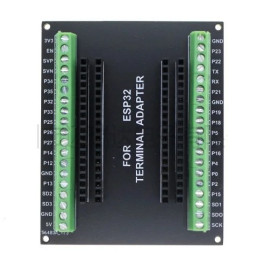
Buna ziua. Am cumparat acest esp 32 wroom 32d si soclurile de culoare neagra, care le avei in magazin. Am constatat ca nu se poate introduce esp32 in aceste socluri, si am testat pe alte socluri de culoare verde si sunt compatibile. Va rog sa scrieti in comentarii la acest esp 32 wroom 32d ca distanta dintre pini este de 30mmx46mm.
// ESP32-DevKitC (ESP32-WROOM-32D) - WiFi network scan test
// Board: ESP32-DevKitC with ESP32-WROOM-32D (select "ESP32 Dev Module" in Arduino IDE)
// No external wiring required, this test only uses the onboard WiFi radio
// No external library required, WiFi.h is included with the ESP32 Arduino core

#include <WiFi.h>

void setup() {
  Serial.begin(115200);     // Start serial communication at 115200 baud
  delay(1000);
  WiFi.mode(WIFI_STA);      // Set WiFi to station mode for scanning
  WiFi.disconnect();        // Make sure WiFi is not connected to any network
  delay(100);
  Serial.println("ESP32-DevKitC WiFi scan test starting...");
}

void loop() {
  Serial.println("Scanning for WiFi networks...");
  int networksFound = WiFi.scanNetworks(); // Perform a blocking WiFi scan

  if (networksFound == 0) {
    Serial.println("No networks found.");
  } else {
    Serial.print(networksFound);
    Serial.println(" networks found:");
    for (int i = 0; i < networksFound; i++) {
      // Print SSID and signal strength (RSSI) for each network found
      Serial.print(i + 1);
      Serial.print(": ");
      Serial.print(WiFi.SSID(i));
      Serial.print(" (RSSI: ");
      Serial.print(WiFi.RSSI(i));
      Serial.println(" dBm)");
    }
  }

  Serial.println("");
  delay(5000); // Wait five seconds before scanning again
}
The ESP32-DevKitC development board with the ESP32-WROOM-32D module is itself the central microcontroller of the project, not a module that gets added alongside another board, so this tutorial uses this very board and shows how to quickly check the WiFi radio built into the module, before moving on to projects that actually connect to a network or to cloud services.
The platform used in the tutorial is the ESP32-DevKitC board with ESP32-WROOM-32D, programmed from the Arduino IDE using Espressif's ESP32 board package. The test does not use any external sensor or module, you only need the board and a USB Type-C cable to connect to the computer.
How it works:
The ESP32-WROOM-32D module integrates an 802.11 b/g/n WiFi radio that can work both as a station connected to an existing network and as its own access point. In this test, the WiFi.scanNetworks() function switches the radio into station mode and sends probe requests on the channels of the 2.4 - 2.5 GHz band, measuring for each network found the received signal strength RSSI, expressed in dBm, a negative value where numbers closer to 0 mean a stronger signal, for example -40 dBm is a very good signal while -85 dBm is close to the limit of reception.
The scan started with WiFi.scanNetworks() is blocking, meaning the program waits until it finishes before continuing, with a duration ranging from a few hundred milliseconds to a bit over a second, depending on the number of networks in the area and the channels covered.
On the datasheet of the ESP32-WROOM-32D module the average consumption is given as approximately 80 mA, however during moments of radio transmission, which happen at the start of each WiFi scan, current peaks on the order of 300 mA can occur, which is why the manufacturer recommends a power supply capable of delivering at least 500 mA. If the USB port or cable used has high internal resistance, these current peaks can cause a brief voltage drop on the 3V3 pin, enough to trigger a board reset through the brownout circuit, especially on weaker USB 2.0 ports or on hubs without their own power supply.
What you need:
- 1 x ESP32-DevKitC development board, ESP32-WROOM-32D, 38P
- 1 x USB cable with display, PD, QC4.0, Type-C to Type-C, 100W
- 1 x Set of 120 electrolytic capacitors, 0.22-470uF
Wiring:
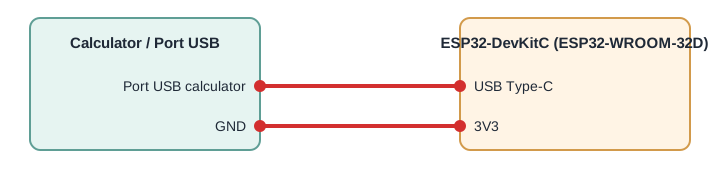
For this test no connection to any GPIO pin is needed, the board only uses the WiFi radio built into the ESP32-WROOM-32D module, and the only connection required is the USB Type-C cable between the board and the computer, used both to power the board at 5 VDC and for programming and for displaying results in the serial monitor. If the USB port used cannot deliver at least 500 mA or the cable has high resistance, add between the 3V3 and GND pins on the board an electrolytic capacitor of 100 - 470 uF, placed as close as possible to the module, to buffer the current peaks that occur during scanning.
| Product pin | Connects to | Role |
|---|---|---|
| USB Type-C | Computer's USB port, preferably USB 3.0, minimum 500 mA | 5 VDC power supply, programming and serial monitor |
| 3V3 | GND, through an electrolytic capacitor (optional) | Buffering current peaks on the 3.3 V supply during WiFi scanning |
The code:
The program switches the WiFi radio into station mode, starts a blocking scan of the surrounding networks every five seconds, and displays on the serial port the SSID name and the RSSI signal strength for each network found.
// ESP32-DevKitC (ESP32-WROOM-32D) - WiFi network scan test
// Board: ESP32-DevKitC with ESP32-WROOM-32D (select "ESP32 Dev Module" in Arduino IDE)
// Wiring: none required on GPIO pins, this test only uses the onboard WiFi radio of the ESP32-WROOM-32D module
// Power and programming through the onboard USB Type-C connector
// Use a USB port or charger able to supply at least 500 mA, WiFi TX current spikes can reset the board on weak supplies
// No external library required, WiFi.h is included with the ESP32 Arduino core
#include <WiFi.h>
void setup() {
  Serial.begin(115200);        // Start serial communication at 115200 baud
  delay(1000);                 // Give the serial monitor time to connect
  WiFi.mode(WIFI_STA);         // Set WiFi to station mode for scanning
  WiFi.disconnect();           // Make sure WiFi is not connected to any network
  delay(100);
  Serial.println("ESP32-DevKitC WiFi scan test starting...");
}
void loop() {
  Serial.println("Scanning for WiFi networks...");
  int networksFound = WiFi.scanNetworks(); // Perform a blocking WiFi scan
  if (networksFound == 0) {
    Serial.println("No networks found.");
  } else {
    Serial.print(networksFound);
    Serial.println(" networks found:");
    for (int i = 0; i < networksFound; i++) {
      // Print SSID and signal strength (RSSI) for each network found
      Serial.print(i + 1);
      Serial.print(": ");
      Serial.print(WiFi.SSID(i));
      Serial.print(" (RSSI: ");
      Serial.print(WiFi.RSSI(i));
      Serial.println(" dBm)");
    }
  }
  Serial.println("");
  delay(5000); // Wait five seconds before scanning again, avoids repeated back-to-back current spikes
}
How the code works:
In the setup function, serial communication is initialized at 115200 baud with Serial.begin, then WiFi.mode(WIFI_STA) sets the radio into station mode, needed for scanning, and WiFi.disconnect() makes sure the board does not stay connected to a previous network before starting the test.
In the loop function, WiFi.scanNetworks() starts the scan and returns in networksFound the number of networks found. If networksFound is 0 a message is displayed saying no network was found, otherwise a for loop goes through each network found and displays, for each one, the name with WiFi.SSID(i) and the signal strength with WiFi.RSSI(i), expressed in dBm.
At the end of each cycle, delay(5000) halts execution for five seconds before repeating the scan, both to avoid unnecessarily loading the processor and the serial port and to avoid repeated current peaks at very short intervals.
Result:
In the Serial Monitor, set to a speed of 115200 baud, you will see every five seconds the list of WiFi networks found nearby, along with the name and signal strength of each one.
ESP32-DevKitC WiFi scan test starting...
Scanning for WiFi networks...
4 networks found:
1: HomeNetwork_24G (RSSI: -42 dBm)
2: Office_WiFi (RSSI: -58 dBm)
3: NeighborAP (RSSI: -71 dBm)
4: IoT_Guest (RSSI: -80 dBm)
Scanning for WiFi networks...
3 networks found:
1: HomeNetwork_24G (RSSI: -44 dBm)
2: Office_WiFi (RSSI: -61 dBm)
3: IoT_Guest (RSSI: -79 dBm)
Common issues:
The board resets or restarts right during WiFi scanning, the cause usually being a USB port or cable that cannot sustain the current peak on the order of 300 mA required by the radio transmission, the fix being to connect to a USB 3.0 port capable of at least 2 A or to a separate USB charger, using a good quality USB Type-C data cable and, if the problem persists, adding an electrolytic capacitor of 100 - 470 uF between the 3V3 and GND pins near the module.
If nothing appears on the serial monitor, check that the speed selected in the Serial Monitor is 115200 baud and that the COM port selected is the one for the ESP32-DevKitC board.
If the message displayed is always No networks found even though your phone sees networks nearby, check that the network in question operates on the 2.4 GHz band, because the ESP32-WROOM-32D module cannot scan networks on the 5 GHz band.
If a known network does not show up in the list even though the signal is good, check whether the router has SSID broadcasting disabled, in which case the hidden network does not appear in a standard scan.
If the board is not recognized by the computer when connected, install the driver for the CP2102 bridge from the chip manufacturer's website and try another USB Type-C cable that supports data transfer, not just power.
If uploading the program does not start, the board is not in Boot mode, disconnect the cable, hold down the BOOT button, reconnect the cable and retry uploading from the Arduino IDE.
Limitations and tips:
The ESP32-WROOM-32D module only scans and connects on the 2.4 GHz band, it has no support for 5 GHz. The WiFi.scanNetworks() function is blocking and occupies the processor for the entire duration of the scan, so in a more complex project the scanning must be placed carefully with regard to other real-time tasks. For stable operation, the power supply connected to the USB Type-C port or to the 5V pins must be able to deliver at least 500 mA at peak, not just on average. Starting from this test, the board can be extended for actually connecting to a WiFi network as a station, for creating its own access point, or for projects that send data to cloud services through MQTT or HTTP.