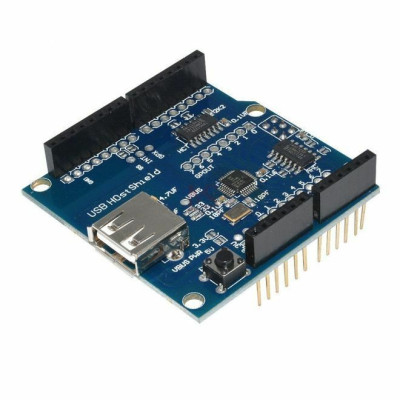

Product images are for informational purposes only and may vary slightly depending on the batch and supplier. Product specifications and prices may be subject to change without notice. We do our best to provide accurate and complete product specifications, but they may not be completely accurate. If you encounter any such situation, please let us know.
The product is intended for specialists and requires qualified and authorized personnel. The product does not include assembly/use instructions . Putting the product into operation by unqualified persons leads to the loss of the warranty according to the Terms and Conditions on the site.
The specified technical parameters (current, power, etc.) represent maximum allowable values under ideal operating conditions. For safe use and optimal lifespan, it is recommended to operate the product continuously at no more than 50% of the specified maximum values.
USB Host Expansion Board, MAX3421E
The expansion board that adds USB Host functionality for Arduino, based on the MAX3421E, providing control over peripherals such as a mouse, keyboard, or controllers. It supports Google Android ADK and compatible libraries, works with UNO and MEGA boards, is USB 2.0 compatible, and accepts a wide range of HID, GPS, FTDI, and other devices, power supply 3.3-5V.
Buying this product earns you 0.45 € in loyalty points.

International fast shipping within EU. Free Shipping for orders above 100 EUR in most EU countries.

We ship from our stock within 24H

You earn points with every order, worth 5%.
The USB Host expansion board (Shield) is a compact and versatile solution designed to add USB Host support to Arduino-compatible development boards, including UNO and MEGA. Based on the MAX3421E integrated circuit, this board turns the base board into a Host device capable of managing and controlling a wide range of USB peripherals.
In the USB architecture, the Host device has control over communication with connected peripherals. It is important to note that two peripherals, for example two keyboards, cannot communicate directly with each other, only through a Host.
The board is compatible with the USB 2.0 standard and offers native support for a wide variety of devices: HID (mouse, keyboard), Android ADK, SLR cameras, game console controllers, GPS devices, FTDI adapters and others. It also supports Mass Storage devices with FAT32 file system, however this functionality is available exclusively for the Arduino MEGA board.
Compatibility with Google Android ADK allows direct interaction with Android devices, including ADK packages and DK-compatible source files compiled for Arduino.
The board operates at supply voltages between 3.3V and 5V DC, making it suitable for use together with Arduino UNO, MEGA, as well as other platforms compatible with 3.3V or 5V logic levels, such as certain STM32 or ESP32 variants with a level shifter.
Specifications:
Supply voltage: 3.3 - 5V DC
USB compatibility: 2.0
Main chip: MAX3421E
Supported devices: HID, Android ADK, SLR cameras, game console controllers, GPS, FTDI
Mass Storage: FAT32 (Arduino MEGA only)
Compatible with: Arduino UNO, Arduino MEGA, 3.3V/5V logic level platforms
Dimensions mm: 55 x 53.3 x 23.8mm
Instructions:
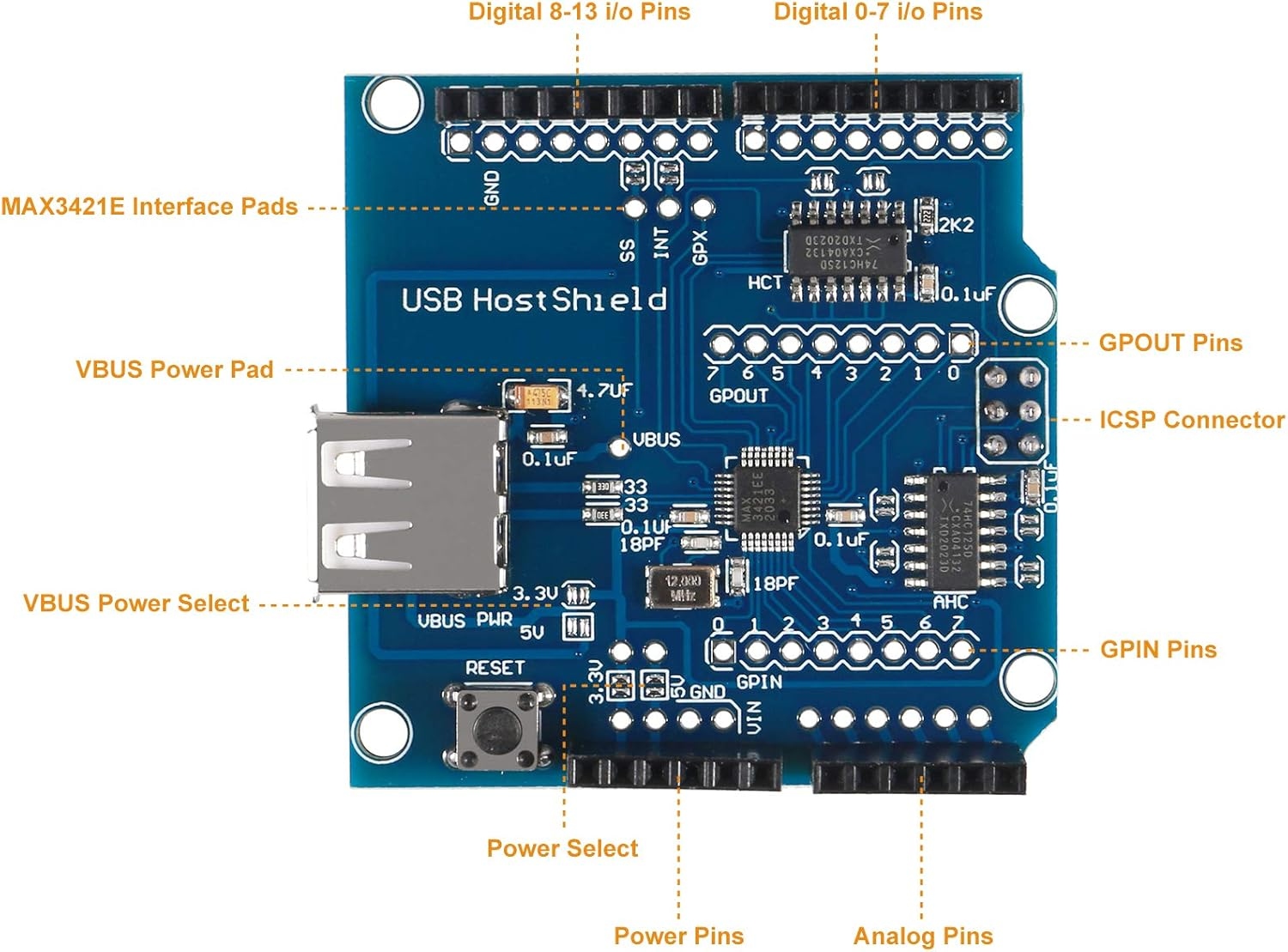
To operate, the board must be powered by creating a connection between the circled 5V and 3.3V pads in the image below.
USB PWR represents the voltage that physically reaches the USB port and only one jumper should be shorted.
Power Select requires soldering both jumpers (5V and 3.3V) because the 5V pad powers the USB port while the 3.3V pad powers the MAX3421E integrated circuit.

Mount the shield on the Arduino UNO or MEGA board, aligning the pins correctly across all connector rows.
Solder both pads in the Power Select area (3.3V and 5V) at the same time. This is the standard configuration for Arduino UNO, Duemilanove, Mega and Mega 2560. The 5V pad powers the USB Host port (VBUS) to the connected device, while the 3.3V pad allows the onboard regulator to supply the voltage required by the internal core of the MAX3421E. The two pads do not directly short the two voltages; conversion is handled in a controlled way by the regulator on the shield.
Solder only the 5V pad in the VBUS PWR area to provide proper power to the USB Host port. The USB standard requires 5V on the VBUS line regardless of the platform used.
Download and install the USB Host Shield Library 2.0 from the Arduino Library Manager or from GitHub (felis/USB_Host_Shield_2.0).
Open Arduino IDE and select the appropriate example for the desired device from the HID folder (e.g. KeyboardController for keyboard or MouseController for mouse).
Connect the Arduino board to the computer using the USB cable.
Select the correct board and port from the Tools menu in Arduino IDE.
Upload the sketch to the board using the Upload button.
Connect the USB device (mouse, keyboard, etc.) to the shield’s Type A USB port.
Open Serial Monitor at 115200 baud to verify the data received from the connected device.
Produs destinat utilizarii in proiecte electronice, automatizari, prototipare, educatie si cercetare.
Produsul trebuie utilizat numai conform specificatiilor tehnice mentionate in descriere si/sau in documentatia produsului.
Avertismente generale de siguranta:
Nu utilizati produsul la tensiuni, curenti sau temperaturi peste valorile specificate.
Montajul si conectarea trebuie realizate de persoane cu cunostinte tehnice minime in domeniul electric/electronic.
Evitati scurtcircuitele, inversarea polaritatii si conectarea gresita a alimentarii.
Nu lasati produsul alimentat nesupravegheat in timpul testelor.
Produsul nu este jucarie si nu este destinat copiilor.
Pentru modulele electronice, se recomanda utilizarea in carcase, panouri sau montaje protejate, dupa caz.
Identificare produs:
Denumirea produsului, codul/SKU-ul si caracteristicile tehnice sunt mentionate in pagina produsului si/sau pe eticheta ambalajului.
Producator / Importator / Distribuitor:
Sigmanortec S.R.L.
Calea Bucuresti nr. 9, Targu Jiu, Gorj, Romania
E-mail: [email protected]
Website: www.sigmanortec.ro
Persoana responsabila in UE:
Sigmanortec S.R.L.
Calea Bucuresti nr. 9, Targu Jiu, Gorj, Romania
E-mail: [email protected]
Documentatie si siguranta:
Pentru informatii suplimentare, fise tehnice, declaratii de conformitate sau instructiuni, ne puteti contacta la [email protected].
Reviews (1) - Review moderation

Un shield care il caut demult (in romania) si in sfarsit este aici. Doresc sa fac un proiect unde am nevoie de input de tastatura si eventual mouse (touch) direct in arduino.
// USB Host Shield - HID Keyboard and Mouse Example
// Compatible with Arduino UNO and MEGA using USB Host Shield (MAX3421E)
#include <hidboot.h>
#include <usbhub.h>
USB Usb;
USBHub Hub(&Usb);
HIDBoot<USB_HID_PROTOCOL_KEYBOARD> HidKeyboard(&Usb);
HIDBoot<USB_HID_PROTOCOL_MOUSE> HidMouse(&Usb);
// --- Keyboard parser ---
class KbdRptParser : public KeyboardReportParser {
protected:
void OnKeyDown(uint8_t mod, uint8_t key) {
uint8_t c = OemToAscii(mod, key);
if (c) {
Serial.print("[KEYBOARD] Key pressed: ");
Serial.println((char)c);
}
}
void OnKeyUp(uint8_t mod, uint8_t key) {
uint8_t c = OemToAscii(mod, key);
if (c) {
Serial.print("[KEYBOARD] Key released: ");
Serial.println((char)c);
}
}
};
// --- Mouse parser ---
class MouseRptParser : public MouseReportParser {
protected:
void OnMouseMove(MOUSEINFO *mi) {
Serial.print("[MOUSE] Move -> X: ");
Serial.print(mi->dX);
Serial.print(" Y: ");
Serial.println(mi->dY);
}
void OnLeftButtonDown(MOUSEINFO *mi) {
Serial.println("[MOUSE] Left button DOWN");
}
void OnLeftButtonUp(MOUSEINFO *mi) {
Serial.println("[MOUSE] Left button UP");
}
void OnRightButtonDown(MOUSEINFO *mi) {
Serial.println("[MOUSE] Right button DOWN");
}
void OnRightButtonUp(MOUSEINFO *mi) {
Serial.println("[MOUSE] Right button UP");
}
void OnMiddleButtonDown(MOUSEINFO *mi) {
Serial.println("[MOUSE] Middle button DOWN");
}
void OnMiddleButtonUp(MOUSEINFO *mi) {
Serial.println("[MOUSE] Middle button UP");
}
};
KbdRptParser KbdPrs;
MouseRptParser MousePrs;
void setup() {
Serial.begin(115200);
if (Usb.Init() == -1) {
Serial.println("USB Host Shield not detected. Check connections and 5V/3.3V pad bridge.");
while (1);
}
HidKeyboard.SetReportParser(0, &KbdPrs);
HidMouse.SetReportParser(0, &MousePrs);
Serial.println("USB Host ready. Connect keyboard and/or mouse.");
}
void loop() {
Usb.Task();
}