
Product images are for informational purposes only and may vary slightly depending on the batch and supplier. Product specifications and prices may be subject to change without notice. We do our best to provide accurate and complete product specifications, but they may not be completely accurate. If you encounter any such situation, please let us know.
The product is intended for specialists and requires qualified and authorized personnel. The product does not include assembly/use instructions . Putting the product into operation by unqualified persons leads to the loss of the warranty according to the Terms and Conditions on the site.
The specified technical parameters (current, power, etc.) represent maximum allowable values under ideal operating conditions. For safe use and optimal lifespan, it is recommended to operate the product continuously at no more than 50% of the specified maximum values.
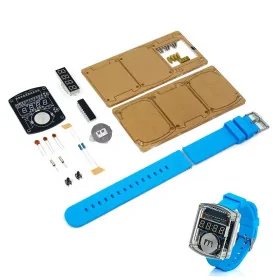
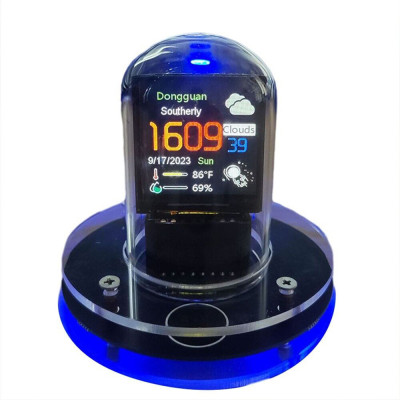
Nixie Smart watch, LCD 1.54", WiFi, Touch
Smart watch with retro-futuristic Nixie-type design, ideal for the office or as a gift, clearly displays the time, date and weather forecast on a 1.54 inch TFT color screen, connects via WiFi for automatic updates without applications, touch control for quick settings, allows customization with themes, animations and photo album mode, compact case with glass over the display for added style.
Shipping by Thursday 22 October
Buying this product earns you Ft815.26 in loyalty points.

International fast shipping within EU. Free Shipping for orders above 100 EUR in most EU countries.

We ship from our stock within 24H

You earn points with every order, worth 5%.
Smart watch that combines retro-futuristic design (imitating the Nixie tube) with current technology, offering a perfect balance between functionality and modern aesthetics. It has a 1.54 inch color screen and a compact case, with a glass case covering the display, becoming both a decorative element and a useful tool for displaying the time, date and weather forecast.
WiFi connectivity allows for automatic information updates, without the need for external applications. Advanced customization features – including animation uploads, multiple graphic themes and photo album mode – transform this clock into an interactive visual experience, ideal for the office, bedroom or creative gift.
Specifications:
Power supply: 5V via USB Type C cable
Screen: TFT color, 1.54 inch
Display resolution: 240 x 240 pixels
Connectivity: Integrated WiFi
Weight: 145g
Dimensions: 8 x 8 x 9 cm
Functions:
Automatic update of time, date and weather forecast.
Upload custom animations.
Digital photo album mode.
Selection from multiple graphic themes.
Configurable lighting effects.
Night mode (automatic low brightness).
Customize date format and display color.
Use:
Screen assembly: Insert the screen into the dedicated socket on the PCB, taking care to align the contacts correctly according to the white marking. Place the glass over the LCD.
Power: Connect the device to a 5V source using the included Type C cable.
WiFi Setup: Search for the "Smart Weather Clock" network on your mobile device or PC and connect. Follow the setup instructions in the automatically displayed web interface.
Personalization: Access interface options to load animations, themes, or adjust display settings to your preferences.
Configuration:
Power supply and network connection
Connect the watch to a power source using the USB Type C cable.
On your phone, access:
Settings → WLAN / WiFi
Search and connect to the Smart Weather Clock network
If your phone displays a warning that the network does not have internet access, ignore the message and continue connecting.
If the configuration page does not open automatically, follow these steps:
Make sure you are connected to the "Smart Weather Clock" network
Temporarily disable mobile data on your phone
Open the browser and manually enter the address: 192.168.4.1
Connecting your watch to your WiFi network
On the opened page:
Go to the WiFi Settings section
Select the desired WiFi network (from home/office)
Enter your password and click Connect.
Access via IP in the local network
After the watch restarts automatically:
An IP address of the form 192.168.xx.xx will appear on the watch screen.
Enter this IP address into your phone or computer's browser (it must be connected to the same WiFi network as the watch)
Personalization
In the watch's web interface you can set:
City for weather display
Brightness
Temperature unit (°C / °F)
Date and time format
Other visual effects and themes
Package contents:
1x Retro-Futuristic Smart Watch with 1.54" screen
1x USB Type-C power cable
1x Glass lid
Produs destinat utilizarii in proiecte electronice, automatizari, prototipare, educatie si cercetare.
Produsul trebuie utilizat numai conform specificatiilor tehnice mentionate in descriere si/sau in documentatia produsului.
Avertismente generale de siguranta:
Nu utilizati produsul la tensiuni, curenti sau temperaturi peste valorile specificate.
Montajul si conectarea trebuie realizate de persoane cu cunostinte tehnice minime in domeniul electric/electronic.
Evitati scurtcircuitele, inversarea polaritatii si conectarea gresita a alimentarii.
Nu lasati produsul alimentat nesupravegheat in timpul testelor.
Produsul nu este jucarie si nu este destinat copiilor.
Pentru modulele electronice, se recomanda utilizarea in carcase, panouri sau montaje protejate, dupa caz.
Identificare produs:
Denumirea produsului, codul/SKU-ul si caracteristicile tehnice sunt mentionate in pagina produsului si/sau pe eticheta ambalajului.
Producator / Importator / Distribuitor:
Sigmanortec S.R.L.
Calea Bucuresti nr. 9, Targu Jiu, Gorj, Romania
E-mail: [email protected]
Website: www.sigmanortec.ro
Persoana responsabila in UE:
Sigmanortec S.R.L.
Calea Bucuresti nr. 9, Targu Jiu, Gorj, Romania
E-mail: [email protected]
Documentatie si siguranta:
Pentru informatii suplimentare, fise tehnice, declaratii de conformitate sau instructiuni, ne puteti contacta la [email protected].