

Imaginile produselor au caracter informativ si pot prezenta diferente minore, in functie de lot si de furnizor. Este posibil ca specificatiile si pretul produselor sa fie modificate fara preaviz. Facem tot posibilul sa adaugam in pagina produselor specificatii cat mai exacte si corecte dar este posibil ca acestea sa nu fie in totalitate corecte. in cazul in care identificati un astfel de caz, va rugam sa ne semnalati acest lucru.
Produsul este destinat specialistilor si nu include instructiuni de asamblare/utilizare. Produsul beneficiaza de garantia legala de conformitate (produsul este conform specificatiilor din site) egala cu durata de functionare medie a produsului de 14 zile de la data primirii produsului si de garantia Dead on Arrival (nefunctional la primire).
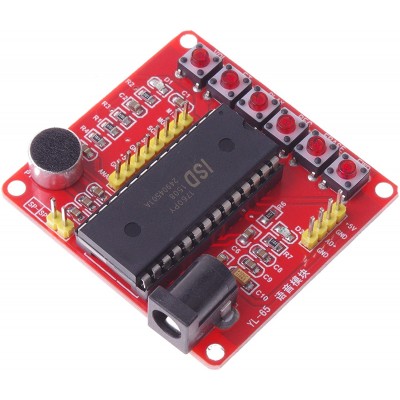
ISD1700 Module series Voice Recording Module Class ISD1760 Voice Module AVR PIC
Specificatii:
Suitable for ISD1700 full series of chips, with simple operation and complete functions. The ISD1700 series recording and playback chip is a highly integrated and high-performance chip.
It can record multiple segments, the sampling rate can be adjusted between 4K and 12K, and the power supply range can be between 2.4V and 5.5V.
The ISD1700 also has a new recording reminder function. When there is a new recording, the LED will flash once every few seconds to remind the user that there is a new recording.
4 kinds of sound effects prompt the user, such as start recording, stop recording, erase, next song and erase all.
The recorded data is stored in the FLASH of the chip without any compression, so it has better sound quality and power-off storage.
The chip has two independent voice signal input channels, microphone input and analog signal input.
In independent button mode, the chip will automatically enter power-down mode to reduce power consumption when a certain function operation is completed.
In SPI mode, users can perform more functional operations on the chip. For example, recording and playback of any storage address, reading and writing of Analog Path Configuration Register (APC), etc.
With power indicator light, chip indicator light.
Simple operation, no need for single chip or other modules to work directly.
Chip control pins have been pulled out for easy control connection.
Specifications:
Item Type: Recording Module
Power Supply: 5V
Recording time: 75 seconds at 6K, 60 seconds at 8K.
Chip working frequency: 6KHZ/8KHZ
Material: PCB Board
Size: 5.2x5.5cm/2.04x2.16in
Color: As shown
Quantity: 1 Pc
Instructions(key operation):
1.Recording REC:
Press and hold the REC button and the LED light will turn on at the same time. When speaking to the MIC, the content of the speech will be recorded in the ISD1700 voice chip.
Raise this key after recording a segment, the LED will turn off at the same time, press it again to start recording the second segment, and the subsequent segments will operate in sequence.
2.Play:
There are two ways, edge trigger and level trigger. (Note: After recording, the playback pointer will stay at the start address of the post-recording section, and at this time, the playback will be the next section.)
(1)Edge trigger: Click the PLAY button to play the current segment. The LED flashes during playback until it goes off at the end of playback. After the playback ends, the playback pointer points to the start address of the section just played, and pressing the PLAY button again will play the section just played.
(2)Level trigger: often press the PLAY button, the chip will play all the voice information, and cycle until the button is released.
3.Fast forward FWD:
Before performing the playback operation, click this button once, the playback pointer will point to the next segment, and double-click to point to the beginning of the second segment after this segment. Click this button during playback to stop the current section and then the next section. If the current section is the next section, stop the next section.
4.Erase ERASE:
The single segment erase operation is only valid for the segment and the subsequent segment. When the playback pointer is at the segment or the subsequent segment, tap this button to erase the segment or the subsequent segment. The playback pointer will jump to the second or penultimate segment before erasing. Press the key for more than 3 seconds, the chip enters the "Erase All Operation Mode", and the LED flashes twice at the same time. Continue to press the key, the LED flashes 7 times and then turns off. At this time, release the key, and the voice message in the chip is changed. Erase all.
5.RESET:
Click this button to execute the reset operation. After resetting, the playback and recording pointers point to the next section, that is, the playback pointer points to the beginning of the next section, and the recording pointer points to the back of the next section. At this time, the playback of the next paragraph is performed when the playback is performed, and the recording of the new subsequent paragraph is started after the execution of the recording.
6.Tuning VOL:
Click this button to adjust the output sound of the chip. The default output of the chip is the sound value. At each click, the sound is attenuated by 4db. Until the sound is low, continue to click this key, each click will increase the sound by 4db (Note: After performing the reset, the sound output is the max).
7.FT thru operation:
Short the FT pin to GND and keep it low to start the pass-through mode. Direct operation will direct the voice from Analn to the speaker or AUD output. During recording, if you press FT, the voice signal of Analn will be recorded at the same time.

feedback Report comment