

Imaginile produselor au caracter informativ si pot prezenta diferente minore, in functie de lot si de furnizor. Este posibil ca specificatiile si pretul produselor sa fie modificate fara preaviz. Facem tot posibilul sa adaugam in pagina produselor specificatii cat mai exacte si corecte dar este posibil ca acestea sa nu fie in totalitate corecte. in cazul in care identificati un astfel de caz, va rugam sa ne semnalati acest lucru.
Produsul este destinat specialistilor si nu include instructiuni de asamblare/utilizare. Produsul beneficiaza de garantia legala de conformitate (produsul este conform specificatiilor din site) egala cu durata de functionare medie a produsului de 14 zile de la data primirii produsului si de garantia Dead on Arrival (nefunctional la primire).
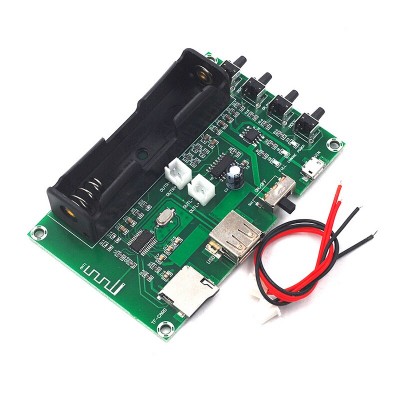
XH-A150 PAM8403 BLE Amplifier audio Board 5W*2 Lithium Battery Singing Machine USB TF-Card Dual Channel Mini Speaker DIY
Specificatii:
Product Name:Bluetooth Digital Power Amplifier Board
Product model: XH-A150
Chip model: PAM8403
Transmission distance: up to 20 meters (no blocking)
Supply voltage: 5v (Micro input)
Number of channels: 2
Maximum power: 5W+5W
Product net weight: 42g
Product size: 99*64*24mm (no protruding part)
Instructions for use
1. Install the TR18650 battery first, pay attention to the positive and negative points! (Battery is purchased by yourself)
2. Two line link speaker speakers, red is positive and black is negative.
3. Insert an SD card with song files in the SD card slot or a USB flash drive with song files inserted in the USB interface. (Also Bluetooth link, but you need to boot first to link Bluetooth)
4. Open the switch key, it will automatically read your SD card or USB flash drive, and start playing songs. If the SD card and USB flash drive are installed at the same time, it will read the SD card file by default and broadcast it. (If you want to broadcast U disk songs, you can press 1 playlist switch button.)
The 5.1 button is the playlist switch button. You can choose to play the SD card or the song in the USB flash drive. However, the Bluetooth link list cannot be switched, and the SD card and the USB flash drive need to be removed.
The 6.2 button is the play pause button, press the pause button, and press to play.
The 7.3 button can be a cut song button or a volume button. A quick press is to play the previous song, and a long press is to increase the volume.
The 8.4 button can be the cut song button or the volume button. A quick click is the next song of the broadcast party, and the volume is increased.
feedback Report comment